1. ບົດແນະນຳ
ຂອບໃຈສໍາລັບການຊື້asing the eKids Cocomelon Karaoke Machine, Model CO-550. This portable Bluetooth party speaker is designed to provide hours of musical fun for children, featuring built-in Cocomelon songs, a real working microphone, and versatile connectivity options. This manual provides essential information for safe and optimal use of your new karaoke machine.
2. ຜະລິດຕະພັນເກີນview
2.1 ລັກສະນະທີ່ສໍາຄັນ
- ການເຊື່ອມຕໍ່ Bluetooth: Wirelessly stream audio from any compatible Bluetooth device.
- ເພງໃນຕົວ: Includes 24 popular Cocomelon songs for immediate entertainment.
- ເຄື່ອງຫຼິ້ນສຽງ USB: Connect a USB drive to play your own MP3 music files.
- ໄມໂຄຣໂຟນເຮັດວຽກຈິງ: Sing along with the included wired microphone.
- ການອອກແບບທີ່ເປັນມິດກັບເດັກນ້ອຍ: Lightweight and portable with a built-in handle.
- ແບັດເຕີຣີທີ່ສາມາດສາກໄດ້: Enjoy portable use with the integrated rechargeable battery (USB charging cable included).
- ຫູຟັງ Jack: ສໍາລັບການຟັງສ່ວນຕົວ.
2.2 ອົງປະກອບ
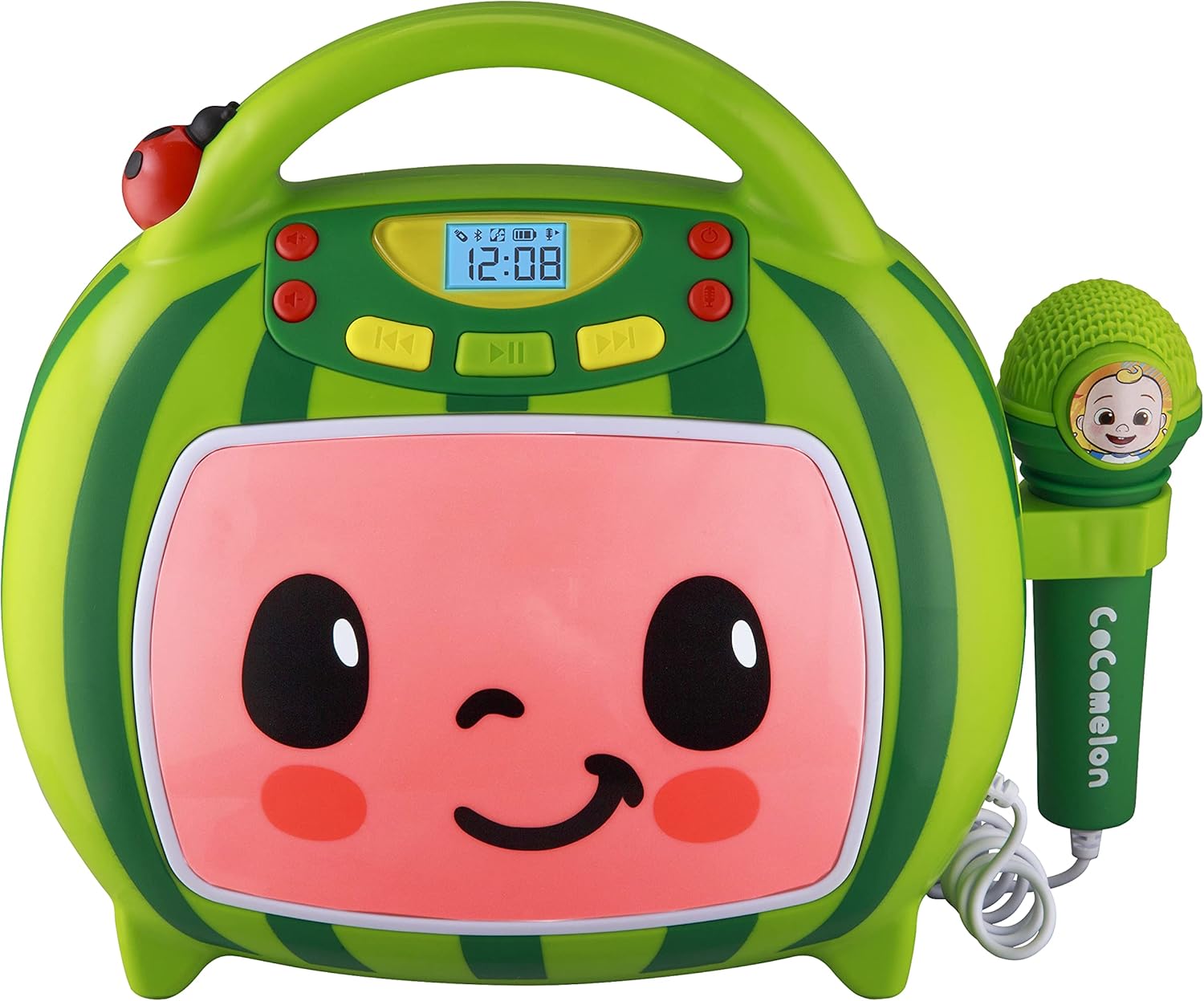
ດ້ານໜ້າ view of the eKids Cocomelon Karaoke Machine, featuring the watermelon-themed design and integrated microphone.

An annotated diagram detailing the dimensions, control buttons (volume, play/pause, power), microphone jack, USB port, and battery compartment of the karaoke machine.
ຊຸດປະກອບມີ:
- eKids Cocomelon Karaoke Machine
- ໄມໂຄຣໂຟນທີ່ມີສາຍ
- ສາຍສາກ USB
3. ຕັ້ງຄ່າ
3.1 ການຕິດຕັ້ງຫມໍ້ໄຟ
The karaoke machine requires 1 Lithium Ion battery. Ensure the battery is correctly installed according to the polarity markings in the battery compartment, located on the back of the unit.
3.2 ການເປີດເຄື່ອງເບື້ອງຕົ້ນ
- Locate the Power ON/OFF button on the unit.
- Press and hold the Power ON/OFF button to turn on the device. The display will illuminate.
4. ຄໍາແນະນໍາການດໍາເນີນງານ
4.1 ການຈັບຄູ່ Bluetooth
- Turn on the karaoke machine. It will automatically enter Bluetooth pairing mode.
- On your compatible device (e.g., smartphone, tablet), enable Bluetooth and search for available devices.
- Select 'eKids Cocomelon' from the list of devices to pair.
- ເມື່ອຈັບຄູ່ແລ້ວ, ທ່ານສາມາດຖ່າຍທອດສຽງແບບໄຮ້ສາຍຈາກອຸປະກອນຂອງທ່ານໄປຫາເຄື່ອງ karaoke ໄດ້.

The karaoke machine is shown with icons indicating its compatibility with various Bluetooth-enabled devices such as PCs, smartwatches, tablets, and mobile phones.
This video demonstrates the Bluetooth pairing process for the eKids Cocomelon Karaoke Machine, showing how to connect a mobile device to stream music wirelessly.
4.2 ການຫຼິ້ນສຽງ USB
- Insert a USB drive containing MP3 music files into the USB port located on the back of the unit.
- The machine will automatically detect the USB drive and begin playing music.
- Use the playback controls (Play/Pause, Forward, Reverse) to navigate your music.
4.3 ເພງໃນຕົວ
The karaoke machine comes pre-loaded with 24 Cocomelon songs. To play these songs, ensure no Bluetooth device is connected and no USB drive is inserted. Use the playback controls to select and play the desired song.

A visual representation of the 24 pre-loaded Cocomelon songs, including popular titles like 'Hello Song' and 'Wheels on the Bus'.
4.4 ການໃຊ້ໄມໂຄຣໂຟນ
- Plug the wired microphone into the microphone jack on the side of the unit.
- Adjust the microphone volume using the dedicated controls.
- Sing along to your favorite tunes!

A young child engaging with the eKids Cocomelon Karaoke Machine, holding the microphone and singing along.
ຫຼາຍກວ່າview ວິດີໂອ showcasing the eKids Cocomelon Karaoke Machine in action, highlighting its portability, microphone, and various functions for children's entertainment.
4.5 ການຄວບຄຸມ
- ເປີດ/ປິດ: ເປີດ ຫຼືປິດເຄື່ອງ.
- Volume UP/DOWN: ປັບລະດັບສຽງໂດຍລວມ.
- ຫຼິ້ນ/ຢຸດ: ເລີ່ມຕົ້ນຫຼືຢຸດຊົ່ວຄາວການຫຼິ້ນ.
- ໄປໜ້າ/ປີ້ນ: ຂ້າມໄປເພງຕໍ່ໄປ ຫຼືກ່ອນໜ້າ.
- ເປີດ/ປິດໄມໂຄຣໂຟນ: ເປີດ ຫຼື ປິດໄມໂຄຣໂຟນ.
5. ບໍາລຸງຮັກສາ
- ທໍາຄວາມສະອາດ: Wipe the unit with a soft, dry cloth. Do not use abrasive cleaners or immerse in water.
- ການເກັບຮັກສາ: ເກັບຮັກສາເຄື່ອງຄາລາໂອເກະໄວ້ໃນບ່ອນທີ່ເຢັນ, ແຫ້ງ, ຫ່າງຈາກແສງແດດໂດຍກົງໃນເວລາທີ່ບໍ່ໄດ້ໃຊ້.
- ການດູແລຫມໍ້ໄຟ: ຖ້າໜ່ວຍດັ່ງກ່າວຈະບໍ່ຖືກໃຊ້ເປັນໄລຍະເວລາທີ່ຍາວນານ, ໃຫ້ຖອດແບັດເຕີຣີອອກເພື່ອປ້ອງກັນການຮົ່ວໄຫຼ.
6. ການແກ້ໄຂບັນຫາ
| ບັນຫາ | ການແກ້ໄຂ |
|---|---|
| ຫນ່ວຍບໍລິການບໍ່ເປີດ. | Check battery installation and ensure the battery is charged. |
| ບໍ່ມີສຽງຈາກລຳໂພງ. | Increase volume. Ensure Bluetooth device is connected and playing, or USB is inserted correctly. |
| Bluetooth ບໍ່ເຊື່ອມຕໍ່. | Ensure the unit is in pairing mode. Turn off and on Bluetooth on your device. Move closer to the unit. |
| ໄມໂຄຣໂຟນບໍ່ເຮັດວຽກ. | Ensure the microphone is securely plugged in and the microphone ON/OFF switch is activated. |
7. ຂໍ້ມູນຈໍາເພາະ
| ຄຸນສົມບັດ | ລາຍລະອຽດ |
|---|---|
| ໝາຍເລກຕົວແບບ | ລະບົບ CO-550 |
| ນ້ໍາຫນັກລາຍການ | 2.12 ປອນ |
| ຂະໜາດສິນຄ້າ | 12 x 4 x 1 ນິ້ວ |
| ໝໍ້ໄຟ | ຕ້ອງໃຊ້ແບັດເຕີຣີ Lithium Ion 1 ອັນ |
| ການເຊື່ອມຕໍ່ | Bluetooth, USB |
| ຈຳນວນລຳໂພງ | 1 |
| ອົງປະກອບລວມ | ສາຍ USB |
8. ການຮັບປະກັນແລະການສະຫນັບສະຫນູນ
For warranty information or technical support, please refer to the contact details provided on the product packaging or visit the official eKids webເວັບໄຊ. ຮັກສາໃບຮັບເງິນການຊື້ຂອງທ່ານໄວ້ເປັນຫຼັກຖານການຊື້.
9. ຂໍ້ມູນຄວາມປອດໄພ
- ຜະລິດຕະພັນນີ້ແມ່ນສຳລັບເດັກອາຍຸ 18 ເດືອນຂຶ້ນໄປ.
- ການເບິ່ງແຍງຜູ້ໃຫຍ່ແມ່ນແນະນໍາໃນລະຫວ່າງການໃຊ້.
- ຢ່າປ່ອຍໃຫ້ຫົວຫນ່ວຍຖືກນ້ໍາຫຼືຄວາມຊຸ່ມຊື່ນຫຼາຍເກີນໄປ.
- ຢ່າພະຍາຍາມຖອດປະກອບຫຼືດັດແປງຫນ່ວຍງານ.
- Keep the USB cable and microphone cord away from young children to prevent choking hazards.
- ຖິ້ມແບດເຕີລີ່ຢ່າງມີຄວາມຮັບຜິດຊອບຕາມກົດລະບຽບທ້ອງຖິ່ນ.


