1. ບົດແນະນຳ
This manual provides essential information for the safe and efficient use of your Aligator A675 Senior Double SIM 2G Mobile Phone. Please read it carefully before using the device and keep it for future reference. The Aligator A675 is designed for ease of use, featuring large buttons and a clear display, making it ideal for senior users.
2. ເນື້ອໃນຊຸດ
ໃຫ້ແນ່ໃຈວ່າທຸກລາຍການຢູ່ໃນຊຸດ:
- ໂທລະສັບມືຖື Aligator A675
- ແບັດເຕີຣີ
- ເຄື່ອງສາກ
- ຄູ່ມືຜູ້ໃຊ້ (ເອກະສານນີ້)
ຖ້າລາຍການໃດຂາດຫາຍໄປຫຼືເສຍຫາຍ, ກະລຸນາຕິດຕໍ່ຮ້ານຂາຍຍ່ອຍຂອງທ່ານ.
3. ອຸປະກອນເກີນview
ຮູ້ຈັກກັບອົງປະກອບຫຼັກຂອງໂທລະສັບ Aligator A675 ຂອງທ່ານ.

ຮູບພາບ 3.1: ດ້ານໜ້າ ແລະ ດ້ານຫຼັງ view of the Aligator A675 mobile phone. The front shows the display, keypad, and navigation buttons. The back features the speaker and camera module.
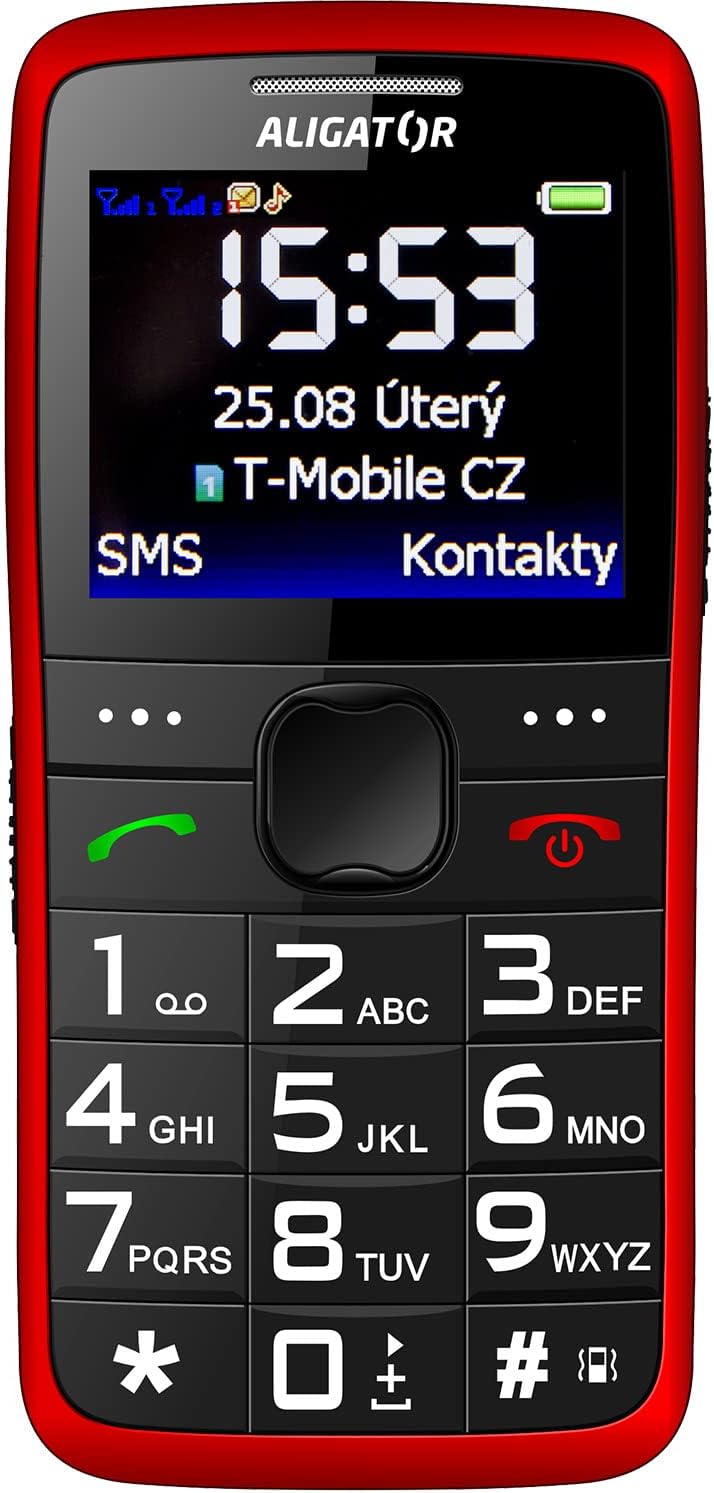
ຮູບພາບ 3.2: ລາຍລະອຽດດ້ານໜ້າ view of the Aligator A675 mobile phone, highlighting the large display, clear numeric keypad, and dedicated call/end buttons.
3.1 ແນວ ໜ້າ View
- ຈໍສະແດງຜົນ: Shows time, date, network status, battery level, and menu options.
- Navigation Key: ໃຊ້ເພື່ອເລື່ອນຜ່ານເມນູ ແລະ ຕົວເລືອກຕ່າງໆ.
- ປຸ່ມໂທ (ສີຂຽວ): Initiates calls and answers incoming calls.
- End/Power Button (Red): Ends calls, returns to the home screen, and powers the phone on/off.
- ປຸ່ມກົດ: Numeric keys (0-9), asterisk (*), and hash (#) for dialing and text input.
3.2 ກັບຄືນ View
- ສຽງ ສຳ ຮອງ: For ringtones and hands-free calls.
- ກ້ອງຖ່າຍຮູບ: For basic photo capture.
- ປຸ່ມ SOS: A dedicated button for emergency calls/SMS (refer to section 5.4 for setup).
4. ຕັ້ງຄ່າ
Follow these steps to prepare your phone for first use.
4.1 ການໃສ່ຊິມກາດ
- ຖອດຝາປິດຫຼັງຂອງໂທລະສັບອອກໂດຍຄ່ອຍໆເປີດມັນອອກຈາກຮູສຽບ.
- ຖ້າໃສ່ແບັດເຕີຣີແລ້ວ, ໃຫ້ຖອດມັນອອກ.
- Locate the SIM card slots. The Aligator A675 supports two SIM cards (Dual SIM).
- Carefully insert your 2G GSM SIM card(s) into the designated slot(s) with the gold contacts facing down, ensuring they are correctly oriented.
- Ensure the SIM cards are securely in place.
4.2 ການໃສ່ແບັດເຕີລີ
- Align the battery contacts with the contacts in the phone's battery compartment.
- Gently press the battery into place until it fits snugly.
- Replace the back cover, ensuring it clicks into position.
4.3 ການສາກໂທລະສັບ
- Connect the charger cable to the charging port on the phone (usually located at the bottom).
- ສຽບສາຍສາກໃສ່ປລັກສຽບໄຟ.
- ໄອຄອນແບັດເຕີຣີໃນຈໍສະແດງຜົນຈະຊີ້ບອກສະຖານະການສາກໄຟ.
- Allow the phone to charge completely before first use. This typically takes a few hours.
5. ປະຕິບັດການໂທລະສັບ
Basic functions and features of your Aligator A675.
5.1 ການເປີດ/ປິດ
- ເພື່ອເປີດເຄື່ອງ: ກົດຄ້າງໄວ້ End/Power Button (red button) until the screen lights up.
- ປິດເຄື່ອງ: ກົດຄ້າງໄວ້ End/Power Button until the power-off options appear, then confirm.
5.2 ໂທອອກ ແລະ ຮັບສາຍ
- ໂທອອກ: ໃສ່ເບີໂທລະສັບໂດຍໃຊ້ປຸ່ມກົດ ແລະກົດປຸ່ມ ປຸ່ມໂທ (green button).
- ເພື່ອຮັບສາຍ: ກົດ ປຸ່ມໂທ ເມື່ອໂທລະສັບດັງຂຶ້ນ.
- ເພື່ອວາງສາຍ: ກົດ End/Power Button.
5.3 ການສົ່ງ ແລະ ການຮັບ SMS
- Navigate to the 'Messages' menu using the navigation key.
- ເລືອກ 'ຂຽນຂໍ້ຄວາມ' ເພື່ອຂຽນ SMS ໃໝ່.
- ໃສ່ເບີໂທຂອງຜູ້ຮັບ ຫຼືເລືອກຈາກລາຍຊື່ຜູ່ຕິດຕໍ່.
- ພິມຂໍ້ຄວາມຂອງທ່ານໂດຍໃຊ້ແປ້ນພິມ. ກົດປຸ່ມທີ່ເໝາະສົມຫຼາຍຄັ້ງສຳລັບຕົວອັກສອນທີ່ແຕກຕ່າງກັນ (ຕົວຢ່າງ, '2' ສຳລັບ A, B, C).
- ເລືອກ 'ສົ່ງ'.
- ຂໍ້ຄວາມທີ່ເຂົ້າມາຈະສະແດງຢູ່ໃນຫນ້າຈໍແລະເກັບໄວ້ໃນ 'Inbox'.
5.4 ຟັງຊັນ SOS
ຟັງຊັນ SOS ຊ່ວຍໃຫ້ທ່ານຕິດຕໍ່ເບີສຸກເສີນທີ່ຕັ້ງໄວ້ລ່ວງໜ້າໄດ້ໄວ.
- ການຕັ້ງຄ່າໝາຍເລກ SOS: Go to 'Settings' > 'SOS Settings'. Add up to 5 emergency contact numbers.
- ການເປີດໃຊ້ SOS: ກົດຄ້າງໄວ້ ປຸ່ມ SOS ຢູ່ດ້ານຫຼັງຂອງໂທລະສັບເປັນເວລາສອງສາມວິນາທີ.
- The phone will automatically send an emergency SMS to the pre-set numbers and then start dialing them one by one until a call is answered.
5.5 ຕິດຕໍ່ພົວພັນ
- ເພີ່ມລາຍຊື່ຕິດຕໍ່: Go to 'Contacts' > 'Add New'. Enter the name and phone number, then save.
- ກຳລັງຊອກຫາລາຍຊື່ຜູ້ຕິດຕໍ່: Go to 'Contacts' and use the navigation key to scroll or type the first letters of the name.
6. ການບໍາລຸງຮັກສາແລະການດູແລ
Proper care ensures the longevity of your Aligator A675 phone.
- ທໍາຄວາມສະອາດ: ໃຊ້ຜ້າປຽກແຫ້ງເພື່ອເຮັດຄວາມສະອາດພື້ນຜິວຂອງໂທລະສັບ. ຫຼີກເວັ້ນການເຮັດຄວາມສະອາດຂອງແຫຼວຫຼືວັດສະດຸຂັດ.
- ການດູແລຫມໍ້ໄຟ: ຢ່າປ່ອຍໃຫ້ແບັດເຕີຣີຢູ່ໃນອຸນຫະພູມສູງເກີນໄປ. ຫຼີກລ່ຽງການສາກໄຟແບັດເຕີຣີຈົນໝົດເລື້ອຍໆ.
- ການເກັບຮັກສາ: ເກັບຮັກສາໂທລະສັບໄວ້ໃນບ່ອນທີ່ເຢັນ, ແຫ້ງ ແລະ ຫ່າງຈາກແສງແດດໂດຍກົງ ແລະ ຄວາມຊຸ່ມ.
- ຄວາມຕ້ານທານນ້ໍາ: ໂທລະສັບນີ້ບໍ່ທົນທານຕໍ່ນ້ໍາ. ຫຼີກເວັ້ນການສໍາຜັດກັບຂອງແຫຼວ.
7. ການແກ້ໄຂບັນຫາ
ບັນຫາທົ່ວໄປແລະການແກ້ໄຂຂອງພວກເຂົາ.
| ບັນຫາ | ສາເຫດທີ່ເປັນໄປໄດ້ | ການແກ້ໄຂ |
|---|---|---|
| ໂທລະສັບບໍ່ເປີດ | ແບັດເຕີຣີອ່ອນ; ບໍ່ໄດ້ໃສ່ແບັດເຕີຣີຢ່າງຖືກຕ້ອງ | ສາກແບັດເຕີຣີ; ໃສ່ແບັດເຕີຣີຄືນໃຫ້ຖືກຕ້ອງ |
| ບໍ່ສາມາດໂທ/ຮັບສາຍໄດ້ | No network signal; SIM card not inserted; SIM card not activated | Move to an area with better signal; Reinsert SIM card; Contact your network provider |
| ບໍ່ມີສຽງໃນລະຫວ່າງການໂທ | Volume too low; Speaker blocked | Increase call volume; Check if speaker is obstructed |
| ຟັງຊັນ SOS ບໍ່ເຮັດວຽກ | ບໍ່ໄດ້ຕັ້ງຕົວເລກ SOS; ບໍ່ມີສັນຍານເຄືອຂ່າຍ | Set up SOS numbers in settings; Ensure network coverage |
ຖ້າບັນຫາຍັງຄົງຢູ່, ກະລຸນາຕິດຕໍ່ຝ່າຍຊ່ວຍເຫຼືອລູກຄ້າ.
8. ຂໍ້ມູນຈໍາເພາະ
Key technical details of the Aligator A675.
- ຍີ່ຫໍ້: ALIGATOR
- ຕົວແບບ: A675
- ຜູ້ໃຫ້ບໍລິການໄຮ້ສາຍ: ປົດລັອກແລ້ວ
- ເຕັກໂນໂລຊີເຄືອຂ່າຍໄຮ້ສາຍ: GSM (2G)
- ຂະໜາດໜ້າຈໍ: 3 ນິ້ວ
- ການໂຕ້ຕອບຂອງມະນຸດ: ປຸ່ມກົດ
- ຮອງຮັບຊິມ: ຊິມສອງ
9. ການຮັບປະກັນແລະການສະຫນັບສະຫນູນ
Your Aligator A675 phone is covered by a standard manufacturer's warranty. Please refer to the warranty card included in your package for specific terms and conditions, including the warranty period and coverage details.
For technical support, service, or warranty claims, please contact your retailer or the official Aligator customer service. Contact information can typically be found on the manufacturer's webສະຖານທີ່ ຫຼື ໃນການຫຸ້ມຫໍ່.
ຮັກສາຫຼັກຖານການຊື້ຂອງທ່ານ (ໃບຮັບເງິນຫຼືໃບແຈ້ງຫນີ້) ຍ້ອນວ່າມັນຈະຕ້ອງການສໍາລັບການບໍລິການຮັບປະກັນໃດໆ.


