1. ຄໍາແນະນໍາຄວາມປອດໄພ
Please read these safety instructions carefully before using the product. Keep this manual for future reference.
- ຜະລິດຕະພັນນີ້ຖືກອອກແບບມາສຳລັບໃຊ້ພາຍໃນເທົ່ານັ້ນ. ຫ້າມວາງໄວ້ໃນບ່ອນທີ່ມີຄວາມຊຸ່ມຊື່ນ ຫຼື ອຸນຫະພູມສູງເກີນໄປ.
- ຢ່າພະຍາຍາມເປີດ ຫຼືແກ້ໄຂອຸປະກອນ. ອັນນີ້ອາດຈະເຮັດໃຫ້ການຮັບປະກັນເປັນໂມຄະ ແລະສ້າງຄວາມສ່ຽງດ້ານຄວາມປອດໄພ.
- ຮັກສາອຸປະກອນໃຫ້ຫ່າງຈາກເດັກນ້ອຍ.
- Use only the provided micro-USB cable for charging.
- ຢ່າເບິ່ງໂດຍກົງເຂົ້າໄປໃນແຫຼ່ງແສງສະຫວ່າງ LED.
2. ເນື້ອໃນຊຸດ
ໃຫ້ແນ່ໃຈວ່າທຸກລາຍການຢູ່ໃນຊຸດ:
- ANSMANN Under-Cabinet Light M
- ສາຍສາກ Micro-USB
- ຄູ່ມືການສອນ
3. ຜະລິດຕະພັນເກີນview
The ANSMANN Under-Cabinet Light M is a versatile, rechargeable LED lamp designed for various indoor applications. It features a motion sensor, adjustable color temperatures, and a slim design for discreet placement.

Image 1: The ANSMANN Under-Cabinet Light M, showcasing its sleek, white design and integrated motion sensor.
ຄຸນນະສົມບັດທີ່ສໍາຄັນ:
- PIR Motion ເຊັນເຊີ: Automatically activates the light when motion is detected in low-light conditions.
- Twilight Sensor: Ensures the light only activates in dark environments, conserving battery life.
- ປັບອຸນຫະພູມສີໄດ້: Choose between 3 color temperatures (cool white, neutral white, warm white) or activate all LEDs for maximum brightness.
- ການຫຼຸດແສງແບບບໍ່ມີຂັ້ນຕອນ: Adjust brightness by holding down the control button.
- ແບັດເຕີຣີທີ່ສາມາດສາກໄດ້: Integrated battery for cordless operation, charged via micro-USB.
- ການຕິດຕັ້ງແມ່ເຫຼັກ: Easy installation and removal with a magnetic strip.

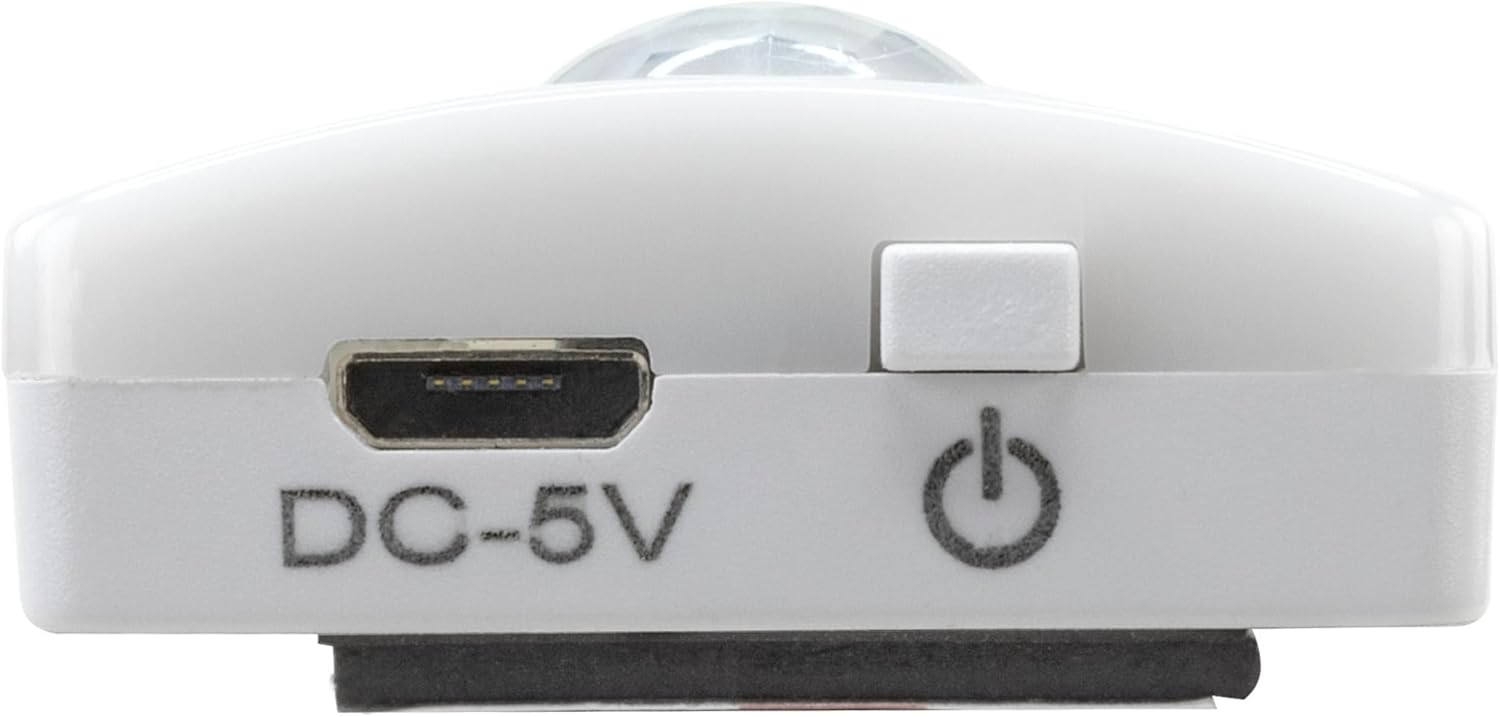
Image 2: Diagram illustrating the Micro-USB Port, On/Off button, and PIR motion sensor on the device.
4. ການຕິດຕັ້ງແລະການຕິດຕັ້ງ
The Under-Cabinet Light M offers flexible installation options using its integrated magnetic strip.
ການຕິດຕັ້ງແມ່ເຫຼັກ:
- Identify a suitable, clean, and dry surface for installation (e.g., inside a cabinet, under a shelf).
- The light comes with a fixed magnetic strip on its back. For non-metallic surfaces, use the included adhesive strip.
- Peel off the protective film from the adhesive strip and firmly press it onto the desired surface.
- Attach the Under-Cabinet Light M to the adhesive strip. The magnetic connection will hold it in place.
ຮູບພາບທີ 3: ໄລຍະໃກ້ view of the magnetic strip and the removable adhesive strip, demonstrating the mounting mechanism.

ຮູບພາບ 4: ຕົວຢ່າງample of the under-cabinet light installed in a modern kitchen setting, providing illumination over a countertop.
5. ການດໍາເນີນງານ
The Under-Cabinet Light M offers intuitive control for its lighting functions.
ເປີດ/ປິດ:
- Locate the On/Off button (refer to Image 2).
- Press the button once to turn the light on or off.
ປັບອຸນຫະພູມສີ:
- With the light on, short press the control button repeatedly to cycle through the 3 available color temperatures: cool white, neutral white, and warm white.
- A fourth press will activate all LEDs for maximum brightness.
ຟັງຊັນ Dimming:
- To adjust the brightness, press and hold the control button. The light will gradually dim or brighten. Release the button when the desired brightness level is reached.
Motion and Twilight Sensor:
- When the light is in motion sensor mode, it will automatically turn on when movement is detected within its range.
- The integrated twilight sensor ensures that the motion sensor only activates the light in dark environments, preventing unnecessary illumination during daylight hours.
6. ການສາກໄຟ
The Under-Cabinet Light M is equipped with a rechargeable battery for convenient cordless use.
- When the battery is low, the light output may decrease or the light may not turn on.
- Gently detach the light from its magnetic mounting surface.
- Connect the provided micro-USB cable to the micro-USB port on the light (refer to Image 2).
- Connect the other end of the micro-USB cable to a suitable USB power source (e.g., USB wall adapter, computer USB port).
- An indicator light will show the charging status (e.g., red for charging, green for fully charged).
- Once fully charged, disconnect the cable and reattach the light to its mounting surface.

ຮູບພາບ 5: ລາຍລະອຽດ view of the Micro-USB charging port and the On/Off button, essential for charging and operation.
7. ບໍາລຸງຮັກສາ
To ensure the longevity and optimal performance of your Under-Cabinet Light M, follow these simple maintenance guidelines:
- ເຊັດໄຟໃຫ້ສະອາດເປັນປະຈຳດ້ວຍຜ້າອ່ອນໆແຫ້ງ. ຢ່າໃຊ້ນໍ້າຢາເຮັດຄວາມສະອາດທີ່ມີສີຂັດ ຫຼື ຕົວລະລາຍ.
- Ensure the motion sensor lens is kept clean and free from obstructions for proper function.
- Store the light in a cool, dry place if not in use for extended periods.
8. ການແກ້ໄຂບັນຫາ
If you encounter issues with your Under-Cabinet Light M, refer to the following common problems and solutions:
| ບັນຫາ | ສາເຫດທີ່ເປັນໄປໄດ້ | ການແກ້ໄຂ |
|---|---|---|
| ແສງບໍ່ໄດ້ເປີດ. | ແບັດເຕີຣີໝົດ. | Charge the light using the micro-USB cable. |
| ເຊັນເຊີກວດຈັບການເຄື່ອນໄຫວບໍ່ໄດ້ກວດພົບການເຄື່ອນໄຫວ. | Ensure the sensor is clean and unobstructed. Check if the environment is dark enough for the twilight sensor to activate. | |
| ແສງສະຫວ່າງບໍ່ຄິດຄ່າ. | ສາຍ ຫຼື ແຫຼ່ງພະລັງງານຜິດພາດ. | Try a different micro-USB cable or USB power adapter. |
| ພອດສາກໄຟແມ່ນເປື້ອນ. | Gently clean the micro-USB port with a dry, soft brush. | |
| ແສງສະຫວ່າງ flickers ຫຼືມືດມົວ. | ແບັດເຕີຣີຕໍ່າ. | ຕື່ມຂໍ້ມູນໃສ່ອຸປະກອນ. |
ຖ້າບັນຫາຍັງຄົງຢູ່ຫຼັງຈາກພະຍາຍາມແກ້ໄຂເຫຼົ່ານີ້, ກະລຸນາຕິດຕໍ່ຝ່າຍຊ່ວຍເຫຼືອລູກຄ້າ.
9. ຂໍ້ມູນຈໍາເພາະ
| ຄຸນສົມບັດ | ລາຍລະອຽດ |
|---|---|
| ໝາຍເລກຕົວແບບ | 1600-0438 |
| ຂະໜາດສິນຄ້າ | 25L x 3.5W x 1.3H cm (9.84L x 1.38W x 0.51H ນິ້ວ) |
| ນ້ໍາຫນັກລາຍການ | 112 ກຣາມ (0.25 ປອນ) |
| ແຫຼ່ງພະລັງງານ | ພະລັງງານຫມໍ້ໄຟ |
| ພອດສາກໄຟ | Micro-USB (DC-5V) |
| ວັດສະດຸ | ພາດສະຕິກ |
| ສີ | ສີຂາວ |
| ປະເພດການຕິດຕັ້ງ | Wall Mount (Magnetic) |
| ປະເພດຫ້ອງ | Dining Room, Kitchen, Wardrobe, Hallway, etc. |
10. ການຮັບປະກັນແລະການສະຫນັບສະຫນູນ
ANSMANN products are manufactured with high-quality standards. For information regarding warranty terms and conditions, please refer to the documentation provided with your purchase or visit the official ANSMANN webເວັບໄຊ.
For technical support or inquiries, please contact ANSMANN customer service through their official channels.


