1. ຜະລິດຕະພັນເກີນview
The Anderic OEM NSRCFNA21 Smart Remote is an original equipment manufacturer (OEM) replacement remote control specifically designed for various Insignia TV models. This remote provides seamless functionality and user-friendly operation, ensuring reliable control over your television.
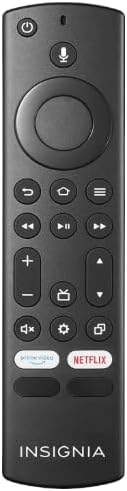
ຮູບພາບ 1.1: The Anderic OEM NSRCFNA21 Smart Remote. This image displays the front view of the black remote control, featuring various buttons for power, voice control, navigation, volume, channel, and dedicated streaming service buttons.
ຄຸນນະສົມບັດທີ່ສໍາຄັນປະກອບມີ:
- Original Quality: An authentic OEM product, ensuring performance and reliability comparable to the remote originally supplied with your TV.
- ການອອກແບບທີ່ເປັນມິດກັບຜູ້ໃຊ້: Intuitive buttons and controls for easy navigation, volume adjustment, channel changes, and access to various TV functions.
- ປະສິດທິພາບທີ່ເຊື່ອຖືໄດ້: Provides a stable and responsive connection for accurate command execution.
2. ຄຳແນະນຳໃນການຕິດຕັ້ງ ແລະ ການຈັບຄູ່
To ensure proper functionality, the remote control must be paired with your Insignia TV. Follow these steps carefully:
- ຣີເຊັດໂທລະພາບ: Unplug your Insignia TV from its power source. Wait for approximately 30 seconds.
- ເປີດໂທລະທັດ: Plug the TV back into the power source and turn it on. Allow the TV to fully boot up.
- ເລີ່ມຕົ້ນການຈັບຄູ່: Once the TV has completely booted up and is displaying content, press and hold the ບ້ານ button on the Anderic NSRCFNA21 remote control for up to 30 seconds.
- Remote Update (if prompted): Your TV may display a message indicating that the remote needs an update. If prompted, allow the TV to proceed with the update. This process may take 1 to 3 minutes to complete.
- ການຢັ້ງຢືນ: After the update (if any) and pairing process, test the remote's functions (e.g., volume, channel, navigation) to confirm successful pairing.
If the remote does not pair after following these steps, repeat the process or refer to the troubleshooting section.
3. ການດໍາເນີນງານການຄວບຄຸມໄລຍະໄກ
The Anderic NSRCFNA21 remote control features an intuitive layout for easy operation of your Insignia TV. Below are the general functions of the primary buttons:
- ປຸ່ມເປີດປິດ: ເປີດ ຫຼືປິດໂທລະພາບ.
- ປຸ່ມຄວບຄຸມດ້ວຍສຽງ: Activates voice commands for searching content or controlling the TV.
- Navigation Pad (Directional Buttons and Select): ໃຊ້ເພື່ອຍ້າຍຜ່ານເມນູ ແລະເລືອກລາຍການ.
- ປຸ່ມຫນ້າທໍາອິດ: Returns to the TV's main home screen.
- ປຸ່ມກັບຄືນ: ກັບຄືນໄປຫາໜ້າຈໍ ຫຼືເມນູກ່ອນໜ້າ.
- Menu/Options Button: Accesses additional menu options or settings.
- ປະລິມານຂຶ້ນ/ລົງ: Adjusts the TV's audio volume.
- ຊ່ອງຂຶ້ນ/ລົງ: ປ່ຽນຊ່ອງໂທລະພາບ.
- ປິດສຽງ: ປິດສຽງ ຫຼືປິດສຽງຂອງໂທລະພາບ.
- ປຸ່ມການຕັ້ງຄ່າ: Opens the TV's settings menu.
- ປຸ່ມປ້ອນ/ແຫຼ່ງ: Changes the TV's input source (e.g., HDMI 1, HDMI 2).
- ປຸ່ມບໍລິການສະຕຣີມມິງສະເພາະ: Provides quick access to popular streaming applications (e.g., Amazon Prime Video, Netflix).
4. ຄວາມເຂົ້າກັນໄດ້
The Anderic OEM NSRCFNA21 Smart Remote is compatible with the following Insignia TV models:
- NS24DF310NA21
- NS39DF310NA21
- NS50DF710NA21
- NS55DF710NA21
This remote also replaces the following models:
- NSRCFNA19 Rev B Fire
- NSRCFNA19revB
- NSRCFNA21 Fire
- NSRCFNA21 Rev E
- NSRCFNA21-Rev-E
Ensure your TV model is listed above for optimal performance.
5. ບໍາລຸງຮັກສາ
Proper maintenance can extend the life and functionality of your remote control.
- ການປ່ຽນແບັດເຕີຣີ: The remote requires two AAA batteries. Replace batteries when the remote's responsiveness decreases or it stops functioning. Ensure correct polarity when inserting new batteries.
- ທໍາຄວາມສະອາດ: Use a soft, dry cloth to clean the remote's surface. Avoid using liquid cleaners or abrasive materials, as these can damage the remote.
- ການເກັບຮັກສາ: ເກັບຮັກສາຣີໂໝດໄວ້ໃນບ່ອນແຫ້ງ, ຫ່າງຈາກອຸນຫະພູມສູງສຸດ ແລະ ແສງແດດໂດຍກົງ.
6. ການແກ້ໄຂບັນຫາ
If you encounter issues with your Anderic NSRCFNA21 Smart Remote, try the following troubleshooting steps:
- ໄລຍະໄກບໍ່ຕອບສະໜອງ:
- Check the batteries. Replace them with fresh AAA batteries, ensuring correct polarity.
- ກວດໃຫ້ແນ່ໃຈວ່າບໍ່ມີສິ່ງກີດຂວາງລະຫວ່າງຣີໂໝດ ແລະເຊັນເຊີຂອງໂທລະທັດ.
- ລອງຂະບວນການຈັບຄູ່ຄືນໃໝ່ຕາມທີ່ໄດ້ອະທິບາຍໄວ້ໃນພາກທີ 2.
- ການທໍາງານແບບບໍ່ຢຸດຢັ້ງ:
- ອັນນີ້ອາດຈະຊີ້ບອກເຖິງພະລັງງານແບັດເຕີຣີຕໍ່າ. ໃຫ້ປ່ຽນແບັດເຕີຣີໃໝ່.
- ໃຫ້ແນ່ໃຈວ່າທ່ານຢູ່ພາຍໃນຂອບເຂດທີ່ມີປະສິດທິພາບຂອງເຊັນເຊີຂອງໂທລະພາບ.
- Pairing Fails:
- Confirm your TV model is listed in the compatibility section (Section 4).
- Ensure the TV is fully booted up before attempting to hold the Home button.
- Try unplugging the TV for a longer period (e.g., 1-2 minutes) before plugging it back in and re-attempting pairing.
ຖ້າບັນຫາຍັງຄົງຢູ່ຫຼັງຈາກພະຍາຍາມຂັ້ນຕອນເຫຼົ່ານີ້ແລ້ວ, ໃຫ້ຕິດຕໍ່ຝ່າຍສະໜັບສະໜູນລູກຄ້າເພື່ອຂໍຄວາມຊ່ວຍເຫຼືອຕື່ມອີກ.
7. ຂໍ້ມູນຈໍາເພາະ
| ຍີ່ຫໍ້ | ອັນເດີຣິກ |
| ໝາຍເລກຕົວແບບ | NSRCFNA21 Rev B |
| ອຸປະກອນທີ່ເຂົ້າກັນໄດ້ | Insignia Televisions |
| ແຫຼ່ງພະລັງງານ | 2 ຫມໍ້ໄຟ AAA (ຕ້ອງການ) |
| ນ້ໍາຫນັກລາຍການ | 1.76 ອອນ |
| ຂະໜາດແພັກເກັດ | 6.3 x 2.95 x 0.67 ນິ້ວ |
| ສີ | ດຳ |
| ຜູ້ຜະລິດ | ບໍລິສັດ Dan's Electronics Etc., Inc. |
8. ການຮັບປະກັນແລະການສະຫນັບສະຫນູນ
For warranty information or technical support, please contact the manufacturer, Anderic (Dan's Electronics Etc., Inc.). Refer to the product packaging or the official Anderic webເວັບໄຊທ໌ສຳລັບລາຍລະອຽດການຕິດຕໍ່ສະເພາະ ແລະ ເງື່ອນໄຂການຮັບປະກັນ.
ທ່ານສາມາດໄປຢ້ຽມຢາມໄດ້ ຮ້ານ Anderic ໃນ Amazon ສໍາລັບຂໍ້ມູນເພີ່ມເຕີມ.


