1. ບົດແນະນຳ
ຂອບໃຈສໍາລັບການຊື້asing the KEPLUG Sunrise Alarm Clock. This device is designed to enhance your waking and sleeping experience with its unique features, including sunrise and sunset simulations, dual alarms, FM radio, and various natural sounds. Please read this manual carefully to ensure proper use and optimal performance.
ເນື້ອໃນຊຸດ:
- 1 x KEPLUG Sunrise Alarm Clock
- 1 x ສາຍ Micro USB
- 1 x ອະແດັບເຕີຝາ
- 1 x ຄູ່ມືຜູ້ໃຊ້
2. ຜະລິດຕະພັນເກີນview
Familiarize yourself with the main components and controls of your KEPLUG Sunrise Alarm Clock.

ຮູບພາບ 2.1: ດ້ານໜ້າ view of the KEPLUG Sunrise Alarm Clock, showing the digital time display and the illuminated light panel. The clock face is round with a white base.
ປຸ່ມຄວບຄຸມ ແລະພອດ:
Refer to the diagram below for button identification (exact button layout may vary slightly by model, but functions are consistent).
- ປຸ່ມຕັ້ງເວລາ: ໃຊ້ເພື່ອເຂົ້າສູ່ໂໝດຕັ້ງເວລາ.
- ປຸ່ມປຸກ 1: ໃຊ້ເພື່ອຕັ້ງ ແລະເປີດໃຊ້ໂມງປຸກ 1.
- ປຸ່ມປຸກ 2: ໃຊ້ເພື່ອຕັ້ງ ແລະເປີດໃຊ້ໂມງປຸກ 2.
- FM Radio Button: Activates and controls FM radio functions.
- ປຸ່ມແສງສະຫວ່າງ: Controls the light brightness and color modes.
- ລະດັບສຽງ +/- ປຸ່ມ: ປັບລະດັບສຽງ.
- ປຸ່ມຂຶ້ນ/ລົງ: ນຳທາງເມນູ ແລະປັບຄ່າ.
- Snooze/Sleep Aid Button: Activates snooze during an alarm or sleep aid function.
- ພອດສາກໄຟ USB: ສໍາລັບການສາກໄຟອຸປະກອນພາຍນອກ.
- ພະລັງງານເຂົ້າ Micro USB: ເຊື່ອມຕໍ່ກັບອະແດບເຕີພະລັງງານ.
3. ຕັ້ງຄ່າ
3.1 ການເຊື່ອມຕໍ່ພະລັງງານ
- Connect the micro USB cable to the power input port on the back of the alarm clock.
- ສຽບອະແດບເຕີຕິດຝາເຂົ້າກັບປລັກໄຟຟ້າມາດຕະຖານ.
- ຈໍສະແດງຜົນຈະສະຫວ່າງຂຶ້ນ, ຊີ້ບອກວ່າອຸປະກອນເປີດຢູ່.
The clock includes a built-in backup battery to retain settings during power outages or disconnections.
3.2 ການ ກຳ ນົດເວລາ
- ກົດ ປຸ່ມຕັ້ງເວລາ (often represented by a clock icon). The hour display will start flashing.
- ໃຊ້ ປຸ່ມຂຶ້ນ / ລົງ ເພື່ອປັບຊົ່ວໂມງ.
- ກົດ ປຸ່ມຕັ້ງເວລາ again to confirm the hour and move to minute setting. The minute display will flash.
- ໃຊ້ ປຸ່ມຂຶ້ນ / ລົງ ເພື່ອປັບນາທີ.
- ກົດ ປຸ່ມຕັ້ງເວລາ a third time to confirm the minutes.
- ເພື່ອປ່ຽນລະຫວ່າງຮູບແບບ 12 ຊົ່ວໂມງ ແລະ 24 ຊົ່ວໂມງ, ໃຫ້ກົດທີ່ປຸ່ມ ປຸ່ມຂຶ້ນ / ລົງ while the time is flashing during setup, or refer to the specific instructions in your manual for a dedicated time format button.
3.3 Time Display Brightness
The time display offers three brightness settings: High, Low, and Off. This can typically be adjusted by repeatedly pressing a dedicated display brightness button or by holding the Time Setting button. Refer to your specific model's instructions for exact control.
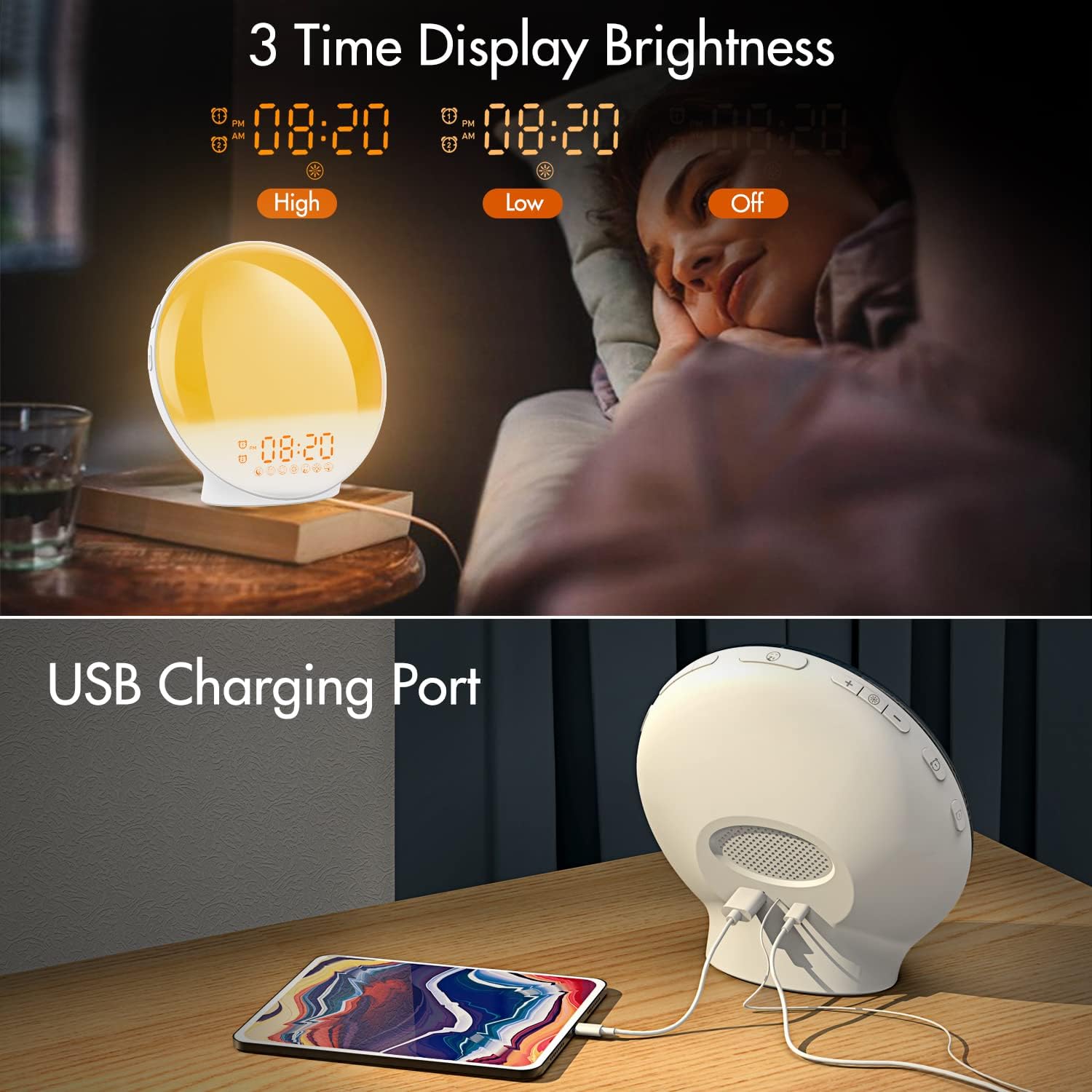
ຮູບພາບ 3.1: Illustration of the three time display brightness options: High, Low, and Off, allowing users to customize visibility for different times of day or night.
4. ຄໍາແນະນໍາການດໍາເນີນງານ
4.1 ການຕັ້ງຄ່າໂມງປຸກ (ປຸກ 1 ແລະປຸກ 2)
The clock features two independent alarms, allowing for separate wake-up times (e.g., weekday and weekend).

ຮູບພາບ 4.1: Depiction of the dual alarm functionality, allowing users to set different alarms for weekdays and weekends, along with the snooze feature.
- ກົດ ປຸກ 1 ປຸ່ມ (ຫຼື ປຸກ 2 ປຸ່ມ) to activate and enter alarm setting mode. The alarm time will flash.
- ໃຊ້ ປຸ່ມຂຶ້ນ / ລົງ ເພື່ອຕັ້ງໂມງປຸກທີ່ຕ້ອງການ.
- ກົດ ປຸ່ມປຸກ again to confirm the hour and set the minutes.
- ໃຊ້ ປຸ່ມຂຶ້ນ / ລົງ to set the desired alarm minutes.
- ກົດ ປຸ່ມປຸກ again to select the wake-up sound. Use ປຸ່ມຂຶ້ນ / ລົງ to cycle through 7 nature sounds or FM radio.
- ກົດ ປຸ່ມປຸກ again to set the volume level (1-16) for the alarm sound. Use ປຸ່ມຂຶ້ນ / ລົງ ປັບ.
- ກົດ ປຸ່ມປຸກ one last time to confirm all settings and activate the alarm. An alarm icon will appear on the display.
4.2 Snooze ຟັງຊັນ
When an alarm sounds, tap the ປຸ່ມ Snooze (often the large button on top or front) to pause the alarm for 9 minutes. This can be repeated up to 5 times.
4.3 Sunrise Simulation
The sunrise simulation gradually brightens the light before your alarm time, mimicking a natural sunrise.

ຮູບພາບ 4.2: Visual representation of the sunrise simulation feature, where the light intensifies gradually over a set period before the alarm, designed for a gentle wake-up.
- When setting an alarm, after selecting the sound and volume, you will typically be prompted to set the sunrise duration.
- ໃຊ້ ປຸ່ມຂຶ້ນ / ລົງ to choose a duration between 10 to 60 minutes. The light will gradually increase from 0% to the set brightness level (0-20) during this period.
- The light color will transition from deep red to bright yellow, simulating a natural sunrise.
4.4 Sunset Simulation / Sleep Aid
The sunset simulation gradually dims the light and can play soothing sounds to help you fall asleep.

ຮູບພາບ 4.3: Illustration of the sunset simulation, where the light gradually dims over a period of 10 to 120 minutes, accompanied by optional sleep sounds like rain, forest, river, or FM radio.
- ກົດ Snooze/Sleep Aid Button (or a dedicated Sleep Aid button) to activate the sleep aid function.
- ໃຊ້ ປຸ່ມຂຶ້ນ / ລົງ to select a duration for the dimming process (10-120 minutes).
- You can also select a natural sound (Rain, Forest, River) or FM radio to play during this period.
- The light will gradually dim from 100% to 0% over the selected duration, and the sound will fade out.
ວິທະຍຸ 4.5 FM
The built-in FM radio allows you to listen to your favorite stations or use them as an alarm sound.

ຮູບພາບ 4.4: ເກີນview of the 7 available alarm sounds and the FM radio option, providing diverse choices for waking up.
- ກົດ ປຸ່ມວິດທະຍຸ FM ເພື່ອເປີດ/ປິດວິທະຍຸ.
- ຖື ປຸ່ມວິດທະຍຸ FM to automatically scan and save available stations.
- ໃຊ້ ປຸ່ມຂຶ້ນ / ລົງ to manually tune to a specific frequency or cycle through saved stations.
- ປັບລະດັບສຽງໂດຍໃຊ້ ປຸ່ມລະດັບສຽງ +/-.
4.6 Night Light / Color Light
The clock can function as a night light with various color options and adjustable brightness.

ຮູບພາບ 4.5: Display of the 7 color atmosphere light options and 20 brightness levels, highlighting the clock's versatility as a mood light or reading lamp.
- ກົດ ປຸ່ມແສງສະຫວ່າງ ເພື່ອເປີດໄຟ.
- ກົດ ປຸ່ມແສງສະຫວ່າງ repeatedly to cycle through 7 static colors (e.g., Red, Green, Blue, Yellow, Indigo, Purple, White) or an automatic color-changing mode.
- ໃຊ້ ປຸ່ມຂຶ້ນ / ລົງ to adjust the brightness level (0-20) of the selected color or white light.
- ຖື ປຸ່ມແສງສະຫວ່າງ ປິດໄຟ.
4.7 ພອດສາກໄຟ USB
A 5V/2.4A USB port is located on the back of the device, allowing you to charge your smartphone or other small electronic devices.
ຮູບພາບ 4.6: ຫລັງ view of the alarm clock showing the USB charging port in use, connected to a tablet for charging.
5. ບໍາລຸງຮັກສາ
- ທໍາຄວາມສະອາດ: ເຊັດອຸປະກອນດ້ວຍຜ້າອ່ອນໆ, ແຫ້ງ. ຢ່າໃຊ້ເຄື່ອງເຮັດຄວາມສະອາດຂັດຫຼືສານລະລາຍ.
- ການເກັບຮັກສາ: ເກັບຮັກສາອຸປະກອນໄວ້ໃນບ່ອນທີ່ເຢັນ, ແຫ້ງ, ເມື່ອບໍ່ໄດ້ໃຊ້ເປັນເວລາດົນນານ.
- ພະລັງງານ: Always use the provided power adapter to prevent damage.
6. ການແກ້ໄຂບັນຫາ
| ບັນຫາ | ສາເຫດທີ່ເປັນໄປໄດ້ | ການແກ້ໄຂ |
|---|---|---|
| ໂມງບໍ່ເປີດ. | ອະແດັບເຕີໄຟບໍ່ໄດ້ເຊື່ອມຕໍ່ ຫຼື ມີບັນຫາ. | Ensure the power adapter is securely connected to both the clock and a working power outlet. Try a different outlet. |
| ໂມງປຸກບໍ່ມີສຽງ. | ໂມງປຸກບໍ່ໄດ້ເປີດໃຊ້ງານ ຫຼື ລະດັບສຽງຕໍ່າເກີນໄປ. | Check if the alarm icon is displayed. Re-set the alarm and ensure the volume is set to an audible level. |
| ການຈຳລອງແສງຕາເວັນຂຶ້ນບໍ່ເຮັດວຽກ. | Sunrise duration not set during alarm setup. | Ensure you have set a sunrise duration (10-60 minutes) when configuring the alarm. |
| ວິທະຍຸ FM ຄົງທີ່ ຫຼື ຮັບສັນຍານບໍ່ດີ. | Weak signal or antenna position. | Extend the antenna wire fully. Reposition the clock to improve reception. Perform an auto-scan for stations. |
| ການສາກ USB ບໍ່ເຮັດວຽກ. | ອຸປະກອນບໍ່ເຂົ້າກັນໄດ້ ຫຼື ສາຍໄຟມີບັນຫາ. | Ensure the device you are charging is compatible with 5V/2.4A USB charging. Try a different USB cable. |
7. ຂໍ້ມູນຈໍາເພາະ
- ຍີ່ຫໍ້: KEPLUG
- ຕົວແບບ: B09FRY71NH
- ຂະໜາດຜະລິດຕະພັນ: 16 x 16 x 6.1 cm
- ນ້ໍາຫນັກລາຍການ: 481 g
- ສະບັບtage: 5 ໂວນ
- ແຫຼ່ງພະລັງງານ: Battery Powered (with AC adapter)
- ປະເພດການສະແດງ: ດິຈິຕອລ
- ຄຸນນະສົມບັດພິເສດ: Charging Port, Dimmable Light, Sunrise/Sunset Simulation, Dual Alarm, FM Radio, Nature Sounds
- ວັນທີທໍາອິດທີ່ມີ: ວັນທີ 12 ພະຈິກ 2021
8. ການຮັບປະກັນແລະການສະຫນັບສະຫນູນ
For warranty information or technical support, please refer to the contact details provided with your purchase documentation or visit the official KEPLUG webເວັບໄຊ. ຮັກສາໃບຮັບເງິນການຊື້ຂອງທ່ານໄວ້ເປັນຫຼັກຖານການຊື້.