1. ບົດແນະນຳ
This manual provides essential instructions for the safe and efficient use of your Xiaomi Mi Portable Bluetooth Speaker. Please read this manual thoroughly before using the product and retain it for future reference. The speaker features high-quality sound, True Wireless Stereo (TWS) capability, Bluetooth 5.0 connectivity, and IPX7 waterproofing, making it suitable for various environments.

ຮູບພາບ: ມຸມ view of the Xiaomi Mi Portable Bluetooth Speaker, highlighting its compact design and control panel.
2. ເນື້ອໃນຊຸດ
ໃຫ້ແນ່ໃຈວ່າທຸກລາຍການຢູ່ໃນຊຸດ:
- Xiaomi Mi Portable Bluetooth Speaker x1
- ສາຍສາກໄຟ x1 (USB-C)
- ຄູ່ມືຜູ້ໃຊ້ x1
3. ຄຸນລັກສະນະຂອງຜະລິດຕະພັນ
- ສຽງຄຸນນະພາບສູງ: Delivers clear and balanced audio.
- True Wireless Stereo (TWS): Connect two speakers for an immersive stereo experience.
- Bluetooth 5.0: ການເຊື່ອມຕໍ່ໄຮ້ສາຍທີ່ໝັ້ນຄົງ ແລະມີປະສິດທິພາບ.
- ກັນນ້ ຳ IPX7: Protected against immersion in water up to 1 meter for 30 minutes.
- ເວລາຫຼິ້ນດົນ: Approximately 13 hours of playback at 50% volume.
- ໄມໂຄຣໂຟນໃນຕົວ: ສໍາລັບການໂທຫາແບບແຮນຟຣີ.
- AUX Input: ສໍາລັບການເຊື່ອມຕໍ່ສຽງມີສາຍ.
4. ການຄວບຄຸມແລະຕົວຊີ້ວັດ
Familiarize yourself with the speaker's control buttons and indicators:
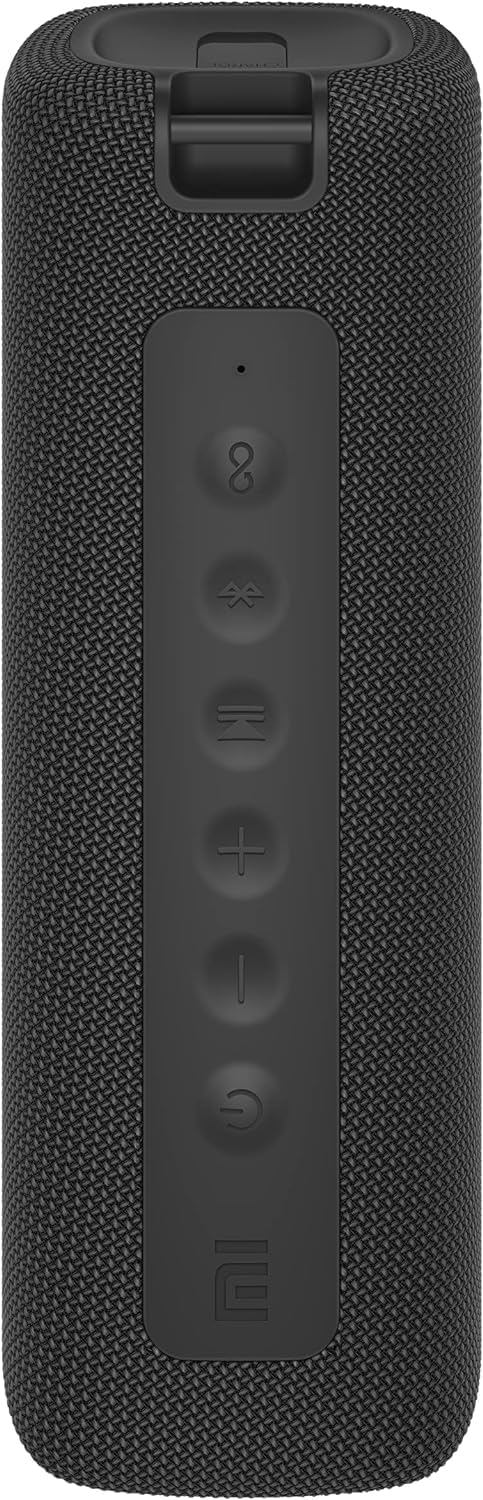
ຮູບພາບ: ທາງຫນ້າ view of the speaker with clearly visible control buttons.
| ປຸ່ມ/ຕົວຊີ້ວັດ | ຟັງຊັນ |
|---|---|
| ປຸ່ມເປີດປິດ (⏻) | Press and hold for 2 seconds to power on/off. Short press to play/pause music or answer/end calls. |
| ປະລິມານລົງ (−) | ກົດສັ້ນໆເພື່ອຫຼຸດລະດັບສຽງ. ກົດຄ້າງໄວ້ເພື່ອຟັງເພງກ່ອນໜ້ານີ້. |
| ປະລິມານຂຶ້ນ (+) | ກົດສັ້ນໆເພື່ອເພີ່ມລະດັບສຽງ. ກົດຄ້າງໄວ້ເພື່ອຟັງເພງຕໍ່ໄປ. |
| ປຸ່ມ Bluetooth (Ⓑ) | ກົດສັ້ນເພື່ອເຂົ້າສູ່ໂຫມດຈັບຄູ່ Bluetooth. |
| ປຸ່ມ TWS (∞) | Press to initiate True Wireless Stereo pairing with another Mi Portable Bluetooth Speaker. |
| ຕົວຊີ້ວັດ LED | ຊີ້ບອກສະຖານະພະລັງງານ, ສະຖານະສາກໄຟ ແລະສະຖານະການຈັບຄູ່ Bluetooth. |
5. ຕັ້ງຄ່າ
5.1 ກຳລັງສາກລຳໂພງ
- ເຊື່ອມຕໍ່ສາຍສາກ USB-C ທີ່ໃຫ້ມາກັບຊ່ອງສາກໄຟຂອງລຳໂພງ.
- Connect the other end of the cable to a 5V 1A USB power adapter (not included) or a computer's USB port.
- ໄຟ LED ຈະສະແດງສະຖານະການສາກໄຟ (ຕົວຢ່າງ: ສີແດງໃນຂະນະທີ່ກຳລັງສາກໄຟ, ປິດເມື່ອສາກເຕັມ).
- ການສາກເຕັມໃຊ້ເວລາປະມານ 4 ຊົ່ວໂມງ.
5.2 ເປີດ/ປິດ
- ເພື່ອເປີດເຄື່ອງ: Press and hold the Power button for 2 seconds. You will hear an audible prompt, and the LED indicator will light up.
- ປິດເຄື່ອງ: Press and hold the Power button for 2 seconds. You will hear an audible prompt, and the LED indicator will turn off.
5.3 ການຈັບຄູ່ Bluetooth
- ກວດໃຫ້ແນ່ໃຈວ່າໄດ້ເປີດລຳໂພງແລ້ວ. ຕົວຊີ້ວັດ LED ຈະກະພິບເປັນສີຟ້າ, ຊີ້ບອກວ່າມັນຢູ່ໃນໂໝດຈັບຄູ່.
- ໃນອຸປະກອນຂອງທ່ານ (ໂທລະສັບສະຫຼາດ, ແທັບເລັດ, ຄອມພິວເຕີ), ເປີດ Bluetooth ແລະຊອກຫາອຸປະກອນທີ່ມີຢູ່.
- Select "Mi Portable Bluetooth Speaker" from the list of devices.
- ເມື່ອຈັບຄູ່ແລ້ວ, ຕົວຊີ້ວັດ LED ຈະປ່ຽນເປັນສີຟ້າແຂງ, ແລະທ່ານຈະໄດ້ຍິນສຽງຢືນຢັນ.
- ລຳໂພງຈະເຊື່ອມຕໍ່ກັບອຸປະກອນທີ່ຈັບຄູ່ຄັ້ງສຸດທ້າຍໂດຍອັດຕະໂນມັດເມື່ອເປີດເຄື່ອງ, ຖ້າຢູ່ພາຍໃນຂອບເຂດ.
5.4 True Wireless Stereo (TWS) ການຈັບຄູ່
To pair two Xiaomi Mi Portable Bluetooth Speakers for stereo sound:
- ກວດໃຫ້ແນ່ໃຈວ່າລຳໂພງທັງສອງເປີດຢູ່ ແລະບໍ່ໄດ້ເຊື່ອມຕໍ່ກັບອຸປະກອນ Bluetooth ອື່ນໆ.
- On one speaker (this will be the primary speaker), short press the TWS button (∞). The LED indicator will flash.
- On the second speaker, short press the TWS button (∞).
- The two speakers will automatically connect to each other. You will hear a confirmation sound, and the LED indicators on both speakers will turn solid blue.
- Now, connect your device to the primary speaker via Bluetooth as described in section 5.3. The sound will play in stereo through both speakers.
5.5 ການເຊື່ອມຕໍ່ AUX
For wired audio playback:
- Connect a 3.5mm audio cable (not included) from your audio source to the AUX IN port on the speaker.
- ລຳໂພງຈະປ່ຽນເປັນໂໝດ AUX ໂດຍອັດຕະໂນມັດ.
- Control playback and volume from your audio source device.
6. ຄໍາແນະນໍາການດໍາເນີນງານ
6.1 ການຫລີ້ນດົນຕີ
- ຫຼິ້ນ/ຢຸດ: ກົດປຸ່ມເປີດປິດສັ້ນ.
- ປະລິມານຂຶ້ນ: Short press the Volume Up (+) ປຸ່ມ.
- ປະລິມານລົງ: Short press the Volume Down (−) ປຸ່ມ.
- ເພງຕໍ່ໄປ: Press and hold the Volume Up (+) ປຸ່ມ.
- ຕິດຕາມກ່ອນ ໜ້າ ນີ້: Press and hold the Volume Down (−) ປຸ່ມ.
6.2 ການຄຸ້ມຄອງການໂທ
- ຮັບ/ສາຍໂທ: Short press the Power button when a call comes in or during a call.
- ປະຕິເສດການໂທ: ກົດປຸ່ມເປີດປິດຄ້າງໄວ້ 2 ວິນາທີເມື່ອມີສາຍໂທເຂົ້າມາ.
7. ບໍາລຸງຮັກສາ
- ທໍາຄວາມສະອາດ: ເຊັດລໍາໂພງດ້ວຍສຽງອ່ອນ, ງamp ຜ້າ. ຢ່າໃຊ້ເຄື່ອງເຮັດຄວາມສະອາດຂັດຫຼືສານລະລາຍ.
- ການເກັບຮັກສາ: ເກັບຮັກສາລຳໂພງໄວ້ໃນບ່ອນທີ່ເຢັນ, ແຫ້ງ, ຫ່າງຈາກແສງແດດໂດຍກົງ ແລະ ອຸນຫະພູມທີ່ຮ້າຍກາດ.
- ຄວາມຕ້ານທານນ້ໍາ: The speaker is IPX7 waterproof. Ensure the charging port cover is securely closed before exposure to water. Do not submerge the speaker for extended periods or beyond specified depths.
- ການດູແລຫມໍ້ໄຟ: ເພື່ອຍືດອາຍຸການໃຊ້ງານຂອງແບັດເຕີຣີ, ໃຫ້ຫຼີກລ່ຽງການຄາຍປະຈຸໄຟຂອງລຳໂພງອອກຈົນໝົດເລື້ອຍໆ. ໃຫ້ສາກໄຟເປັນປະຈຳ, ເຖິງແມ່ນວ່າຈະບໍ່ໄດ້ໃຊ້ເປັນເວລາດົນກໍຕາມ.
8. ການແກ້ໄຂບັນຫາ
| ບັນຫາ | ການແກ້ໄຂທີ່ເປັນໄປໄດ້ |
|---|---|
| ລຳໂພງບໍ່ເປີດ. | ໃຫ້ແນ່ໃຈວ່າໄດ້ສາກໄຟແລ້ວ. ເຊື່ອມຕໍ່ຫາແຫຼ່ງພະລັງງານແລ້ວລອງໃໝ່ອີກຄັ້ງ. |
| ບໍ່ສາມາດຈັບຄູ່ຜ່ານ Bluetooth ໄດ້. |
|
| ບໍ່ມີສຽງ ຫຼືສຽງຕໍ່າ. |
|
| ການຈັບຄູ່ TWS ລົ້ມເຫລວ. |
|
| ຄຸນະພາບສຽງບໍ່ດີ. |
|
9. ຂໍ້ມູນຈໍາເພາະ

ຮູບພາບ: ລຸ່ມ view of the speaker, displaying model number and certifications.
| ພາລາມິເຕີ | ມູນຄ່າ |
|---|---|
| ຕົວແບບ | MDZ-36-DB |
| ຂະໜາດສິນຄ້າ | W 213 x D 74 x H 74 mm (approx. 8 x 3 x 3 inches) |
| ການເຊື່ອມຕໍ່ | Bluetooth 5.0, 3.5mm AUX IN |
| ຄະແນນຜົນຜະລິດ | 2 x 8W (ທັງໝົດ 16W) |
| ອັດຕາສ່ວນສັນຍານເຖິງສຽງດັງ | ≥ 70dB |
| TWS Connection Range | ≤ 5 ມ |
| ການປະເມີນກັນນ້ໍາ | IPX7 |
| ປະເພດຫມໍ້ໄຟ | Lithium-ion, 3.7V |
| ຄວາມອາດສາມາດຫມໍ້ໄຟ | 2600mAh |
| ເວລາສາກແບັດເຕີຣີ | ປະມານ. 4 ຊົ່ວໂມງ |
| ເວລາຫຼິ້ນ | ປະມານ. 13 ຊົ່ວໂມງ (ໃນປະລິມານ 50%) |
| ຊ່ວງຄວາມຖີ່ | 80Hz ຫາ 20KHz |
| ການປະເມີນຄ່າ Impedance | 4 Ω |
| ໄລຍະການສົ່ງ | 15ມ |
| ການປ້ອນຂໍ້ມູນໃຫ້ຄະແນນ | 5V 1A |
| ນ້ໍາຫນັກລາຍການ | 500 ກຣາມ (1.1 ປອນ) |
10. ການຮັບປະກັນແລະການສະຫນັບສະຫນູນ
ສໍາລັບລາຍລະອຽດການຮັບປະກັນ, ກະລຸນາເບິ່ງບັດຮັບປະກັນທີ່ມາພ້ອມກັບຜະລິດຕະພັນຂອງທ່ານຫຼືໄປຢ້ຽມຢາມ Xiaomi ຢ່າງເປັນທາງການ webເວັບໄຊ.
If you encounter any issues not covered in this manual, please contact Xiaomi customer support or visit their official support channels for assistance.


