ແນະນຳ
The SilverStone Technology RC05 is a 220mm flexible PCIe 4.0 x16 riser cable designed to extend the connection between a PCIe 4.0 supported motherboard and a compatible graphics or expansion card. This cable facilitates alternative mounting orientations for components within a computer chassis, offering high-speed data transmission and robust signal integrity.

Image: The SilverStone RC05 220mm Flexible PCIe 4.0 x16 Riser Cable, showcasing its overall design and length.
ຄຸນນະສົມບັດທີ່ສໍາຄັນ
- ການສົ່ງຂໍ້ມູນຄວາມໄວສູງ: Supports PCIe 4.0 x16 for optimal performance with compatible motherboards and graphics cards.
- ການອອກແບບທີ່ຍືດຫຍຸ່ນ: 220mm length with a flexible ribbon design allows for folding and twisting without impacting signal reliability or performance.
- EMI Shielding: Incorporates comprehensive EMI shielding to prevent electromagnetic interference and maintain signal integrity.
- Strengthened Connection Protection: Enhanced durability at connector points to minimize signal loss.
- ການຕິດຕັ້ງອະເນກປະສົງ: Ideal for various graphics card installation orientations, including vertical mounts.
ການຕິດຕັ້ງແລະການຕິດຕັ້ງ
Proper installation of the SilverStone RC05 riser cable is crucial for stable system operation and optimal performance. Follow these steps carefully:
- ກະກຽມລະບົບຂອງທ່ານ:
- Power off your computer completely and unplug it from the power outlet.
- Open your computer case to access the motherboard and PCIe slots.
- Ensure you are working in a static-free environment or use an anti-static wrist strap.
- Identify PCIe Slots:
Locate the primary PCIe x16 slot on your motherboard where the graphics card would normally be installed. Also, identify the desired mounting location for your graphics card within the chassis.

ຮູບພາບ: ໃກ້ຊິດ view of the male PCIe connector on the riser cable, designed to plug into the motherboard's PCIe slot.
- ເຊື່ອມຕໍ່ກັບເມນບອດ:
Carefully insert the male end of the RC05 riser cable into the PCIe x16 slot on your motherboard. Ensure it is fully seated and the retention clip (if present on your motherboard slot) is engaged.
- ເຊື່ອມຕໍ່ກັບກາດກຣາບຟິກ:
Take your graphics card and carefully insert it into the female PCIe x16 slot on the other end of the RC05 riser cable. Ensure it is fully seated. If a protective cover is present on the female connector, remove it before insertion.
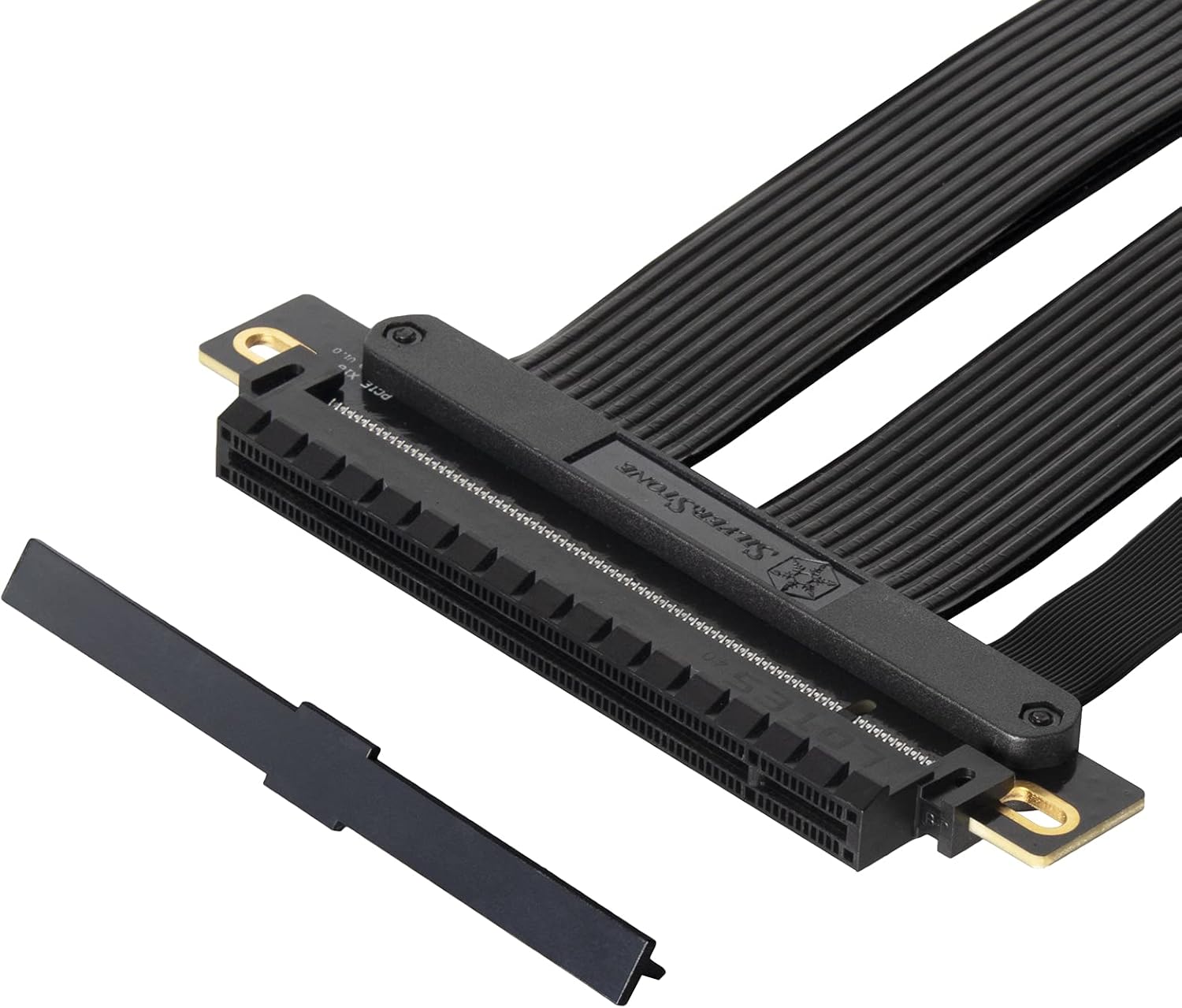
ຮູບພາບ: ໃກ້ຊິດ view of the female PCIe connector on the riser cable, showing a protective cover that should be removed before connecting a graphics card.
- ອົງປະກອບທີ່ປອດໄພ:
Once both ends are connected, carefully route the flexible cable to the desired position for your graphics card. Secure the graphics card in its new mounting location within the chassis using appropriate screws or retention mechanisms. Ensure the cable is not sharply bent or under excessive tension.

Image: This diagram highlights the durability and flexibility of the RC05 cable, demonstrating how it can be routed and bent to accommodate various graphics card orientations within a computer case.
- ເປີດ ແລະທົດສອບ:
Close your computer case, reconnect the power cable, and power on your system. Verify that the graphics card is detected and functioning correctly in your operating system.
ໝາຍເຫດສຳຄັນ: For systems with PCIe 3.0 motherboards, it is recommended to manually set the PCIe slot speed to Gen3 in the motherboard's BIOS/UEFI settings before installing a PCIe 4.0 riser cable to ensure compatibility and stability. While the RC05 is designed for PCIe 4.0, some older motherboards may require this adjustment for proper operation with riser cables.
ການດໍາເນີນງານ
The SilverStone RC05 PCIe riser cable is a passive component designed to extend a PCIe connection. Once correctly installed, it operates transparently, allowing your graphics card or other PCIe expansion card to communicate with the motherboard as if it were directly plugged in. No additional software or drivers are required for the cable itself.

Image: This diagram illustrates the high-speed data transmission capabilities of the RC05, ensuring minimal performance loss when extending a PCIe 4.0 x16 connection.
ບໍາລຸງຮັກສາ
The SilverStone RC05 riser cable requires minimal maintenance. To ensure longevity and optimal performance:
- ຮັກສາຄວາມສະອາດ: Periodically inspect the cable and connectors for dust accumulation. Use compressed air to gently clean any dust.
- ຫຼີກລ້ຽງການຄວາມກົດດັນ: Do not excessively bend, twist, or pull on the cable, especially near the connectors. While flexible, extreme stress can damage internal wiring.
- ການເຊື່ອມຕໍ່ທີ່ປອດໄພ: Ensure both ends of the cable remain firmly seated in their respective slots. Loose connections can lead to intermittent issues or performance degradation.
- ເງື່ອນໄຂສິ່ງແວດລ້ອມ: Operate the cable within standard computer operating temperatures and humidity levels.
ການແກ້ໄຂບັນຫາ
If you encounter issues after installing the RC05 riser cable, consider the following troubleshooting steps:
- ບໍ່ມີຈໍສະແດງຜົນ / ລະບົບບໍ່ເປີດ:
- Ensure the riser cable and graphics card are fully seated in their slots.
- Verify that all necessary power cables are connected to the graphics card.
- If your motherboard is PCIe 3.0, try setting the PCIe slot speed to Gen3 in the BIOS/UEFI.
- Test the graphics card by plugging it directly into the motherboard's PCIe slot to rule out a card issue.
- ປະສິດທິພາບຫຼຸດລົງ:
- Confirm that your motherboard and graphics card both support PCIe 4.0 for optimal speed.
- Check BIOS/UEFI settings to ensure the PCIe slot is configured for PCIe 4.0 (if supported by all components).
- Ensure the cable is not excessively bent or kinked, which could affect signal integrity.
- Intermittent Issues/Crashes:
- Reseat the riser cable and graphics card.
- ກວດເບິ່ງຄວາມເສຍຫາຍທາງດ້ານຮ່າງກາຍຕໍ່ກັບສາຍຫຼືຕົວເຊື່ອມຕໍ່.
- Ensure proper airflow within the case to prevent overheating of components.
ຂໍ້ມູນຈໍາເພາະ
| ຄຸນສົມບັດ | ລາຍລະອຽດ |
|---|---|
| ຍີ່ຫໍ້ | SilverStone |
| ໝາຍເລກຕົວແບບ | SST-RC05-220 |
| ຄວາມຍາວສາຍ | 220ມມ |
| ລຸ້ນ PCIe | PCIe 4.0 x16 |
| ປະເພດຕົວເຊື່ອມຕໍ່ | PCIe x16 Male to PCIe x16 Female |
| ອັດຕາການໂອນຂໍ້ມູນ | Up to 16 Gigabits Per Second (PCIe 4.0) |
| ຄຸນນະສົມບັດພິເສດ | Flexible ribbon design, EMI shielding, strengthened connection protection |
| ອຸປະກອນທີ່ເຂົ້າກັນໄດ້ | PCIe 4.0 supported motherboards and graphics/expansion cards |
| ຂະໜາດສິນຄ້າ | 10.35 x 4.61 x 0.35 ນິ້ວ (ປະມານ 263 x 117 x 9 ມມ) |
| ນ້ໍາຫນັກລາຍການ | 7 ອອນສ໌ (ປະມານ 0.2 ກິໂລ) |
ສິນຄ້າເກີນview ວິດີໂອ
Video: An official SilverStone overview of the PCIe Riser Cable, highlighting its features and compatibility. This video provides a visual demonstration of the product's design and functionality.
ການຮັບປະກັນແລະການສະຫນັບສະຫນູນ
For warranty information and technical support, please refer to the official SilverStone Technology webເວັບໄຊ ຫຼືຕິດຕໍ່ບໍລິການລູກຄ້າຂອງເຂົາເຈົ້າໂດຍກົງ. ຮັກສາໃບຮັບເງິນການຊື້ຂອງທ່ານສໍາລັບການຮ້ອງຂໍການຮັບປະກັນ.
Official SilverStone Webເວັບໄຊ: www.silverstonetek.com


