1. ບົດແນະນຳ
The ARCADE1UP Adjustable Height Stool (Joust) is designed to provide a comfortable and themed seating solution for your Arcade1Up game cabinet. This officially licensed stool features iconic Joust artwork and is built for durability and user comfort during extended gaming sessions. Its adjustable height feature makes it versatile for various arcade setups.

Image: The ARCADE1UP Joust Adjustable Height Stool, showcasing its design and chrome legs.
2. ຂໍ້ມູນຄວາມປອດໄພ
Please read and understand all safety instructions before assembling or using the stool. Failure to follow these instructions may result in injury or damage to the product.
- Ensure the stool is used on a stable, level surface to prevent tipping.
- Do not overload the stool beyond its maximum weight capacity.
- ຮັກສາມື ແລະ ນິ້ວມືໃຫ້ຫ່າງຈາກຊິ້ນສ່ວນທີ່ເຄື່ອນທີ່ໃນລະຫວ່າງການປັບຄວາມສູງ.
- ກວດສອບສະລັອດທັງໝົດເປັນໄລຍະເພື່ອໃຫ້ແນ່ໃຈວ່າມັນແໜ້ນແລະປອດໄພ.
- ຮັກສາໃຫ້ຫ່າງຈາກໄຟທີ່ເປີດຫຼືຄວາມຮ້ອນຫຼາຍເກີນໄປ.
3. ເນື້ອໃນຊຸດ
ກວດສອບວ່າອົງປະກອບທັງຫມົດແມ່ນມີຢູ່ກ່ອນທີ່ຈະເລີ່ມການປະກອບ:
- 1 x Stool Seat (Joust themed)
- 1 x Set of Chrome Legs (Base)
- 4 x Leg Extenders (for taller height setting)
- 1 x Hardware Pack (screws, washers, Allen wrench)
- 1 x ໃບແນະ ນຳ
4. ຕັ້ງຄ່າ
ຄໍາແນະນໍາຂອງສະພາແຫ່ງ
Assembly is straightforward and typically takes minimal time. Follow these steps:
- ຖອດຊິ້ນສ່ວນທັງໝົດອອກຢ່າງລະມັດລະວັງ ແລະວາງພວກມັນອອກເທິງພື້ນຜິວທີ່ສະອາດ ແລະອ່ອນເພື່ອປ້ອງກັນຮອຍຂີດຂ່ວນ.
- Attach the chrome legs to the underside of the stool seat using the provided screws and Allen wrench. Ensure all screws are tightened securely.
- For the 21.5-inch height setting, no leg extenders are needed.
- For the 29.5-inch height setting, insert the four leg extenders into the bottom of each chrome leg. Ensure they click into place or are secured as per the specific hardware provided.
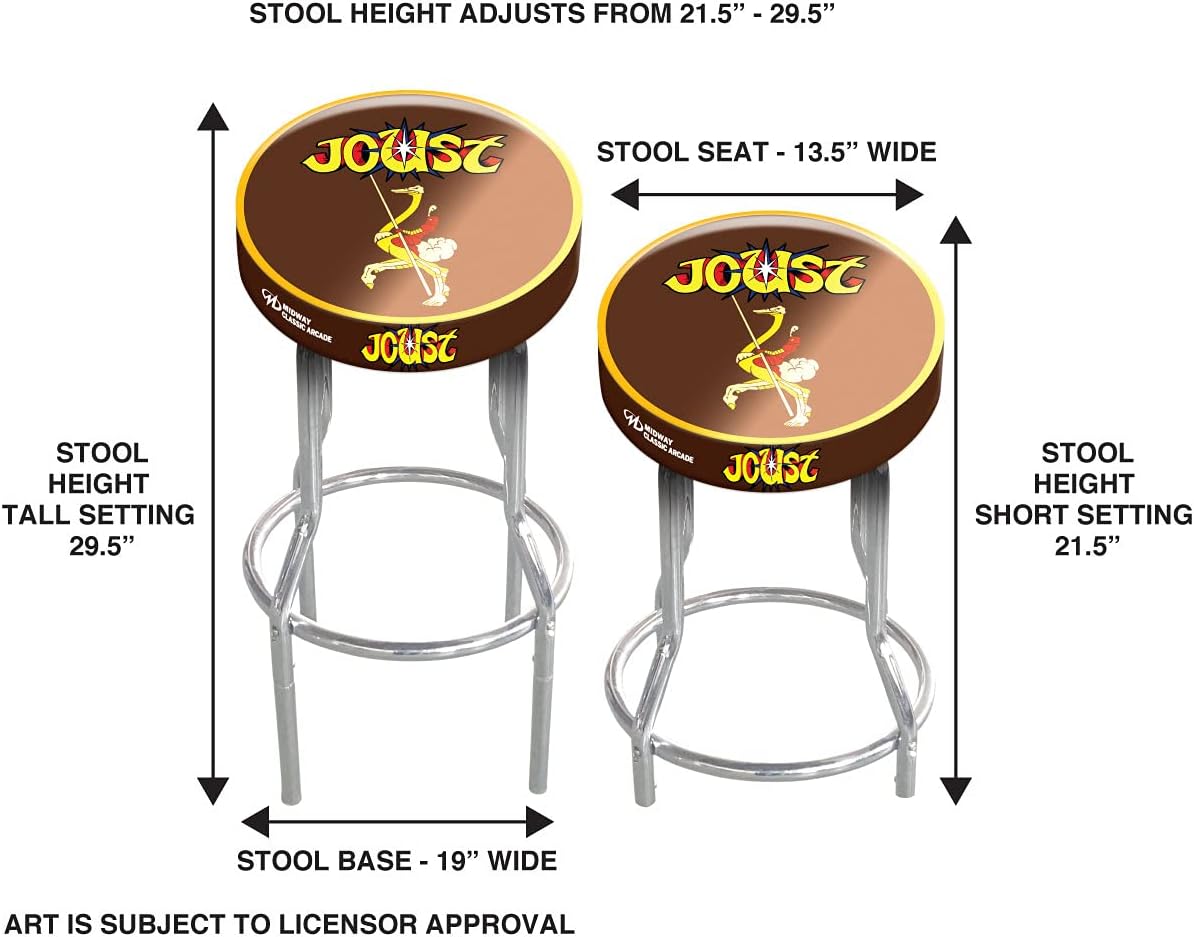
Image: Diagram illustrating the two adjustable height settings of the stool (21.5 inches and 29.5 inches).
5. ຄໍາແນະນໍາການດໍາເນີນງານ
The ARCADE1UP stool is designed for simple use. Once assembled to your desired height, it provides stable seating. To switch between heights, you will need to remove or attach the leg extenders as described in the assembly section. The stool does not swivel.

Image: Close-up of the Joust themed stool seat, highlighting the detailed artwork.
6. ບໍາລຸງຮັກສາ
To ensure the longevity and appearance of your ARCADE1UP stool, follow these simple maintenance guidelines:
- ທໍາຄວາມສະອາດ: Wipe the stool with a dry cloth to remove dust and light dirt. For more stubborn marks on the vinyl seat, use a damp cloth with mild soap and water, then dry thoroughly. Avoid abrasive cleaners or solvents.
- Chrome Care: The chrome legs can be cleaned with a soft, dry cloth. For smudges or fingerprints, a chrome cleaner can be used sparingly, followed by buffing to a shine.
- ກວດກາປົກກະຕິ: ກວດກາຈຸດເຊື່ອມຕໍ່ ແລະ ຕົວຍຶດທັງໝົດເປັນໄລຍະເພື່ອຮັບປະກັນວ່າພວກມັນຍັງແໜ້ນດີ. ຂັນໃຫ້ແໜ້ນຄືນຖ້າຈຳເປັນ.
7. ການແກ້ໄຂບັນຫາ
If you encounter any issues with your ARCADE1UP stool, consider the following common solutions:
- ອາຈົມຮູ້ສຶກສັ່ນ: Ensure all assembly screws are fully tightened. Check that the stool is on a flat, level surface. If using leg extenders, ensure they are fully inserted and seated correctly.
- ຄວາມຫຍຸ້ງຍາກໃນການປັບຄວາມສູງ: Ensure no debris is obstructing the leg extender insertion points. Apply gentle, even pressure when inserting or removing extenders.
- Scratches on chrome: Minor scratches can sometimes be buffed out with a specialized chrome polish. For deeper scratches, professional repair may be required.
If problems persist, please refer to the Warranty and Support section.
8. ຂໍ້ມູນຈໍາເພາະ
| ຄຸນສົມບັດ | ລາຍລະອຽດ |
|---|---|
| ຂະໜາດສິນຄ້າ | 13.5"D x 13.5"W x 29.5"H |
| ສີ | Joust |
| ຍີ່ຫໍ້ | ARCADE1UP |
| ແບບ | ສະໄຕລ໌ |
| ເຟີນິເຈີສຳເລັດຮູບ | Chrome |
| ແບບຂາ | ກົງ |
| ຄໍາແນະນໍາການດູແລຜະລິດຕະພັນ | ເຊັດດ້ວຍຜ້າແຫ້ງ |
| ຕ້ອງການສະພາແຫ່ງ | No (referring to complex assembly, simple assembly is required) |
| ຈໍານວນຊິ້ນ | 1 |
| ຈໍານວນລາຍການ | 1 |
| ນ້ໍາຫນັກລາຍການ | 10.66 ປອນ |
| ຜູ້ຜະລິດ | ARCADE1UP |
| ປະເທດຕົ້ນກໍາເນີດ | ຈີນ |
9. ການຮັບປະກັນແລະການສະຫນັບສະຫນູນ
For warranty information or technical support regarding your ARCADE1UP Adjustable Height Stool, please contact ARCADE1UP directly through their official webເວັບໄຊທ໌ ຫຼື ຊ່ອງທາງການບໍລິການລູກຄ້າ. ເກັບຮັກສາຫຼັກຖານການຊື້ຂອງທ່ານໄວ້ສຳລັບການຮຽກຮ້ອງການຮັບປະກັນໃດໆ.

Image: The official ARCADE1UP logo.


