1. ບົດແນະນຳ
The JVC HA-A5T Gumy Mini True Wireless Earbuds are designed for convenient, high-quality audio on the go. These compact and lightweight earbuds feature a Neodymium magnet driver for clear sound, Bluetooth 5.1 for stable wireless connection, and an IPX4 rain-proof rating for durability. They offer hands-free calling with voice assistant compatibility and simple one-button control.
ຄຸນນະສົມບັດທີ່ສໍາຄັນ:
- ການອອກແບບກະທັດຮັດແລະນ້ໍາຫນັກເບົາ
- High sound quality with Neodymium magnet driver
- Bluetooth Version 5.1 for stable wireless connectivity
- Rain Proof (IPX4) for protection against splashes and sweat
- Up to 15 hours of total battery life (including charging case)
- Hands-free microphone with Voice Assistant compatibility
- ການຄວບຄຸມປຸ່ມຫນຶ່ງສໍາລັບການດໍາເນີນງານໄດ້ງ່າຍ
- Auto on/off/connect function
- Compatible with iOS, Android, and Windows devices
2. ເນື້ອໃນຊຸດ
ກະລຸນາກວດສອບວ່າສິນຄ້າທັງໝົດມີຢູ່ໃນຊຸດ:
- JVC HA-A5T True Wireless Earbuds (Left and Right)
- ກ່ອງສາກ
- Regular Silicon Earpieces (S/M/L sizes)
- ສາຍສາກ USB

Image: The retail packaging for the JVC HA-A5T Gumy Mini True Wireless Earbuds, showing the earbuds and charging case.
3. ຕັ້ງຄ່າ
3.1 ການສາກຫູຟັງ ແລະ ເຄສ
Before first use, fully charge the earbuds and the charging case. The charging case provides additional power to the earbuds, extending their usage time.
- Place the earbuds into their respective slots in the charging case. Ensure they are seated correctly.
- Connect the supplied USB charging cable to the charging port on the case and to a USB power source (e.g., computer, USB wall adapter).
- The indicator lights on the case will show the charging status. Refer to the indicator light section for details.
- Once fully charged, disconnect the USB cable. The earbuds and case together provide up to 15 hours of playback.

Image: The JVC HA-A5T earbuds placed inside their open charging case, ready for charging.
3.2 ການຈັບຄູ່ກັບອຸປະກອນ Bluetooth
The earbuds feature an auto on/off/connect function for seamless pairing.
- ເປີດກ່ອງສາກໄຟ. ຫູຟັງເອຍບັດຈະເປີດເຄື່ອງອັດຕະໂນມັດ ແລະເຂົ້າສູ່ໂໝດຈັບຄູ່.
- ໃນອຸປະກອນ Bluetooth ຂອງທ່ານ (ໂທລະສັບສະຫຼາດ, ແທັບເລັດ, ແລະອື່ນໆ), ເປີດ Bluetooth ແລະຊອກຫາອຸປະກອນທີ່ມີຢູ່.
- Select "JVC HA-A5T" from the list of found devices.
- Once connected, a confirmation sound or indicator will notify you. The earbuds will automatically reconnect to the last paired device when taken out of the case.
3.3 Selecting the Right Earpieces
For optimal sound quality and comfort, choose the silicone earpieces that best fit your ears. The package includes Small (S), Medium (M), and Large (L) sizes.
- Try each size to find the one that creates a snug seal in your ear canal. A good seal enhances bass response and noise isolation.
- ຄ່ອຍໆໃສ່ຫູຟັງເອຍບັດເຂົ້າໄປໃນຫູຂອງທ່ານ ແລະ ບິດເລັກນ້ອຍຈົນກວ່າມັນຈະຮູ້ສຶກແໜ້ນ ແລະ ສະບາຍ.
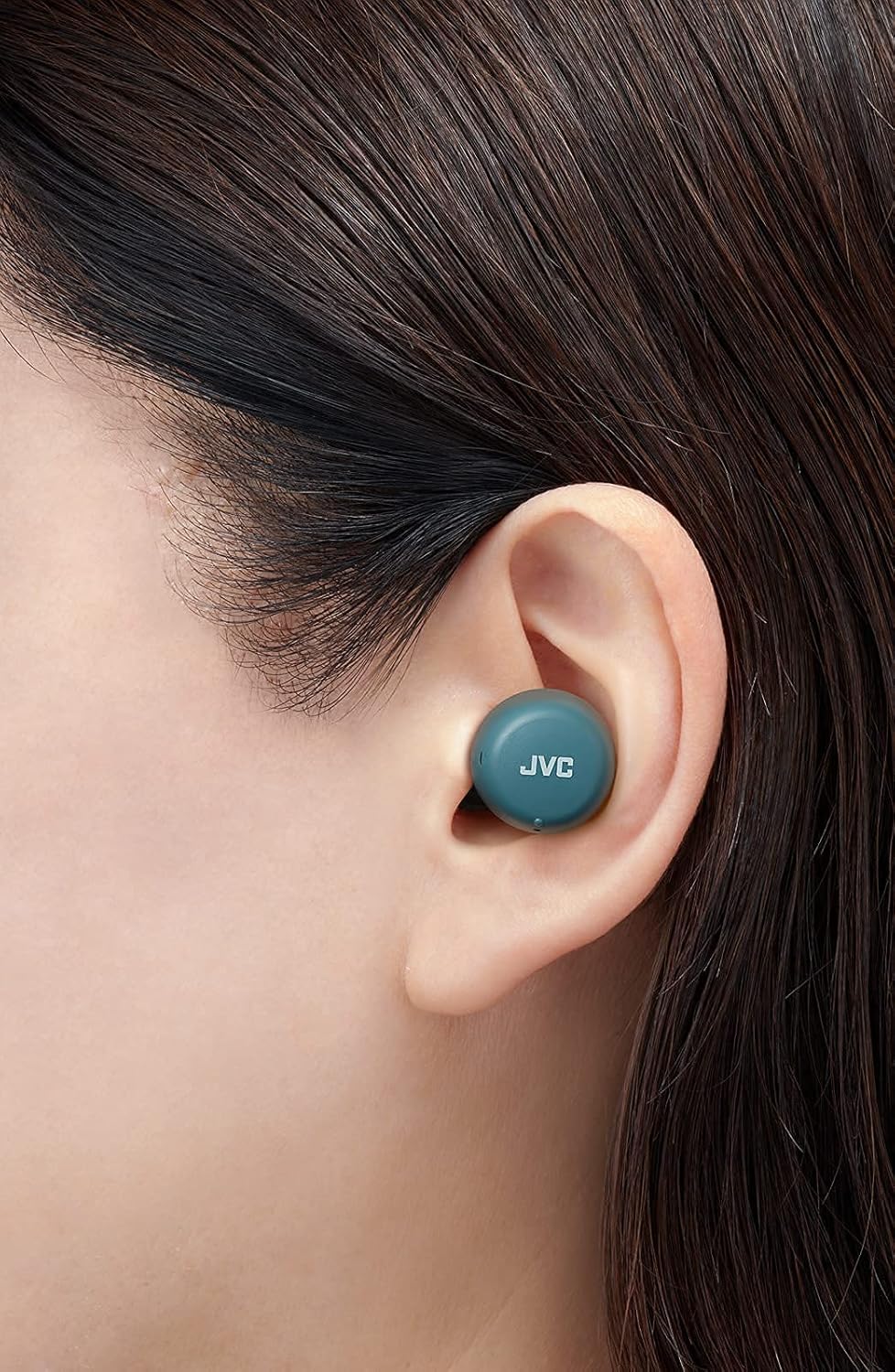
ຮູບພາບ: A close-up view of a JVC HA-A5T earbud correctly positioned in a user's ear, demonstrating proper fit.
4. ປະຕິບັດການຫູຟັງ
4.1 ເປີດ/ປິດ
- ເປີດ: Open the charging case or press and hold the button on each earbud for approximately 2 seconds.
- ປິດພະລັງງານ: Place the earbuds back into the charging case and close the lid, or press and hold the button on each earbud for approximately 5 seconds.
4.2 Basic Controls (One-Button Operation)
Each earbud features a multi-function button for controlling playback and calls.
| ຟັງຊັນ | ການປະຕິບັດ |
|---|---|
| ຫຼິ້ນ/ຢຸດຊົ່ວຄາວ | ກົດປຸ່ມໃສ່ຫູຟັງຫູຟັງທັງສອງຄັ້ງ. |
| ຕິດຕາມຕໍ່ໄປ | ກົດປຸ່ມຢູ່ຫູຟັງເບື້ອງຂວາສອງເທື່ອ. |
| ເພງກ່ອນໜ້າ | ກົດປຸ່ມຢູ່ຫູຟັງຊ້າຍສອງເທື່ອ. |
| ຕອບ/ວາງສາຍ | Press the button on either earbud once during an incoming call or active call. |
| ປະຕິເສດການໂທ | ກົດປຸ່ມຢູ່ຫູຟັງຫູຟັງທັງສອງຂ້າງຄ້າງໄວ້ປະມານ 2 ວິນາທີໃນລະຫວ່າງສາຍໂທເຂົ້າ. |
| ເປີດໃຊ້ຜູ້ຊ່ວຍສຽງ | ກົດປຸ່ມຢູ່ຫູຟັງຂ້າງໃດກໍໄດ້ສາມເທື່ອ. |
4.3 ການໃຊ້ Earbud ດຽວ
The JVC HA-A5T earbuds support single earbud use, specifically with the left earbud. This allows you to use one earbud while the other is charging or stored.
- To use only the left earbud, simply take it out of the case. It will automatically connect to your device if previously paired.
- The right earbud cannot be used independently for calls or music playback.
4.4 ຜູ້ຊ່ວຍສຽງ
Activate your smartphone's voice assistant (e.g., Siri, Google Assistant) directly from the earbuds.
- Press the multi-function button on either earbud three times to activate the voice assistant.
- ເວົ້າຄໍາສັ່ງຂອງເຈົ້າຫຼັງຈາກການເຕືອນ.

Image: A woman wearing JVC HA-A5T earbuds, demonstrating their use for listening to audio.
5. ບໍາລຸງຮັກສາ
5.1 ການທໍາຄວາມສະອາດ
ການເຮັດຄວາມສະອາດເປັນປະຈຳຈະຊ່ວຍຮັກສາປະສິດທິພາບ ແລະ ອາຍຸການໃຊ້ງານຂອງຫູຟັງຂອງທ່ານໄດ້.
- ເຊັດຫູຟັງຫູຟັງ ແລະ ກະເປົ໋າສາກໄຟດ້ວຍຜ້າແພອ່ອນໆ, ແຫ້ງ, ບໍ່ມີເຈັ້ຍ.
- Remove the silicone earpieces and clean them with a mild soap solution if necessary. Rinse thoroughly and dry completely before reattaching.
- Do not use harsh chemicals, abrasive materials, or immerse the earbuds or case in water.
5.2 ການເກັບຮັກສາ
ເມື່ອບໍ່ໄດ້ໃຊ້, ໃຫ້ເກັບຮັກສາຫູຟັງເອຍບັດໃສ່ໃນກະເປົ໋າສາກໄຟເພື່ອປົກປ້ອງພວກມັນຈາກຂີ້ຝຸ່ນ, ຄວາມເສຍຫາຍ, ແລະເພື່ອຮັກສາສາຍສາກ.
- ເກັບຮັກສາໄວ້ໃນບ່ອນທີ່ເຢັນ, ແຫ້ງ, ຫ່າງຈາກແສງແດດໂດຍກົງແລະອຸນຫະພູມທີ່ສຸດ.
5.3 ກັນນ້ຳ (IPX4)
ຫູຟັງເອຍບັດໄດ້ຮັບການຈັດອັນດັບ IPX4, ຊຶ່ງຫມາຍຄວາມວ່າພວກມັນຖືກປ້ອງກັນຈາກການກະດ້າງນ້ໍາຈາກທິດທາງໃດກໍ່ຕາມ. ນີ້ເຮັດໃຫ້ພວກເຂົາເຫມາະສົມສໍາລັບການອອກກໍາລັງກາຍແລະຝົນອ່ອນໆ.
- ຢ່າເອົາຫູຟັງເອຍບັດໃສ່ນ້ຳ.
- ໃຫ້ແນ່ໃຈວ່າຫູຟັງແຫ້ງກ່ອນໃສ່ກັບຄືນໃນກ່ອງສາກໄຟເພື່ອປ້ອງກັນຄວາມເສຍຫາຍຕໍ່ຈຸດເຊື່ອມຕໍ່ການສາກໄຟ.

Image: A woman engaged in physical activity while wearing the JVC HA-A5T earbuds, highlighting their sweat and rain-proof capabilities.
6. ການແກ້ໄຂບັນຫາ
If you encounter issues with your JVC HA-A5T earbuds, refer to the following common solutions:
| ບັນຫາ | ສາເຫດທີ່ເປັນໄປໄດ້ | ການແກ້ໄຂ |
|---|---|---|
| ຫູຟັງບໍ່ເປີດ. | ແບັດເຕີຣີຕໍ່າ. | ວາງຫູຟັງເອຍບັດໃສ່ໃນກ່ອງສາກ ແລະສາກເຕັມ. |
| ບໍ່ສາມາດຈັບຄູ່ກັບອຸປະກອນໄດ້. | Bluetooth ປິດຢູ່ໃນອຸປະກອນ; ຫູຟັງບໍ່ຢູ່ໃນໂໝດຈັບຄູ່; ອຸປະກອນການຈັບຄູ່ກ່ອນຫນ້ານີ້ແຊກແຊງ. | Ensure Bluetooth is enabled on your device. Place earbuds in case, close, then open to re-enter pairing mode. Forget "JVC HA-A5T" from your device's Bluetooth list and try pairing again. |
| ບໍ່ມີສຽງ ຫຼືສຽງຕໍ່າ. | Volume too low on device; earbuds not properly seated; poor earpiece fit. | Increase volume on your connected device. Ensure earbuds are properly inserted. Try different earpiece sizes for a better seal. |
| ການເຊື່ອມຕໍ່ແບບບໍ່ຢຸດຢັ້ງ ຫຼືສຽງຢຸດ. | Distance from device; interference; low earbud battery. | Keep earbuds within 10 meters (33 feet) of your device. Avoid areas with strong Wi-Fi or other Bluetooth signals. Charge earbuds fully. |
| ໄມໂຄຣໂຟນບໍ່ເຮັດວຽກ. | ໄມໂຄຣໂຟນຖືກບລັອກ; ການຕັ້ງຄ່າອຸປະກອນ. | Ensure the microphone port is not obstructed. Check your device's audio input settings to confirm "JVC HA-A5T" is selected. |
7. ຂໍ້ມູນຈໍາເພາະ
| ຄຸນສົມບັດ | ຂໍ້ມູນຈໍາເພາະ |
|---|---|
| ຊື່ຕົວແບບ | HA-A5T |
| ເຕັກໂນໂລຊີການເຊື່ອມຕໍ່ | Bluetooth, Wireless |
| ລຸ້ນ Bluetooth | 5.1 |
| ລະດັບຄວາມຕ້ານທານນ້ໍາ | IPX4 (Rain Proof) |
| ຊີວິດຫມໍ້ໄຟ | ດົນເຖິງ 15 ຊົ່ວໂມງ (ພ້ອມກ່ອງສາກ) |
| ແຫຼ່ງພະລັງງານ | Battery-Powered (2 Lithium Polymer batteries included) |
| ຮູບແບບໄມໂຄຣໂຟນ | ໃນຕົວ |
| ປະເພດການຄວບຄຸມ | One-button control, Voice Control |
| ວັດສະດຸ | ພາດສະຕິກ |
| ປັດໄຈແບບຟອມ | ໃນຫູ |
| impedance | 16 ໂອມ |
| ນ້ໍາຫນັກລາຍການ | 90 g |
| ຂະໜາດສິນຄ້າ | 40 x 47 x 23 ຊັງຕີແມັດ |
| ອົງປະກອບລວມ | Regular Silicon Earpieces (S/M/L), USB charging cable, Charging case |
8. ການຮັບປະກັນແລະການສະຫນັບສະຫນູນ
ສຳລັບຂໍ້ມູນການຮັບປະກັນ ແລະ ການສະໜັບສະໜູນລູກຄ້າ, ກະລຸນາອ້າງອີງບັດຮັບປະກັນທີ່ມາພ້ອມກັບຜະລິດຕະພັນຂອງທ່ານ ຫຼື ເຂົ້າເບິ່ງທີ່ JVC ຢ່າງເປັນທາງການ. webເວັບໄຊ. ຮັກສາຫຼັກຖານການຊື້ຂອງທ່ານສໍາລັບການຮຽກຮ້ອງການຮັບປະກັນໃດໆ.
- ສະຫນັບສະຫນູນອອນໄລນ໌: Visit the JVC official webເວັບໄຊສໍາລັບ FAQs, ການດາວໂຫຼດຄົນຂັບ, ແລະຂໍ້ມູນການຕິດຕໍ່.
- ຂໍ້ມູນຕິດຕໍ່: Refer to your product packaging or the JVC webເວັບໄຊສໍາລັບລາຍລະອຽດການຕິດຕໍ່ບໍລິການລູກຄ້າໃນພາກພື້ນ.


