1. ບົດແນະນຳ
The Sonel CMM 30 is an advanced industrial multimeter engineered for versatility, modern functionality, and exceptional durability. This device integrates 11 fundamental measurement functions along with additional features, providing a broad spectrum of applications for professionals. Its robust design includes drop protection and an IP67 rated casing, ensuring reliable performance even in challenging environments.
Key features include a smartphone application for remote reading and data saving via wireless communication, an automatically adjusting backlight for optimal screen visibility, and a built-in flashlight for illumination in dark conditions. This manual provides essential information for the safe and effective use of your CMM 30 multimeter.
2. ຂໍ້ມູນຄວາມປອດໄພ
Always adhere to the following safety precautions to prevent electric shock, injury, or damage to the meter or equipment under test.
- Read and understand all instructions and safety information in this manual before operating the meter.
- ຢ່າໃຊ້ມິເຕີຖ້າມັນເບິ່ງຄືວ່າເສຍຫາຍ ຫຼື ຖ້າຊັ້ນກັນຄວາມຮ້ອນຂອງສາຍທົດສອບຖືກທຳລາຍ.
- ສະເຫມີຕັດການເຊື່ອມຕໍ່ພະລັງງານກັບວົງຈອນແລະປ່ອຍສູງທັງຫມົດtage capacitors ກ່ອນທີ່ຈະເຮັດໃຫ້ຄວາມຕ້ານທານ, ຄວາມຕໍ່ເນື່ອງ, diode, ຫຼືການວັດແທກ capacitance.
- ໃຊ້ຄວາມລະມັດລະວັງໃນເວລາທີ່ເຮັດວຽກກັບ voltages ຂ້າງເທິງ 30V AC RMS, ສູງສຸດ 42V, ຫຼື 60V DC. vol ເຫຼົ່ານີ້tages ເຮັດໃຫ້ເກີດອັນຕະລາຍຊ໊ອກ.
- ຢ່າໃຊ້ເກີນຂີດຈຳກັດການປ້ອນຂໍ້ມູນສູງສຸດສຳລັບຟັງຊັນໃດໆ.
- ໃຫ້ແນ່ໃຈວ່າສະວິດຟັງຊັນຢູ່ໃນຕຳແໜ່ງທີ່ຖືກຕ້ອງສຳລັບການວັດແທກທີ່ຕ້ອງການກ່ອນທີ່ຈະເຊື່ອມຕໍ່ສາຍທົດສອບເຂົ້າກັບວົງຈອນ.
- ປ່ຽນແບັດເຕີລີທັນທີທີ່ຕົວຊີ້ບອກແບດເຕີລີ່ຕໍ່າ ເພື່ອຮັບປະກັນການອ່ານທີ່ຖືກຕ້ອງ.
- ຢ່າໃຊ້ມິເຕີໃນສະພາບແວດລ້ອມທີ່ມີອາຍແກັສ, ໄອນ້ຳ ຫຼື ຝຸ່ນລະອອງທີ່ລະເບີດໄດ້.
3. ເນື້ອໃນຊຸດ
ກວດສອບວ່າລາຍການທັງໝົດທີ່ລະບຸໄວ້ຂ້າງລຸ່ມນີ້ແມ່ນມີຢູ່ ແລະ ບໍ່ເສຍຫາຍເມື່ອເປີດການຫຸ້ມຫໍ່:
- Sonel CMM 30 Industrial Multimeter
- ການທົດສອບນໍາພາ (ສີແດງແລະສີດໍາ)
- ເຂັມວັດແທກອຸນຫະພູມ (ເທີໂມຄັບເປິ້ນປະເພດ K)
- 4 x AAA Batteries (pre-installed or separate)
- ຄູ່ມືຜູ້ໃຊ້ (ເອກະສານນີ້)
ຖ້າລາຍການໃດຂາດຫາຍໄປຫຼືເສຍຫາຍ, ກະລຸນາຕິດຕໍ່ຜູ້ສະຫນອງຂອງທ່ານທັນທີ.
4. ຜະລິດຕະພັນເກີນview
Familiarize yourself with the components of your Sonel CMM 30 multimeter:
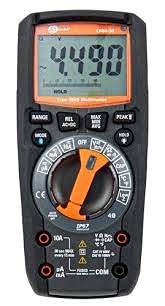
ຮູບ 4.1: ດ້ານຫນ້າ view of the Sonel CMM 30 Industrial Multimeter. This image displays the device's main components, including the digital display, the central rotary function switch, and the various input terminals for test leads.
4.1. ຈໍສະແດງຜົນ
The large LCD shows measurement readings, units, function indicators, and battery status. It features an automatic backlight that adjusts to ambient light conditions for optimal visibility.
4.2. ສະຫຼັບຟັງຊັນ Rotary
This central switch is used to select the desired measurement function (e.g., Voltage, Current, Resistance, Capacitance, Temperature, Frequency).
4.3. ປຸ່ມຟັງຊັນ
Various buttons provide additional controls and features:
- ຊ່ອງຫວ່າງ: Toggles between manual and automatic ranging.
- ແບບ: Selects sub-functions within a main rotary switch position (e.g., AC/DC voltagອີ, ໄດໂອດ/ຄວາມຕໍ່ເນື່ອງ).
- ຖື: ຢຸດການອ່ານໜ້າຈໍປັດຈຸບັນ.
- MAX/MIN/AVG: Records maximum, minimum, and average readings.
- REL: Relative mode, subtracts a stored value from subsequent measurements.
- Bluetooth/Light: Activates Bluetooth connectivity for the smartphone app and controls the built-in flashlight.
4.4. Input Jacks
These are the connection points for the test leads:
- COM: Common terminal for the black test lead.
- VΩHzCAP°C: ການປ້ອນຂໍ້ມູນສໍາລັບ voltage, resistance, frequency, capacitance, and temperature measurements (red test lead).
- mA: ອິນພຸດສຳລັບມິນລິampere ແລະ microampການວັດແທກກະແສໄຟຟ້າ (ສາຍທົດສອບສີແດງ).
- 10A: Input for up to 10 Ampການວັດແທກກະແສໄຟຟ້າ (ສາຍທົດສອບສີແດງ).
5. ຕັ້ງຄ່າ
5.1. ການຕິດຕັ້ງຫມໍ້ໄຟ
The Sonel CMM 30 requires 4 AAA batteries. These may be pre-installed or included separately.
- ກວດໃຫ້ແນ່ໃຈວ່າມັລຕິມິເຕີຖືກປິດໄວ້.
- ຊອກຫາຊ່ອງໃສ່ແບັດເຕີຣີຢູ່ດ້ານຫຼັງຂອງມິເຕີ.
- ໃຊ້ໄຂຄວງເພື່ອຄາຍສະກູທີ່ຍຶດຝາປິດແບັດເຕີຣີອອກ.
- ເອົາຝາປິດຫມໍ້ໄຟອອກ.
- Insert the 4 AAA batteries, observing the correct polarity (+ and -) as indicated inside the compartment.
- Replace the battery cover and tighten the screw(s) securely.
ໝາຍເຫດ: Always use fresh batteries of the same type. Remove batteries if the meter is not used for an extended period to prevent leakage.
6. ຄໍາແນະນໍາການດໍາເນີນງານ
6.1. ເປີດ / ປິດພະລັງງານ
Turn the rotary function switch from the OFF position to any desired measurement function to power on the meter. To power off, turn the switch back to the OFF position.
6.2. Basic Measurement Procedures
Before any measurement, ensure the test leads are correctly inserted into the appropriate input jacks for the selected function.
6.2.1. ລຸ້ນ Voltage ການວັດແທກ (AC/DC)
- Insert the black test lead into the COM jack and the red test lead into the VΩHzCAP°C jack.
- Turn the rotary switch to the V~ (AC Voltage) ຫຼື V- (DC Voltage) position. If both are combined, use the MODE button to select AC or DC.
- ເຊື່ອມຕໍ່ສາຍທົດສອບຂະໜານກັນທົ່ວວົງຈອນ ຫຼື ອົງປະກອບທີ່ຈະວັດແທກ.
- ອ່ານ voltage ມູນຄ່າໃນການສະແດງຜົນ.
6.2.2. ການວັດແທກກະແສໄຟຟ້າ (AC/DC)
ຂໍ້ຄວນລະວັງ: Never connect the meter in parallel for current measurement. Always connect in series with the circuit.
- Insert the black test lead into the COM jack. For currents up to 10A, insert the red test lead into the 10A jack. For smaller currents (mA/µA), insert the red test lead into the mAµA jack.
- Turn the rotary switch to the A~ (AC Current) or A- (DC Current) position, or the mA/µA position as appropriate. Use the MODE button to select AC or DC if needed.
- ເປີດວົງຈອນບ່ອນທີ່ຈະວັດແທກກະແສໄຟຟ້າ ແລະ ເຊື່ອມຕໍ່ມິເຕີເປັນຊຸດ.
- ອ່ານຄ່າປັດຈຸບັນຢູ່ໜ້າຈໍ.
6.2.3. ການວັດແທກຄວາມຕ້ານທານ
- Insert the black test lead into the COM jack and the red test lead into the VΩHzCAP°C jack.
- ໝຸນສະວິດໝຸນໄປທີ່ຕຳແໜ່ງ Ω (ຄວາມຕ້ານທານ).
- Ensure the circuit or component is de-energized before connecting the test leads across it.
- ອ່ານຄ່າການຕໍ່ຕ້ານໃນຈໍສະແດງຜົນ.
6.2.4. ການວັດແທກຄວາມອາດສາມາດ
- Insert the black test lead into the COM jack and the red test lead into the VΩHzCAP°C jack.
- Turn the rotary switch to the CAP (Capacitance) position.
- ໃຫ້ແນ່ໃຈວ່າຕົວເກັບປະຈຸໄຟຟ້າຖືກປ່ອຍປະຈຸອອກໝົດກ່ອນທີ່ຈະເຊື່ອມຕໍ່ສາຍທົດສອບຜ່ານມັນ.
- ອ່ານຄ່າ capacitance ເທິງ ໜ້າ ຈໍ.
6.2.5. ເຄື່ອງວັດອຸນຫະພູມ
- Insert the temperature probe into the VΩHzCAP°C and COM jacks, observing polarity if applicable.
- Turn the rotary switch to the °C/°F (Temperature) position.
- ວາງປາຍຂອງເຄື່ອງວັດອຸນຫະພູມໄວ້ເທິງ ຫຼື ໃກ້ກັບວັດຖຸທີ່ຈະວັດແທກອຸນຫະພູມ.
- ອ່ານຄ່າອຸນຫະພູມຢູ່ໜ້າຈໍ.
6.3. ຄຸນສົມບັດຂັ້ນສູງ
6.3.1. True RMS Measurement
The CMM 30 features True RMS for AC voltage and current measurements, providing accurate readings for non-sinusoidal waveforms.
6.3.2. Wireless Communication and Smartphone App
The CMM 30 can connect wirelessly to a smartphone application, allowing for remote reading and saving of measurements. This is particularly useful in hard-to-reach or hazardous locations.
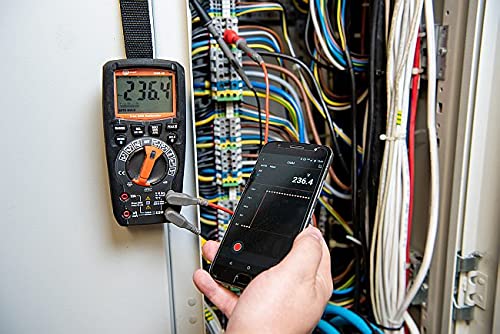
Figure 6.1: The Sonel CMM 30 Multimeter connected to an electrical panel, demonstrating its wireless communication feature. A smartphone displays the measurement reading remotely, highlighting the convenience for inaccessible areas.
ເພື່ອໃຊ້ຄຸນສົມບັດນີ້:
- Download the official Sonel CMM app from your smartphone's app store.
- ເປີດໃຊ້ Bluetooth ໃນໂທລະສັບສະຫຼາດຂອງທ່ານ.
- Press the Bluetooth button on the multimeter to activate its wireless communication.
- Follow the app's instructions to pair with your CMM 30 and begin remote monitoring.
6.3.3. ໄຟສາຍໃນຕົວ
The integrated flashlight assists in illuminating measurement areas, especially in low-light conditions. Activate it by pressing the dedicated light button.
6.4. Durability and IP67 Rating
The CMM 30 is designed with an IP67 rating, signifying its protection against dust ingress and immersion in water up to 1 meter for 30 minutes. This makes it suitable for demanding industrial environments.
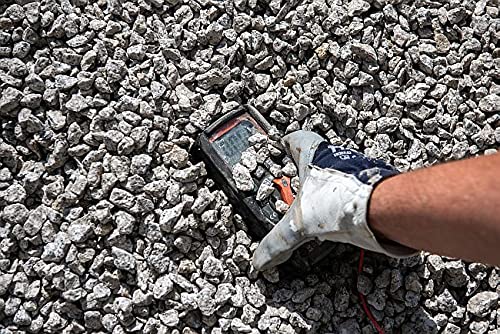
Figure 6.2: The Sonel CMM 30 Multimeter partially submerged in gravel, illustrating its robust construction and resistance to dust and debris, a testament to its IP67 rating.
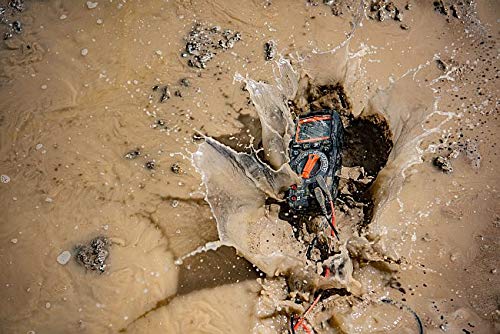
Figure 6.3: The Sonel CMM 30 Multimeter creating a splash as it impacts a muddy puddle, demonstrating its exceptional water resistance and ability to withstand harsh, wet conditions.
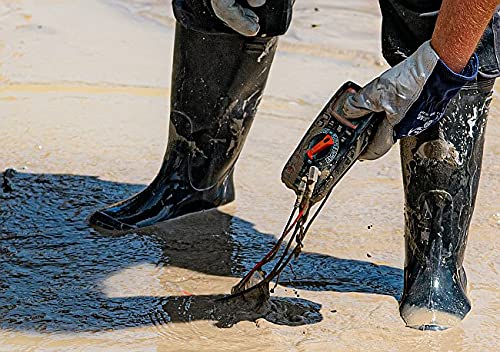
Figure 6.4: A person, wearing protective boots and gloves, retrieves the Sonel CMM 30 Multimeter from a muddy environment. This image emphasizes the device's resilience and ease of handling even after exposure to challenging conditions.
7. ບໍາລຸງຮັກສາ
7.1. ທໍາຄວາມສະອາດ
ເຊັດແມັດຄasing ກັບການໂຄສະນາamp ຜ້າ ແລະ ຜົງຊັກຟອກອ່ອນໆ. ຢ່າໃຊ້ນໍ້າຢາຂັດ ຫຼື ຕົວລະລາຍ. ໃຫ້ແນ່ໃຈວ່າມິເຕີແຫ້ງໝົດກ່ອນການນຳໃຊ້.
7.2. ການທົດແທນຫມໍ້ໄຟ
ໃຫ້ອ້າງອີງເຖິງພາກທີ 5.1 ສຳລັບຄຳແນະນຳໃນການປ່ຽນແບັດເຕີຣີ. ໃຫ້ປ່ຽນແບັດເຕີຣີທັນທີເມື່ອຕົວຊີ້ບອກແບັດເຕີຣີຕໍ່າປະກົດຂຶ້ນຢູ່ໜ້າຈໍ.
7.3. ການເກັບຮັກສາ
When not in use for extended periods, store the multimeter in a dry, cool place, away from direct sunlight and extreme temperatures. Remove the batteries to prevent leakage.
8. ການແກ້ໄຂບັນຫາ
| ບັນຫາ | ສາເຫດທີ່ເປັນໄປໄດ້ | ການແກ້ໄຂ |
|---|---|---|
| ເຄື່ອງວັດແທກບໍ່ເປີດ. | ແບັດເຕີຣີຕາຍ ຫຼື ຕິດຕັ້ງບໍ່ຖືກຕ້ອງ. | ກວດເບິ່ງຂົ້ວຂອງແບດເຕີຣີ້ຫຼືປ່ຽນແບດເຕີລີ່. |
| ບໍ່ມີການອ່ານ ຫຼື "OL" (Overload) ສະແດງ. | ເລືອກຟັງຊັນບໍ່ຖືກຕ້ອງ; ເປີດວົງຈອນ; ການວັດແທກເກີນຂອບເຂດ. | Select correct function; check circuit continuity; switch to a higher range or auto-range. |
| ການອ່ານບໍ່ຖືກຕ້ອງ. | ແບັດເຕີຣີຕໍ່າ; ສາຍ/ແຈັກທົດສອບເປື້ອນ; ການລົບກວນຈາກພາຍນອກ. | ປ່ຽນແບັດເຕີຣີ; ທຳຄວາມສະອາດສາຍ/ແຈັກ; ຫຼີກລ່ຽງຈາກສະໜາມແມ່ເຫຼັກໄຟຟ້າແຮງ. |
| ບັນຫາການເຊື່ອມຕໍ່ Bluetooth. | Bluetooth not enabled on meter/phone; app issues; distance. | Ensure Bluetooth is on; restart app/phone; reduce distance between devices. |
9. ຂໍ້ມູນຈໍາເພາະ
| ຄຸນສົມບັດ | ຂໍ້ມູນຈໍາເພາະ |
|---|---|
| ຍີ່ຫໍ້ | Sonel |
| ໝາຍເລກຕົວແບບ | SON001 |
| ສີ | ດຳ |
| ນ້ໍາຫນັກລາຍການ | 418 g |
| ຂະໜາດແພັກເກັດ | 30 x 15 x 10 cm |
| ໝໍ້ໄຟ | ຕ້ອງໃຊ້ແບັດເຕີຣີ AAA 4 ອັນ (ລວມ) |
| ຟັງຊັນການວັດແທກ | AC/DC Voltage, AC/DC Current, Resistance, Capacity, Temperature, Duty Cycle, Frequency |
| ລະດັບ | ຄູ່ມືແລະອັດຕະໂນມັດ |
| RMS ທີ່ແທ້ຈິງ | Yes (for AC voltage ແລະປະຈຸບັນ) |
| ການຈັດອັນດັບການປົກປ້ອງຂາເຂົ້າ (IP). | IP67 |
| ການເຊື່ອມຕໍ່ | Wireless (Smartphone App) |
| ຄຸນສົມບັດເພີ່ມເຕີມ | HOLD function, Built-in flashlight, Backlight auto-adjustment |
10. ການຮັບປະກັນແລະການສະຫນັບສະຫນູນ
10.1. ຂໍ້ມູນການຮັບປະກັນ
Sonel products are manufactured to high standards and are warranted against defects in materials and workmanship for a period specified by your regional distributor from the date of purchase. This warranty does not cover damage caused by misuse, unauthorized modification, accident, or neglect. Please retain your proof of purchase for warranty claims.
10.2. ສະຫນັບສະຫນູນດ້ານວິຊາການ
For technical assistance, troubleshooting beyond this manual, or warranty inquiries, please contact your local Sonel distributor or the authorized service center. Contact information can typically be found on the Sonel official webເວັບໄຊຫຼືຜ່ານຈຸດຊື້ຂອງທ່ານ.
When contacting support, please have your product model number (SON001) and purchase date readily available.


