1. ຜະລິດຕະພັນເກີນview
The CAMECHO Q3178 is an Android-based single DIN car stereo featuring a 7-inch flip-out touchscreen. It includes GPS navigation, Bluetooth 4.0, WiFi connectivity, Mirror Link functionality, steering wheel control support, USB and AUX inputs, and an FM audio receiver. The system operates on Android 9.1 with 1GB RAM and 16GB internal storage.
ດ້ານໜ້າ view of the CAMECHO Q3178 Android Single Din Car Stereo with its 7-inch flip-out touchscreen.
2. ເນື້ອໃນຊຸດ
Verify that all items are present in the package before installation.
- 1 x Android Car Stereo (CAMECHO Q3178)
- ຫລັງ 1 x View ກ້ອງຖ່າຍຮູບ
- 1 x ເສົາອາກາດ GPS
- 1 x ສາຍໄຟ
- 1 x Horn Wire
- 2 x ຖອດກະແຈອອກ
- 1 x ຄູ່ມືການສອນ

Image showing all components included in the CAMECHO Q3178 car stereo package.
3. ການຕິດຕັ້ງແລະການຕິດຕັ້ງ
3.1 ການຕິດຕັ້ງທາງດ້ານຮ່າງກາຍ
The CAMECHO Q3178 is designed for single DIN slots. Ensure your vehicle has a compatible slot. The common size is 186(L)*55(H)*178(D)mm (7.33(L)*2.17(H)*7.01(D)inch).

Diagram illustrating the installation dimensions and various wiring connections for the car stereo.
3.2 ການເຊື່ອມຕໍ່ສາຍໄຟ
Connect the provided cables to the corresponding ports on the car stereo and your vehicle's wiring harness. Refer to the detailed wiring diagram for specific connections.
- ສາຍໄຟ: Connect to your vehicle's power supply (ACC, B+, GND).
- Horn Wire: Connect to the vehicle's horn system if applicable.
- ເສົາອາກາດ GPS: ເຊື່ອມຕໍ່ເສົາອາກາດ GPS ເຂົ້າກັບພອດສະເພາະຢູ່ດ້ານຫຼັງຂອງຕົວເຄື່ອງ ແລະ ຕິດຕັ້ງມັນໄວ້ໃນສະຖານທີ່ທີ່ມີບ່ອນໂປ່ງໃສ view ຂອງທ້ອງຟ້າ.
- ຫລັງ View ກ້ອງຖ່າຍຮູບ: Connect the camera's video output to the 'CAM IN' port. Connect the camera's power to the reversing light positive and ground. The 'BACK' wire from the stereo should also connect to the reversing light positive to trigger the display.
Video demonstrating the correct wiring for the reversing camera connection, including connecting the camera cable and the BACK line to the car's reversing light circuit.

Detailed diagram showing how to connect the backup camera to the car stereo and the vehicle's reversing lights.
4. ຄໍາແນະນໍາການດໍາເນີນງານ
4.1 ການດໍາເນີນງານພື້ນຖານ
The unit features a 7-inch foldable touchscreen. Power on the device using the PWR button. Navigate through the Android interface by touching and swiping the screen. Adjust volume using the rotary knob or on-screen controls.
Video demonstrating various settings and features of the car stereo's Android interface, including sound settings, factory settings, and GPS detection.
4.2 GPS Navigation
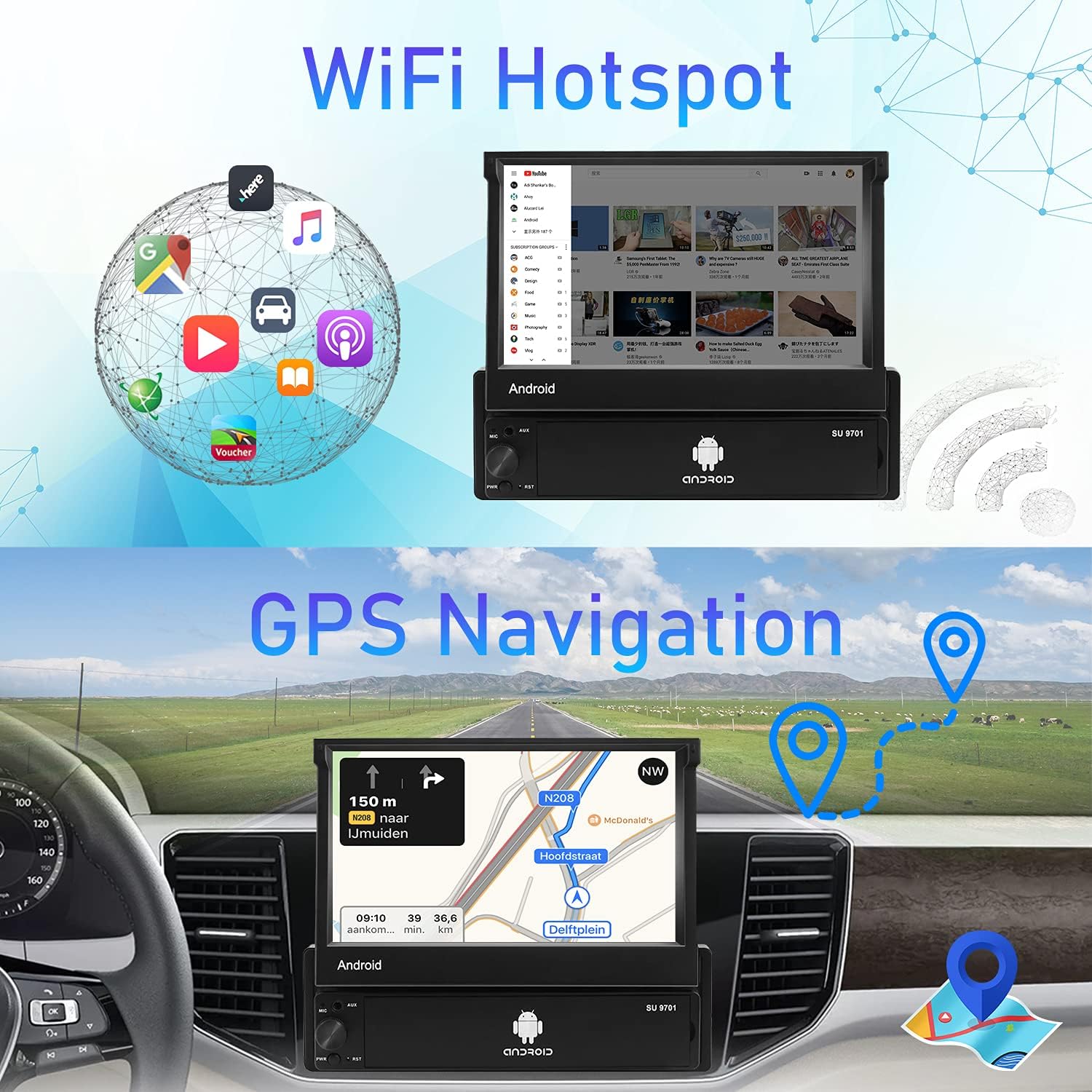
The unit has a built-in GPS module and comes with an external GPS antenna. For offline navigation, download map data using the pre-installed "Here WeGo" application. Ensure the GPS antenna is properly installed for optimal signal reception.

Image showing the GPS navigation interface and the WiFi hotspot functionality on the car stereo.
4.3 ການເຊື່ອມຕໍ່ WiFi
Connect the car stereo to a WiFi hotspot (e.g., from your smartphone) to access online features, download apps from the Play Store, use online maps, and stream online videos. The unit supports 3G internet via a connected hotspot.
4.4 ການທໍາງານ Bluetooth
Pair your smartphone via Bluetooth 4.0 for hands-free calling and wireless music streaming. Access your phonebook and call history directly from the stereo's screen.
- ການຈັບຄູ່: Go to Bluetooth settings on the stereo and your phone, search for available devices, and select the car stereo to pair.
- ໂທຟຣີ: Make and receive calls directly from the stereo.
- ກະແສສຽງ: Play music from your phone wirelessly through the car speakers.

Screenshot of the car stereo's interface displaying the Bluetooth hands-free calling screen.
4.5 Mirror Link
Synchronize your smartphone's display onto the car stereo's 7-inch touchscreen. This feature supports iPhone (iOS 12 and below) and Android (9.0 and below) devices.
- For Android USB Mirror Link: Connect your Android phone via USB cable. Enable USB debugging in your phone's developer options. Open the TimaAvn app on your phone and follow prompts.
- For Android WiFi Mirror Link: Turn on your phone's portable hotspot. Connect the car stereo to this hotspot. Open the TimaAvn app on your phone and follow prompts.
- For iPhone WiFi Mirror Link: Turn on your iPhone's personal hotspot. Connect the car stereo to this hotspot. Slide up on your iPhone to access AirPlay Mirroring.
Video demonstrating the setup process for Android USB Mirror Link, including enabling USB debugging and using the TimaAvn app.
Video demonstrating the setup process for Android WiFi Mirror Link, including connecting to a mobile hotspot and using the TimaAvn app.

Image illustrating the Mirror Link functionality, showing both one-way connection for iPhone and two-way connection for Android.
4.6 FM Stereo Receiver
Tune into FM radio stations with 18-station presets. Scan for stations and save your favorites for quick access.

Screenshot of the car stereo's FM radio interface, showing station frequencies and preset options.
4.7 ການຄວບຄຸມພວງມາໄລ (SWC)
The unit supports original steering wheel key functions. Configure the SWC settings in the system menu to map your steering wheel buttons to stereo functions.

Screenshot of the car stereo's settings menu for configuring steering wheel controls.
4.8 ລະບົບມັນຕິມີເດຍ
The stereo includes a built-in preset equalizer for audio customization. It supports USB playback and AUX input for various audio sources. The unit also has the ability to connect an external amplifier and subwoofer (not included).

Screenshot of the car stereo's audio equalizer settings, allowing customization of sound profiles.

Image highlighting the car stereo's multimedia capabilities, including AUX input, USB playback, and subwoofer support.
5. ບໍາລຸງຮັກສາ
To ensure the longevity and optimal performance of your CAMECHO Q3178 car stereo, follow these maintenance guidelines:
- ທໍາຄວາມສະອາດ: Use a soft, dry cloth to clean the touchscreen and exterior. Avoid abrasive cleaners or solvents that may damage the surface.
- ອັບເດດຊອບແວ: Periodically check for software updates to ensure the system runs efficiently and has the latest features. Updates can typically be found via the system settings when connected to WiFi.
- ອຸນຫະພູມ: ຫຼີກລ້ຽງການເປີດເຄື່ອງຢູ່ໃນອຸນຫະພູມທີ່ຮ້າຍແຮງ, ທັງຮ້ອນແລະເຢັນ, ສໍາລັບໄລຍະເວລາຕໍ່ໄປ.
- ການເຊື່ອມຕໍ່: Ensure all wiring connections are secure and free from corrosion.
6. ການແກ້ໄຂບັນຫາ
ຖ້າທ່ານພົບບັນຫາກັບສະເຕີລິໂອລົດຂອງທ່ານ, ໃຫ້ອ້າງອີງເຖິງຂັ້ນຕອນການແກ້ໄຂບັນຫາທົ່ວໄປຕໍ່ໄປນີ້:
- ບໍ່ມີພະລັງງານ: Check all power connections (B+, ACC, GND). Ensure the vehicle's fuse for the stereo is not blown.
- ບໍ່ມີສຽງ: Verify speaker connections. Check volume levels and audio output settings. Ensure the mute function is not activated.
- ບັນຫາສັນຍານ GPS: ໃຫ້ແນ່ໃຈວ່າເສົາອາກາດ GPS ໄດ້ເຊື່ອມຕໍ່ຢ່າງຖືກຕ້ອງ ແລະ ຕິດຕັ້ງຢູ່ໃນສະຖານທີ່ທີ່ມີແສງສະຫວ່າງ view of the sky. Try restarting the unit.
- ບັນຫາການເຊື່ອມຕໍ່ Bluetooth: ໃຫ້ແນ່ໃຈວ່າ Bluetooth ຖືກເປີດໃຊ້ງານທັງໃນສະເຕີລິໂອ ແລະ ໂທລະສັບຂອງທ່ານ. ລຶບການຈັບຄູ່ກ່ອນໜ້ານີ້ ແລະ ລອງຈັບຄູ່ຄືນໃໝ່.
- ການເຊື່ອມຕໍ່ກະຈົກບໍ່ເຮັດວຽກ: Verify USB debugging is enabled for Android or AirPlay is active for iPhone. Ensure the TimaAvn app is installed and running correctly on your phone. Check phone compatibility (iOS 12 and below, Android 9.0 and below).
- ກ້ອງຖ່າຍຮູບສຳຮອງບໍ່ສະແດງ: Check the 'CAM IN' video connection and the 'BACK' trigger wire connection to the reversing light. Ensure the camera is receiving power.
- ໜ້າຈໍສໍາຜັດບໍ່ຕອບສະໜອງ: ລອງເປີດເຄື່ອງຄືນໃໝ່. ຖ້າບັນຫາຍັງຄົງຢູ່, ອາດຈະຈຳເປັນຕ້ອງຕັ້ງຄ່າໂຮງງານຄືນໃໝ່ (ອ້າງອີງເຖິງການຕັ້ງຄ່າລະບົບ).
For any complex wiring, operation, or other problems, please contact customer support.
7. ຂໍ້ມູນຈໍາເພາະ
| ຄຸນສົມບັດ | ຂໍ້ມູນຈໍາເພາະ |
|---|---|
| ນ້ໍາຫນັກລາຍການ | 3.83 ປອນ |
| ຂະໜາດສິນຄ້າ | 7.32 x 7.01 x 2.17 ນິ້ວ |
| ໝາຍເລກຕົວແບບ | ຄໍາຖາມທີ 3178 |
| ຂະຫນາດຈໍສະແດງຜົນ | 7 ນິ້ວ |
| ຄຳສັ່ງສຽງ | ໜ້າຈໍສຳຜັດ |
| ຍີ່ຫໍ້ | CAMECHO |
| ຊື່ຕົວແບບ | 7 Inch Flip Out Touchscreen Android Car Radio |
| ປະເພດການບໍລິການພາຫະນະ | ລົດ |
| ຄຸນນະສົມບັດພິເສດ | ໜ້າຈໍສຳຜັດ |
| ເຕັກໂນໂລຊີການເຊື່ອມຕໍ່ | Bluetooth |
| ປະເພດແຜນທີ່ | ທົ່ວໂລກ |
| ຮູບແບບການອອກສຽງ | AUX, ສະເຕີລິໂອ |
| ຄວາມລະອຽດ | 1024 x 600 |
8. ການຮັບປະກັນແລະການສະຫນັບສະຫນູນ
For product support, technical assistance, or warranty inquiries, please contact CAMECHO customer support directly.
ອີເມວ: CAMECHOVIP@126.com
Please have your model number (Q3178) and purchase details ready when contacting support.


