ສິນຄ້າເກີນview
The Dyplay 20-Inch Bluetooth Soundbar (Model 1702C) is designed to upgrade your home theater audio with its 100-watt peak power output. It delivers clear treble, heavy bass, and a wide stereo effect, making it ideal for TVs, smartphones, PCs, and gaming setups. Its compact design allows for flexible placement, either on a desktop or wall-mounted.

Image: The Dyplay 20-Inch Bluetooth Soundbar in black, accompanied by its remote control, showcasing ການອອກແບບ sleek ຂອງຕົນ.
ຄູ່ມືການຕິດຕັ້ງ
ແມ່ນຫຍັງຢູ່ໃນກ່ອງ?
ກ່ອນທີ່ທ່ານຈະເລີ່ມຕົ້ນ, ໃຫ້ແນ່ໃຈວ່າອົງປະກອບທັງຫມົດມີຢູ່:
- 1 x Dyplay Soundbar
- 1 x Power Adapter
- 1 x ຕົວຄວບຄຸມໄລຍະໄກ
- 1 x ສາຍ HDMI
- 1 x ສາຍໄຟສາຍ
- ສາຍສຽງ 1 ເສັ້ນ (3.5 ມມ)
- 1 x RCA-3.5mm Cable
- 1 x ຄູ່ມືຜູ້ໃຊ້ (ເອກະສານນີ້)

Image: A visual representation of all items included in the soundbar package, such as the soundbar, remote, cables, and power adapter.
ຕົວເລືອກບັນຈຸເຂົ້າຮຽນ
The soundbar can be placed on a desktop or mounted on a wall:
- ການຈັດວາງ Desktop: Place the soundbar directly in front of your TV or monitor on a flat, stable surface.
- ຕົວຍຶດຕິດWallາ: The soundbar is designed to be wall-mountable. (Mounting brackets are not included).

Image: Demonstrates the soundbar's versatility with illustrations for both wall-mounted and desktop setups.
ການເຊື່ອມຕໍ່ Soundbar ຂອງທ່ານ
The Dyplay soundbar offers multiple connection options:
- HDMI (ARC): For optimal audio quality and synchronized volume control with your TV remote. Connect an HDMI cable from the soundbar's HDMI ARC port to your TV's HDMI ARC port. Ensure your TV's audio output is set to HDMI (ARC) and PCM format.
- Optical: For high-quality digital audio. Connect an optical cable from the soundbar's OPTICAL port to your TV's Optical Output port. Remember to remove the protective caps from the optical cable ends. Ensure your TV's audio output is set to Optical and PCM format.
- AUX (3.5mm): For connecting devices with a 3.5mm audio jack. Use the provided 3.5mm audio cable.
- USB: ສໍາລັບການຫຼິ້ນສຽງຈາກ USB drive.
- ບັດ TF: ສຳລັບການຫຼິ້ນສຽງຈາກບັດ TF (MicroSD).
- Bluetooth 5.0: ສຳລັບການເຊື່ອມຕໍ່ແບບໄຮ້ສາຍກັບໂທລະສັບສະຫຼາດ, ແທັບເລັດ ແລະ ອຸປະກອນອື່ນໆທີ່ເປີດໃຊ້ Bluetooth.

ຮູບພາບ: A close-up view of the soundbar's rear panel, highlighting the various input ports including USB, AUX, Optical, TF card slot, and HDMI ARC.
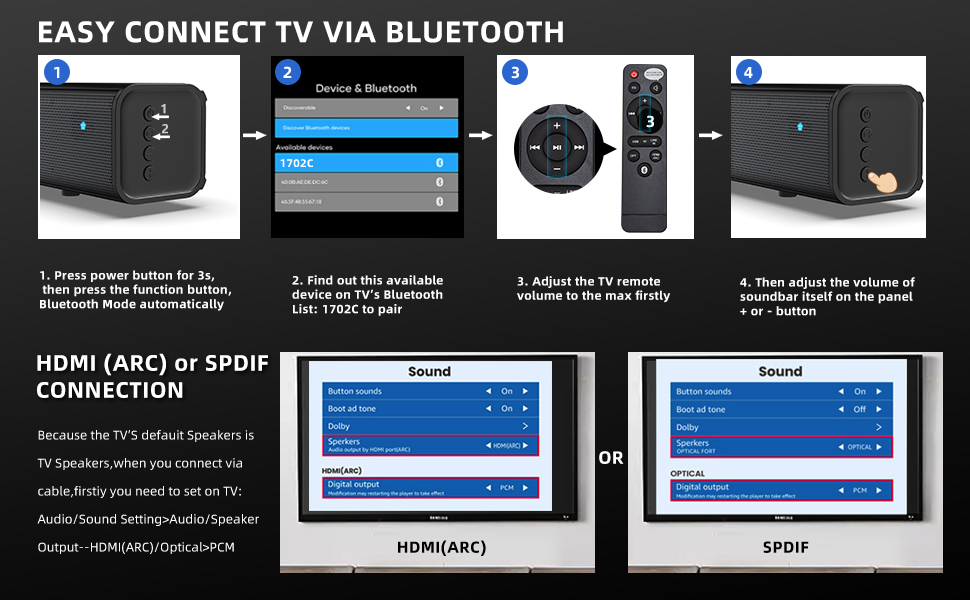
Image: A step-by-step diagram illustrating how to connect the soundbar via Bluetooth and how to configure TV settings for HDMI (ARC) or SPDIF connections, including setting audio output to PCM.
ຄໍາແນະນໍາການດໍາເນີນງານ
ເປີດ/ປິດ
ກົດປຸ່ມເປີດ/ປິດຢູ່ເທິງແຖບສຽງ ຫຼື ຣີໂໝດຄວບຄຸມເພື່ອເປີດ ຫຼື ປິດເຄື່ອງ.
ການເລືອກໂໝດ
The soundbar features 4 equalizer modes to optimize your listening experience:
- ໂໝດດົນຕີ: ປັບປຸງໃຫ້ດີຂຶ້ນສຳລັບການຫຼິ້ນເພງ.
- ຮູບເງົາຮູບເງົາ: Optimized for cinematic sound effects.
- ໂໝດຂ່າວ: Clearer dialogue for news and talk shows.
- ແບບເກມ: Immersive sound for gaming.
Switch between modes using the dedicated buttons on the remote control or the soundbar's control panel.

Image: Illustrates the four distinct equalizer modes (Music, Movie, News, Gaming) available on the soundbar, each with a corresponding visual scene.
ການຄວບຄຸມປະລິມານ
Adjust the volume using the volume up/down buttons on the remote control or the soundbar's control panel. If connected via HDMI ARC, your TV remote may also control the soundbar's volume.
ການຈັບຄູ່ Bluetooth
- Ensure the soundbar is powered on and in Bluetooth mode (indicated by a specific LED color or voice prompt).
- ໃນອຸປະກອນຂອງທ່ານ (ໂທລະສັບສະຫຼາດ, ແທັບເລັດ, ແລະອື່ນໆ), ເປີດໃຊ້ Bluetooth ແລະຊອກຫາອຸປະກອນທີ່ມີຢູ່.
- Select "1702C" from the list of devices to pair.
- Once paired, the soundbar will indicate a successful connection, and you can stream audio wirelessly.
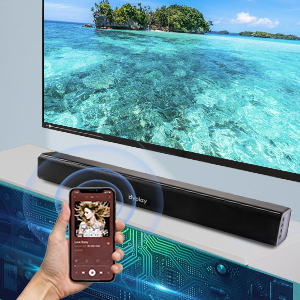
Image: A graphic illustrating a smartphone wirelessly connected to the soundbar via Bluetooth, with sound waves emanating from the soundbar.
ການດູແລແລະບໍາລຸງຮັກສາ
To ensure the longevity and optimal performance of your Dyplay soundbar, follow these guidelines:
- ທໍາຄວາມສະອາດ: ໃຊ້ຜ້າປຽກອ່ອນໆເຊັດພື້ນຜິວຂອງແຖບສຽງ. ຢ່າໃຊ້ເຄື່ອງເຮັດຄວາມສະອາດຂອງແຫຼວຫຼືວັດສະດຸຂັດ, ເພາະວ່າພວກມັນອາດຈະທໍາລາຍການສໍາເລັດຮູບ.
- ການຈັດວາງ: Avoid placing the soundbar in direct sunlight, near heat sources, or in areas with high humidity or dust.
- ການລະບາຍອາກາດ: Ensure adequate airflow around the soundbar to prevent overheating.
- ການຈັດການ: Handle the soundbar with care. Avoid dropping it or subjecting it to strong impacts.
ການແກ້ໄຂບັນຫາ
ຖ້າເຈົ້າພົບບັນຫາກັບແຖບສຽງຂອງເຈົ້າ, ໃຫ້ອ້າງອີງເຖິງບັນຫາ ແລະວິທີແກ້ໄຂບັນຫາທົ່ວໄປຕໍ່ໄປນີ້:
| ບັນຫາ | ສາເຫດ / ການແກ້ໄຂທີ່ເປັນໄປໄດ້ |
|---|---|
| ບໍ່ມີສຽງຈາກ Soundbar |
|
| Sound is Not Loud Enough |
|
| ບັນຫາການຈັບຄູ່ Bluetooth |
|
| ການຄວບຄຸມໄລຍະໄກບໍ່ເຮັດວຽກ |
|
ໝາຍເຫດ: The soundbar does not support Dolby Audio due to copyright issues.
ຂໍ້ມູນຈໍາເພາະ
| ຄຸນສົມບັດ | ຂໍ້ມູນຈໍາເພາະ |
|---|---|
| ຊື່ຕົວແບບ | 1702C |
| ປະເພດລຳໂພງ | ແຖບສຽງ |
| ປະເພດການຕິດຕັ້ງ | Wall Mount, Desktop |
| ລຳໂພງກຳລັງຜົນຜະລິດສູງສຸດ | 100 ວັດ (ສູງສຸດ) |
| ການຕັ້ງຄ່າຊ່ອງສຽງອ້ອມຮອບ | 2.0 |
| ເຕັກໂນໂລຊີການເຊື່ອມຕໍ່ | Bluetooth 5.0, HDMI (ARC), Optical, AUX (3.5mm), USB, TF Card |
| ເຕັກໂນໂລຊີການສື່ສານໄຮ້ສາຍ | Bluetooth |
| ຊ່ວງ Bluetooth | 15 ແມັດ |
| ຂະໜາດສິນຄ້າ (ກວ້າງ x ຍາວ x ສູງ) | 2.4"D x 20"W x 2.4"H |
| ນ້ໍາຫນັກລາຍການ | 2.89 ປອນ |
| ສີ | ດຳ |
| ປະເພດການຄວບຄຸມ | ປຸ່ມ, ການຄວບຄຸມໄລຍະໄກ |
| ແຫຼ່ງພະລັງງານ | ໄຟຟ້າສາຍ |
| ປະເພດໄດເວີສຽງ | ໄດນາມິກໄດເວີ |
| ຄຸນນະສົມບັດພິເສດ | Wireless, Bluetooth, Wall Mount, 2 Powerful Full-Range Speakers, 4 Equalizer Modes, Remote Control |
ການຮັບປະກັນແລະການສະຫນັບສະຫນູນ
Every Dyplay soundbar undergoes a strict quality test process. We stand by the quality of our product with a 12-month worry-free after-sales support.
For any problems or inquiries, please contact us via Amazon. Our customer service team is ready to assist you.
ຂໍ້ມູນຕິດຕໍ່:
- Through your Amazon order page for the product.
- Visit the official Dyplay Store on Amazon: dyplay Store


