ແນະນຳ
The Anova Precision Smart Oven is a versatile countertop appliance designed to bring professional-grade cooking capabilities to your home kitchen. It combines convection, steam, bake, broil, roast, and dehydrate functions, offering precise temperature control for a wide range of culinary tasks. This manual provides essential information for the safe and effective operation and maintenance of your Anova Precision Smart Oven.
For optimal performance and longevity, please read this manual thoroughly before first use and retain it for future reference.
ຂໍ້ມູນຄວາມປອດໄພ
ປະຕິບັດຕາມຄວາມລະມັດລະວັງດ້ານຄວາມປອດໄພຂັ້ນພື້ນຖານສະເໝີ ເມື່ອນຳໃຊ້ເຄື່ອງໃຊ້ໄຟຟ້າເພື່ອຫຼຸດຜ່ອນຄວາມສ່ຽງຕໍ່ການເກີດອັກຄີໄພ, ໄຟຟ້າຊອດ ແລະ ການບາດເຈັບຕໍ່ຄົນ.
- ຢ່າແຕະພື້ນຜິວທີ່ຮ້ອນ. ໃຊ້ດ້າມຈັບ ຫຼື ບິດ.
- ເພື່ອປ້ອງກັນໄຟຟ້າ, ຢ່າເອົາສາຍໄຟ, ປລັກສຽບ, ຫຼືເຄື່ອງໃຊ້ໃນນ້ຳຫຼືຂອງແຫຼວອື່ນໆ.
- ການເບິ່ງແຍງຢ່າງໃກ້ຊິດແມ່ນມີຄວາມຈໍາເປັນໃນເວລາທີ່ອຸປະກອນໃດໆຖືກນໍາໃຊ້ໂດຍຫຼືຢູ່ໃກ້ກັບເດັກນ້ອຍ.
- ຖອດປລັກອອກຈາກປລັກສຽບໃນເວລາທີ່ບໍ່ໄດ້ໃຊ້ແລະກ່ອນທີ່ຈະເຮັດຄວາມສະອາດ. ປ່ອຍໃຫ້ເຢັນກ່ອນທີ່ຈະໃສ່ຫຼືເອົາຊິ້ນສ່ວນ.
- ຫ້າມນຳໃຊ້ເຄື່ອງໃຊ້ທີ່ມີສາຍໄຟ ຫຼື ປລັກສຽບທີ່ເສຍຫາຍ, ຫຼື ຫຼັງຈາກເຄື່ອງໃຊ້ຜິດປົກກະຕິ ຫຼືໄດ້ຮັບຄວາມເສຍຫາຍໃນທຸກຮູບແບບ.
- ການນໍາໃຊ້ອຸປະກອນເສີມທີ່ບໍ່ແນະນໍາໂດຍຜູ້ຜະລິດເຄື່ອງໃຊ້ອາດຈະເຮັດໃຫ້ເກີດການບາດເຈັບ.
- ຢ່າໃຊ້ນອກ.
- ຢ່າປ່ອຍໃຫ້ສາຍໄຟແຂວນໃສ່ຂອບໂຕະ ຫຼືໂຕະ, ຫຼືແຕະພື້ນຜິວທີ່ຮ້ອນ.
- ຢ່າວາງໃສ່ ຫຼືຢູ່ໃກ້ກັບເຕົາແກ໊ສຮ້ອນ ຫຼືເຕົາໄຟຟ້າ, ຫຼືໃນເຕົາອົບທີ່ມີຄວາມຮ້ອນ.
- ຕ້ອງໃຊ້ຄວາມລະມັດລະວັງເປັນຢ່າງຍິ່ງໃນເວລາເຄື່ອນຍ້າຍເຄື່ອງທີ່ບັນຈຸນ້ຳມັນຮ້ອນ ຫຼືຂອງແຫຼວຮ້ອນອື່ນໆ.
- ຢ່າໃຊ້ເຄື່ອງໃຊ້ອື່ນນອກເໜືອໄປຈາກການໃຊ້ທີ່ຕັ້ງໃຈ.
ສ່ວນປະກອບເກີນview
Familiarize yourself with the main components of your Anova Precision Smart Oven:
- ເຕົາອົບ: The main cooking chamber.
- ຖັງນໍ້າ: Removable tank for steam generation. Located on the side.
- ກະດານຄວບຄຸມ: Digital display and knobs for setting temperature, time, and cooking modes.
- Food Probe: Detachable probe for precise internal temperature monitoring.
- Removable Racks: Multiple racks for various cooking needs.
- Baking Pan: Included pan for general baking and roasting.

ຮູບ 1: ດ້ານຫນ້າ view of the Anova Precision Smart Oven, showing the main oven cavity, control panel, and side-mounted water tank.

ຮູບ 2: ພາຍໃນ view of the Anova Precision Smart Oven, illustrating the two removable racks and the included baking pan.

Figure 3: A user demonstrating the removal of the clear water tank from the side of the Anova Precision Smart Oven for refilling or cleaning.
ຕັ້ງຄ່າ
ການຫຸ້ມຫໍ່ແລະການຈັດວາງ
- ເອົາເຕົາອົບແລະອຸປະກອນເສີມທັງຫມົດອອກຈາກເຄື່ອງຫຸ້ມຫໍ່ຢ່າງລະມັດລະວັງ.
- Remove any protective film or packaging materials from the oven.
- Place the oven on a stable, level, heat-resistant surface with adequate clearance from walls and other appliances for ventilation. Ensure at least 4 inches of space on all sides and above the oven.
- ໃຫ້ແນ່ໃຈວ່າປລັກສຽບໄຟສາມາດເຂົ້າເຖິງໄດ້ງ່າຍ.
ທໍາຄວາມສະອາດເບື້ອງຕົ້ນ
- ກ່ອນທີ່ຈະນໍາໃຊ້ຄັ້ງທໍາອິດ, ເຊັດພາຍໃນແລະພາຍນອກຂອງເຕົາອົບດ້ວຍການໂຄສະນາamp ຜ້າ.
- Wash the removable racks, baking pan, and water tank with warm, soapy water. Rinse thoroughly and dry completely.
ການກະກຽມຖັງນໍ້າ
- Remove the water tank from its housing on the side of the oven.
- Fill the water tank with distilled water. Do not use tap water as it can lead to mineral buildup.
- Securely reinsert the water tank into its housing until it clicks into place.
ການເຊື່ອມຕໍ່ພະລັງງານ
Plug the oven into a grounded electrical outlet. The display will illuminate, indicating the oven is ready for use.
ຄໍາແນະນໍາການດໍາເນີນງານ
ແຜງຄວບຄຸມຜ່ານview
The Anova Precision Smart Oven features an intuitive control panel with a digital display and rotary knobs for setting cooking parameters. The display shows temperature, time, and current cooking mode.
Connecting to the Anova App
For enhanced control and access to a recipe library, download the Anova Oven app on your smartphone. Follow the in-app instructions to connect your oven via Wi-Fi.
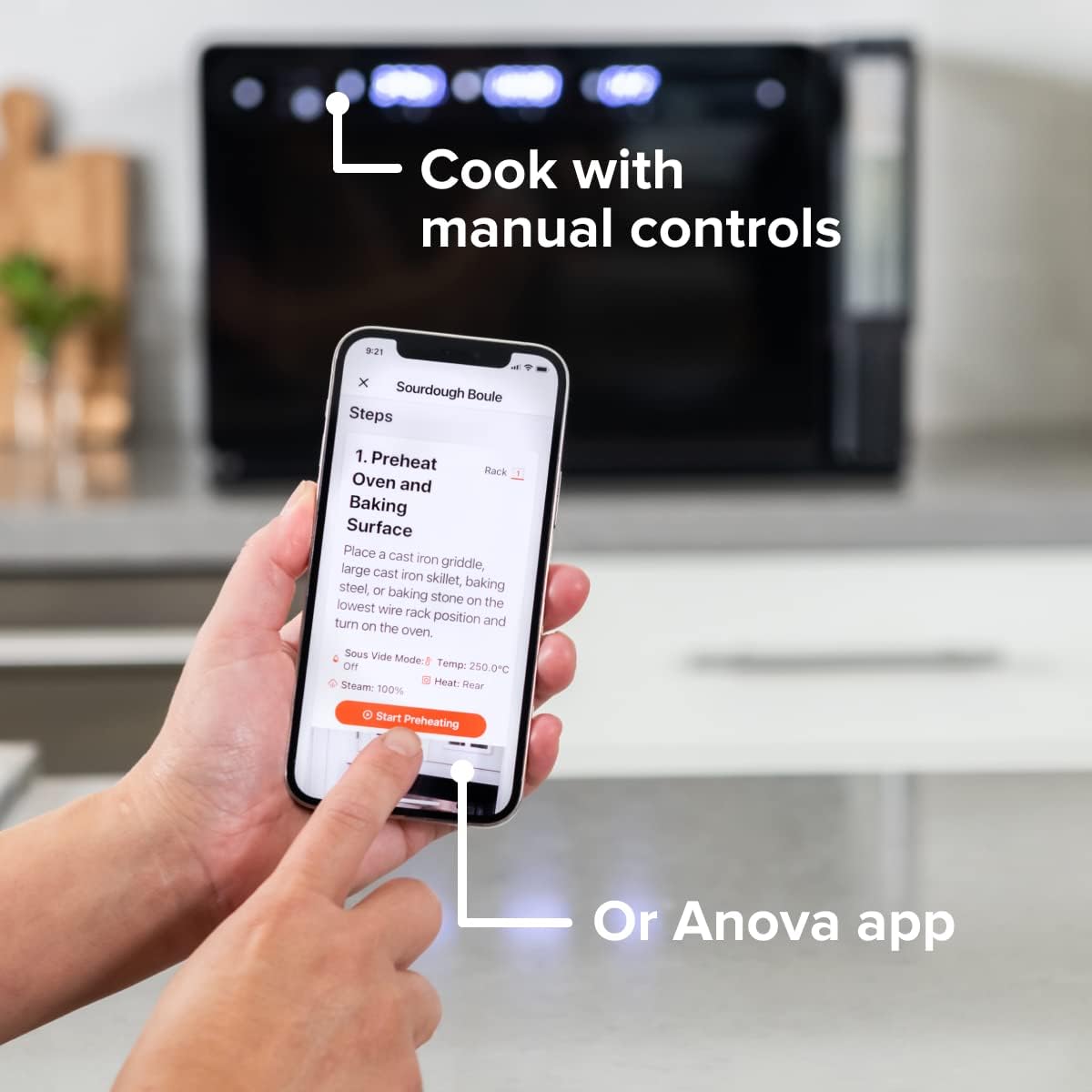
Figure 4: A user interacting with the Anova app on a smartphone, demonstrating remote control capabilities for the oven.
ຮູບແບບການປຸງແຕ່ງອາຫານພື້ນຖານ
The oven offers several cooking modes:
- ການລະບາຍຄວາມຮ້ອນ: Uses a fan to circulate hot air for even cooking and browning.
- ອາຍ: Injects steam into the oven cavity, ideal for baking bread, steaming vegetables, or sous vide style cooking.
- Combi (Convection + Steam): Combines hot air and steam for moist interiors and crispy exteriors.
- ອົບ/ປີ້ງ: Standard oven functions for baking and roasting.
- ໜັງ ສືພີມ: High heat from the top element for searing and browning.
- ຂາດນໍ້າ: Low heat and fan circulation for drying foods.
Setting a Program (Manual Control)
- Turn the mode knob to select your desired cooking mode.
- Adjust the temperature using the temperature knob.
- ຕັ້ງເວລາປຸງແຕ່ງອາຫານໂດຍໃຊ້ລູກບິດເວລາ.
- ກົດປຸ່ມ Start/Pause ເພື່ອເລີ່ມຕົ້ນການປຸງແຕ່ງອາຫານ.
- To use the food probe, insert it into the thickest part of your food before starting. The oven will cook until the target internal temperature is reached.
ໂໝດ Sous Vide
The Anova Precision Oven can achieve sous vide style results without a water bath. Use the steam function and the food probe to cook food to a precise internal temperature, ensuring tenderness and juiciness.
Steam Injection for Baking
For perfect breads with crispy crusts and soft interiors, utilize the steam injection feature. Ensure the water tank is filled before starting a steam-assisted baking program.

Figure 5: Two loaves of freshly baked bread, showcasing the results of steam injection for a perfect crust and crumb. The Anova Precision Smart Oven is visible in the background.
ການບໍາລຸງຮັກສາແລະການທໍາຄວາມສະອາດ
Regular cleaning and maintenance will ensure the longevity and optimal performance of your Anova Precision Smart Oven.
ທໍາຄວາມສະອາດປະຈໍາວັນ
- After each use, allow the oven to cool completely.
- ເຊັດພື້ນຜິວພາຍໃນແລະພາຍນອກດ້ວຍການໂຄສະນາamp ຜ້າແລະຢາຊັກຜ້າອ່ອນໆ. ຫຼີກລ້ຽງການເຮັດຄວາມສະອາດຂັດຫຼື pads scouring.
- Remove and clean the racks and baking pan with warm, soapy water.
- Empty and rinse the water tank after each use, especially if using steam functions. Allow it to air dry before reinserting.
Descaling (Steam Function Users)
If you frequently use the steam function, mineral buildup may occur. The oven may indicate when descaling is needed. Refer to the Anova app or online resources for detailed descaling instructions using a descaling solution.
ການເກັບຮັກສາ
ເມື່ອບໍ່ໄດ້ໃຊ້ເປັນເວລາດົນ, ໃຫ້ແນ່ໃຈວ່າເຕົາອົບສະອາດແລະແຫ້ງ. ເກັບຮັກສາມັນໄວ້ໃນບ່ອນທີ່ເຢັນ, ແຫ້ງ.
ການແກ້ໄຂບັນຫາ
This section addresses common issues you might encounter with your Anova Precision Smart Oven.
| ບັນຫາ | ສາເຫດທີ່ເປັນໄປໄດ້ | ການແກ້ໄຂ |
|---|---|---|
| ເຕົາອົບບໍ່ເປີດ. | ບໍ່ສຽບ; ພະລັງງານ outage; ເຄື່ອງຕັດວົງຈອນປິດ. | ກວດໃຫ້ແນ່ໃຈວ່າໄດ້ສຽບເຕົາອົບເຂົ້າກັບປ່ຽງທີ່ເຮັດວຽກຢ່າງປອດໄພ. ກວດເບິ່ງເຄື່ອງຕັດວົງຈອນຂອງຄົວເຮືອນ. |
| ບໍ່ມີໄອນ້ໍາຜະລິດ. | Water tank empty or not properly seated; mineral buildup. | Fill water tank with distilled water and ensure it is correctly inserted. Perform descaling if necessary. |
| ອາຫານບໍ່ຖືກແຕ່ງຢູ່ສະເຫມີ. | Improper rack placement; overcrowding; fan obstruction. | Refer to recipe for recommended rack position. Avoid overcrowding the oven. Ensure nothing obstructs the convection fan. |
| ບັນຫາການເຊື່ອມຕໍ່ Wi-Fi. | ລະຫັດຜ່ານ Wi-Fi ບໍ່ຖືກຕ້ອງ; ເຣົາເຕີ້ຢູ່ໄກເກີນໄປ; ການລົບກວນເຄືອຂ່າຍ. | Double-check Wi-Fi password. Move oven closer to router or use a Wi-Fi extender. Restart oven and router. |
If the problem persists after attempting these solutions, please contact Anova Customer Support.
ຂໍ້ມູນຈໍາເພາະ
- ຍີ່ຫໍ້: ອາຫານ Anova
- ຊື່ຕົວແບບ: ເຕົາອົບຄວາມຊັດເຈນ
- ໝາຍເລກຕົວແບບ: AN900-10
- ຂະໜາດຜະລິດຕະພັນ: 18"D x 22"W x 14"H
- ນ້ໍາຫນັກລາຍການ: 59 ປອນ
- ສີ: ດຳ
- ປະເພດການຄວບຄຸມ: ປຸ່ມ
- ແຫຼ່ງພະລັງງານ: ໄຟຟ້າ
- ອົງປະກອບລວມ: Water tank, pan, temp probe
- ຄຸນນະສົມບັດພິເສດ: ສາມາດຕັ້ງໂປຣແກຣມໄດ້
ການຮັບປະກັນແລະການສະຫນັບສະຫນູນ
The Anova Precision Smart Oven comes with a manufacturer's warranty. Please refer to the warranty card included with your product or visit the official Anova Culinary webເວັບໄຊສໍາລັບເງື່ອນໄຂການຮັບປະກັນລາຍລະອຽດ.
For technical support, troubleshooting assistance, or to inquire about replacement parts, please contact Anova Customer Support:
- ສະຫນັບສະຫນູນອອນໄລນ໌: ຢ້ຽມຢາມ Anova Culinary Store on Amazon ຫຼືທາງການຂອງເຂົາເຈົ້າ webເວັບໄຊ.
- ຄູ່ມືຜູ້ໃຊ້ (PDF): A comprehensive user guide is available for download at ລິ້ງນີ້.

Figure 6: The Anova Precision Smart Oven integrated with a smart home assistant (Alexa), demonstrating its connectivity features.


