1. ບົດແນະນຳ
This manual provides essential information for the safe and effective use of your Amazon Echo Dot (5th Gen) smart speaker. Please read these instructions thoroughly before operating the device and retain them for future reference.

Image: Amazon Echo Dot (5th Gen) in Glacier White on a wooden surface, highlighting its compact size and capabilities.
2. ສິ່ງທີ່ຢູ່ໃນກ່ອງ
ກວດສອບວ່າລາຍການທັງຫມົດແມ່ນມີຢູ່ໃນການຫຸ້ມຫໍ່:
- Echo Dot (5th Gen) Device
- Glacier White Power Adapter (15W)
- ຄູ່ມືເລີ່ມຕົ້ນດ່ວນ
3. ຜະລິດຕະພັນເກີນview
The Amazon Echo Dot (5th Gen) is a compact smart speaker designed to deliver an enhanced audio experience and integrate seamlessly with your smart home ecosystem. It features a spherical design with a fabric finish and an LED light ring at the base.

Image: Amazon Echo Dot (5th Gen) in Glacier White, front view with glowing light ring.
ຄຸນນະສົມບັດທີ່ສໍາຄັນ:
- Improved Audio: Features a 1.73” (44 mm) front-firing speaker for clearer vocals, deeper bass, and vibrant sound.
- Alexa Voice Assistant: Provides hands-free control for music, information, timers, and smart home devices.
- ການຄວບຄຸມຄວາມເປັນສ່ວນຕົວ: Includes a microphone off button and the ability to view ແລະລຶບການບັນທຶກສຽງ.
- Smart Home Hub: Supports WiFi, Bluetooth Low Energy Mesh, and Matter for compatible smart home device control.
- ເຊັນເຊີອຸນຫະພູມ: Built-in sensor for triggering smart home routines.
- ການຄວບຄຸມການແຕະ: Tap the top of the device to snooze alarms or pause music.
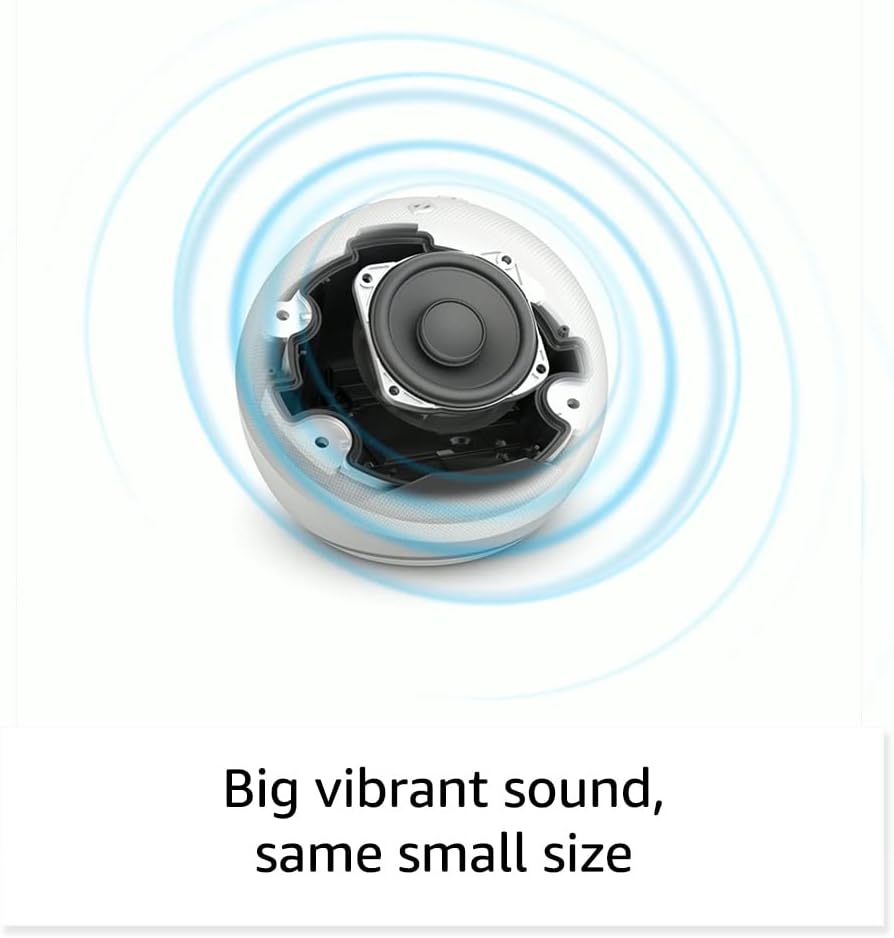
ຮູບພາບ: ພາຍໃນ view of the Amazon Echo Dot (5th Gen) speaker components, illustrating its audio design.
4. ຕັ້ງຄ່າ
ປະຕິບັດຕາມຂັ້ນຕອນເຫຼົ່ານີ້ເພື່ອຕັ້ງຄ່າ Echo Dot ຂອງທ່ານ (5th Gen):
- ສຽບໃສ່ຈຸດ Echo ຂອງທ່ານ: Connect the included power adapter to your Echo Dot and then to a power outlet. The light ring will turn blue, then orange, indicating it's ready for setup.
- ດາວໂຫລດແອັບຯ Alexa: On your mobile device, download and install the Amazon Alexa app from your device's app store (compatible with Fire OS, Android, and iOS devices).
- ເພີ່ມອຸປະກອນຂອງທ່ານ: Open the Alexa app. If prompted, sign in with your Amazon account. Tap the 'Devices' icon at the bottom, then the '+' icon in the top right corner. Select 'Add Device', then 'Amazon Echo', and choose 'Echo Dot'.
- ປະຕິບັດຕາມຄໍາແນະນໍາໃນຫນ້າຈໍ: The app will guide you through connecting your Echo Dot to your Wi-Fi network. Ensure your Wi-Fi network supports 802.11a/b/g/n/ac (2.4 and 5 GHz). Ad-hoc networks are not supported.
- ການຈັດວາງ: Place your Echo Dot in a central location within your room, away from walls or other objects that might obstruct sound.
5. ປະຕິບັດການ Echo Dot ຂອງທ່ານ
Voice Commands with Alexa:
To interact with your Echo Dot, simply say the wake word "Alexa," followed by your command or question. The light ring will turn blue to indicate Alexa is listening.
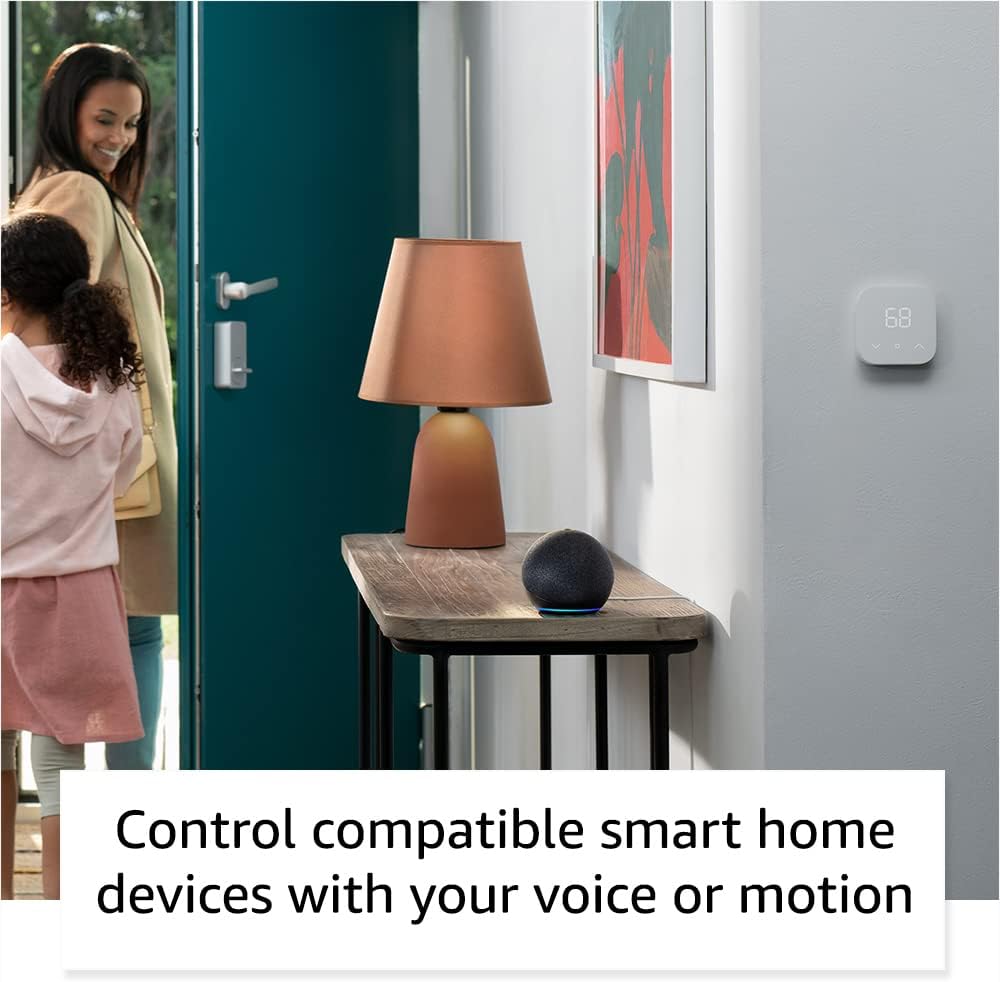
Image: Amazon Echo Dot (5th Gen) in Deep Sea Blue on a kitchen counter, demonstrating a user asking Alexa for the weather.
ຄໍາສັ່ງທົ່ວໄປ:
- "Alexa, ຫຼິ້ນດົນຕີ."
- "Alexa, ອາກາດເປັນແນວໃດ?"
- "Alexa, ຕັ້ງໂມງຈັບເວລາ 10 ນາທີ."
- "Alexa, ບອກຂ້ອຍເລື່ອງຕະຫລົກ."
- "Alexa, ເປີດປະລິມານ."
ການຄວບຄຸມການແຕະ:
The top surface of your Echo Dot is touch-sensitive for quick actions:
- Tap to Snooze: When an alarm sounds, tap the top of the device to snooze it.
- Tap to Pause/Resume: Tap to pause or resume music playback.

Image: A hand tapping the top of the Amazon Echo Dot (5th Gen) in Glacier White, demonstrating the tap-to-snooze or pause music function.
6. Smart Home Integration
Your Echo Dot can control compatible smart home devices using voice commands or routines. It supports WiFi, Bluetooth Low Energy Mesh, and Matter protocols.
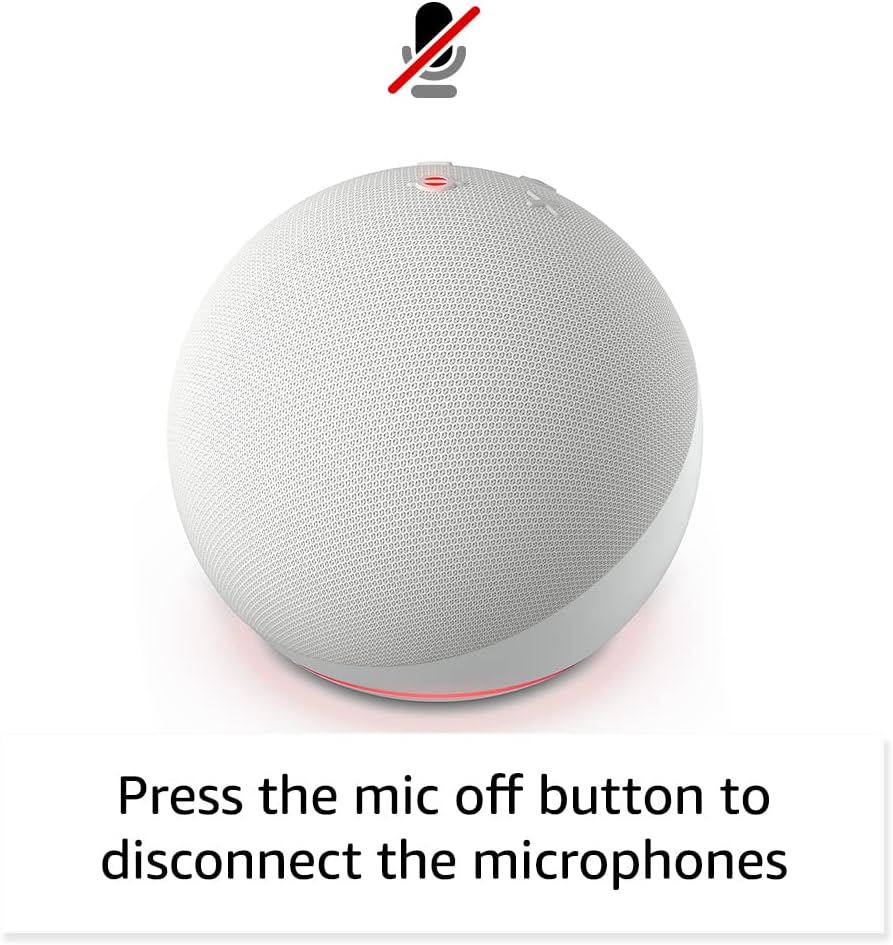
Image: Amazon Echo Dot (5th Gen) in a living space, illustrating its use for controlling compatible smart home devices.
Using the Temperature Sensor:
The built-in temperature sensor allows you to create routines in the Alexa app. For example, you can set a routine to automatically turn on a fan if the room temperature exceeds a specified comfort zone.
Amazon Sidewalk:
Amazon Sidewalk uses Echo and Ring devices to securely keep other devices connected and help find lost items. It can enable supported devices to remain connected even when Wi-Fi is lost or they are outside the range of their home Wi-Fi. Sidewalk uses a small portion of your internet bandwidth. You can manage Sidewalk settings in the Alexa app.
eero ໃນຕົວ:
If you have a compatible eero router, your Echo Dot can extend Wi-Fi coverage. This feature requires linking your eero and Amazon accounts and managing it through the eero mobile application. eero Built-in compatible Echo devices support up to 1,000 sq. ft. of additional coverage, speeds up to 100 Mbps, and 10 or fewer connected devices in the 5 GHz band.
7. ລັກສະນະຄວາມເປັນສ່ວນຕົວ
Amazon Echo devices are designed with multiple layers of privacy controls:
- ປຸ່ມປິດໄມໂຄຣໂຟນ: Press the microphone off button on the top of your Echo Dot to electronically disconnect the microphones. The light ring will turn red to indicate the microphones are off.
- ການບັນທຶກສຽງ: ທ່ານມີຄວາມສາມາດ view, listen to, and delete your voice recordings through the Alexa app or your Amazon account settings.
- ເຕັກໂນໂລຊີ Wake Word: The device only begins recording and sending audio to the cloud after it detects the wake word (e.g., "Alexa").
Image: Amazon Echo Dot (5th Gen) with a red light indicating the microphone is off, showing the privacy control feature.
8. ຄຸນສົມບັດການເຂົ້າເຖິງ
The Alexa app provides various accessibility features to personalize your experience. Access these settings by navigating to 'Settings' → 'Accessibility' in the Alexa App.
- ການຟັງແບບປັບຕົວ: ໃຫ້ເວລາຫຼາຍກວ່າທີ່ຈະເວົ້າໃຫ້ຈົບກ່ອນທີ່ Alexa ຈະຕອບ.
- ອັດຕາການເວົ້າທີ່ຕ້ອງການ: ຄວບຄຸມຄວາມໄວ ຫຼື ຊ້າຂອງ Alexa ໂດຍການເວົ້າວ່າ "Alexa, ເວົ້າຊ້າລົງ" ຫຼື "Alexa, ເວົ້າໄວຂຶ້ນ".
- ຮ້ອງຂໍສຽງ: ຫຼິ້ນສຽງທີ່ສາມາດໄດ້ຍິນນອກເໜືອໄປຈາກຕົວຊີ້ບອກທີ່ເບິ່ງເຫັນໄດ້ເມື່ອທ່ານເວົ້າກັບ Alexa. ເປີດໃຊ້ໂດຍການເວົ້າວ່າ "Alexa, ເປີດສຽງເລີ່ມຕົ້ນຂອງຄຳຮ້ອງຂໍ."
- Kindle ອ່ານດັງໆ: Alexa ສາມາດອ່ານປຶ້ມ Kindle ຂອງທ່ານດັງໆ.
- ແຈ້ງເຕືອນເມື່ອຢູ່ໃກ້: ຫຼິ້ນສຽງການແຈ້ງເຕືອນເມື່ອທ່ານກວດພົບຢູ່ໃກ້ກັບອຸປະກອນ Echo ຂອງທ່ານ.
9. ບໍາລຸງຮັກສາ
To ensure the longevity and optimal performance of your Echo Dot:
- ທໍາຄວາມສະອາດ: Use a soft, dry, lint-free cloth to clean the device. Do not use abrasive cleaners or sprays.
- ການຈັດວາງ: ຫຼີກເວັ້ນການວາງອຸປະກອນຢູ່ໃນແສງແດດໂດຍກົງ, ຢູ່ໃກ້ກັບແຫຼ່ງຄວາມຮ້ອນ, ຫຼືໃນສະພາບແວດລ້ອມທີ່ຊຸ່ມຊື່ນເກີນໄປ.
- ອັບເດດຊອບແວ: Your Echo Dot automatically receives software security updates. Ensure it remains connected to Wi-Fi for these updates.
10. ການແກ້ໄຂບັນຫາ
ບັນຫາທົ່ວໄປ ແລະການແກ້ໄຂ:
- ອຸປະກອນບໍ່ຕອບສະໜອງ:
- Ensure the microphone is not muted (red light ring indicates mute).
- Check if the device is plugged in and powered on.
- Restart the device by unplugging it from the power outlet for 30 seconds and then plugging it back in.
- ບໍ່ສາມາດເຊື່ອມຕໍ່ກັບ Wi-Fi ໄດ້:
- ກວດສອບລະຫັດຜ່ານ Wi-Fi ຂອງທ່ານແມ່ນຖືກຕ້ອງ.
- Ensure your router is working and other devices can connect.
- Move the Echo Dot closer to your Wi-Fi router.
- ຣີສະຕາດເຣົາເຕີ ແລະໂມເດັມຂອງທ່ານ.
- ຄຸນະພາບສຽງບໍ່ດີ:
- ປັບລະດັບສຽງໂດຍໃຊ້ຄຳສັ່ງສຽງ ຫຼື ແອັບ Alexa.
- ໃຫ້ແນ່ໃຈວ່າອຸປະກອນບໍ່ໄດ້ຖືກວາງໄວ້ໃນພື້ນທີ່ປິດລ້ອມທີ່ອາດຈະເຮັດໃຫ້ສຽງບໍ່ດັງ.
- Check for any physical obstructions around the speaker.
- Alexa ບໍ່ເຂົ້າໃຈຄໍາສັ່ງ:
- Speak clearly and at a normal pace.
- ຫຼຸດສຽງລົບກວນໃນພື້ນຫຼັງ.
- Ensure you are within hearing range of the device.
11. ຂໍ້ມູນຈໍາເພາະ
| ຄຸນສົມບັດ | ລາຍລະອຽດ |
|---|---|
| ຂະໜາດ | 3.9” x 3.9” x 3.5” (100mm x 100mm x 89 mm) |
| ນ້ຳໜັກ | 10.7 ອໍ (304g) |
| ສຽງ | ລຳໂພງໄຟທາງໜ້າ 1.73” (44 ມມ) ຄວາມລະອຽດສູງ Lossless |
| ການເຊື່ອມຕໍ່ Wi-Fi | Dual-band Wi-Fi ຮອງຮັບເຄືອຂ່າຍ 802.11a/b/g/n/ac (2.4 ແລະ 5 GHz). ບໍ່ຮອງຮັບເຄືອຂ່າຍໂຄສະນາ. |
| ການເຊື່ອມຕໍ່ Bluetooth | ຮອງຮັບ A2DP ສໍາລັບການຖ່າຍທອດສຽງ, AVRCP ສໍາລັບການຄວບຄຸມສຽງຂອງອຸປະກອນມືຖືທີ່ເຊື່ອມຕໍ່. ບໍ່ຮອງຮັບລຳໂພງ Bluetooth ທີ່ຕ້ອງການລະຫັດ PIN. |
| ຄວາມເຂົ້າກັນໄດ້ຂອງອຸປະກອນ Smart Home | WiFi, Bluetooth Low Energy Mesh, and Matter |
| ຄວາມຕ້ອງການລະບົບ | Alexa app compatible with Fire OS, Android, and iOS devices. Web browser access also available. |
| ລຸ້ນ | Echo Dot (ລຸ້ນທີ 5) - ລຸ້ນ 2022 |
| ພາສາ | Alexa ເວົ້າພາສາອັງກິດແລະແອສປາໂຍນ |
12. ການຮັບປະກັນແລະການສະຫນັບສະຫນູນ
ຂໍ້ມູນການຮັບປະກັນ:
Your Echo Dot (5th Gen) comes with a 90-day limited warranty and service. Optional 1-year, 2-year, and 3-year extended warranties are available for U.S. customers and are sold separately. Use of the Echo Dot is subject to specific terms and conditions.
ອັບເດດຄວາມປອດໄພຊອບແວ:
ອຸປະກອນນີ້ໄດ້ຮັບການຮັບປະກັນວ່າຈະໄດ້ຮັບການອັບເດດຄວາມປອດໄພຂອງຊອບແວຢ່າງໜ້ອຍສີ່ປີຫຼັງຈາກທີ່ມັນສາມາດຊື້ໄດ້ເປັນເຄື່ອງໃໝ່ໃນ Amazon. websites. For more information on software security updates or to manage your device, visit the Amazon webເວັບໄຊ.
ການຊ່ວຍເຫຼືອລູກຄ້າ:
For further assistance, please refer to the Amazon Alexa app or visit the Amazon support website. You can also find information specific to your device by visiting 'Manage Your Content and Devices' on Amazon.


