
1. ບົດແນະນຳ
This manual provides essential instructions for the installation, operation, and maintenance of your Hikvision 8MP AcuSense WDR Mini Bullet Network Camera, model DS-2CD2083G2-IU. Please read this manual thoroughly before using the product and retain it for future reference.
ສິນຄ້າເກີນview
The Hikvision DS-2CD2083G2-IU is a high-performance 8-megapixel (4K) network camera designed for advanced surveillance. It features AcuSense technology for accurate human and vehicle target classification, Wide Dynamic Range (WDR) for clear imaging against strong backlight, and a fixed 2.8mm lens for a wide field of view. Its IP67 rating ensures robust outdoor performance, and the integrated microphone allows for audio monitoring.
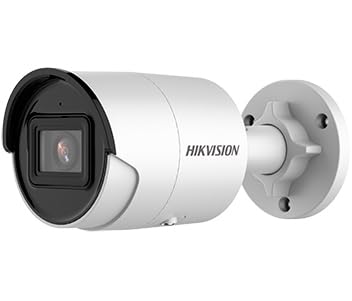
Figure 1: Hikvision 8MP AcuSense WDR Mini Bullet Network Camera (DS-2CD2083G2-IU)
This image displays the Hikvision 8MP AcuSense WDR Mini Bullet Network Camera, highlighting its compact bullet-style design suitable for various installation environments.
ຄຸນນະສົມບັດທີ່ສໍາຄັນ
- 8 Megapixel (4K) Resolution: Delivers high-quality, detailed video.
- ເທັກໂນໂລຢີ AcuSense: Reduces false alarms by accurately classifying human and vehicle targets.
- ຊ່ວງໄດນາມິກກວ້າງ (WDR): Ensures clear images even in scenes with strong contrast.
- Fixed 2.8mm Lens: ສະຫນອງຢ່າງກວ້າງຂວາງ viewມຸມ ing.
- Infrared (IR) Illumination: Night vision up to 40 meters.
- IP67 ການປະເມີນຄວາມທົນທານຕໍ່ສະພາບອາກາດ: Suitable for outdoor use in various weather conditions.
- ໄມໂຄຣໂຟນໃນຕົວ: Enables audio monitoring.
- ເຄື່ອງອ່ານບັດປະສົມປະສານ: Supports local storage (microSD card not included).
2. ຂໍ້ມູນຄວາມປອດໄພ
ກະລຸນາສັງເກດການລະມັດລະວັງດ້ານຄວາມປອດໄພດັ່ງຕໍ່ໄປນີ້ເພື່ອປ້ອງກັນການບາດເຈັບຫຼືຄວາມເສຍຫາຍຂອງຜະລິດຕະພັນ:
- Ensure the power supply meets the camera's requirements (6.5 Watts).
- ຢ່າເຮັດໃຫ້ກ້ອງຖ່າຍຮູບຖືກອຸນຫະພູມສູງ, ຄວາມຊຸ່ມຊື່ນ, ຫຼືສະພາບແວດລ້ອມທີ່ກັດກ່ອນ.
- Avoid pointing the lens directly at strong light sources, as this may damage the sensor.
- ການຕິດຕັ້ງຄວນໄດ້ຮັບການປະຕິບັດໂດຍບຸກຄະລາກອນທີ່ມີຄຸນວຸດທິສອດຄ່ອງກັບລະຫັດໄຟຟ້າທ້ອງຖິ່ນ.
- ໃຊ້ອຸປະກອນເສີມທີ່ຜູ້ຜະລິດລະບຸໄວ້ເທົ່ານັ້ນ.
- ເຊັດເລນກ້ອງຖ່າຍຮູບດ້ວຍຜ້າອ່ອນໆແລະແຫ້ງ. ຫຼີກລ່ຽງສານເຄມີທີ່ຮຸນແຮງ.
3. ການຕິດຕັ້ງແລະການຕິດຕັ້ງ
3.1 ການຫຸ້ມຫໍ່
Carefully unpack the camera and check for any signs of damage. Ensure all components are present. (Typical components include: camera unit, mounting template, screws, waterproof connector, quick start guide).
3.2 ການຕິດຕັ້ງທາງດ້ານຮ່າງກາຍ
The camera is designed for ceiling mounting. Select a suitable location that provides the desired field of view and is within reach of network and power cables. Due to its IP67 rating, it is suitable for outdoor environments.
- Use the provided mounting template to mark drill holes on the ceiling.
- Drill the necessary holes and insert wall plugs if required.
- Secure the camera base to the mounting surface using the supplied screws.
- ປັບມຸມກ້ອງເພື່ອການປົກຄຸມທີ່ດີທີ່ສຸດ.
3.3 ການເຊື່ອມຕໍ່ເຄືອຂ່າຍ ແລະພະລັງງານ
This is an IP network camera. It requires a network connection and power. Power over Ethernet (PoE) is typically supported, simplifying installation by delivering both power and data over a single Ethernet cable. If PoE is not used, a separate 12V DC power adapter (not included) will be required.
- Connect an Ethernet cable from your network switch/router to the camera's RJ45 port. Use the waterproof connector for outdoor installations.
- If not using PoE, connect a 12V DC power adapter to the camera's power input.
- Once connected, the camera will power on. Allow a few minutes for it to boot up.
3.4 ການຕັ້ງຄ່າເບື້ອງຕົ້ນ
ເຂົ້າເຖິງກ້ອງຖ່າຍຮູບ web ການໂຕ້ຕອບຜ່ານ a web browser using its default IP address (refer to the quick start guide or use Hikvision's SADP tool to discover the IP address). You will be prompted to set a strong password for security. Follow the on-screen instructions to configure network settings, date/time, and other basic parameters.
4. ຄໍາແນະນໍາການດໍາເນີນງານ
4.1 ດໍາລົງຊີວິດ View ແລະການບັນທຶກ
ຫຼັງຈາກການຕິດຕັ້ງເບື້ອງຕົ້ນ, ທ່ານສາມາດເຮັດໄດ້ view the live feed from the camera through its web interface, a Network Video Recorder (NVR), or Hikvision's client software (e.g., iVMS-4200) or mobile app (Hik-Connect). Configure recording schedules and methods (continuous, motion-triggered) via the camera's settings or NVR.
4.2 AcuSense Smart Features
The AcuSense technology allows the camera to distinguish between humans, vehicles, and other moving objects, significantly reducing false alarms caused by animals, rain, or falling leaves. Configure these detection rules in the camera's event settings to receive more accurate alerts.
- ກວດຈັບການເຄື່ອນໄຫວ 2.0: Set up detection zones and sensitivity for human and vehicle events.
- ການກວດຫາການບຸກລຸກ: Define virtual boundaries, and the camera will trigger an alarm if a human or vehicle crosses them.
- ການກວດຫາເສັ້ນຂ້າມ: Similar to intrusion, but for a specific line.
4.3 ຂອບເຂດໄດນາມິກກວ້າງ (WDR)
WDR compensates for extreme lighting conditions, such as strong backlight, to ensure that both bright and dark areas of the image are clearly visible. This feature is typically enabled by default but can be adjusted in the image settings.
4.4 Infrared (IR) Night Vision
The camera automatically switches to IR mode in low-light conditions, providing clear black-and-white video up to 40 meters. Ensure no obstructions block the IR LEDs for optimal night vision performance.
4.5 ການຕິດຕາມສຽງ
With its built-in microphone, the camera can capture audio from the surveillance area. Audio settings, including gain control, can be configured in the camera's web interface. Ensure local regulations regarding audio recording are followed.
5. ບໍາລຸງຮັກສາ
- ທໍາຄວາມສະອາດ: ເຮັດຄວາມສະອາດເລນກ້ອງຖ່າຍຮູບ ແລະ ທີ່ຢູ່ອາໃສຢ່າງເປັນປະຈໍາດ້ວຍເຄື່ອງອ່ອນ, ງamp ຜ້າ. ຢ່າໃຊ້ເຄື່ອງເຮັດຄວາມສະອາດຂັດ.
- ການອັບເດດເຟີມແວ: ກວດເບິ່ງເຈົ້າຫນ້າທີ່ Hikvision ເປັນໄລຍະ website for firmware updates. Keeping the firmware updated ensures optimal performance, new features, and security enhancements.
- ການກວດສອບສາຍ: For outdoor installations, periodically inspect cables and connections for wear or damage, especially the waterproof connectors.
- ການຈັດການລະຫັດຜ່ານ: Regularly change your camera's password to maintain security.
6. ການແກ້ໄຂບັນຫາ
| ບັນຫາ | ສາເຫດທີ່ເປັນໄປໄດ້ | ການແກ້ໄຂ |
|---|---|---|
| No image/camera offline | No power, network cable disconnected, incorrect IP address. | Check power supply and network cable. Verify IP address using SADP tool. Restart camera. |
| ຄຸນນະພາບຮູບພາບບໍ່ດີ | Dirty lens, incorrect focus (if adjustable), poor lighting, network bandwidth issues. | Clean the lens. Ensure adequate lighting. Check network connection speed. Adjust image settings (WDR, exposure). |
| ສັນຍານເຕືອນທີ່ບໍ່ຖືກຕ້ອງຈາກການກວດຈັບການເຄື່ອນໄຫວ | Sensitivity too high, environmental factors (trees, animals), AcuSense not configured. | Adjust motion detection sensitivity. Configure AcuSense human/vehicle detection. Adjust detection zones. |
| ບໍ່ສາມາດເຂົ້າເຖິງໄດ້ web ການໂຕ້ຕອບ | Incorrect IP address, network connectivity issue, browser compatibility. | Verify IP address. Ensure camera and PC are on the same network segment. Try a different browser. |
If the problem persists after attempting these solutions, please contact Hikvision technical support.
7. ຂໍ້ມູນຈໍາເພາະ
| ຄຸນສົມບັດ | ລາຍລະອຽດ |
|---|---|
| ໝາຍເລກຕົວແບບ | DS-2CD2083G2-IU |
| ເຊັນເຊີຮູບພາບ | CMOS |
| ສູງສຸດ. ຄວາມລະອຽດ | 8 ລ້ານພິກເຊວ (4K) |
| ເລນ | ເລນຄົງທີ່ 2.8 ມມ |
| ລະດັບ IR | ເຖິງ 40 ແມັດ |
| WDR | ສະຫນັບສະຫນູນ |
| AcuSense | Human and Vehicle Target Classification |
| ສຽງ | ໄມໂຄຣໂຟນໃນຕົວ |
| ການເກັບຮັກສາທ້ອງຖິ່ນ | Integrated Card Reader (MicroSD slot) |
| ການປະເມີນສະພາບອາກາດ | IP67 |
| ການບໍລິໂພກພະລັງງານ | 6.5 ວັດ |
| ຂະໜາດ (L x W x H) | 15 x 15 x 8 cm (ໂດຍປະມານ) |
| ປະເພດການຕິດຕັ້ງ | ເພດານ Mount |
| ປະເພດ Alert | Motion Only (configurable for human/vehicle) |
8. ການຮັບປະກັນແລະການສະຫນັບສະຫນູນ
Hikvision products typically come with a limited manufacturer's warranty. Please refer to the warranty card included with your product or visit the official Hikvision webເວັບໄຊສໍາລັບເງື່ອນໄຂການຮັບປະກັນລາຍລະອຽດສະເພາະກັບພາກພື້ນຂອງທ່ານ.
For technical support, firmware downloads, or further assistance, please visit the official Hikvision support portal or contact their customer service department. Ensure you have your product model number (DS-2CD2083G2-IU) and serial number ready when contacting support.
Hikvision ຢ່າງເປັນທາງການ Webເວັບໄຊ: www.hikvision.com