1. ບົດແນະນຳ
The Wellue DUOEK-S Bluetooth Heart Monitoring Device is designed for personal heart health tracking at home. This portable device allows users to record electrocardiogram (ECG) data and view heart rate information. It connects wirelessly to a smartphone or tablet application for data management and analysis. This manual provides essential instructions for proper setup, operation, and maintenance of your DUOEK-S device.

Image 1.1: The Wellue DUOEK-S Heart Monitoring Device.
ໝາຍເຫດສຳຄັນ:
- This device is for informational purposes only and should not be used to diagnose or treat any medical condition.
- It is not applicable to individuals with pacemakers or defibrillators.
- Always consult a healthcare professional for medical advice.
2. ເນື້ອໃນຊຸດ
ເມື່ອເປີດແພັກເກັດ, ໃຫ້ກວດເບິ່ງວ່າອົງປະກອບທັງໝົດມີຢູ່:
- Wellue DUOEK-S Heart Monitoring Device
- ສາຍສາກ
- ຄູ່ມືຜູ້ໃຊ້ (ເອກະສານນີ້)
Video 2.1: Unboxing and initial setup of the Wellue DUOEK-S device. This video demonstrates the contents of the package and the first steps of preparing the device for use, including charging.
3. ອຸປະກອນເກີນview
Familiarize yourself with the main components of your DUOEK-S device:

Image 3.1: Labeled diagram of the Wellue DUOEK-S device showing the display screen, LED indicator, charge port, left electrode, right electrode, left base, and right base.
- ຈໍສະແດງຜົນ: Shows real-time ECG waveform, heart rate, and device status.
- ຕົວຊີ້ວັດ LED: Provides visual feedback on device status (e.g., charging, connected).
- ຊ່ອງສາກໄຟ: ໃຊ້ເພື່ອເຊື່ອມຕໍ່ສາຍສາກ.
- Left Electrode (L): Contact point for ECG measurement.
- Right Electrode (R): Contact point for ECG measurement.
4. ຕັ້ງຄ່າ
4.1 ການສາກໄຟເບື້ອງຕົ້ນ
Before first use, fully charge the DUOEK-S device. Connect the charging cable to the device's charge port and a USB power source. The LED indicator will show charging status.
4.2 ການຕິດຕັ້ງແອັບ ແລະ ການເຊື່ອມຕໍ່
- Download the "Vihealth" app from your device's app store (compatible with iOS and Android).
- ກວດໃຫ້ແນ່ໃຈວ່າ Bluetooth ຖືກເປີດໃຊ້ຢູ່ໃນສະມາດໂຟນ ຫຼືແທັບເລັດຂອງທ່ານ.
- Open the Vihealth app and follow the on-screen instructions to pair your DUOEK-S device. You may need to grant location and file access permissions for Bluetooth connection and data storage.
- To initiate pairing, touch both electrodes on the device for a few seconds.

Image 4.1: The Vihealth app icon, used for connecting and managing data from your Wellue DUOEK-S device.
5. ປະຕິບັດການອຸປະກອນ
5.1 ການວັດແທກ ECG
The DUOEK-S device supports both handheld and wearable measurements (with a chest strap, if applicable). For handheld measurements:
- ກວດໃຫ້ແນ່ໃຈວ່າໄດ້ສາກໄຟ ແລະເປີດອຸປະກອນແລ້ວ.
- Place your index fingers on both the Left (L) and Right (R) electrodes.
- Remain still during the measurement. The device will display the ECG waveform and heart rate.
- Measurements typically last between 30 seconds and 5 minutes.

Image 5.1: Proper hand placement on the Wellue DUOEK-S electrodes for an ECG measurement.
5.2 Viewing and Saving Data
After a measurement, the data is automatically saved to the device. To view and manage your history:
- Open the Vihealth app on your connected smartphone or tablet.
- The device will sync its history with the app.
- ທ່ານສາມາດ review detailed ECG waveforms, heart rate trends, and other relevant data within the app.
- The app allows for exporting reports, such as PDF files, which can be shared with healthcare providers.
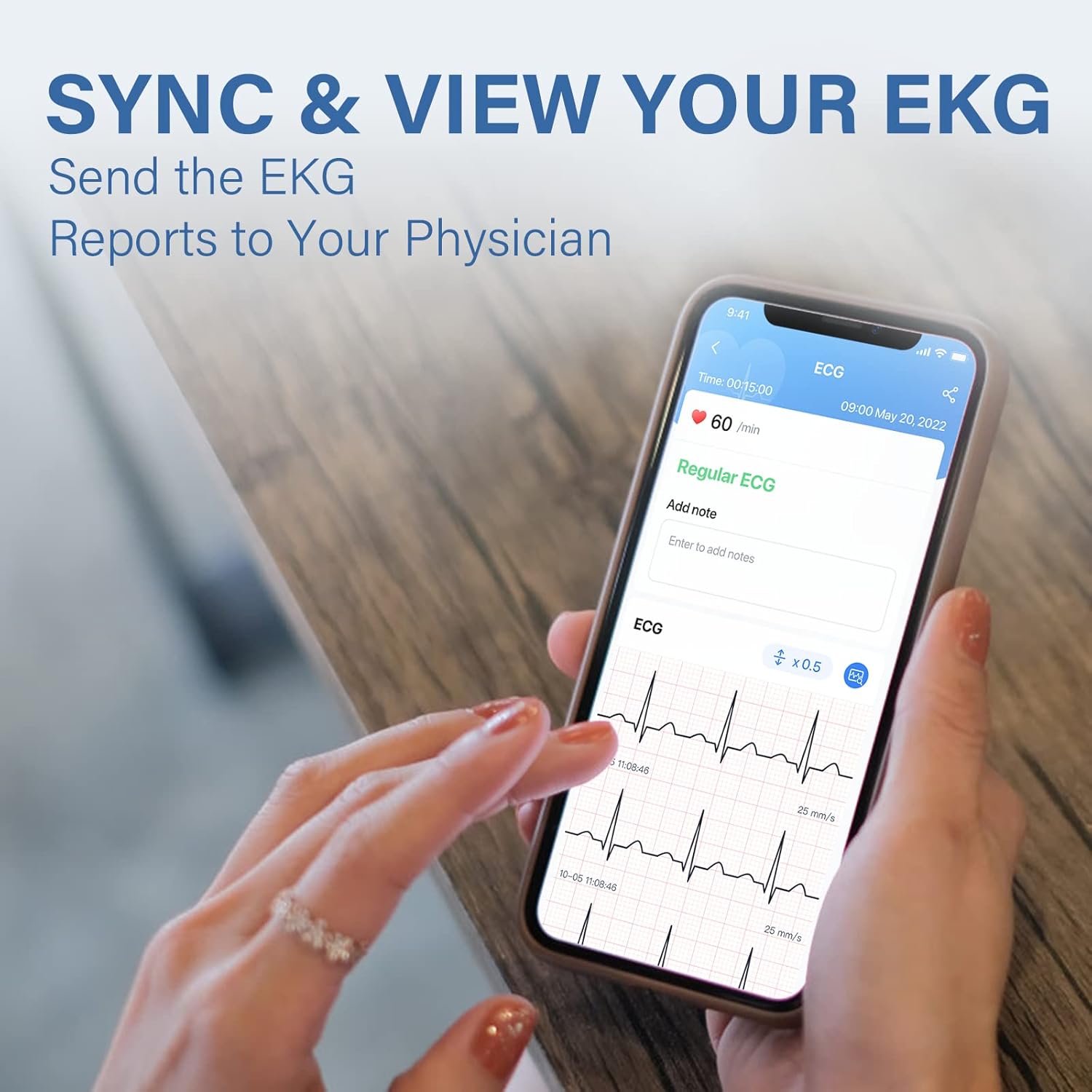
Image 5.2: The Vihealth app interface showing a detailed EKG report on a smartphone.

Image 5.3: Screenshot of the Vihealth app demonstrating the option to share an EKG report, likely as a PDF.
6. ບໍາລຸງຮັກສາ
- Keep the device clean and dry. Use a soft, dry cloth to wipe the electrodes and device body.
- ຫຼີກເວັ້ນການເປີດເຜີຍອຸປະກອນກັບອຸນຫະພູມທີ່ຮຸນແຮງ, ຄວາມຊຸ່ມຊື່ນ, ຫຼືແສງແດດໂດຍກົງ.
- ເກັບຮັກສາອຸປະກອນໄວ້ໃນບ່ອນທີ່ປອດໄພເມື່ອບໍ່ໄດ້ໃຊ້ເພື່ອປ້ອງກັນຄວາມເສຍຫາຍ.
- Ensure the device is regularly charged to maintain battery health.
7. ການແກ້ໄຂບັນຫາ
| ບັນຫາ | ສາເຫດທີ່ເປັນໄປໄດ້ | ການແກ້ໄຂ |
|---|---|---|
| ອຸປະກອນບໍ່ເປີດ. | ແບັດເຕີຣີຕໍ່າ. | Charge the device using the provided cable. |
| Cannot connect to Vihealth app. | Bluetooth is off; app permissions not granted; incorrect pairing procedure. |
|
| Inaccurate or erratic ECG readings. | Movement during measurement; improper electrode contact; dry skin. |
|
8. ຂໍ້ມູນຈໍາເພາະ
| ຄຸນສົມບັດ | ລາຍລະອຽດ |
|---|---|
| ຕົວແບບ | DUOEK-S |
| ເຕັກໂນໂລຊີການເຊື່ອມຕໍ່ | Bluetooth |
| ມາດຕະຖານການສື່ສານໄຮ້ສາຍ | Bluetooth |
| ອຸປະກອນທີ່ເຂົ້າກັນໄດ້ | ແທັບເລັດ, ໂທລະສັບສະຫຼາດ (iOS, Android) |
| ລະບົບປະຕິບັດການ | Android, iOS |
| ວິທີການຄວບຄຸມ | ແອັບ |
| ການນໍາໃຊ້ທີ່ແນະນໍາ | ໃຊ້ໃນເຮືອນ |
| ຄຸນນະສົມບັດພິເສດ | Hand-held and wearable with the chest strap |
| ນ້ໍາຫນັກລາຍການ | 8.8 ອອນ |
| ຂະໜາດແພັກເກັດ | 6.8 x 4.6 x 2.4 ນິ້ວ |
9. ການຮັບປະກັນແລະການສະຫນັບສະຫນູນ
For warranty information, technical support, or further inquiries regarding your Wellue DUOEK-S device, please visit the official Wellue webເວັບໄຊ ຫຼືຕິດຕໍ່ບໍລິການລູກຄ້າຂອງເຂົາເຈົ້າໂດຍກົງ.
Official Wellue Webເວັບໄຊ: www.getwellue.com


