1. ບົດແນະນຳ
This manual provides essential information for the safe and optimal use of your Definitive Technology Descend DN15 15" Subwoofer. The DN15 is engineered to deliver powerful, clear, and impactful low-frequency sound, featuring 3XR Architecture, Intelligent Phase Control, and a 1500W peak Class H amplifier. Please read these instructions thoroughly before operating your subwoofer.
2. ຄໍາແນະນໍາຄວາມປອດໄພ
Observe the following safety precautions to prevent damage to the unit and ensure personal safety:
- ແຫຼ່ງພະລັງງານ: Connect the subwoofer only to the specified power supply voltage ຊີ້ບອກຢູ່ໃນຫນ່ວຍງານ.
- ການລະບາຍອາກາດ: Ensure adequate ventilation. Do not block ventilation openings. Maintain a minimum distance of 6 inches (15 cm) around the unit for proper airflow.
- ນ້ໍາແລະຄວາມຊຸ່ມ: ຢ່າໃຫ້ເຄື່ອງຖືກຝົນ, ຄວາມຊຸ່ມ, ນ້ຳຢອດ ຫຼື ນ້ຳກະເດັນ. ຢ່າວາງວັດຖຸທີ່ເຕັມໄປດ້ວຍຂອງແຫຼວ ເຊັ່ນ: ແຈກັນ ເທິງເຄື່ອງ.
- ຄວາມຮ້ອນ: ຮັກສາເຄື່ອງໃຫ້ຫ່າງຈາກແຫຼ່ງຄວາມຮ້ອນເຊັ່ນ: ລັງສີ, ເຄື່ອງບັນທຶກຄວາມຮ້ອນ, ເຕົາ ຫຼືອຸປະກອນອື່ນໆທີ່ຜະລິດຄວາມຮ້ອນ.
- ທໍາຄວາມສະອາດ: ຖອດປລັກໜ່ວຍອອກຈາກປລັກສຽບໃສ່ຝາກ່ອນທຳຄວາມສະອາດ. ໃຊ້ຜ້າແຫ້ງເທົ່ານັ້ນ.
- ການບໍລິການ: ຢ່າພະຍາຍາມບໍລິການຜະລິດຕະພັນນີ້ດ້ວຍຕົນເອງ. ອ້າງເຖິງການບໍລິການທັງtoົດໃຫ້ກັບພະນັກງານບໍລິການທີ່ມີຄຸນວຸດທິ.
- ການຈັດວາງ: ວາງຊັບວູບເຟີໄວ້ເທິງໜ້າດິນທີ່ໝັ້ນຄົງ ແລະ ຮາບພຽງເພື່ອປ້ອງກັນການບິດງໍ.
3. ສິ່ງທີ່ຢູ່ໃນກ່ອງ
ກວດສອບວ່າລາຍການທັງຫມົດແມ່ນມີຢູ່ໃນການຫຸ້ມຫໍ່:
- ເທັກໂນໂລຢີທີ່ແນ່ນອນ Descend DN15 ຊັບວູບເຟີ
- Slim Remote Control
- AAA Batteries (for the remote)
- ສາຍໄຟ
- ຄູ່ມືເລີ່ມຕົ້ນດ່ວນ
- ບັດລົງທະບຽນ
4. ຕັ້ງຄ່າ
4.1 ການຈັດວາງ Subwoofer
Optimal subwoofer placement is crucial for achieving the best bass performance in your listening environment. Experiment with different locations to find the ideal spot. Generally, placing the subwoofer in a corner can enhance bass output, while placing it along a wall can provide a more balanced sound. Avoid placing it directly in the center of a room, which can sometimes lead to bass nulls.

ຮູບທີ 1: ດ້ານໜ້າເປັນມຸມ view of the Definitive Technology Descend DN15 Subwoofer.
4.2 ການເຊື່ອມຕໍ່
The DN15 offers versatile connection options to integrate with various home audio systems. Ensure your main audio system is powered off before making any connections.

Figure 2: Rear panel connections of the DN15 Subwoofer.
- ການປ້ອນຂໍ້ມູນ LFE: For receivers or processors with a dedicated Subwoofer/LFE output. Connect a single RCA cable from your receiver's LFE output to the LFE input on the subwoofer.
- ຂາເຂົ້າ RCA ລະດັບສາຍສະເຕີລິໂອ: For receivers or preamplifiers without a dedicated LFE output. Connect RCA cables from your receiver's stereo pre-out (left and right) to the corresponding Line In (Left/Right) inputs on the subwoofer.
- High-Level Input (5-way binding posts): ສຳລັບການເຊື່ອມຕໍ່ໂດຍກົງກັບຜົນຜະລິດລຳໂພງຂອງທ່ານ amplifier or receiver. This method allows the subwoofer to receive the same signal as your main speakers.
- USB A Input: ສໍາລັບການນໍາໃຊ້ການບໍລິການເທົ່ານັ້ນ.
- ຕົວກະຕຸ້ນ 12V: For integrating with home automation systems, allowing the subwoofer to power on/off with other components.
After making connections, plug the power cord into the subwoofer and then into a wall outlet.
5. ການເຮັດວຽກ
The Descend DN15 Subwoofer features various controls for fine-tuning its performance to your listening preferences and room acoustics.
5.1 ການຄວບຄຸມແລະການປັບຕົວ
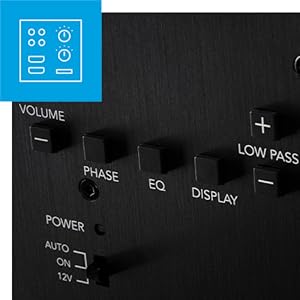
Figure 3: Subwoofer control panel.
- ປະລິມານ: Adjusts the overall output level of the subwoofer. Use the remote control or the rear panel buttons.
- ຕົວກອງຕ່ ຳ: Controls the upper frequency limit of the subwoofer's output. This should be set to blend seamlessly with your main speakers. If your receiver has a built-in crossover, set the subwoofer's low pass filter to its maximum setting (LFE mode).
- ການຄວບຄຸມໄລຍະ (0/180°): Adjusts the phase of the subwoofer's output relative to your main speakers. Experiment with both settings to find the one that provides the most coherent and impactful bass. The DN15 features Intelligent Phase Control for 360 degrees of customizable adjustment.
- EQ Modes (Flat, Deep, Loud): Select an EQ mode to tailor the subwoofer's response to your content and preference.
- ແປ: Provides a balanced frequency response.
- ເລິກ: Enhances the lowest frequencies for a more profound bass experience, ideal for movies.
- ດັງ: Maximizes output for higher volume levels.
- Power Toggle (Auto On/Off or DC Control):
- ເປີດ/ປິດອັດຕະໂນມັດ: The subwoofer will automatically power on when an audio signal is detected and enter standby mode after a period of inactivity.
- ການຄວບຄຸມ DC: For use with a 12V trigger from a compatible receiver or processor.
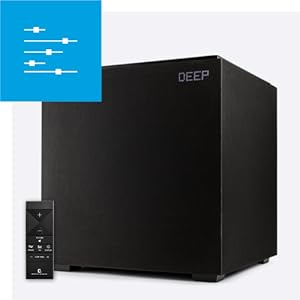
Figure 4: Subwoofer displaying 'DEEP' EQ mode.
5.2 3XR Architecture
The DN15 features Definitive Technology's 3XR Architecture, which provides three times the bass-radiating surface area compared to a traditional ported subwoofer of similar size. This design incorporates a 15-inch driver pressure-coupled with dual 15-inch bass radiators, enabling the subwoofer to produce louder and clearer low frequencies without port noise distortion.
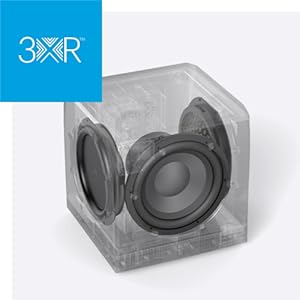
Figure 5: Illustration of the 3XR Architecture.
6. ບໍາລຸງຮັກສາ
Proper care ensures the longevity and performance of your subwoofer.
- ທໍາຄວາມສະອາດ: Use a soft, dry cloth to clean the cabinet. Avoid using harsh chemicals, solvents, or abrasive cleaners, as these can damage the finish.
- ຂີ້ຝຸ່ນ: Regularly dust the grille and cabinet to prevent accumulation that could affect performance or aesthetics.
- ຫຼີກເວັ້ນແສງແດດໂດຍກົງ/ຄວາມຮ້ອນ: Do not place the subwoofer in direct sunlight or near heat sources, as this can cause discoloration or damage to internal components.
7. ການແກ້ໄຂບັນຫາ
If you encounter issues with your Descend DN15 Subwoofer, refer to the following common problems and solutions:
- ບໍ່ມີພະລັງງານ:
- Ensure the power cord is securely plugged into both the subwoofer and a working wall outlet.
- ກວດເບິ່ງສະວິດໄຟຢູ່ໃນແຜງດ້ານຫລັງ.
- ກວດສອບວ່າປ່ຽງຕິດຝາໃຊ້ງານໄດ້ໂດຍການສຽບອຸປະກອນອື່ນ.
- ບໍ່ມີສຽງ:
- Confirm that the audio cables are securely connected to both the subwoofer and your receiver/processor.
- Check the volume level on the subwoofer and your receiver.
- Ensure the subwoofer is powered on and not in standby mode.
- Verify the LFE/subwoofer output is enabled in your receiver's settings.
- Adjust the Low Pass Filter setting. If using LFE, ensure it is set to maximum.
- ສຽງບິດເບືອນ ຫຼື ສຽງດັງ:
- Reduce the subwoofer's volume level.
- Adjust the Low Pass Filter to a lower frequency.
- Experiment with the Phase Control (0° or 180°).
- Try different EQ modes (Flat, Deep, Loud) to see if one provides a cleaner sound.
- Adjust the subwoofer's placement in the room.
If problems persist, contact Definitive Technology customer support or a qualified service technician.
8. ຂໍ້ມູນຈໍາເພາະ
Detailed technical specifications for the Definitive Technology Descend DN15 Subwoofer:

Figure 6: Dimensions of the DN15 Subwoofer.
| ຄຸນສົມບັດ | ຂໍ້ມູນຈໍາເພາະ |
|---|---|
| ຊື່ຕົວແບບ | DN15 |
| ປະເພດລຳໂພງ | Subwoofer |
| ເສັ້ນຜ່າສູນກາງຂອງ Subwoofer | 15 ນິ້ວ |
| Woofer ເສັ້ນຜ່າສູນກາງ | 15 ນິ້ວ |
| ລຳໂພງກຳລັງຜົນຜະລິດສູງສຸດ | 1500 ວັດ (ສູງສຸດ) |
| ການຕອບສະໜອງຄວາມຖີ່ | 20 Hz |
| ເຕັກໂນໂລຊີການເຊື່ອມຕໍ່ | ສາຍ (RCA) |
| ຮູບແບບການອອກສຽງ | ສະເຕຣິໂອ |
| ຄຸນນະສົມບັດພິເສດ | 3XR™ Architecture, Built-In EQ Modes, Class H Digital Amplification, Intelligent Phase Control™ |
| ການນໍາໃຊ້ທີ່ແນະນໍາສໍາລັບຜະລິດຕະພັນ | ໂຮມເທຍເຕີ |
| ປະເພດການຕິດຕັ້ງ | Floor Standing |
| ວັດສະດຸ | Rubber (likely referring to driver surround) |
| ສີ | ດຳ |
| ຂະໜາດສິນຄ້າ (ກວ້າງ x ຍາວ x ສູງ) | 23.44" x 24.14" x 24.91" |
| ນ້ໍາຫນັກລາຍການ | 129.6 ປອນ (58.92 ກິໂລກຣາມ) |
| ວິທີການຄວບຄຸມ | ໄລຍະໄກ |
| ແຫຼ່ງພະລັງງານ | ໄຟຟ້າສາຍ |
| UPC | 747192132675 |
9. ການຮັບປະກັນແລະການສະຫນັບສະຫນູນ
The Definitive Technology Descend DN15 Subwoofer comes with a limited warranty. For specific warranty terms and conditions, please refer to the included Registration Card or visit the official Definitive Technology webເວັບໄຊ.
For technical support, troubleshooting assistance, or service inquiries, please contact Definitive Technology customer support directly. Contact information can typically be found on the manufacturer's webສະຖານທີ່ຫຼືຢູ່ໃນການຫຸ້ມຫໍ່ຜະລິດຕະພັນ.


