1. ບົດແນະນຳ
The BirdDog PF120 is a high-performance Full HD NDI box camera designed for professional video production environments. It features an Exmor R back-illuminated sensor, 20x optical zoom, and a full color matrix, all housed within a durable all-metal chassis. This manual provides essential information for the proper setup, operation, and maintenance of your PF120 camera.
2. ເນື້ອໃນຊຸດ
ກະລຸນາກວດສອບວ່າລາຍການທັງຫມົດທີ່ລະບຸໄວ້ຂ້າງລຸ່ມນີ້ແມ່ນລວມຢູ່ໃນຊຸດຂອງທ່ານ. ຖ້າລາຍການໃດຂາດຫາຍໄປຫຼືເສຍຫາຍ, ໃຫ້ຕິດຕໍ່ຜູ້ຂາຍຂອງເຈົ້າທັນທີ.
- BirdDog PF120 Full HD NDI 20x Box Camera
- ອະແດັບເຕີໄຟ (DC 12V)
- ເລນ Cap
- ເອກະສານ (ຄູ່ມືເລີ່ມຕົ້ນດ່ວນ, ຂໍ້ມູນຄວາມປອດໄພ)
3. ຜະລິດຕະພັນເກີນview
The BirdDog PF120 is engineered for versatility and robust performance. Key features include:
- Full NDI support for seamless integration into IP workflows.
- 20x optical zoom for detailed close-ups.
- Exmor R back-illuminated sensor for superior low-light performance.
- Durable all-metal housing.
- Multiple connectivity options including HDMI, NDI/PoE, RS-232, and USB2.0.
3.1 ກ້ອງຖ່າຍຮູບ Views ແລະອົງປະກອບ

ຮູບທີ 3.1: ຂ້າງຫນ້າ view of the BirdDog PF120 camera, showcasing the lens and the BirdDog logo on the side panel.
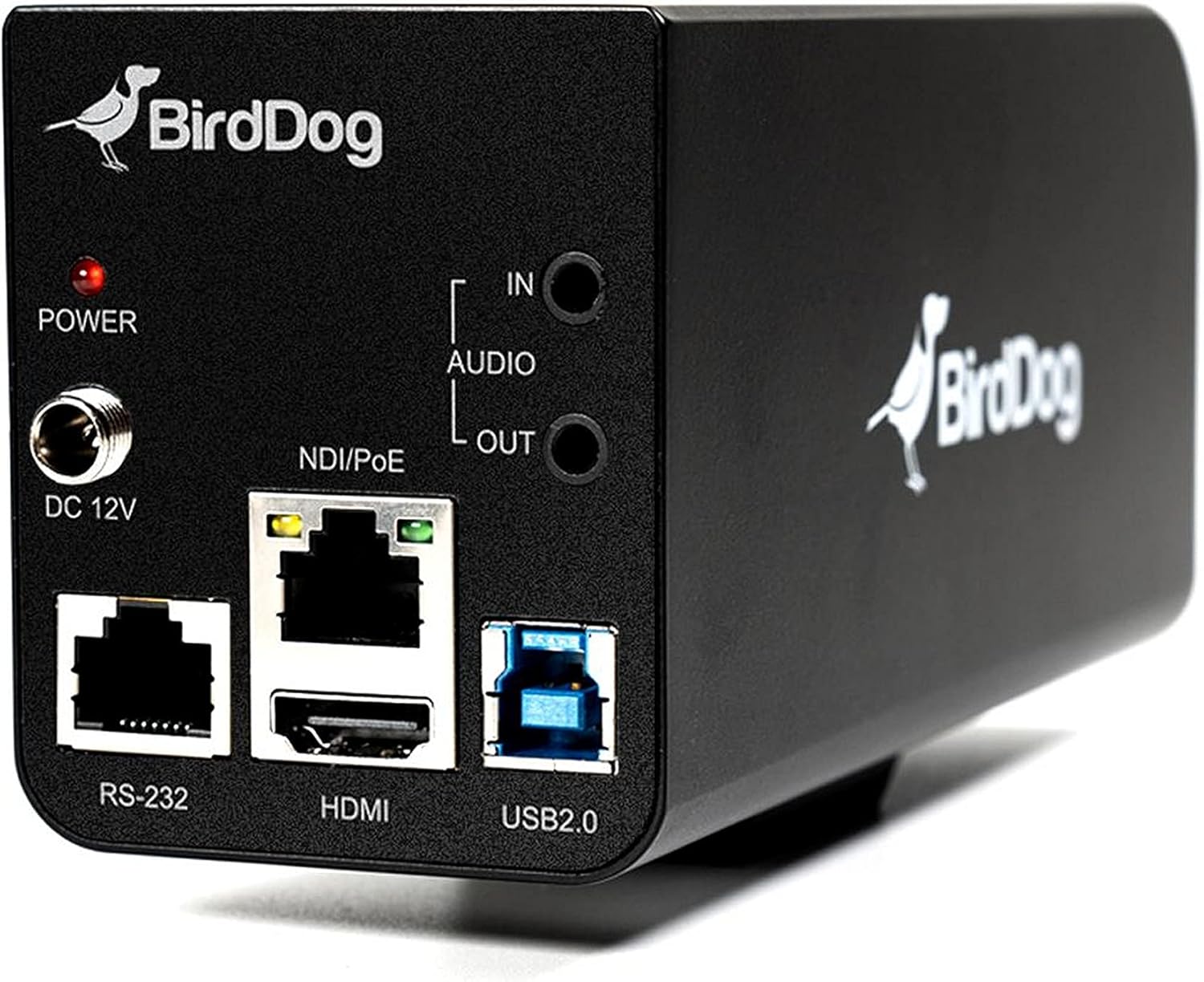
ຮູບທີ 3.2: Rear panel of the BirdDog PF120, displaying the power input (DC 12V), audio input/output, NDI/PoE port, HDMI output, RS-232 port, and USB2.0 port.
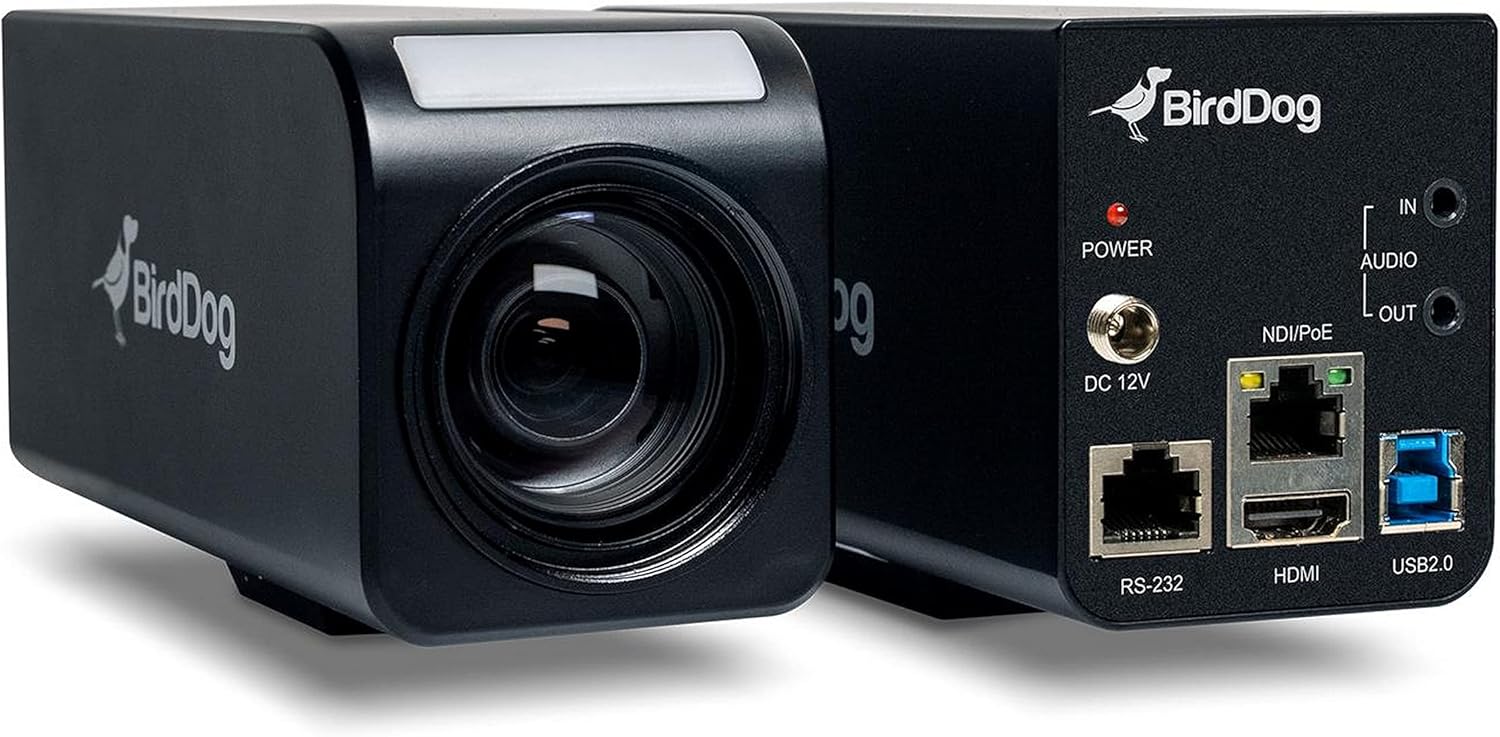
ຮູບທີ 3.3: ປະສົມປະສານ view of the BirdDog PF120, showing both the front lens assembly and the rear connectivity panel.

ຮູບທີ 3.4: ເທິງ view of the BirdDog PF120 camera, highlighting the sleek design and BirdDog branding.
4. ຕັ້ງຄ່າ
4.1 ການເປີດເຄື່ອງ
- Connect the supplied DC 12V power adapter to the "DC 12V" port on the rear of the camera.
- ສຽບອະແດບເຕີໄຟເຂົ້າໄປໃນບ່ອນສຽບໄຟທີ່ເຫມາະສົມ.
- Alternatively, if using a PoE-enabled network switch, connect an Ethernet cable to the "NDI/PoE" port. The camera will power on via Power over Ethernet.
4.2 Network Connection (NDI)
- Connect an Ethernet cable from the "NDI/PoE" port on the camera to your network switch or router.
- Ensure your network is configured to support NDI protocols.
- The camera will obtain an IP address automatically via DHCP. For static IP configuration, refer to the BirdDog Central application or web ການໂຕ້ຕອບ.
4.3 ຜົນໄດ້ຮັບວິດີໂອ
- NDI Output: The primary video output is via NDI over the Ethernet connection.
- HDMI Output: Connect an HDMI cable from the "HDMI" port on the camera to a monitor or video switcher for direct video monitoring.
5. ປະຕິບັດການກ້ອງຖ່າຍຮູບ
5.1 ການເຂົ້າເຖິງ Web ການໂຕ້ຕອບ
- Once connected to the network, use the BirdDog Central application or an IP scanner to discover the camera's IP address.
- ເປີດ ກ web ໂປຣແກຣມທ່ອງເວັບ ແລະ ໃສ່ທີ່ຢູ່ IP ຂອງກ້ອງຖ່າຍຮູບເພື່ອເຂົ້າເຖິງ web ການໂຕ້ຕອບ.
- ຈາກ web interface, you can configure video settings, network parameters, and control camera functions.
ການຄວບຄຸມກ້ອງຖ່າຍຮູບ 5.2
The PF120 can be controlled via:
- NDI Tools: Utilize NewTek NDI Tools (e.g., NDI Studio Monitor) for basic control.
- BirdDog Central / Cam Control: BirdDog's dedicated software provides comprehensive control over camera settings, including zoom, focus, iris, and color matrix.
- RS-232: Connect a compatible serial controller to the RS-232 port for hardware control.
- ການຄວບຄຸມໄລຍະໄກ: The camera supports remote control methods as specified in the product documentation.
5.3 ຊູມ ແລະ ໂຟກັສ
The PF120 features a 20x optical zoom lens. Zoom and focus adjustments are typically made through the web interface or compatible control software.
6. ບໍາລຸງຮັກສາ
- ທໍາຄວາມສະອາດ: Use a soft, dry cloth to clean the camera body. For the lens, use a specialized lens cleaning solution and microfiber cloth. Avoid abrasive cleaners.
- ການອັບເດດເຟີມແວ: Periodically check the BirdDog website for firmware updates. Keeping the firmware updated ensures optimal performance and access to new features.
- ການເກັບຮັກສາ: ເມື່ອບໍ່ໄດ້ໃຊ້ເປັນເວລາດົນ, ໃຫ້ເກັບຮັກສາກ້ອງໄວ້ໃນບ່ອນເຢັນ, ແຫ້ງ, ຫ່າງຈາກແສງແດດໂດຍກົງ ແລະ ອຸນຫະພູມທີ່ຮ້າຍກາດ.
7. ການແກ້ໄຂບັນຫາ
7.1 ບໍ່ມີພະລັງງານ
- ໃຫ້ແນ່ໃຈວ່າອະແດັບເຕີໄຟເຊື່ອມຕໍ່ຢ່າງປອດໄພກັບທັງກ້ອງຖ່າຍຮູບ ແລະປລັກສຽບໄຟທີ່ເຮັດວຽກ.
- If using PoE, verify that the Ethernet cable is connected to a PoE-enabled port on your switch and that the switch is providing power.
7.2 No NDI Signal
- ກວດເບິ່ງການເຊື່ອມຕໍ່ສາຍອີເທີເນັດ.
- Verify that the camera has obtained an IP address (check your router's DHCP client list or use BirdDog Central).
- Ensure your network firewall is not blocking NDI traffic.
- Confirm that NDI tools or software on your receiving device are correctly configured to discover NDI sources.
7.3 ບັນຫາຄຸນນະພາບຮູບພາບ
- Check lens for smudges or dust and clean if necessary.
- Adjust focus settings via the web interface or control software.
- Review exposure, white balance, and color matrix settings in the camera's web ການໂຕ້ຕອບ.
8. ຂໍ້ມູນຈໍາເພາະ
| ຄຸນສົມບັດ | ລາຍລະອຽດ |
|---|---|
| ໝາຍເລກຕົວແບບ | BD-BDPF120 |
| ຄວາມລະອຽດການຖ່າຍວິດີໂອ | 1080p |
| ຄວາມລະອຽດວິດີໂອທີ່ມີປະສິດທິພາບ | 720 ພິກເຊລ |
| Optical Zoom | 20x |
| ປະເພດການຊູມ | Digital Zoom, Optical Zoom |
| ເຕັກໂນໂລຊີການເຊື່ອມຕໍ່ | ມີສາຍ |
| ອະນຸສັນຍາການເຊື່ອມຕໍ່ | Wi-Fi (for control/management, NDI is primary video) |
| ວິທີການຄວບຄຸມ | Remote, Iris, RS-232 |
| ແຫຼ່ງພະລັງງານ | AC/DC, PoE |
| ວັດtage | 5 ວັດ |
| ວັດສະດຸ | ໂລຫະ |
| ຂະໜາດລາຍການ (L x W x H) | 9.9 x 9 x 3.6 ນິ້ວ |
| ນ້ໍາຫນັກລາຍການ | 2.94 ປອນ |
| ປະເພດການຕິດຕັ້ງ | Wall Mount (as per spec, but typically box cameras are versatile) |
| ການຈັດອັນດັບການປົກປ້ອງສາກົນ | IP65 |
| ເຕັກໂນໂລຊີແສງສະຫວ່າງຕ່ໍາ | ສີກາງຄືນ |
9. ການຮັບປະກັນແລະການສະຫນັບສະຫນູນ
For warranty information and technical support, please refer to the official BirdDog website or contact your authorized BirdDog reseller. Keep your proof of purchase for warranty claims.
BirdDog Official Webເວັບໄຊ: www.bird-dog.tv


