1. ບົດແນະນຳ
This manual provides comprehensive instructions for the assembly, operation, and maintenance of your FLEXISPOT EN2 Electric Height Adjustable Standing Desk. Please read this manual thoroughly before assembly and use to ensure safe and efficient operation.
The FLEXISPOT EN2 desk features a spacious one-piece desktop, an electric height adjustment system with memory presets, and a removable clamp power strip for convenient device charging and cable management. It is designed to support a dynamic work environment, allowing seamless transitions between sitting and standing positions.
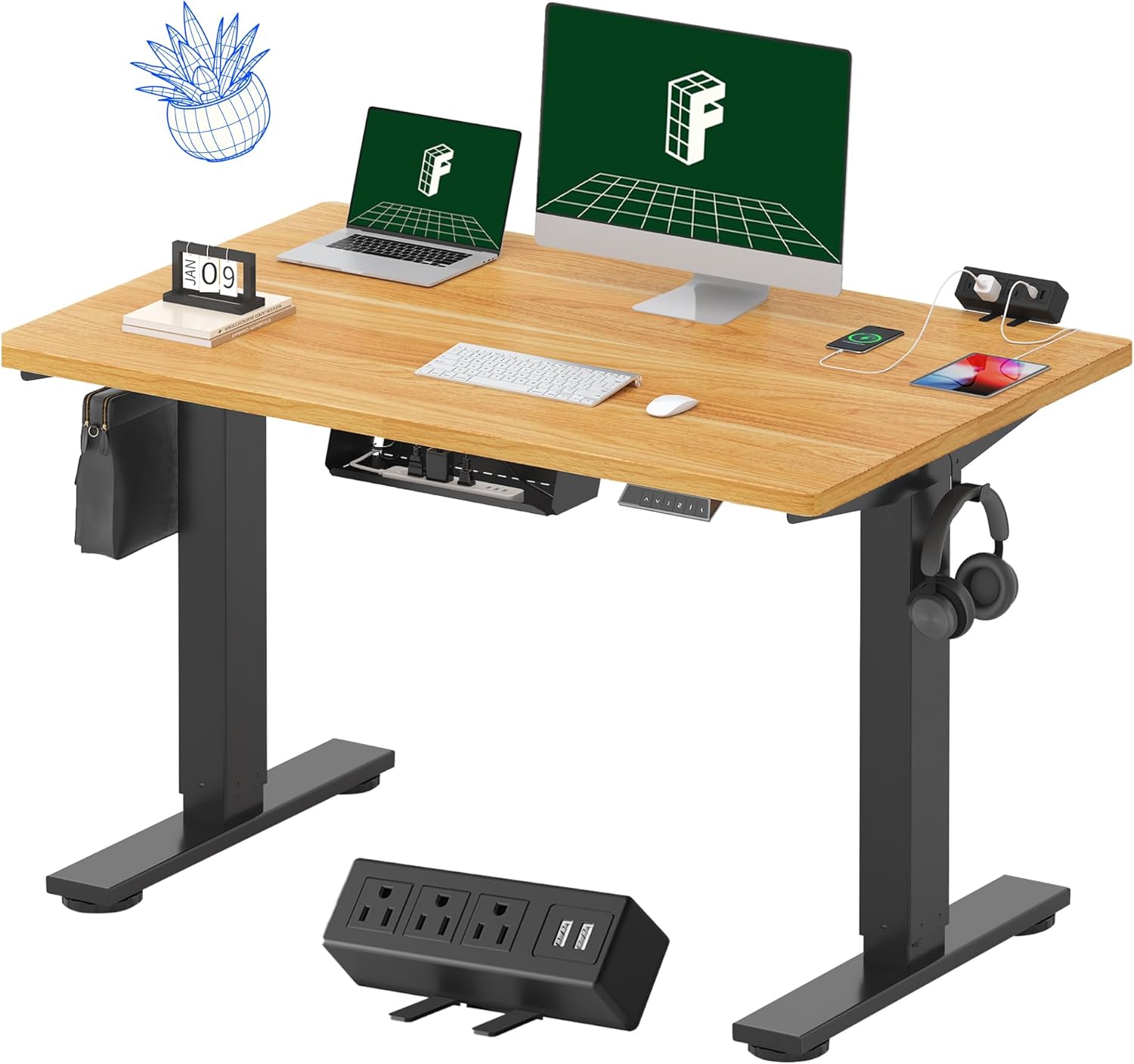
Image 1.1: FLEXISPOT EN2 Standing Desk with Maple Top and Black Frame, showcasing a typical setup with monitors, a laptop, and a clamp ແຖບໄຟຟ້າ.
2. ຂໍ້ມູນຄວາມປອດໄພ
ຄໍາເຕືອນ: ການບໍ່ປະຕິບັດຕາມຄໍາແນະນໍາດ້ານຄວາມປອດໄພເຫຼົ່ານີ້ອາດຈະເຮັດໃຫ້ເກີດການບາດເຈັບຫຼືຄວາມເສຍຫາຍຕໍ່ຜະລິດຕະພັນ.
- ສະເຫມີປະຕິບັດຕາມຄໍາແນະນໍາການປະກອບຢ່າງລະມັດລະວັງ.
- An electric drill (not included) may be required for assembly.
- Ensure the desk is properly anchored to prevent tipping.
- ບໍ່ໃຫ້ເກີນຄໍາແນະນໍານ້ໍາຫນັກສູງສຸດຂອງ 176 ປອນ (80 ກິໂລກໍາ).
- Keep the work surface clear of items that could fall and cause injury during height adjustments.
- Always unplug the desk before performing any maintenance or making adjustments to the frame or electrical components.
- ໃຫ້ເດັກນ້ອຍ ແລະສັດລ້ຽງຢູ່ຫ່າງຈາກໂຕະເຮັດວຽກໃນລະຫວ່າງການເຮັດວຽກ.
3. ເນື້ອໃນຊຸດ
Your FLEXISPOT EN2 Standing Desk will arrive in two separate packages, which may be shipped separately. Please ensure you have received both packages and all components before beginning assembly.

Image 3.1: Illustration showing the desk components arriving in two separate packages: one for the desktop and one for the desk frame.
ອົງປະກອບລວມ:
- One-piece desktop (48" x 30" Maple Top)
- Electric height-adjustable frame (Black)
- 6-button digital controller with 4 memory presets
- Removable clamp power strip (3 AC outlets, 2 USB charging ports)
- Cable management device
- Assembly hardware and tools (excluding electric drill)
4. ການຕິດຕັ້ງແລະການປະກອບ
Assembly typically requires two people and an electric drill (not included). Follow the detailed instructions provided in the separate assembly guide included with your product. The process involves attaching the legs to the desktop and connecting the control panel and motor.
ເຄັດລັບກອງປະຊຸມ:
- ວາງອົງປະກອບທັງໝົດຢູ່ເທິງພື້ນຜິວທີ່ສະອາດ ແລະອ່ອນເພື່ອປ້ອງກັນຮອຍຂີດຂ່ວນ.
- ຮັບປະກັນວ່າສະກູທັງໝົດຖືກຂັນແໜ້ນດີ, ແຕ່ຢ່າຂັນແໜ້ນເກີນໄປ.
- Properly route all cables using the provided cable management solutions to avoid interference with desk movement.
Video 4.1: Official FLEXISPOT Standing Desk Frame Installation Guide. This video demonstrates the step-by-step process of assembling the desk frame and attaching it to the desktop.
5. ຄໍາແນະນໍາການດໍາເນີນງານ
5.1 ແຜງຄວບຄຸມດິຈິຕອນ
The desk is operated using a 6-button digital controller, typically mounted on the underside of the desktop. It features up/down arrows, an LED display for height, and four programmable memory presets.

Image 5.1: Digital control panel with LED display showing current height, up/down arrows, and four numbered memory preset buttons.
5.2 ການປັບຄວາມສູງ
- ກົດຄ້າງໄວ້ Up Arrow (^) ປຸ່ມເພື່ອຍົກໂຕະຂຶ້ນ.
- ກົດຄ້າງໄວ້ Down Arrow (v) ປຸ່ມເພື່ອຫຼຸດໂຕະລົງ.
- The desk adjusts smoothly from 28.1 inches (71.4 cm) to 45.7 inches (116.1 cm).
- The motor operates quietly at less than 50 dB.
5.3 ການຕັ້ງຄ່າຄວາມຈຳລ່ວງໜ້າ
The controller allows you to save up to four preferred height settings for quick adjustments.
- ປັບໂຕະໃຫ້ໄດ້ຄວາມສູງຕາມທີ່ທ່ານຕ້ອງການໂດຍໃຊ້ລູກສອນຂຶ້ນ/ລົງ.
- ກົດ ໜ່ວຍຄວາມຈຳ (M) button. The LED display will flash.
- ພາຍໃນ 3 ວິນາທີ, ໃຫ້ກົດປຸ່ມທີ່ຕັ້ງໄວ້ລ່ວງໜ້າອັນໜຶ່ງ (1, 2, 3, ຫຼື 4) ເພື່ອບັນທຶກຄວາມສູງປະຈຸບັນໃຫ້ກັບ preset ນັ້ນ.
- ເພື່ອເອີ້ນຄວາມສູງທີ່ບັນທຶກໄວ້, ພຽງແຕ່ກົດປຸ່ມທີ່ກຳນົດໄວ້ລ່ວງໜ້າທີ່ມີຕົວເລກທີ່ສອດຄ້ອງກັນ. ໂຕະຈະຍ້າຍໄປທີ່ຕຳແໜ່ງທີ່ບັນທຶກໄວ້ໂດຍອັດຕະໂນມັດ.
Video 5.2: FlexiSpot Brand Store video demonstrating the desk's height adjustment and memory preset functions.
6. ຄຸນສົມບັດ
6.1 One-Piece Desktop
The desk features a spacious, single-piece desktop made of FSC-Certified wood. This design provides a smooth, seamless work surface, enhancing stability and aesthetics compared to multi-piece desktops.

Image 6.1: Visual comparison highlighting the smooth surface of a single-piece desktop against the visible seams of a two-piece desktop.
6.2 Removable Clamp ສາຍພະລັງງານ
A desktop-mounted power strip is included, featuring 3 AC outlets (125V/12A) and 2 USB charging ports (5V/2A). This allows for convenient charging of electronic devices directly from your desk. The power strip can be clipped to the back or side of your desk.

Image 6.2: Close-up of the removable clamp power strip, detailing its 3 AC outlets and 2 USB-A ports, and how it attaches to the desk edge.
6.3 ການຈັດການສາຍ
The desk includes a cable management device to help organize and tidy up your workspace, preventing cables from dangling and interfering with desk movement.

Image 6.3: Illustration demonstrating effective cable management with an under-desk tray, showing a tidy setup compared to unmanaged cables.
7. ບໍາລຸງຮັກສາ
- ກວດກາທຸກໆສະກູແລະການເຊື່ອມຕໍ່ຢ່າງເປັນປົກກະຕິເພື່ອຮັບປະກັນວ່າພວກມັນແຫນ້ນ.
- ທຳຄວາມສະອາດພື້ນຜິວໜ້າຈໍດ້ວຍຜ້າທີ່ອ່ອນນຸ້ມ, ຜ້າເຊັດໂຕamp ຜ້າ. ຫຼີກລ້ຽງການເຮັດຄວາມສະອາດຂັດທີ່ອາດຈະທໍາລາຍການສໍາເລັດຮູບ.
- ຮັກສາມໍເຕີແລະອົງປະກອບໄຟຟ້າບໍ່ໃຫ້ຂີ້ຝຸ່ນແລະຄວາມຊຸ່ມຊື່ນ.
- Do not place hot items directly on the desktop without protective coasters.
8. ການແກ້ໄຂບັນຫາ
8.1 Desk Not Moving or Displaying Error Code (e.g., "r5t")
If your desk is not responding or the LED display shows an error code like "r5t", a system reset may be required.
- ຖອດປລັກໂຕະອອກຈາກປລັກໄຟ.
- ລໍຖ້າຢ່າງໜ້ອຍ 10-15 ວິນາທີ.
- ສຽບປລັກໂຕະກັບຄືນເຂົ້າກັບປລັກໄຟ.
- Press and hold the "Down Arrow (v)" button until the desk reaches its lowest position and then slightly rises. This indicates a successful reset.
- ຖ້າບັນຫາຍັງຄົງຢູ່, ໃຫ້ຕິດຕໍ່ຝ່າຍຊ່ວຍເຫຼືອລູກຄ້າ.
8.2 Desk Wobbling at Higher Heights
While the desk is designed for stability, minor wobbling can occur at maximum heights. Ensure the adjustable feet on the leg bases are properly leveled to compensate for uneven flooring.
9. ຂໍ້ມູນຈໍາເພາະ
| ຄຸນສົມບັດ | ຂໍ້ມູນຈໍາເພາະ |
|---|---|
| ຍີ່ຫໍ້ | FLEXISPOT |
| ຕົວແບບ | EN2 |
| ວັດສະດຸ Desktop | FSC-Certified Maple Wood |
| ຂະໜາດ Desktop | 48" (W) x 30" (D) |
| ຄວາມຫນາຂອງ desktop | 1 ນິ້ວ |
| ວັດສະດຸກອບ | Industrial-grade Alloy Steel (Black) |
| ຊ່ວງການປັບຄວາມສູງ | 28.1" ຫາ 45.7" (71.4 ຊມ ຫາ 116.1 ຊມ) |
| ລະດັບສຽງລົບກວນມໍເຕີ | < 50 dB |
| ຄວາມອາດສາມາດນ້ໍາຫນັກ | 176 lbs (80 ກິໂລ) |
| ກະດານຄວບຄຸມ | 6-button digital controller with 4 memory presets |
| ປະຕູພະລັງງານ | 3 AC outlets (125V/12A), 2 USB charging ports (5V/2A) |
| ຕ້ອງການສະພາແຫ່ງ | Yes (electric drill recommended) |
10. ການຮັບປະກັນແລະການສະຫນັບສະຫນູນ
10.1 ຂໍ້ມູນການຮັບປະກັນ
- ການຮັບປະກັນ 5 ປີ: Covers frames, motors, and other mechanical devices.
- ການຮັບປະກັນ 2 ປີ: Covers controllers, switches, and electronics.
ກະລຸນາເກັບຫຼັກຖານການຊື້ຂອງທ່ານໄວ້ເພື່ອການຮຽກຮ້ອງການຮັບປະກັນ. ການຮັບປະກັນກວມເອົາຂໍ້ບົກຜ່ອງດ້ານວັດສະດຸ ແລະ ຝີມືການຜະລິດພາຍໃຕ້ການນຳໃຊ້ປົກກະຕິ.
10.2 ສະຫນັບສະຫນູນລູກຄ້າ
For any questions, troubleshooting assistance, or warranty claims, please contact FLEXISPOT customer support through their official webເວັບໄຊ ຫຼືຮ້ານຂາຍຍ່ອຍບ່ອນທີ່ທ່ານຊື້ຜະລິດຕະພັນ.


