ແນະນຳ
Thank you for choosing the PHEANOO D6 Sound Bar System. This 2.1 channel soundbar with a dedicated wired subwoofer is designed to enhance your audio experience, providing clear dialogue, powerful bass, and immersive sound for your home entertainment. This manual provides detailed instructions for setup, operation, maintenance, and troubleshooting to ensure optimal performance and longevity of your device.
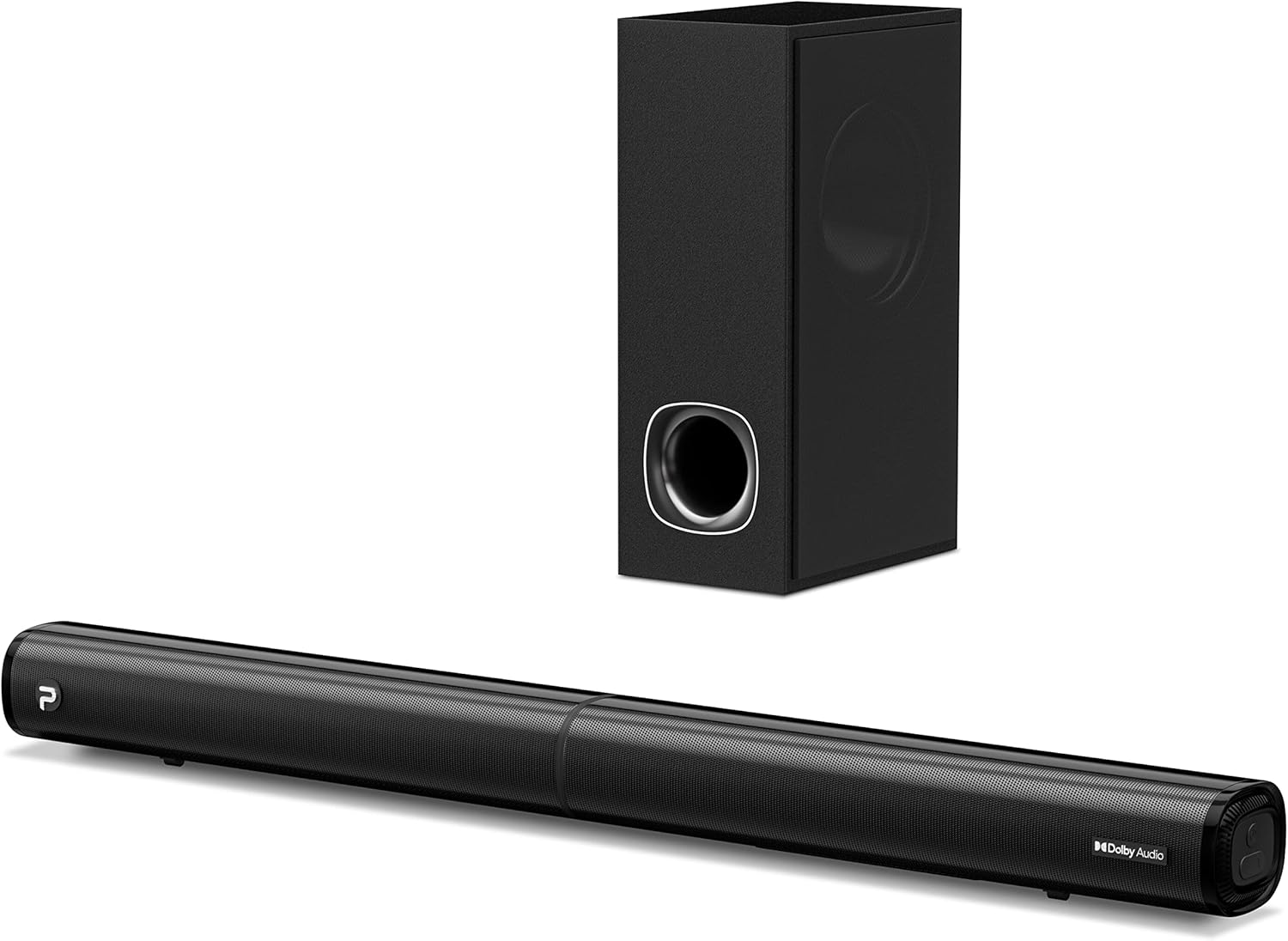
Image: The PHEANOO D6 Sound Bar and its accompanying wired subwoofer, showcasing ການອອກແບບສີດໍາ sleek ຂອງເຂົາເຈົ້າ.
ແມ່ນຫຍັງຢູ່ໃນກ່ອງ
ກະລຸນາກວດເບິ່ງເນື້ອໃນຂອງແພັກເກັດຢ່າງລະມັດລະວັງ. ຖ້າລາຍການໃດຂາດຫາຍໄປ ຫຼືເສຍຫາຍ, ໃຫ້ຕິດຕໍ່ຝ່າຍຊ່ວຍເຫຼືອລູກຄ້າ.
- Soundbar and Wired Subwoofer
- ສາຍ HDMI
- ສາຍສຽງ RCA
- ຊຸດຕິດຕັ້ງຝາ (ສະກູ ແລະ ສະກູ)
- ການຄວບຄຸມໄລຍະໄກ (ບໍ່ລວມຫມໍ້ໄຟ)
- Power Adapter

Image: All components included in the PHEANOO D6 Sound Bar package, laid out for clear identification, including the soundbar, subwoofer, cables, remote, and wall mount kit.
ຕັ້ງຄ່າ
1. Assembling the Soundbar (Detachable Design)
The PHEANOO D6 soundbar features a unique detachable design for flexible placement. Follow these steps to assemble it:
- Align the audio connector from one half of the soundbar with the corresponding port on the other half.
- Gently push the two halves together until they click into place.
- Twist the two halves to secure the connection, ensuring the soundbar is firmly assembled.

Image: A three-step visual guide demonstrating how to connect the two halves of the detachable soundbar, ensuring proper alignment and secure locking.
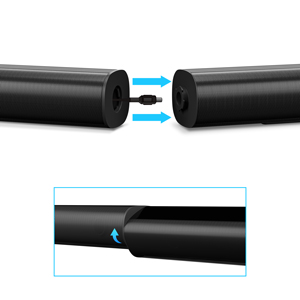
ຮູບພາບ: A close-up view of the soundbar's detachable connection point, showing the male and female connectors.
2. ການເຊື່ອມຕໍ່ Subwoofer
Connect the wired subwoofer to the soundbar using the dedicated subwoofer cable. Ensure the connection is secure.
3. ຕົວເລືອກການຈັດວາງ
You can place the soundbar on a tabletop or mount it on a wall.
- ການຈັດວາງເທິງໂຕະ: ວາງແຖບສຽງໄວ້ທາງໜ້າໂທລະພາບຂອງທ່ານໂດຍກົງ, ຮັບປະກັນວ່າມັນບໍ່ບັງເຊັນເຊີຣີໂໝດຂອງໂທລະພາບ.
- ຕິດຝາ: Use the included wall mount kit. It is recommended to measure and mark the drilling points accurately, rather than relying solely on the paper stencil, to ensure a level installation.
4. ການເຊື່ອມຕໍ່ສຽງ
The PHEANOO D6 offers multiple connectivity options. Choose the best one for your device:
- HDMI (ARC): For the best audio quality and control, connect an HDMI cable from the soundbar's HDMI (ARC) port to your TV's HDMI (ARC) port. This allows your TV remote to control the soundbar's volume.
- Optical: Connect an optical cable from the soundbar's Optical port to your TV's Optical Digital Audio Out port.
- AUX: Use the 3.5mm AUX cable to connect to devices with a 3.5mm audio output.
- Bluetooth 5.0: For wireless connection, pair your device via Bluetooth.

Image: The rear panel of the PHEANOO D6 Sound Bar, highlighting the HDMI (ARC), Bluetooth, Optical, and AUX input ports with corresponding icons.

ຮູບພາບ: A ລາຍລະອຽດ view of the soundbar's input panel, showing the AUX, Optical, and HDMI (ARC) ports clearly labeled.
5. ການເຊື່ອມຕໍ່ພະລັງງານ
ເຊື່ອມຕໍ່ອະແດບເຕີໄຟເຂົ້າກັບແຖບສຽງ ແລະ ຈາກນັ້ນສຽບມັນເຂົ້າກັບປລັກສຽບຝາ.
ຄໍາແນະນໍາການດໍາເນີນງານ
ການຄວບຄຸມໄລຍະໄກ
The included remote control allows you to manage all functions of the soundbar. Insert two AAA batteries (not included) into the remote before use.

Image: The remote control for the PHEANOO D6 Sound Bar, showing its buttons and an indicator light.
ເປີດ/ປິດ
Press the power button on the remote or the soundbar to turn the unit on or off.
ການຄັດເລືອກການປ້ອນຂໍ້ມູນ
Press the "Input" button on the remote to cycle through available input sources: HDMI (ARC), Optical, AUX, and Bluetooth.
ການຈັບຄູ່ Bluetooth
ເພື່ອຈັບຄູ່ອຸປະກອນ Bluetooth:
- Select Bluetooth input on the soundbar. The indicator light will flash.
- Enable Bluetooth on your device (smartphone, tablet, etc.) and search for "PHEANOO D6".
- Select the soundbar from the list to pair. Once connected, the indicator light will be solid.

Image: A smartphone displaying a music app, wirelessly connected to the PHEANOO D6 Sound Bar via Bluetooth, indicated by a Wi-Fi like symbol.
ໂໝດສຽງ
ແຖບສຽງມີໂໝດສຽງຫຼາກຫຼາຍເພື່ອເພີ່ມປະສິດທິພາບການຟັງຂອງທ່ານ:
- ຮູບແບບການສົນທະນາ: Enhances vocal clarity, making speech easier to understand.
- ໂໝດດົນຕີ: ເຫມາະສໍາລັບການຫຼິ້ນດົນຕີ, ໃຫ້ສຽງທີ່ສົມດູນ.
- ຮູບເງົາຮູບເງົາ: Delivers an immersive cinematic experience with enhanced effects.
- ໂໝດ 3D: Creates a wider, more enveloping soundstage.

Image: Icons representing different sound modes: Dialogue, Music, Movie, and 3D, indicating the soundbar's versatility.
ການປັບສຽງເບດ
Use the dedicated bass control buttons on the remote to increase or decrease the subwoofer's output level to your preference.

Image: A close-up of the subwoofer, with a visual effect suggesting powerful bass emanating from it.
Dolby Digital Support
The PHEANOO D6 Sound Bar supports Dolby Digital decoding, providing a rich and dynamic audio experience for compatible content.

Image: A living room setup with the soundbar and TV, overlaid with a grid pattern indicating premium 3D surround sound powered by Dolby Audio.

Image: The Dolby Audio logo accompanied by visual representations of sound waves, emphasizing the enhanced audio quality.
Roku TV ພ້ອມ
This soundbar is certified to work seamlessly with your Roku TV. Enjoy smooth setup, easy access to sound settings, and compatibility with any Roku TV remote.

Image: A television screen displaying the "Roku TV Ready" setup interface, with the PHEANOO Soundbar and subwoofer positioned below it, illustrating seamless integration.
ບໍາລຸງຮັກສາ
- ທໍາຄວາມສະອາດ: ໃຊ້ຜ້າປຽກແຫ້ງເພື່ອເຮັດຄວາມສະອາດພື້ນຜິວຂອງແຖບສຽງ ແລະເຄື່ອງຍ່ອຍ. ຢ່າໃຊ້ເຄື່ອງເຮັດຄວາມສະອາດຂອງແຫຼວຫຼື aerosols.
- ການລະບາຍອາກາດ: ຮັບປະກັນການລະບາຍອາກາດທີ່ເໝາະສົມອ້ອມຮອບແຖບສຽງ ແລະ ຊັບວູບເຟີເພື່ອປ້ອງກັນຄວາມຮ້ອນເກີນໄປ. ຢ່າອຸດຕັນຊ່ອງລະບາຍອາກາດໃດໆ.
- ການເກັບຮັກສາ: ຖ້າເກັບຮັກສາເຄື່ອງສໍາລັບໄລຍະເວລາທີ່ຍາວນານ, ຖອດມັນອອກຈາກພະລັງງານແລະເກັບໄວ້ໃນບ່ອນທີ່ເຢັນ, ແຫ້ງ.
ການແກ້ໄຂບັນຫາ
| ບັນຫາ | ສາເຫດທີ່ເປັນໄປໄດ້ | ການແກ້ໄຂ |
|---|---|---|
| ບໍ່ມີພະລັງງານ | ສາຍໄຟບໍ່ໄດ້ເຊື່ອມຕໍ່; ປລັກສຽບໄຟບໍ່ເຮັດວຽກ. | ໃຫ້ແນ່ໃຈວ່າສາຍໄຟເຊື່ອມຕໍ່ຢ່າງປອດໄພ. ລອງປລັກສຽບໄຟອື່ນ. |
| ບໍ່ມີສຽງ | ເລືອກອິນພຸດບໍ່ຖືກຕ້ອງ; ລະດັບສຽງຕໍ່າເກີນໄປ; ສາຍບໍ່ໄດ້ເຊື່ອມຕໍ່ຢ່າງຖືກຕ້ອງ. | Select the correct input source. Increase volume. Check all audio cable connections. |
| ການຈັບຄູ່ Bluetooth ລົ້ມເຫລວ | ແຖບສຽງບໍ່ຢູ່ໃນໂໝດຈັບຄູ່; ອຸປະກອນໄກເກີນໄປ; ແຊກແຊງ. | Ensure soundbar is in Bluetooth input and indicator is flashing. Move device closer. Turn off other Bluetooth devices. |
| ຄຸນນະພາບສຽງບໍ່ດີ | Incorrect sound mode; Source audio quality is low. | Try different sound modes (Music, Movie, Dialogue). Ensure the audio source is high quality. |
| ການຄວບຄຸມໄລຍະໄກບໍ່ເຮັດວຽກ | Batteries dead or incorrectly inserted; Obstruction between remote and soundbar. | Replace batteries, ensuring correct polarity. Remove any obstructions. |
For more detailed troubleshooting, refer to the official Troubleshooting Guide PDF available on the product page or contact PHEANOO customer support.
ຂໍ້ມູນຈໍາເພາະ
| ຄຸນສົມບັດ | ລາຍລະອຽດ |
|---|---|
| ຕົວແບບ | D6 |
| ຍີ່ຫໍ້ | ພູອາໂນ |
| ປະເພດລຳໂພງ | Soundbar ທີ່ມີສາຍ subwoofer |
| ການຕັ້ງຄ່າຊ່ອງ | 2.1 ຊ |
| ເຕັກໂນໂລຊີການເຊື່ອມຕໍ່ | HDMI (ARC), Bluetooth 5.0, Optical, AUX |
| ຊ່ວງ Bluetooth | Up to 100 Meters (approx. 328 feet) |
| ລຳໂພງກຳລັງຜົນຜະລິດສູງສຸດ | 240 ວັດ |
| ຂະໜາດຜະລິດຕະພັນ (ແຖບສຽງ) | 29.5"W x 2.4"H x 2.8"D |
| ນ້ໍາຫນັກລາຍການ | 11.57 ປອນ |
| ປະເພດການຄວບຄຸມ | ການຄວບຄຸມໄລຍະໄກ |
| ຄຸນນະສົມບັດພິເສດ | Dolby Digital Decoding, Dialogue Enhancement, Bass Adjustable, Detachable Design, Roku TV Ready |
ການຮັບປະກັນແລະການສະຫນັບສະຫນູນ
The PHEANOO D6 Sound Bar System comes with a ການຮັບປະກັນຈໍາກັດ. ກະລຸນາເບິ່ງບັດຮັບປະກັນທີ່ລວມຢູ່ໃນຊຸດຂອງທ່ານສໍາລັບຂໍ້ກໍານົດແລະເງື່ອນໄຂສະເພາະ.
For technical support, warranty claims, or further assistance, please visit the official PHEANOO website or contact their customer service department. You can also find additional resources like the ຄູ່ມືຜູ້ໃຊ້ (PDF) ແລະ ຄູ່ມືແກ້ໄຂບັນຫາ (PDF) ອອນໄລນ໌.