1. ບົດແນະນຳ
Thank you for choosing the CREATE WINDCALM M Ceiling Fan. This manual provides essential information for the safe installation, operation, and maintenance of your new ceiling fan. Please read this manual thoroughly before installation and keep it for future reference.

Image 1.1: The CREATE WINDCALM M Ceiling Fan, showcasing its sleek design, accompanying remote control, and the smartphone app interface for smart control.
2. ຄໍາແນະນໍາຄວາມປອດໄພ
ໃຫ້ປະຕິບັດຕາມຂໍ້ຄວນລະວັງດ້ານຄວາມປອດໄພຂັ້ນພື້ນຖານສະເໝີເມື່ອຕິດຕັ້ງ ແລະ ໃຊ້ງານເຄື່ອງໃຊ້ໄຟຟ້າເພື່ອຫຼຸດຜ່ອນຄວາມສ່ຽງຈາກໄຟໄໝ້, ໄຟຟ້າຊັອດ ແລະ ການບາດເຈັບສ່ວນຕົວ.
- ໃຫ້ແນ່ໃຈວ່າການປິດການສະຫນອງພະລັງງານກ່ອນທີ່ຈະຕິດຕັ້ງຫຼືບໍາລຸງຮັກສາ.
- ການຕິດຕັ້ງຄວນໄດ້ຮັບການປະຕິບັດໂດຍຊ່າງໄຟຟ້າທີ່ມີຄຸນວຸດທິຫຼືຜູ້ທີ່ມີຄວາມຮູ້ຄວາມສາມາດ.
- The mounting structure must be capable of supporting the fan's weight.
- ຫ້າມໃສ່ວັດຖຸເຂົ້າໄປໃນໃບພັດລົມໃນຂະນະທີ່ພັດລົມກຳລັງເຮັດວຽກ.
- ຮັກສາເດັກນ້ອຍ ແລະສັດລ້ຽງຢູ່ຫ່າງຈາກພັດລົມໃນລະຫວ່າງການປະຕິບັດງານ.
- This fan is suitable for indoor and outdoor covered areas.
3. ເນື້ອໃນຊຸດ
Carefully unpack all components and check against the list below. If any items are missing or damaged, contact customer support immediately.
- Ceiling Fan Motor Unit
- ໃບພັດລົມ (3x)
- ວົງເລັບຕິດຕັ້ງ
- ການຄວບຄຸມໄລຍະໄກ
- ອຸປະກອນຕິດຕັ້ງ (ສະກູ, ສະມໍ, ແຜ່ນຮອງ)
- ຄູ່ມືການສອນ
4. ການຕິດຕັ້ງແລະການຕິດຕັ້ງ
ປະຕິບັດຕາມຂັ້ນຕອນເຫຼົ່ານີ້ສຳລັບການຕິດຕັ້ງທີ່ຖືກຕ້ອງ. ແນະນຳໃຫ້ຕິດຕັ້ງແບບມືອາຊີບ.
- ກະກຽມສະຖານທີ່ຕິດຕັ້ງ: Ensure the ceiling joist or support structure can hold the fan's weight (approximately 6.22 kg).
- ຕິດຕັ້ງຕົວຍຶດຕິດ: Secure the mounting bracket to the ceiling using the provided screws and anchors. Ensure it is firmly attached.
- ສາຍໄຟ: Connect the fan's electrical wires to your household wiring according to local electrical codes. The fan operates on 240 Volts. Ensure correct connection of Live (L), Neutral (N), and Ground (Earth) wires.
- ຕິດໜ່ວຍພັດລົມ: Carefully lift the fan motor unit and attach it to the mounting bracket. Many models include a hook to temporarily hang the fan while wiring.
- ຕິດຕັ້ງພັດລົມ Blades: Attach the three fan blades to the motor unit using the provided screws. Ensure all screws are tightened securely.

ຮູບພາບ 4.1: ລາຍລະອຽດ view of the fan's central unit, showing the robust construction and points for blade attachment.

Image 4.2: The ceiling fan seamlessly integrated into a room, demonstrating its aesthetic appeal and compact design.
5. ການດໍາເນີນງານ
Your CREATE WINDCALM M Ceiling Fan can be controlled via the included remote control or the CREATE mobile application (for Wi-Fi enabled models).
5.1. ຟັງຊັນຄວບຄຸມໄລຍະໄກ
- ເປີດ/ປິດ: ເປີດ ຫຼືປິດພັດລົມ.
- ການຄວບຄຸມຄວາມໄວ: Adjusts fan speed through 6 settings.
- ໂມງຈັບເວລາ: ຕັ້ງພັດລົມໃຫ້ປິດອັດຕະໂນມັດຫຼັງຈາກ 1, 2, ຫຼື 4 ຊົ່ວໂມງ.
- ໂໝດລະດູຮ້ອນ/ລະດູໜາວ: ປ່ຽນທິດທາງການໝູນຂອງໃບມີດ.
5.2. Summer/Winter Operation
ພັດລົມມີມໍເຕີທີ່ສາມາດປ່ຽນໄດ້ສອງດ້ານເພື່ອຄວາມສະດວກສະບາຍຕະຫຼອດປີ.
- ໂໝດລະດູຮ້ອນ (ການໝຸນຕາມເຂັມໂມງ): Pushes cool air downwards, creating a refreshing breeze. This mode helps to cool the room by circulating air.
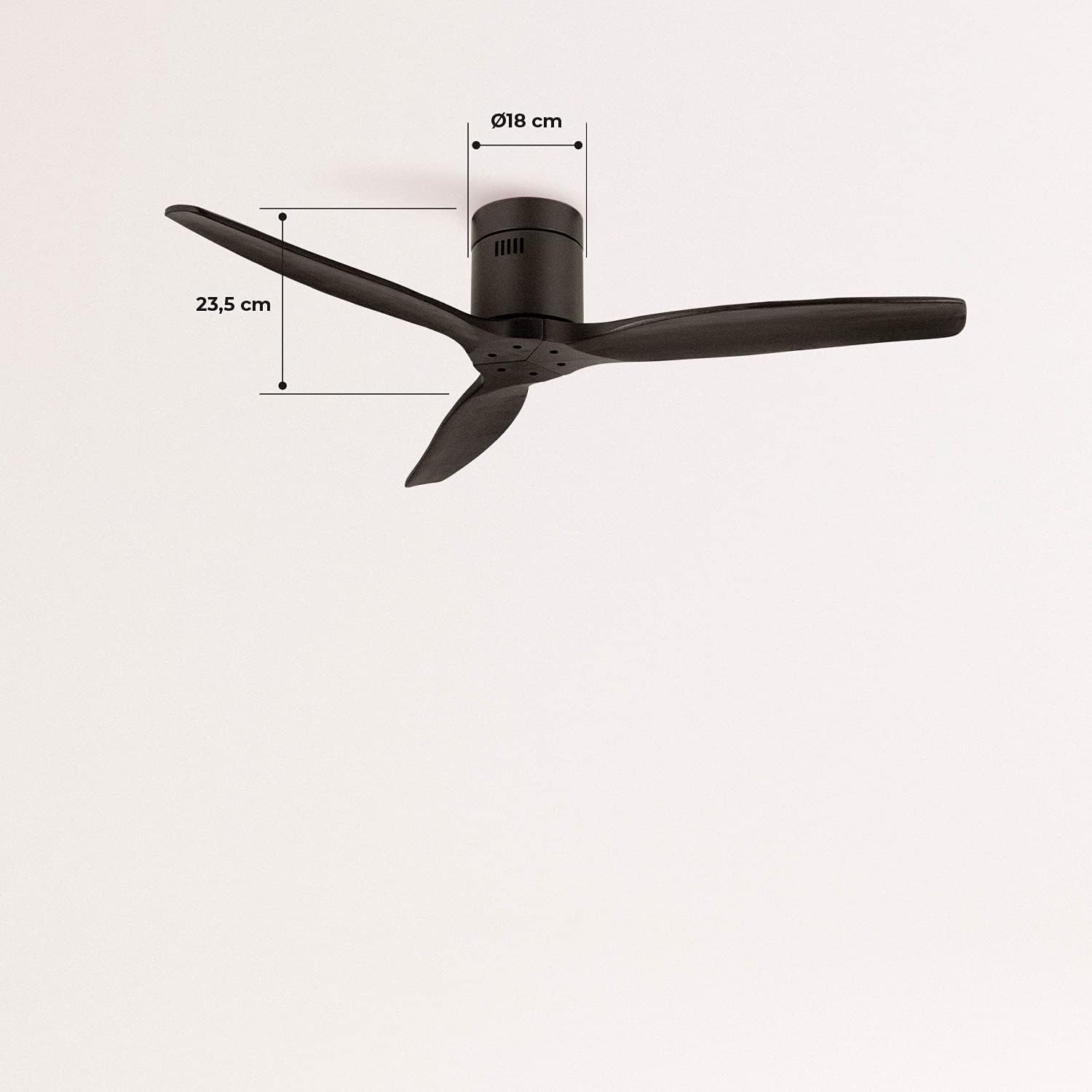
Image 5.1: Visual representation of the fan's airflow in Summer Mode, where cool air is directed downwards.
- ໂໝດລະດູໜາວ (ການໝຸນຕາມເຂັມໂມງ): Draws cool air upwards, circulating warm air trapped near the ceiling downwards. This helps to distribute heat more evenly, reducing heating costs.

Image 5.2: Visual representation of the fan's airflow in Winter Mode, where warm air is recirculated from the ceiling.
5.3. Wi-Fi and App Control (Smart Option)
If your model includes the Wi-Fi option, download the CREATE app to control and program your fan from your smartphone. Follow the in-app instructions for pairing your device.
6. ບໍາລຸງຮັກສາ
ການບໍາລຸງຮັກສາເປັນປົກກະຕິຮັບປະກັນປະສິດທິພາບທີ່ດີທີ່ສຸດແລະອາຍຸຍືນຂອງພັດລົມຂອງທ່ານ.
- ທໍາຄວາມສະອາດ: ຂີ້ຝຸ່ນແຜ່ນພັດລົມ ແລະ ທີ່ຢູ່ອາໃສຂອງມໍເຕີເປັນປະຈໍາດ້ວຍເຄື່ອງອ່ອນ, ງamp ຜ້າ. ຢ່າໃຊ້ເຄື່ອງເຮັດຄວາມສະອາດຂັດຫຼືສານລະລາຍ.
- ການກວດກາແຜ່ນໃບ: ກວດເບິ່ງແຕ່ລະໄລຍະວ່າ screws ແຜ່ນໃບທັງຫມົດແມ່ນແຫນ້ນ. ແຜ່ນໃບຄ້າຍຄືວ່າງສາມາດເຮັດໃຫ້ເກີດການສັ່ນສະເທືອນ ແລະສຽງດັງ.
- ມໍເຕີລີລູລີ: ມໍເຕີ DC ຂອງພັດລົມແມ່ນມີການຫລໍ່ລື່ນຢ່າງຖາວອນ ແລະ ບໍ່ຕ້ອງການການຫລໍ່ລື່ນເພີ່ມເຕີມ.
7. ການແກ້ໄຂບັນຫາ
ຖ້າເຈົ້າພົບບັນຫາກັບພັດລົມຂອງເຈົ້າ, ໃຫ້ອ້າງອີງເຖິງບັນຫາທົ່ວໄປ ແລະວິທີແກ້ໄຂບັນຫາຕໍ່ໄປນີ້:
| ບັນຫາ | ສາເຫດທີ່ເປັນໄປໄດ້ | ການແກ້ໄຂ |
|---|---|---|
| ພັດລົມບໍ່ເປີດ | No power supply; Remote control battery low; Incorrect wiring. | ກວດສອບເຄື່ອງຕັດວົງຈອນ; ປ່ຽນແບັດເຕີຣີຣີໂໝດ; ກວດສອບການເຊື່ອມຕໍ່ສາຍໄຟ. |
| ພັດລົມສັ່ນ | screws ແຜ່ນໃບຄ້າຍຄືວ່າງ; ແຜ່ນໃບບໍ່ສົມດຸນ; ວົງເລັບຍຶດວ່າງ. | ຂັນສະກູໃບມີດທັງໝົດໃຫ້ແໜ້ນ; ຮັບປະກັນວ່າໃບມີດຖືກຕິດຕັ້ງຢ່າງຖືກຕ້ອງ; ກວດສອບຂາຕັ້ງເພື່ອການຕິດທີ່ແໜ້ນໜາ. |
| ສຽງດັງເກີນໄປ | Loose components; Motor issue. | Check all screws and connections; If noise persists, contact customer support. |
| ການຄວບຄຸມໄລຍະໄກບໍ່ເຮັດວຽກ | ແບັດເຕີຣີຕໍ່າ/ໝົດ; ບໍ່ໄດ້ຈັບຄູ່ຣີໂໝດ. | ປ່ຽນແບັດເຕີຣີ; ອ້າງອີງຄຳແນະນຳການຈັບຄູ່ທາງໄກໃນຄູ່ມືສະບັບເຕັມ (ຖ້າມີ). |
| ບັນຫາການເຊື່ອມຕໍ່ Wi-Fi | Incorrect network password; Router too far; App issues. | Verify Wi-Fi password; Move router closer or use a Wi-Fi extender; Reinstall app or check for updates. |
8. ຂໍ້ມູນຈໍາເພາະ
| ຄຸນສົມບັດ | ຂໍ້ມູນຈໍາເພາະ |
|---|---|
| ຍີ່ຫໍ້ | ສ້າງ |
| ໝາຍເລກຕົວແບບ | 93531_182750 |
| ສີ | ດຳ |
| ແບບ | ໂດຍບໍ່ມີແສງສະຫວ່າງ |
| ແຫຼ່ງພະລັງງານ | ໄຟຟ້າສາຍ |
| ສະບັບtage | 240 ໂວນ |
| ວັດtage | 40 ວັດ |
| ກະແສລົມ | 210 Cubic meters per minute |
| ລະດັບສຽງ | 50 dB |
| ຄວາມຍາວຂອງແຜ່ນໃບ | 66 ຊັງຕີແມັດ |
| ເສັ້ນຜ່າສູນກາງ | 132 ຊັງຕີແມັດ |
| ຂະໜາດສິນຄ້າ | 132D x 132W x 23.5H ຊມ |
| ນ້ໍາຫນັກລາຍການ | 6.22 ກິໂລກຣາມ |
| ຄຸນນະສົມບັດພິເສດ | ນ້ຳໜັກເບົາ |

Image 8.1: Key dimensions of the fan, including its 132 cm diameter and 66 cm blade length.

Image 8.2: Additional dimensions, highlighting the fan's height of 23.5 cm and the 18 cm diameter of the motor housing.
9. ການຮັບປະກັນແລະການສະຫນັບສະຫນູນ
Your CREATE WINDCALM M Ceiling Fan comes with a standard warranty. For specific warranty terms and conditions, please refer to the documentation included with your purchase or visit the official CREATE website. In case of any issues or for technical support, please contact CREATE customer service. The seller, CREATE, offers support and assistance for product-related inquiries.


