ແນະນຳ
The WaterGuru Sense is an advanced smart device designed to simplify pool water chemistry management. It provides daily, accurate measurements of your pool's Free Chlorine (FC) and pH levels, delivering insights directly to your smartphone. By continuously monitoring these critical parameters, the WaterGuru Sense helps maintain optimal water balance, ensuring a safe and clear swimming environment while potentially reducing energy consumption and chemical waste.

Figure 1: WaterGuru Sense Smart Pool Monitoring System, showing the circular skimmer cover and the submerged sensor unit.
ການຕິດຕັ້ງແລະການຕິດຕັ້ງ
The WaterGuru Sense is designed for easy, tool-free installation. It fits directly into most standard 8-inch round pool skimmer openings. For square skimmers, a WaterGuru Square Skimmer Adapter (sold separately) may be required.
- Prepare the Skimmer: Ensure your pool skimmer basket is clean and free of debris.
- Insert the Sense Unit: Carefully lower the WaterGuru Sense unit into the skimmer opening. The unit is designed to be submerged and will rest securely within the skimmer.
- Replace Skimmer Cover: Place the WaterGuru Sense cover over the skimmer opening. It replaces your existing skimmer cover.
- ການເຊື່ອມຕໍ່ແອັບຯ: Download the WaterGuru app from your device's app store. Follow the in-app instructions to connect your WaterGuru Sense to your home Wi-Fi network and complete the initial setup.

Figure 2: The WaterGuru Sense unit being installed into a pool skimmer, demonstrating its simple, tool-free placement.
Video 1: Official WaterGuru video demonstrating the easy installation process of the Sense device into a pool skimmer.
ຄໍາແນະນໍາການດໍາເນີນງານ
The WaterGuru Sense operates automatically, providing daily measurements of your pool's water chemistry. All interactions and data viewing are done through the WaterGuru mobile application.
- Daily Monitoring: The device automatically measures Free Chlorine (FC) and pH levels daily using patented optical sensor technology. These measurements are then sent to your WaterGuru app.
- ການເຂົ້າເຖິງຂໍ້ມູນ: Open the WaterGuru app on your smartphone or tablet to view the latest water chemistry readings, historical data, and trends. The app provides a clear overview of your pool's health.
- Receiving Recommendations: Based on the collected data, the app provides personalized recommendations for chemical adjustments to maintain optimal water balance. Follow these recommendations to keep your pool safe and clear.
- ການປະຫຍັດພະລັງງານ: The app can also help optimize your pool pump's operation, potentially leading to significant energy cost savings by adjusting pump speeds based on water chemistry needs.
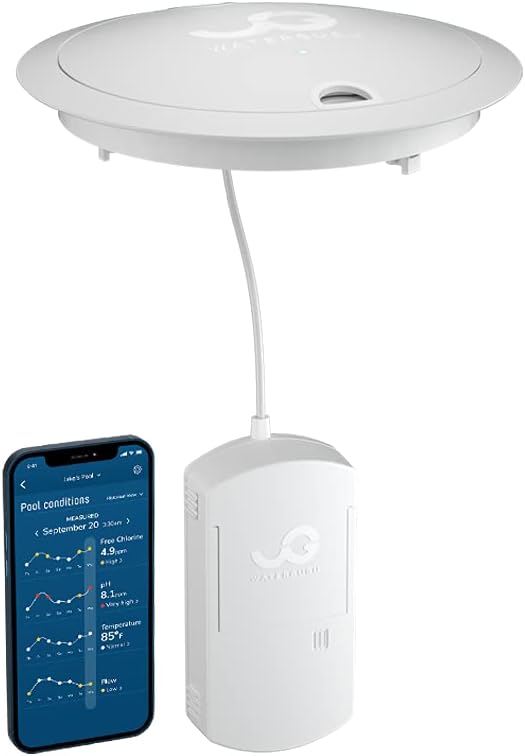
Figure 3: The WaterGuru Sense device alongside a smartphone displaying the WaterGuru app interface with real-time pool conditions and chemistry readings.
Video 2: A WaterGuru client discusses how the system helps save money on pool energy costs by optimizing pump operation based on daily water chemistry monitoring.
ບໍາລຸງຮັກສາ
To ensure the continued accuracy and performance of your WaterGuru Sense, regular maintenance is required.
- ການປ່ຽນເທບ: The WaterGuru Sense uses replaceable measurement cassettes. The app will notify you when a cassette needs to be replaced. Follow the in-app instructions for safe and proper replacement.
- ການອະນາໄມອຸປະກອນ: Periodically remove the WaterGuru Sense unit from the skimmer and gently clean any debris or buildup from its exterior, especially around the optical sensors. Use a soft cloth and clean water.
- ອັບເດດແອັບ: Keep your WaterGuru app updated to the latest version to ensure compatibility, access new features, and receive performance improvements.

ຮູບທີ 4: ໄລຍະໃກ້ view of the WaterGuru Sense's patented optical sensors, which are crucial for accurate chlorine and pH readings.
ການແກ້ໄຂບັນຫາ
If you encounter issues with your WaterGuru Sense, try the following troubleshooting steps:
- No Readings/Inaccurate Readings:
- Check the cassette: Ensure the measurement cassette is properly installed and not expired. Replace if necessary.
- Clean sensors: Remove the unit and gently clean the optical sensors as described in the Maintenance section.
- Verify placement: Ensure the unit is correctly seated in the skimmer and fully submerged.
- App synchronization: Confirm the app is connected to the device and has the latest data. Try refreshing the app.
- ບັນຫາການເຊື່ອມຕໍ່ (Wi-Fi/Bluetooth):
- Check Wi-Fi signal: Ensure your Wi-Fi router is within range and providing a strong signal to the pool area.
- Restart device: Remove the WaterGuru Sense from the skimmer, wait 30 seconds, and reinsert it to restart.
- Restart router: Power cycle your home Wi-Fi router.
- Re-pair device: In the WaterGuru app settings, try re-pairing the device via Bluetooth or re-connecting to Wi-Fi.
- App Not Functioning:
- Update app: Ensure your WaterGuru app is updated to the latest version.
- Restart app: Close and reopen the app.
- Reinstall app: If issues persist, try uninstalling and reinstalling the app (your data is stored in the cloud).
If these steps do not resolve the issue, please contact WaterGuru Customer Support for further assistance.
ຂໍ້ມູນຈໍາເພາະ
| ຍີ່ຫໍ້ | WaterGuru |
| ໝາຍເລກຕົວແບບ | WG-SENSE |
| ວິທີການຄວບຄຸມ | ແອັບ, ແຕະ |
| ປະເພດການຕິດຕັ້ງ | Wall Mount (referring to the skimmer opening, not a literal wall) |
| ເຕັກໂນໂລຢີເຊັນເຊີ | Chemical Sensor (Optical) |
| ນ້ໍາຫນັກລາຍການ | 5.94 ປອນ |
| ຂະໜາດສິນຄ້າ | 20.5 x 12.25 x 3.63 ນິ້ວ |
| ແຫຼ່ງພະລັງງານ | ພະລັງງານຫມໍ້ໄຟ (Lithium-Ion) |
| ອຸປະກອນທີ່ເຂົ້າກັນໄດ້ | Tablet (and Smartphone) |
| ສີ | ສີຂາວ |
ການຮັບປະກັນແລະການສະຫນັບສະຫນູນ
For warranty information, product registration, or technical support, please visit the official WaterGuru website or contact their customer service directly. Customer reviews indicate that WaterGuru stands by its product and offers support for issues.
WaterGuru Support: www.waterguru.com/support


