1. ບົດແນະນຳ
This manual provides comprehensive instructions for the installation, programming, and operation of the Finder 12.A4.8.230.0010 NFC Weekly Time Clock. This electronic astronomical time switch features a weekly program, an analog output, and can be programmed via a joystick or an NFC-enabled smartphone using the Finder Toolbox app.
2. ຂໍ້ມູນຄວາມປອດໄພ
Please read these safety instructions carefully before installation and operation. Failure to follow these instructions may result in electric shock, fire, or damage to the device.
- ການຕິດຕັ້ງຕ້ອງໄດ້ປະຕິບັດໂດຍຊ່າງໄຟຟ້າທີ່ມີຄຸນວຸດທິຕາມກົດລະບຽບສາຍໄຟທ້ອງຖິ່ນ.
- ໃຫ້ແນ່ໃຈວ່າແຫຼ່ງຈ່າຍໄຟໄດ້ຖືກຕັດການເຊື່ອມຕໍ່ກ່ອນການຕິດຕັ້ງ ຫຼື ວຽກງານບຳລຸງຮັກສາໃດໆ.
- ຢ່າເຮັດໃຫ້ອຸປະກອນມີຄວາມຊຸ່ມຊື່ນ, ອຸນຫະພູມທີ່ຮຸນແຮງ, ຫຼືສະພາບແວດລ້ອມທີ່ກັດກ່ອນ.
- ອຸປະກອນໄດ້ຖືກອອກແບບສໍາລັບການນໍາໃຊ້ພາຍໃນເຮືອນເທົ່ານັ້ນ.
3. ຜະລິດຕະພັນເກີນview
The Finder 12.A4.8.230.0010 is an electronic time switch designed for DIN rail mounting. It offers precise time control with a weekly program and astronomical function.

ຮູບ 1: ດ້ານຫນ້າ view of the Finder 12.A4.8.230.0010 Time Clock, showing the LCD display, joystick, and NFC symbol.
ຄຸນນະສົມບັດທີ່ສໍາຄັນ:
- Weekly program for flexible scheduling.
- 1 analog output: 0-10 V or PWM.
- 1 changeover contact for 16 A / 250 V AC (AC1).
- ການສະຫນອງ voltage: 110-230 V AC/DC.
- LCD display for clear information.
- Programming via joystick or NFC-enabled smartphone with Finder Toolbox app (Android and iOS).
- Astronomical time control: automatic switching at sunrise and sunset based on postcode or coordinates.
- Adjustable time offset for sunrise/sunset.
4. ການຕິດຕັ້ງແລະການຕິດຕັ້ງ
This device is designed for DIN rail mounting. Follow these steps for proper installation:
- ການຕັດການເຊື່ອມຕໍ່ໄຟຟ້າ: Ensure the main power supply to the installation area is completely disconnected before proceeding.
- ການຕິດຕັ້ງ: Mount the time switch securely onto a standard DIN rail.
- ສາຍໄຟ: Connect the power supply (110-230 V AC/DC) to terminals A1 and A2. Connect the load to the changeover contact terminals (NO, NC, COM) and the analog output (W, O, Y) as required. Refer to the wiring diagram below.
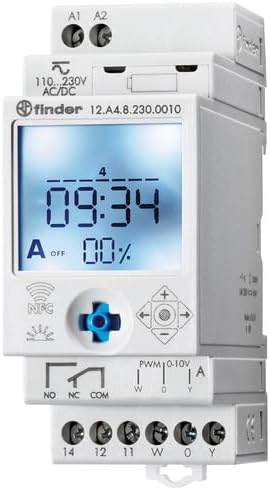
ຮູບທີ 2: ລາຍລະອຽດ view of the wiring terminals for power input (A1, A2), relay output (NO, NC, COM), and analog output (W, O, Y).
ໝາຍເຫດ: The device features safe separation between the power supply and contacts.
5. ຄໍາແນະນໍາການດໍາເນີນງານ
5.1 ການເປີດພະລັງງານເບື້ອງຕົ້ນ
Once wired, restore power. The LCD display will illuminate. You may need to set the current date and time if it's the first use or after a prolonged power outage.
5.2 Programming via Joystick
The integrated joystick allows for direct programming on the device:
- ການນໍາທາງ: Use the joystick to move through menu options (up, down, left, right).
- ການຄັດເລືອກ/ການຢືນຢັນ: ກົດປຸ່ມ joystick ເຂົ້າໄປຂ້າງໃນເພື່ອເລືອກຕົວເລືອກ ຫຼືຢືນຢັນການຕັ້ງຄ່າ.
- Follow the on-screen prompts to set the current time, date, weekly program, and astronomical functions.
5.3 Programming via NFC (Finder Toolbox App)
For maximum flexibility, program the time switch using an NFC-enabled smartphone and the Finder Toolbox app:
- ດາວໂຫລດແອັບ:: Download the "Finder Toolbox" app from the Google Play Store (Android) or Apple App Store (iOS).
- Create/Load Program: Open the app and create a new program or load an existing one. The app allows for detailed configuration of weekly schedules, astronomical settings, and special functions.
- ໂອນຂໍ້ມູນ: To transfer the program, hold your smartphone close to the NFC symbol on the time switch. The app will guide you through the data transfer process.
- Read Program: You can also read an existing program from the time switch to your smartphone for editing or backup.
5.4 Astronomical Time Control
The device can automatically switch based on sunrise and sunset times:
- ການຕັ້ງຄ່າສະຖານທີ່: Set your location by entering a postcode or geographical coordinates in the programming menu (via joystick or app).
- ຊົດເຊີຍ: You can set a selectable time offset for both sunrise and sunset times to adjust switching points.
- Astro ON/OFF: Configure specific ON/OFF times during the astronomical ON period if needed.
6. ບໍາລຸງຮັກສາ
The Finder 12.A4.8.230.0010 is designed for maintenance-free operation. However, periodic checks are recommended:
- ທໍາຄວາມສະອາດ: ເຊັດອຸປະກອນດ້ວຍຜ້າແຫ້ງ ແລະ ນຸ່ມ. ຢ່າໃຊ້ນໍ້າຢາເຮັດຄວາມສະອາດທີ່ມີສີຂັດ ຫຼື ຕົວລະລາຍ.
- ການເຊື່ອມຕໍ່: ກວດສອບການເຊື່ອມຕໍ່ຂອງເຄື່ອງສາຍໄຟເປັນໄລຍະເພື່ອຮັບປະກັນວ່າພວກມັນປອດໄພ.
- ການອັບເດດເຟີມແວ: Check the Finder website or app for any available firmware updates for improved functionality or bug fixes.
7. ການແກ້ໄຂບັນຫາ
| ບັນຫາ | ສາເຫດທີ່ເປັນໄປໄດ້ | ການແກ້ໄຂ |
|---|---|---|
| ອຸປະກອນບໍ່ໄດ້ເປີດເຄື່ອງ. | ບໍ່ມີສາຍໄຟ ຫຼືສາຍໄຟບໍ່ຖືກຕ້ອງ. | Check power connections (A1, A2) and ensure power is supplied. Verify wiring against the diagram. |
| Program not executing. | Incorrect program settings or manual override active. | Review program settings via joystick or app. Check for any active manual override functions. Ensure current date/time is correct. |
| NFC transfer fails. | Smartphone not NFC-enabled, app not open, or poor contact. | Ensure your smartphone has NFC enabled. Open the Finder Toolbox app. Hold the phone directly over the NFC symbol on the device. |
| Astronomical function inaccurate. | Incorrect location (postcode/coordinates) or time zone setting. | Verify the entered postcode or coordinates. Check the time zone setting. |
If the problem persists, please contact Finder technical support.
8. ຂໍ້ກໍານົດດ້ານວິຊາການ
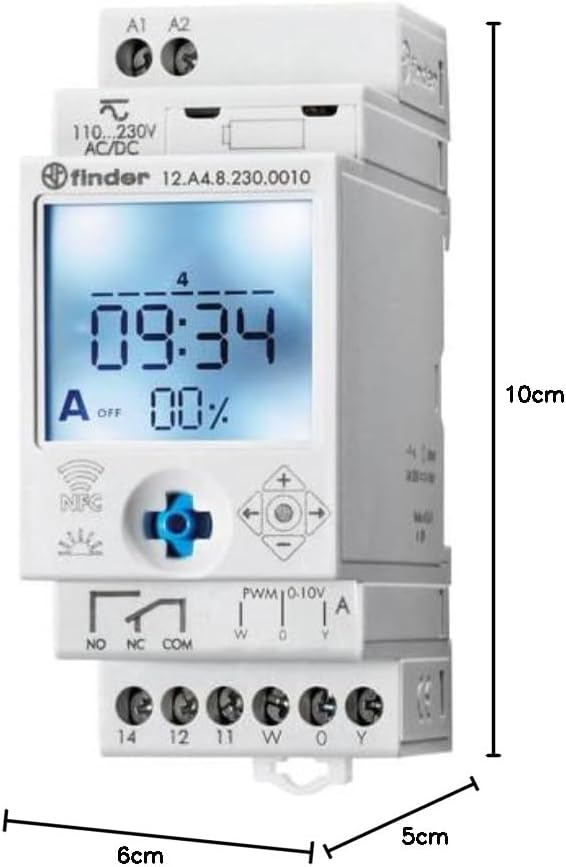
Figure 3: Dimensions of the Finder 12.A4.8.230.0010 Time Clock, showing approximate measurements of 10cm height, 6cm width, and 5cm depth.
| ຄຸນສົມບັດ | ລາຍລະອຽດ |
|---|---|
| ຍີ່ຫໍ້ | ຜູ້ຊອກຫາ |
| ໝາຍເລກຕົວແບບ | 12.A4.8.230.0010 |
| ຂະໜາດ (H x W x D) | 10 x 6 x 5 cm |
| ນ້ຳໜັກ | 70 g |
| ການສະຫນອງ Voltage | 110-230 V AC/DC |
| ລາຍຊື່ຜູ້ຕິດຕໍ່ | 1 changeover contact, 16 A / 250 V AC (AC1) |
| ຜົນຜະລິດອະນາລັອກ | 0-10 V or PWM |
| ວັດສະດຸຕິດຕໍ່ | AgSnO2 |
| ສູງສຸດ. Inrush Current | 120 A ສໍາລັບ 5 ms |
| Min. Switching Time | 1 ນາທີ |
| Max. Switching Power (230 V AC1) | 4000 VA |
| ການໂຕ້ຕອບຂອງມະນຸດ | Buttons (Joystick) |
| ຕ້ອງໃຊ້ແບັດເຕີຣີ | ບໍ່ |
| ເຂົ້າກັນໄດ້ກັບ | Power supplies/ballasts with 0-10 V or PWM inputs, or Slave dimmers Type 15.11 |
9. ການຮັບປະກັນແລະການສະຫນັບສະຫນູນ
ສຳລັບຂໍ້ມູນການຮັບປະກັນ ແລະ ການຊ່ວຍເຫຼືອດ້ານເຕັກນິກ, ກະລຸນາອ້າງອີງເຖິງ Finder ຢ່າງເປັນທາງການ webສະຖານທີ່ຫຼືຕິດຕໍ່ຜູ້ຈັດຈໍາຫນ່າຍທ້ອງຖິ່ນຂອງທ່ານ. ຮັກສາໃບຮັບເງິນການຊື້ຂອງທ່ານໄວ້ເປັນຫຼັກຖານການຊື້.
ຜູ້ຜະລິດ: ຜູ້ຊອກຫາ
Product on Amazon.es since: ວັນທີ 24 ພຶດສະພາ 2021