1. ການແນະນໍາ ແລະຫຼາຍກວ່າview
This manual provides essential information for the safe and efficient installation, operation, and maintenance of your ExpertPower 1.3KWH 12V Solar Power Kit. This kit is designed for off-grid applications, including RVs, trailers, campers, and marine use, providing a reliable power solution.
ລາຍລະອຽດວິດີໂອ: ຫຼາຍກວ່າview of ExpertPower LiFePO4 solar kits in various mobile applications like RVs and converted buses, showcasing the components and their use in off-grid living.

ລາຍລະອຽດຮູບພາບ: A visual representation of the ExpertPower Solar Kit components, including solar panels, a LiFePO4 battery, charge controller, and inverter, set against a backdrop of a remote cabin and mountains, illustrating its off-grid application.
2. ອົງປະກອບຊຸດ
The ExpertPower 1.3KWH 12V Solar Power Kit includes the following main components:
- 12V 100Ah LiFePO4 Bluetooth Battery: A high-performance lithium iron phosphate battery with a built-in Battery Management System (BMS) and Bluetooth connectivity for monitoring.
- 200W Monocrystalline Solar Panels: Two 100W monocrystalline solar panels designed for efficient power generation.
- 20A MPPT Solar Charge Controller with Bluetooth: Maximizes solar power generation and includes Bluetooth for remote monitoring.
- 2000W Pure Sine Wave Inverter Charger: Converts DC power to AC power and charges the battery, featuring UPS functionality.
- 10ft 12AWG Panel-Controller Cables: One pair of cables for connecting solar panels to the charge controller.
- 6ft 12AWG Controller-Battery Cables: One pair of cables for connecting the charge controller to the battery.
- ວົງເລັບຕິດກະດານແສງອາທິດ: Two sets of brackets for securing the solar panels.
Individual Component Details:
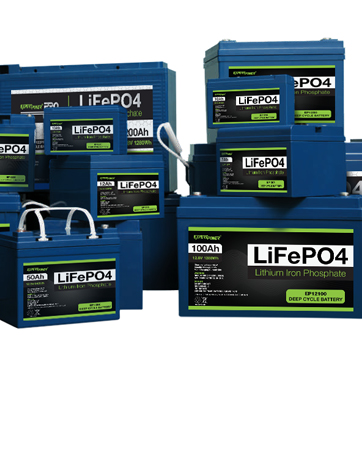
ແບັດເຕີຣີ LiFePO4: 12V 100Ah with Bluetooth.
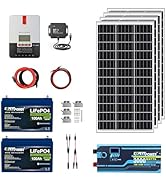
ແຜງແສງອາທິດ: 100W Monocrystalline.

MPPT Charge Controller: 20A with Bluetooth.
ໂມດູນ Bluetooth: For charge controller.
Inverter Charger: 2000W Pure Sine Wave.
3. ການຕິດຕັ້ງແລະການເຊື່ອມຕໍ່
Follow these steps for proper installation and connection of your solar power kit. Refer to the diagrams for visual guidance.
3.1 Solar Panel to Charge Controller Connection
- Cover your solar panels to prevent exposure to sunlight during installation.
- Connect the solar panels. They can be connected in series or parallel depending on your system requirements.
- Connect the 10ft 12AWG Panel-Controller Cables from the solar panels to the Solar Charge Controller. Secure them to the appropriate positive and negative screws.
- Ensure your Solar Controller settings match your battery's voltage and composition type before proceeding.

ລາຍລະອຽດຮູບພາບ: A detailed diagram illustrating the connection process from solar panels to the MPPT solar charge controller, including series/parallel wiring options and cable connections.
3.2 Charge Controller, Battery, and Inverter Connection
- Connect the 6ft 12AWG Controller-Battery Cables from the Solar Charge Controller to the appropriate Positive and Negative terminals on the 12V 100Ah LiFePO4 battery. This will power your Solar Controller.
- Connect the Inverter Switch Panel to the Inverter-Charger. Ensure the Switch Panel is in the OFF position during installation.
- Set the Dial and Switches on the front of the Inverter-Charger based on your Battery Type and preferred AC/DC priority. Refer to the inverter's specific manual for detailed settings.
- Optional: Connect Shore Power to the Inverter-Charger using the AC Input on the back. After wiring, power on the Inverter using the Switch Panel for a brief period to check connectivity. Turn the Inverter off to continue.
- Connect Negative and Positive Cables to the front Inverter terminals as pictured. Then, connect these cables to the appropriate battery terminals.
- Connect AC appliances to the AC Output using LNE wiring or by directly plugging them into the AC outlets.
- Ensure all cables are connected properly. Remove coverings from solar panels and expose them to the sun. Finally, turn the Inverter-Charger ON.
- Connect the included Bluetooth Module for Bluetooth connectivity to the charge controller.

ລາຍລະອຽດຮູບພາບ: A comprehensive wiring diagram detailing the connections between the solar charge controller, LiFePO4 battery, and the pure sine wave inverter charger, including AC and DC load connections.
3.3 Basic RV System Diagram
This diagram illustrates a typical RV setup using the ExpertPower Solar Power Kit, showing how various components integrate to power onboard appliances.

ລາຍລະອຽດຮູບພາບ: A schematic diagram of a basic RV solar power system, showing the placement and interconnection of solar panels, charge controller, battery bank, inverter-charger, and various AC/DC loads within an RV.
4. ການດໍາເນີນງານ
Once installed, your ExpertPower Solar Power Kit operates automatically to charge your battery bank and provide power to your devices. Key operational features include:
- ການຕິດຕາມກວດກາ Bluetooth: Use the dedicated app on your smartphone to monitor the LiFePO4 battery's State of Charge, temperature, protection warnings, and other parameters.
- MPPT Controller Efficiency: The 20A MPPT controller optimizes power generation from your solar panels, increasing efficiency by over 20% compared to PWM controllers. It auto-detects 12V/24V systems.
- Inverter/Charger Functionality: The 2000W Pure Sine Wave Inverter/Charger provides clean AC power for sensitive electronics. Its built-in UPS functionality allows for automatic switching between shore power and battery power within 5ms.
- ການຂະຫຍາຍແບັດເຕີຣີ: The LiFePO4 battery supports expansion up to 4 batteries in series (48V 100Ah) or in parallel (12V 1000Ah) for increased capacity.
5. ບໍາລຸງຮັກສາ
Proper maintenance ensures the longevity and optimal performance of your solar power kit:
- ການດູແລຫມໍ້ໄຟ: The LiFePO4 battery has a long lifespan of 2500-7000 cycles and a 10-year lifetime. Its low self-discharge rate allows for up to 1 year of maintenance-free storage.
- ການປົກປ້ອງອຸນຫະພູມ: The built-in BMS prevents charging below 23 °F (-5 °C) to protect the battery from damage. Ensure the battery is in an environment above this temperature for charging.
- ການກວດກາປົກກະຕິ: Periodically check all cable connections for tightness and corrosion. Ensure solar panels are clean and free from obstructions for maximum efficiency.
- ການອັບເດດເຟີມແວ: Check the ExpertPower website or app for any available firmware updates for the charge controller or inverter to ensure optimal performance and compatibility.
6. ການແກ້ໄຂບັນຫາ
If you encounter issues with your solar power kit, consider the following common troubleshooting steps:
- ບໍ່ມີຜົນຜະລິດພະລັງງານ: Check all cable connections, especially between the battery, charge controller, and inverter. Ensure the inverter is turned ON and the battery has sufficient charge. Verify solar panels are receiving adequate sunlight.
- Inverter Malfunction: If the inverter displays an error code or alarm, consult the inverter's specific manual for the meaning of the code and recommended actions. Ensure the load connected to the inverter does not exceed its rated capacity.
- ແບັດເຕີຣີບໍ່ໄດ້ສາກ: Confirm solar panels are clean and exposed to sunlight. Check connections to the charge controller and battery. Verify charge controller settings are correct for your battery type and voltage. Ensure the ambient temperature is above 23 °F (-5 °C) for charging.
- ອົງປະກອບທີ່ຂາດຫາຍໄປ: If any critical components, such as fuses or specific cables, appear to be missing, contact ExpertPower customer support immediately.
- ບັນຫາການເຊື່ອມຕໍ່ Bluetooth: Ensure the Bluetooth module is correctly connected to the charge controller. Restart your smartphone's Bluetooth and the app. Ensure you are within range of the device.
7. ຂໍ້ມູນຈໍາເພາະ
| ຄຸນສົມບັດ | ຂໍ້ມູນຈໍາເພາະ |
|---|---|
| ຍີ່ຫໍ້ | ExpertPower |
| ໝາຍເລກຕົວແບບ | C10LBXLFP12_100B3 |
| ປະເພດຫມໍ້ໄຟ | LiFePO4 (Lithium Iron Phosphate) |
| ຄວາມອາດສາມາດຫມໍ້ໄຟ | 12V 100Ah (1.3KWH) |
| ປະເພດກະດານແສງຕາເວັນ | Monocrystalline Silicon |
| ພະລັງງານກະດານແສງຕາເວັນ | 200W (2x 100W panels) |
| ຕົວຄວບຄຸມການສາກໄຟ | 20A MPPT ພ້ອມ Bluetooth |
| ປະເພດ Inverter | 2000W Pure Sine Wave Inverter Charger |
| ຄຸນນະສົມບັດພິເສດ | Bluetooth Battery Tracking |
| ນ້ໍາຫນັກລາຍການ | 22.6 Pounds (for 100W panel, total kit weight varies) |
| UPC | 840140942675 |
8. ການຮັບປະກັນແລະການສະຫນັບສະຫນູນ
For warranty information, technical support, or any questions regarding your ExpertPower 1.3KWH 12V Solar Power Kit, please contact ExpertPower customer service. Refer to the product packaging or the official ExpertPower website for contact details and the most current warranty policy.


