ແນະນຳ
The Infinity Kappa Series component speaker system is engineered to deliver exceptional car audio performance. Featuring Plus One fiberglass woofers for powerful bass and high-resolution edge-driven textile dome tweeters for clear highs, this system provides a superior listening experience in virtually any vehicle. This manual provides essential information for installation, operation, and maintenance of your KAPPA693C speaker system.
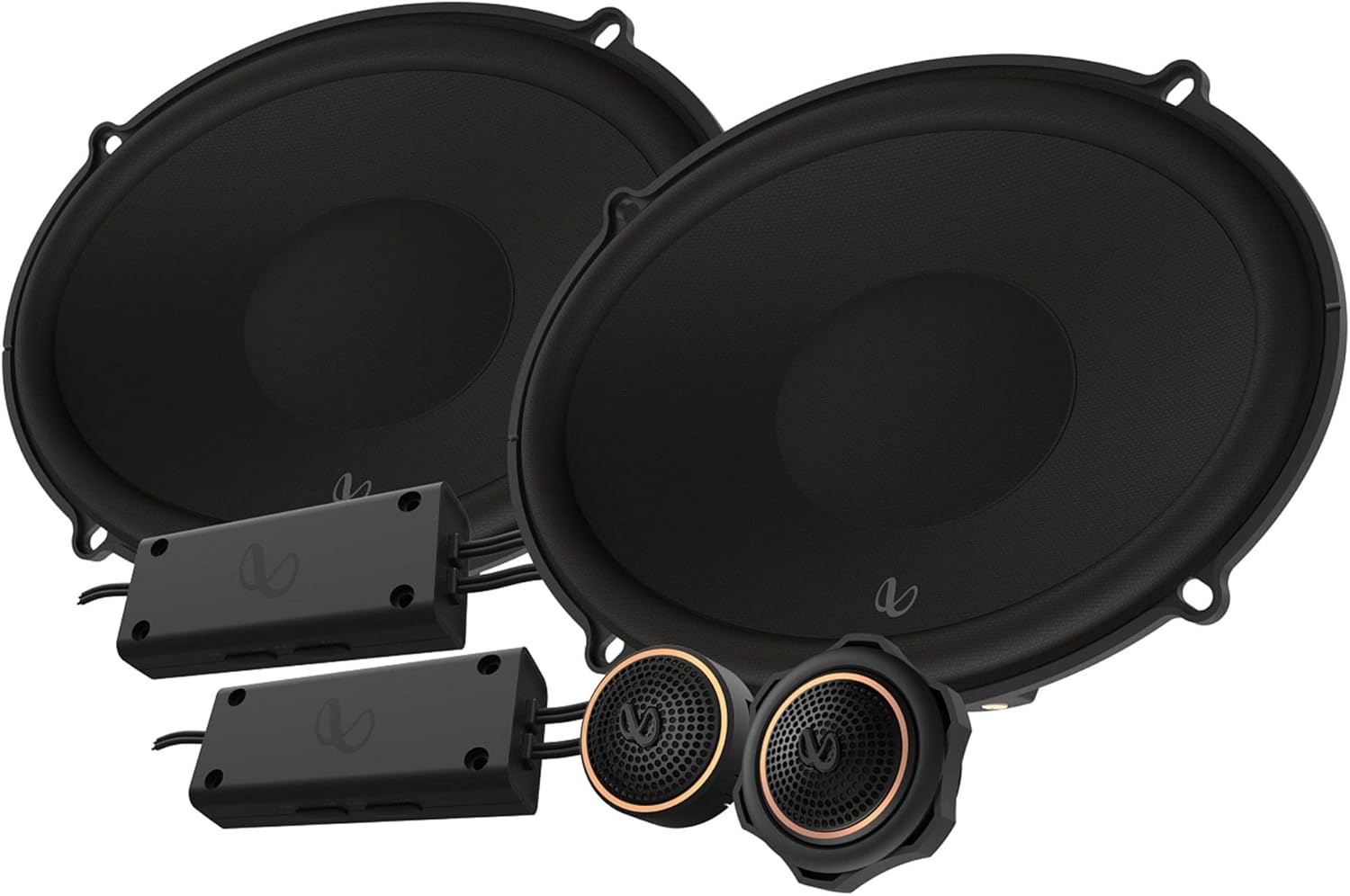
Figure 1: Infinity KAPPA693C Component Speaker System components.
ແມ່ນຫຍັງຢູ່ໃນກ່ອງ
ກວດສອບວ່າອົງປະກອບທັງຫມົດທີ່ລະບຸໄວ້ຂ້າງລຸ່ມນີ້ແມ່ນມີຢູ່ໃນຊຸດຂອງທ່ານ:
- 2x Speakers (Woofers)
- ຂະ ໜາດ 2 ເທົ່າ
- ກະປgasອງໂຟມ 2 ເທົ່າ
- ຂະ ໜາດ 2 ເທົ່າ
- 2 ເທົ່າ Tweeters
- ເຄື່ອງປັບໄຟຟ້າທີ່ມີສາຍໄຟ 2x
- ແກ່ນປິດກະຕິກ 2x
- ຈອກຂະ ໜາດ 2x
- ຂະ ໜາດ 2 ເທົ່າຂອງ Starfish tweeter
- Screws 22x
- ຄລິບຄວາມໄວ 16 ເທົ່າ
- 1x ຫົວ Allen (2.5mm)
- ເຄື່ອງ ໝາຍ ໂລໂກ້ Infinity 2 ເທົ່າ
- ສະຕິກເກີຍີ່ຫໍ້ 2x
- 1x Owner’s manual (this document)
ຂໍ້ມູນຈໍາເພາະ
| ຄຸນສົມບັດ | ລາຍລະອຽດ |
|---|---|
| ປະເພດລຳໂພງ | 6" x 9" (168mm x 240mm) Two-way Component System |
| ການຈັດການພະລັງງານ | 145W RMS, ສູງສຸດ 435W |
| ຄວາມອ່ອນໄຫວ (@ 2.83V) | 94dB |
| ການຕອບສະໜອງຄວາມຖີ່ | 35Hz – 40kHz |
| impedance | 3.0 ໂອມ |
| Woofer ເສັ້ນຜ່າສູນກາງ | 15.24 ຊມ (6 ນິ້ວ) |
| Tweeter ເສັ້ນຜ່າສູນກາງ | 1.91 ຊມ (0.75 ນິ້ວ) |
| ນ້ຳໜັກລວມ | 5.06 ກິໂລ (10.93 ປອນ) |
| ໝາຍເລກຕົວແບບ | INFSPKKA693CAM |
| UPC | 050667376987 |
ຄຸນນະສົມບັດທີ່ສໍາຄັນ
- Plus One Fiberglass Woofers: Lighter and stiffer cones provide increased low-frequency output and higher efficiency for robust bass.
- ຕູ້ສຽງ Silk Dome ທີ່ຂັບເຄື່ອນດ້ວຍຂອບ: Equipped with oversized voice coils for smooth highs and impressive thermal power handling up to 40kHz.
- ຜົນຜະລິດຂອງ Tweeter ທີ່ສາມາດປັບໄດ້: A push-button on the angled tweeter allows for 0dB or -3dB output level control to optimize system linearity based on installation.
- ຄຣອສໂອເວີຂະໜາດກະທັດຮັດ: Designed for easy integration, with 2-way and 3-way selections to accommodate optional midrange upgrades.


ຮູບທີ 2: ລາຍລະອຽດ views of the woofer, tweeters, and crossovers.
ການຕິດຕັ້ງແລະການຕິດຕັ້ງ
Professional installation is recommended for optimal performance and to prevent damage to your vehicle's electrical system. Always disconnect the vehicle's battery before beginning any electrical work.
1. ການວາງແຜນການຕິດຕັ້ງ
- ການເລືອກສະຖານທີ່: Choose suitable locations for the woofers, tweeters, and crossovers within your vehicle. Ensure adequate clearance and proper acoustic placement.
- ແຜນຜັງສາຍ: Refer to the detailed wiring diagram provided in the physical owner's manual for correct connections between your head unit, amplifier (if used), crossovers, woofers, and tweeters.
- ເຄື່ອງມືທີ່ຕ້ອງການ: Gather necessary tools including screwdrivers, wire strippers, crimpers, drill, and appropriate safety gear.
2. Mounting the Woofers
- Carefully remove existing speakers or prepare the mounting location.
- Use the provided spacers and foam gaskets as needed to ensure a secure and sealed fit.
- Secure the woofers using the supplied screws and speed clips.

ຮູບ 3: ຂ້າງ view of the woofer, illustrating mounting depth considerations.
3. Mounting the Tweeters
- Choose between flush-mount, surface-mount, or starfish tweeter mounts based on your vehicle's interior and desired sound dispersion.
- Install the tweeters securely using the appropriate adapters and nuts.
- Adjust the tweeter output level (0dB or -3dB) using the push-button on the tweeter to match your listening preference and vehicle acoustics.
4. Installing Crossovers
- Mount the compact crossovers in a dry, accessible location, away from excessive heat or moisture.
- Connect the input from your amplifier/head unit to the crossover, and then connect the woofer and tweeter outputs from the crossover to their respective speakers.
- ໃຫ້ແນ່ໃຈວ່າການເຊື່ອມຕໍ່ທັງຫມົດແມ່ນປອດໄພແລະຖືກ insulated ຢ່າງຖືກຕ້ອງເພື່ອປ້ອງກັນບໍ່ໃຫ້ວົງຈອນສັ້ນ.
ຄໍາແນະນໍາການດໍາເນີນງານ
Once installed, operate your Infinity KAPPA693C system as follows:
- ການເພີ່ມພະລັງງານເບື້ອງຕົ້ນ: After installation, reconnect the vehicle's battery. Turn on your car audio system at a low volume.
- ການປັບລະດັບສຽງ: Gradually increase the volume to a comfortable listening level. Avoid excessively high volumes that can cause distortion or damage to the speakers.
- ການຕັ້ງຄ່າສຽງ: Adjust your head unit's equalizer and sound settings to optimize the audio output for your vehicle's acoustics and personal preference. Experiment with bass, treble, and balance controls.
- ລະດັບ tweeter: If you notice the highs are too bright or too subtle, re-adjust the tweeter output level on the tweeters (0dB or -3dB) as needed.
ບໍາລຸງຮັກສາ
To ensure the longevity and optimal performance of your Infinity KAPPA693C speakers, follow these maintenance guidelines:
- ທໍາຄວາມສະອາດ: ໃຊ້ຜ້າອ່ອນໆແຫ້ງເຊັດໜ້າລຳໂພງ ແລະ ບໍລິເວນອ້ອມຮອບລຳໂພງຢ່າງເບົາໆ. ຫຼີກລ່ຽງການໃຊ້ສານເຄມີທີ່ຮຸນແຮງ ຫຼື ນ້ຳຢາທຳຄວາມສະອາດທີ່ມີສີຂັດ.
- ການປົກປ້ອງສິ່ງແວດລ້ອມ: While designed for automotive use, avoid exposing the speakers to extreme moisture or direct sunlight for prolonged periods, which can degrade materials over time.
- ການກວດກາປົກກະຕິ: ກວດເບິ່ງການເຊື່ອມຕໍ່ລຳໂພງເປັນໄລຍະເພື່ອຄວາມແໜ້ນໜາ ແລະ ຮັບປະກັນວ່າບໍ່ມີສາຍໄຟຂາດ ຫຼື ເປີດເຜີຍ.
- ຫຼີກເວັ້ນການ overpowering: Do not continuously play audio at distortion levels, as this can cause permanent damage to the speaker components.
ການແກ້ໄຂບັນຫາ
If you experience issues with your speaker system, consult the following common troubleshooting steps:
| ບັນຫາ | ສາເຫດທີ່ເປັນໄປໄດ້ | ການແກ້ໄຂ |
|---|---|---|
| ບໍ່ມີສຽງຈາກລຳໂພງ | ການເຊື່ອມຕໍ່ສາຍໄຟວ່າງ ຫຼືບໍ່ຖືກຕ້ອງ. Amplifier/head unit not powered on or faulty. Speaker wires shorted. | Check all wiring connections at the head unit, amplifier, crossovers, and speakers. Ensure proper polarity. Verify power to your audio system components. ກວດສອບສາຍລຳໂພງວ່າເສຍຫາຍ ຫຼື ສາຍໄຟລັດວົງຈອນຫຼືບໍ່. |
| ສຽງບິດເບືອນ | ລະດັບສຽງສູງເກີນໄປ. Amplifier gain ສູງເກີນໄປ. ການຕັ້ງຄ່າ crossover ບໍ່ຖືກຕ້ອງ. ລໍາໂພງເສຍຫາຍ. | ຫຼຸດປະລິມານລົງ. ປັບ ampການຕັ້ງຄ່າ lifier gain. ກວດສອບການເຊື່ອມຕໍ່ ແລະ ການຕັ້ງຄ່າແບບຄຣອສໂອເວີ. ກວດເບິ່ງລໍາໂພງສໍາລັບຄວາມເສຍຫາຍທາງດ້ານຮ່າງກາຍ. |
| ລຳໂພງໜ່ວຍໜຶ່ງບໍ່ເຮັດວຽກ | Loose connection to that specific speaker or crossover. Damaged speaker or crossover. | Check connections for the affected speaker. Swap the speaker with a known working one to isolate the issue. |
| Lack of Bass | Incorrect woofer wiring polarity. ບໍ່ພຽງພໍ ampພະລັງງານ lifier. ປະທັບຕາລໍາໂພງທີ່ບໍ່ດີຢູ່ໃນສະຖານທີ່ຕິດຕັ້ງ. | ກວດສອບຂົ້ວຂອງສາຍໄຟ woofer. ຮັບປະກັນ amplifier ສະຫນອງພະລັງງານທີ່ພຽງພໍ. Check for air leaks around the speaker mounting. |
If the problem persists after trying these steps, contact Infinity customer support or a qualified car audio technician.
ການຮັບປະກັນແລະການສະຫນັບສະຫນູນ
ຂໍ້ມູນການຮັບປະກັນ: This product comes with a Limited Warranty provided by Infinity. Please refer to the physical owner's manual included in your package for specific terms, conditions, and duration of the warranty. Retain your proof of purchase for warranty claims.
ການຊ່ວຍເຫຼືອລູກຄ້າ: For technical assistance, installation questions, or warranty service, please visit the official Infinity website or contact their customer support line. Contact information can typically be found in your physical manual or on the manufacturer's webເວັບໄຊ.
ນອກນັ້ນທ່ານຍັງສາມາດໄປຢ້ຽມຢາມໄດ້ ຮ້ານ Infinity ໃນ Amazon ສໍາລັບຂໍ້ມູນເພີ່ມເຕີມຜະລິດຕະພັນແລະຊັບພະຍາກອນສະຫນັບສະຫນູນ.


