1. ບົດແນະນຳ
The Blaupunkt BP 4.0 FHD Dash Cam is a compact and robust in-car video recorder designed to capture your journeys in Full HD. Featuring a 140-degree wide-angle lens, an integrated microphone, and an interior camera, it provides comprehensive coverage for your vehicle. This manual provides essential information for the proper installation, operation, and maintenance of your device.
2. ເນື້ອໃນຊຸດ
ກະລຸນາກວດສອບເນື້ອໃນຂອງຊຸດເພື່ອໃຫ້ແນ່ໃຈວ່າລາຍການທັງຫມົດມີຢູ່:
- Blaupunkt BP 4.0 FHD Dash Cam (Video Recorder)
- ເລນພາຍໃນ
- Mount (Suction Cup Type)
- ສາຍໄຟ (ເຄື່ອງສາກໄຟລົດ)
- ຄູ່ມືຜູ້ໃຊ້

Image 2.1: Contents of the Blaupunkt BP 4.0 FHD Dash Cam package.

Image 2.2: The retail packaging for the Blaupunkt BP 4.0 FHD Dash Cam.
3. ຜະລິດຕະພັນເກີນview
The BP 4.0 FHD Dash Cam features a main unit with a 2-inch display and a separate interior camera. It is designed for easy installation and discreet operation within your vehicle.
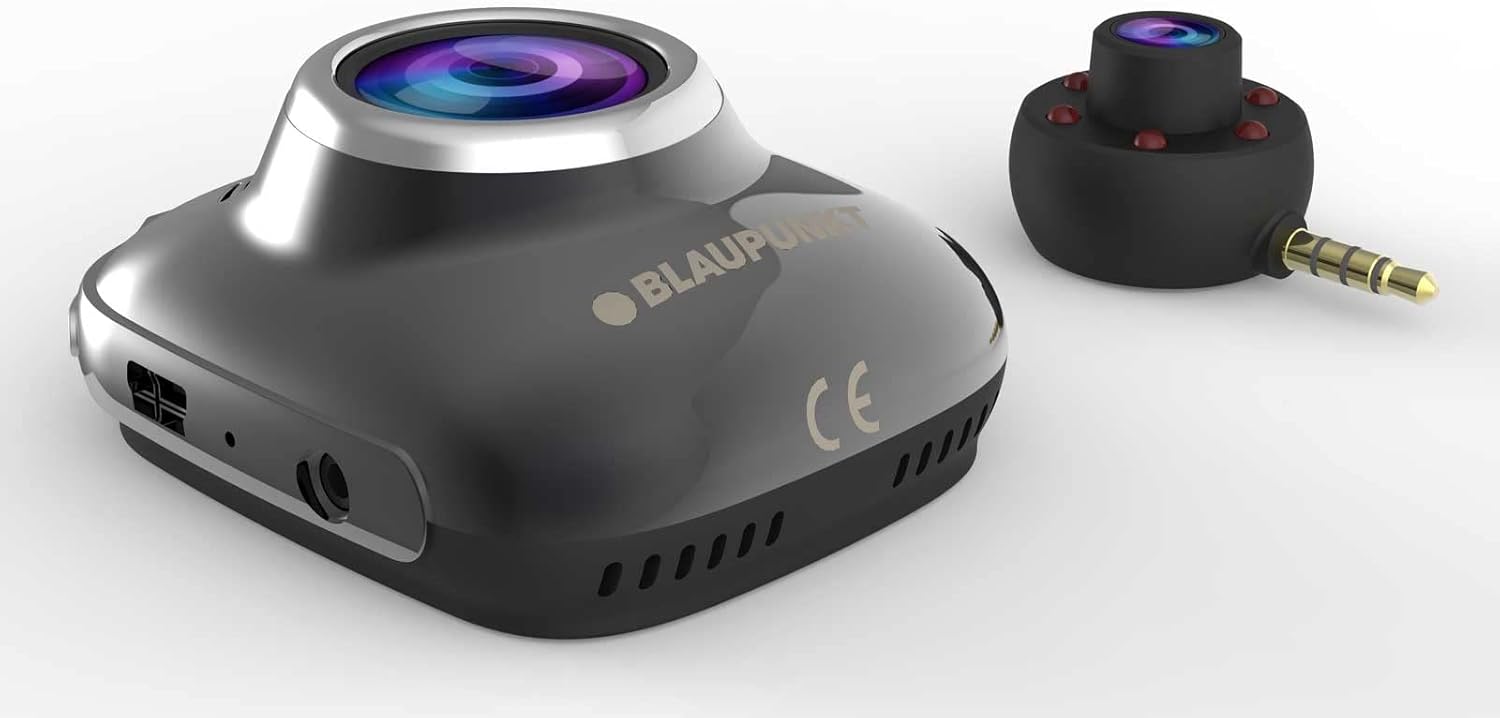
Image 3.1: Main unit and interior camera of the Blaupunkt BP 4.0 FHD Dash Cam.
ຄຸນນະສົມບັດທີ່ສໍາຄັນ:
- ເລນຄູ່: Records both front and interior views ພ້ອມໆກັນ.
- ມຸມກວ້າງ View: ພາກສະຫນາມແນວນອນ 140 ອົງສາຂອງ view for comprehensive road coverage.
- ໄມໂຄຣໂຟນປະສົມປະສານ: Captures in-cabin audio.
- ຈໍສະແດງຜົນ 2 ນິ້ວ: ສໍາລັບການດໍາລົງຊີວິດ view, ການຫຼິ້ນ ແລະການນໍາທາງເມນູ.
- G-ເຊັນເຊີ: ລັອກວິດີໂອອັດຕະໂນມັດ files upon impact.
- ການບັນທຶກວົງ: ບັນທຶກຢ່າງຕໍ່ເນື່ອງ, ຂຽນທັບໄຟລ໌ເກົ່າທີ່ສຸດ files ເມື່ອກາດຫນ່ວຍຄວາມຈໍາເຕັມ.
- ການອອກແບບທົນທານ: Constructed with zinc alloy for robustness.

Image 3.2: Dimensions of the Blaupunkt BP 4.0 FHD Dash Cam.
4. ການຕິດຕັ້ງ
ປະຕິບັດຕາມຂັ້ນຕອນເຫຼົ່ານີ້ສຳລັບການຕິດຕັ້ງກ້ອງວົງຈອນປິດຂອງທ່ານຢ່າງຖືກຕ້ອງ:
- ກະກຽມສະຖານທີ່ຕິດຕັ້ງ: ເລືອກສະຖານທີ່ເທິງກະຈົກໜ້າລົດທີ່ບໍ່ບັງກະຈົກໜ້າລົດຂອງທ່ານ view of the road. Clean the area thoroughly to ensure good adhesion for the suction cup mount.
- ຕິດພູ: Secure the suction cup mount to the chosen spot on the windshield. Ensure it is firmly attached.
- Mount the Dash Cam: Slide the main dash cam unit onto the mount until it clicks into place. Adjust the angle of the camera to ensure the front lens captures the road ahead clearly.
- ໃສ່ບັດ MicroSD: Insert a high-speed MicroSD card (not included) into the designated slot on the dash cam. Ensure it is inserted correctly until it locks.
- Connect Interior Camera: Plug the interior camera's 3.5mm jack into the auxiliary port on the main dash cam unit. Position the interior camera to capture the vehicle's cabin as desired.
- ເຊື່ອມຕໍ່ພະລັງງານ: Plug the car charger cable into the dash cam's power input port and then into your vehicle's 12V power outlet (cigarette lighter socket). Route the cable neatly along the windshield and dashboard to avoid interference with driving.
- ເປີດ ແລະທົດສອບ: Start your vehicle. The dash cam should power on automatically and begin recording. Check the display to confirm both front and interior camera views are visible and recording correctly.
5. ການດໍາເນີນງານພື້ນຖານ
Understanding the basic functions of your dash cam will ensure optimal performance.
ເປີດ/ປິດ:
- ອັດຕະໂນມັດ: ກ້ອງວົງຈອນປິດຈະເປີດໂດຍອັດຕະໂນມັດ ແລະ ເລີ່ມບັນທຶກເມື່ອລະບົບຈູດໄຟຂອງລົດຂອງທ່ານຖືກເປີດ (ແລະ ພະລັງງານຈະຖືກສະໜອງໃຫ້ກັບປລັກໄຟ 12V).
- ຄູ່ມື: Press and hold the power button (usually marked with a power symbol) to manually turn the device on or off.
ໂໝດການບັນທຶກ:
- ການບັນທຶກວົງ: The camera records video in continuous loops (e.g., 1, 3, or 5-minute segments). When the memory card is full, the oldest unlocked files ຖືກຂຽນທັບອັດຕະໂນມັດ.
- G-Sensor (ການບັນທຶກສຸກເສີນ): ໃນກໍລະນີທີ່ມີການກະທົບ ຫຼື ການປະທະຢ່າງກະທັນຫັນ, G-Sensor ໃນຕົວຈະກວດຈັບເຫດການ ແລະ ລັອກວິດີໂອປັດຈຸບັນໂດຍອັດຕະໂນມັດ file, ປ້ອງກັນບໍ່ໃຫ້ມັນຖືກຂຽນທັບໂດຍການບັນທຶກວົນຊ້ຳໆ.
ເມນູນໍາທາງ:
Use the buttons located around the 2-inch display to navigate through the menu options. Common settings include video resolution, loop recording duration, G-Sensor sensitivity, date/time stamp, and format MicroSD card.
6. ບໍາລຸງຮັກສາ
ການບໍາລຸງຮັກສາເປັນປົກກະຕິຮັບປະກັນອາຍຸຍືນແລະການປະຕິບັດທີ່ດີທີ່ສຸດຂອງກ້ອງ dash ຂອງທ່ານ.
- Cleaning Lenses and Screen: Use a soft, lint-free cloth to gently wipe the camera lenses and the display screen. Avoid abrasive materials or chemical cleaners that could scratch or damage the surfaces.
- ການຄຸ້ມຄອງບັດ MicroSD: Periodically format your MicroSD card (at least once a month) to prevent data corruption and ensure smooth recording. Back up any important video files ກ່ອນການຈັດຮູບແບບ.
- ການຄວບຄຸມອຸນຫະພູມ: Avoid exposing the dash cam to extreme temperatures for extended periods. If your car is parked in direct sunlight on a hot day, consider removing the dash cam to prevent overheating.
- ການອັບເດດເຟີມແວ: ກວດເບິ່ງ Blaupunkt ຢ່າງເປັນທາງການ website for any available firmware updates. Keeping your dash cam's firmware up-to-date can improve performance and add new features.
7. ການແກ້ໄຂບັນຫາ
If you encounter issues with your Blaupunkt BP 4.0 FHD Dash Cam, refer to the following common problems and solutions:
| ບັນຫາ | ສາເຫດທີ່ເປັນໄປໄດ້ | ການແກ້ໄຂ |
|---|---|---|
| Dash cam ບໍ່ເປີດ. | No power supply; faulty cable; dead battery. | Check car charger connection and vehicle's 12V outlet. Try a different power source or cable. Ensure the internal battery is charged. |
| ການບັນທຶກຢຸດ ຫຼືຢຸດ. | ກາດ MicroSD ຊ້າ; ກາດ MicroSD ເຕັມ; ກາດເກີດຄວາມຜິດພາດ. | Use a high-speed (Class 10 or U1/U3) MicroSD card. Format the MicroSD card. Replace the MicroSD card if errors persist. |
| Poor video quality (especially at night). | Dirty lens; low light conditions; windshield glare. | Clean the camera lenses and windshield. Ensure no obstructions. Adjust exposure settings if available. Note that night vision performance can be limited. |
| Interior camera not working. | Loose connection; faulty interior camera. | Ensure the interior camera is securely plugged into the main unit's auxiliary port. If the issue persists, contact support. |
| ປຸ່ມບໍ່ຕອບສະໜອງ. | Device frozen; software glitch. | Perform a soft reset by pressing the reset button (if available) or by holding the power button for 10-15 seconds. |
8. ຂໍ້ມູນຈໍາເພາະ
Detailed technical specifications for the Blaupunkt BP 4.0 FHD Dash Cam:
- ຍີ່ຫໍ້: BLAUPUNKT
- ຊື່ຕົວແບບ: BP 4.0 FHD
- ໝາຍເລກຕົວແບບ: BP 4.0 FHD
- ສີ: ສັງກະສີໂລຫະປະສົມ / ສີດໍາ
- ຂະໜາດໜ້າຈໍ: 2 ນິ້ວ
- ພາກສະຫນາມຂອງ View: 140 ອົງສາ
- ການແກ້ໄຂບັນທຶກວິດີໂອ: 1080p, 720p
- ເຕັກໂນໂລຍີການເຊື່ອມຕໍ່: ຜູ້ຊ່ວຍ
- ປະເພດການຕິດຕັ້ງ: ດູດຈອກ Mount
- ອຸປະກອນທີ່ເຂົ້າກັນໄດ້: ລົດ, ລົດບັນທຸກ
- ອົງປະກອບລວມ: Cable, Video Recorder, User Manual, Interior Lens, Mount
- ຜູ້ຜະລິດ: BLAUPUNKT
- ວັນທີ່ວາງຂາຍຄັ້ງທຳອິດໃນ Amazon.com.be: ວັນທີ 6 ມິຖຸນາ 2022
- ຄວາມພ້ອມຂອງອາໄຫຼ່: ບໍ່ມີຂໍ້ມູນ
- ການອັບເດດຊອບແວຮັບປະກັນຈົນກ່ວາ: ບໍ່ມີຂໍ້ມູນ
9. ການຮັບປະກັນແລະການສະຫນັບສະຫນູນ
For warranty information and customer support, please refer to the warranty card included in your product package or visit the official Blaupunkt webເວັບໄຊ. ຂໍ້ກໍານົດແລະເງື່ອນໄຂການຮັບປະກັນສະເພາະອາດຈະແຕກຕ່າງກັນໄປຕາມພາກພື້ນແລະຮ້ານຂາຍຍ່ອຍ.


