1. ບົດແນະນຳ
This manual provides essential information for the installation, operation, and maintenance of the Cisco Catalyst 9500 C9500-24Y4C-A 24-Port Network Advantage Switch. Please read this manual thoroughly before using the device to ensure proper setup and functionality. This switch is designed for enterprise-level networking environments, offering high performance and advanced features.
2. ຂໍ້ມູນຄວາມປອດໄພ
WARNING: Failure to follow these safety instructions can result in injury or damage to the product.
- ໃຫ້ແນ່ໃຈວ່າແຫຼ່ງພະລັງງານກົງກັບ voltage requirements of the switch.
- Do not operate the switch in environments with excessive moisture or extreme temperatures. The upper temperature rating is 40 degrees Celsius.
- ໃຫ້ຖອດສາຍໄຟອອກກ່ອນປະຕິບັດຂັ້ນຕອນການບຳລຸງຮັກສາ ຫຼື ການຕິດຕັ້ງໃດໆສະເໝີ.
- ການໃສ່ພື້ນດິນທີ່ເຫມາະສົມແມ່ນຈໍາເປັນສໍາລັບການດໍາເນີນງານທີ່ປອດໄພ.
- ມີພຽງແຕ່ພະນັກງານທີ່ມີຄຸນວຸດທິເທົ່ານັ້ນທີ່ຄວນຕິດຕັ້ງ ແລະ ບໍລິການອຸປະກອນນີ້.
3. ເນື້ອໃນຊຸດ
ກວດສອບວ່າຊຸດຂອງທ່ານມີລາຍການດັ່ງຕໍ່ໄປນີ້:
- Cisco Catalyst 9500 C9500-24Y4C-A Switch
- ສາຍໄຟ
- Rack-mount Kit (brackets, screws)
- ສາຍຄອນໂຊນ (RJ-45 ຫາ DB-9)
- ເອກະສານ (ຄູ່ມືເລີ່ມຕົ້ນດ່ວນ, ຂໍ້ມູນຄວາມປອດໄພ)
ຖ້າມີສິນຄ້າໃດຂາດຫາຍໄປ ຫຼື ເສຍຫາຍ, ໃຫ້ຕິດຕໍ່ຫາຜູ້ຂາຍຂອງທ່ານທັນທີ.
4. ທາງກາຍview
The Cisco Catalyst 9500 C9500-24Y4C-A is a high-performance network switch. Below is an image illustrating the front panel of the device, highlighting its various ports and indicators.
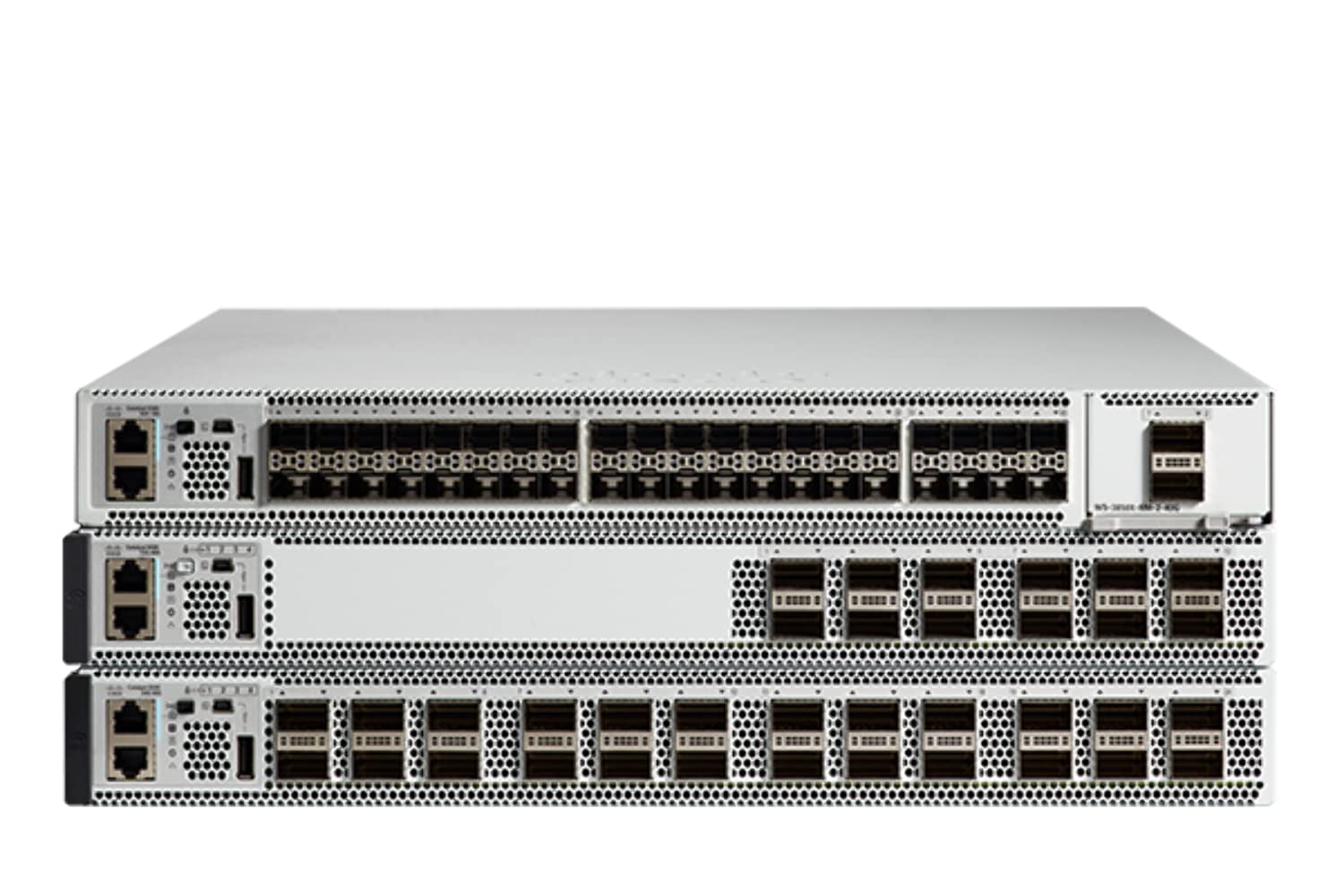
ຮູບທີ 4.1: Front Panel of the Cisco Catalyst 9500 C9500-24Y4C-A Switch. This image displays the front of the switch, featuring 24 SFP/SFP+/SFP28 ports for high-speed fiber and copper connectivity, along with 4 QSFP28 ports for even higher bandwidth uplinks. Various status LEDs and management ports are also visible.
4.1 ຄຸນສົມບັດແຜງໜ້າ
- 24 x SFP/SFP+/SFP28 Ports: These ports support various fiber and copper transceivers for flexible network connectivity at speeds up to 25 Gbps.
- 4 x QSFP28 Ports: High-density quad small form-factor pluggable ports for 100 Gbps uplinks or stacking.
- LEDs ສະຖານະ: Indicators for system status, port activity, and power. Refer to the LED section for detailed explanations.
- ຜອດຄອນໂຊນ: RJ-45 port for out-of-band management via a serial connection.
- ພອດ USB: For software upgrades or configuration backup/restore.
4.2 ຄຸນນະສົມບັດຂອງແຜງດ້ານຫລັງ
- ໂມດູນການສະຫນອງພະລັງງານ: Slots for redundant power supplies.
- ໂມດູນພັດລົມ: Slots for hot-swappable fan modules.
- ກົກດິນ: ສຳລັບການເຊື່ອມຕໍ່ຕົວຖັງກັບສາຍດິນ.
5. ການຕິດຕັ້ງແລະການຕິດຕັ້ງ
5.1 ການກະກຽມສະຖານທີ່
- ຮັບປະກັນວ່າສະຖານທີ່ຕິດຕັ້ງແມ່ນສະອາດ, ແຫ້ງ ແລະ ມີລະບາຍອາກາດໄດ້ດີ.
- Maintain ambient temperature within the specified operating range (up to 40°C).
- Provide adequate space for airflow around the switch.
- Ensure a reliable power source with proper grounding.
5.2 ການຕິດຕັ້ງ Rack
The switch is designed for standard 19-inch rack mounting.
- ຕິດຂາຍຶດແບບຕິດຕັ້ງທີ່ໃຫ້ມາໃສ່ດ້ານຂ້າງຂອງສະວິດໂດຍໃຊ້ສະກູທີ່ໃຫ້ມາ.
- ຈັດລຽນສະວິດໃຫ້ກົງກັບເສົາຊັ້ນວາງ ແລະ ຮັດມັນໃຫ້ແໜ້ນໂດຍໃຊ້ສະກູຊັ້ນວາງທີ່ເໝາະສົມ.
- Ensure the switch is level and securely fastened.
5.3 ການເຊື່ອມຕໍ່ພະລັງງານ
- Insert the power cord into the power supply module on the rear of the switch.
- ເຊື່ອມຕໍ່ອີກປາຍສາຍໄຟກັບປລັກສຽບໄຟ AC ທີ່ມີສາຍດິນ.
- If using redundant power supplies, connect both to separate power sources for maximum reliability.
5.4 ການເຊື່ອມຕໍ່ເຄືອຂ່າຍ
- Insert appropriate SFP/SFP+/SFP28 transceivers into the desired front panel ports.
- Connect fiber optic or copper cables from your network devices to the installed transceivers.
- For high-speed uplinks or stacking, insert QSFP28 transceivers and connect compatible cables.
5.5 ການເຂົ້າເຖິງການຕັ້ງຄ່າເບື້ອງຕົ້ນ
To perform initial configuration, connect a console cable from your management workstation to the console port on the switch's front panel. Use a terminal emulation program (e.g., PuTTY, Tera Term) with the following settings:
- ອັດຕາ Baud: 9600
- ບິດຂໍ້ມູນ: 8
- Parity: ບໍ່ມີ
- ຢຸດບິດ: 1
- ການຄວບຄຸມການໄຫຼເຂົ້າ: ບໍ່ມີ
6. ການດໍາເນີນງານຂອງ Switch
6.1 ການເປີດ/ປິດ
- ເປີດ: After connecting the power cords, the switch will automatically power on. Observe the system LEDs for boot-up status.
- ປິດພະລັງງານ: To power off, disconnect the power cords from the power source. For graceful shutdown, it is recommended to save the configuration and issue a shutdown command via the CLI before disconnecting power.
6.2 ຕົວຊີ້ວັດ LED
ໄຟ LED ແຜງດ້ານໜ້າສະແດງສະຖານະພາບການເຮັດວຽກຂອງສະວິດ:
- ລະບົບ LED: Indicates overall system health (e.g., green for normal, amber for warning, red for critical).
- LED ສະຖານະພອດ: Indicate link status and activity for each network port (e.g., green for link, blinking for activity, off for no link).
- ໄຟ LED ສຳລັບສະໜອງພະລັງງານ: Indicate the status of installed power supply units.
6.3 ການໂຕ້ຕອບການຄຸ້ມຄອງ
- ການໂຕ້ຕອບເສັ້ນຄໍາສັ່ງ (CLI): Accessed via the console port or SSH/Telnet (after initial configuration). Provides full control over the switch.
- Web ສ່ວນຕິດຕໍ່ຜູ້ໃຊ້ (Web UI): Accessed via a web browser (after initial IP configuration). Offers a graphical interface for common tasks.
- SNMP: For network management system integration.
7. ບໍາລຸງຮັກສາ
7.1 ການອັບເດດເຟີມແວ
ກວດສອບການສະໜັບສະໜູນຂອງ Cisco ເປັນປະຈຳ website for the latest firmware updates. Keeping the firmware up-to-date ensures optimal performance, security, and access to new features. Follow the specific upgrade procedures provided by Cisco.
7.2 ການທໍາຄວາມສະອາດ
- ໃຫ້ແນ່ໃຈວ່າສະວິດຖືກປິດ ແລະ ຕັດການເຊື່ອມຕໍ່ຈາກແຫຼ່ງພະລັງງານກ່ອນການທຳຄວາມສະອາດ.
- ໃຊ້ຜ້າອ່ອນແລະແຫ້ງເຊັດດ້ານນອກຂອງສະວິດ.
- ຫ້າມໃຊ້ນໍ້າສະອາດ ຫຼື ແອໂຣໂຊລ.
- ຮັກສາຊ່ອງລະບາຍອາກາດໃຫ້ສະອາດຂອງຂີ້ຝຸ່ນແລະສິ່ງເສດເຫຼືອ.
7.3 ການພິຈາລະນາດ້ານສິ່ງແວດລ້ອມ
Maintain the operating environment within specified limits to prevent overheating and ensure longevity. Monitor ambient temperature and humidity. Ensure proper airflow through the rack and around the switch.
8. ການແກ້ໄຂບັນຫາ
ພາກນີ້ສະຫນອງການແກ້ໄຂບັນຫາທົ່ວໄປທີ່ທ່ານອາດຈະພົບ.
8.1 ບໍ່ມີພະລັງງານ
- Verify that the power cord is securely connected to both the switch and the power outlet.
- ກວດເບິ່ງປລັກສຽບໄຟກັບອຸປະກອນອື່ນເພື່ອຮັບປະກັນວ່າມັນສາມາດໃຊ້ໄດ້.
- Ensure the power supply modules are correctly seated in their slots.
8.2 ບໍ່ມີການເຊື່ອມຕໍ່ຢູ່ໃນພອດ
- Check the cable connection between the switch port and the connected device.
- Ensure the correct transceiver (SFP/SFP+/SFP28) is used and properly seated.
- ກວດສອບວ່າອຸປະກອນທີ່ເຊື່ອມຕໍ່ນັ້ນເປີດ ແລະເຮັດວຽກຢ່າງຖືກຕ້ອງ.
- Check the port configuration on the switch (e.g., speed, duplex, shutdown status) via CLI or Web UI
8.3 ບັນຫາການເຊື່ອມຕໍ່
- ກວດສອບທີ່ຢູ່ IP, subnet mask, ແລະການຕັ້ງຄ່າເກດເວໃນສະວິດ ແລະອຸປະກອນທີ່ເຊື່ອມຕໍ່.
- Check VLAN configurations to ensure devices are in the correct broadcast domain.
- Examine routing tables if devices are on different subnets.
- ໃຊ້ເຄື່ອງມືການວິນິດໄສເຊັ່ນ: ping ແລະ traceroute ຈາກ CLI ສະວິດ.
8.4 System LED Indicates Error
If the System LED is amber or red, consult the Cisco documentation for specific error codes or patterns. This usually indicates a hardware fault or a critical system issue. Contact Cisco Technical Support if the issue persists.
9. ຂໍ້ມູນຈໍາເພາະ
Key technical specifications for the Cisco Catalyst 9500 C9500-24Y4C-A Switch:
| ຄຸນສົມບັດ | ຂໍ້ມູນຈໍາເພາະ |
|---|---|
| ຍີ່ຫໍ້ | ຊິສໂກ |
| ໝາຍເລກຕົວແບບ | C9500-24Y4C-A |
| ຈໍານວນພອດ | 24 x SFP/SFP+/SFP28, 4 x QSFP28 |
| ປະເພດການໂຕ້ຕອບ | SFP, SFP+, SFP28, QSFP28 |
| ອັດຕາການໂອນຂໍ້ມູນ | Up to 25 Gigabits Per Second (per SFP28 port) |
| ລະດັບອຸນຫະພູມສູງສຸດ | 40 ອົງສາ Celsius |
| ວັດສະດຸກໍລະນີ | ໂລຫະ |
| ອຸປະກອນທີ່ເຂົ້າກັນໄດ້ | Desktop (for management workstation) |
| ຜູ້ຜະລິດ | ລະບົບຊິສໂກ - ວິສາຫະກິດ |
| UPC | 649661945130 |
10. ການຮັບປະກັນແລະການສະຫນັບສະຫນູນ
This product is a renewed item. For specific warranty information, please refer to the Amazon Renewed Guarantee details provided at the time of purchase. For technical support, documentation, and software downloads, please visit the official Cisco support webຫຼື ຕິດຕໍ່ຕົວແທນຈຳໜ່າຍ Cisco ທີ່ໄດ້ຮັບອະນຸຍາດຂອງທ່ານ.
Amazon ຮັບປະກັນການຕໍ່ອາຍຸ: Renewed products are eligible for replacement or refund under the Amazon Renewed Guarantee if not satisfied with the purchase.


