1. ບົດແນະນຳ
This manual provides essential instructions for setting up, operating, and maintaining your ENHANCE Colmi V23 Smart Watch. Please read this manual thoroughly before using the device to ensure proper function and longevity.

Figure 1.1: ENHANCE Colmi V23 Smart Watch
2. ຂໍ້ມູນຄວາມປອດໄພ
Disclaimer: This device is not a medical device and is not intended to replace a Sphygmomanometer (an instrument for measuring blood pressure). Individuals with hypertension or other medical conditions should consult their doctor before using this device for health monitoring purposes.
3. ສິ່ງທີ່ຢູ່ໃນກ່ອງ
- 1x ENHANCE Colmi V23 Smart Watch
- 1x ສາຍສາກ
- 1x ຄູ່ມືຜູ້ໃຊ້
4. ຕັ້ງຄ່າ
4.1 ການສາກ Smart Watch
Before initial use, fully charge your smart watch. Connect the magnetic charging cable to the charging points on the back of the watch and plug the USB end into a power adapter (not included) or a computer's USB port. A full charge typically takes approximately 2 hours.

ຮູບທີ 4.1: ການສາກໄຟໂມງອັດສະລິຍະ
4.2 ການຕິດຕັ້ງແອັບ ແລະ ການຈັບຄູ່
- ດາວນ໌ໂຫລດ "ດາ ຟິດ" application from your device's app store (compatible with iOS 9.0 and above, Android 4.0 and above). You can also scan the QR code provided in the included manual to download the app.
- ເປີດແອັບ Da Fit ໃນໂທລະສັບສະຫຼາດຂອງທ່ານ.
- Follow the in-app instructions to add a new device. Select the V23 Smart Watch from the list of available devices to pair.
- ໃຫ້ແນ່ໃຈວ່າ Bluetooth ຖືກເປີດໃຊ້ຢູ່ໃນໂທລະສັບສະຫຼາດຂອງທ່ານໃນລະຫວ່າງຂະບວນການຈັບຄູ່.
5. ການໃຊ້ງານ Smart Watch
5.1 ການນຳທາງໜ້າຈໍສຳຜັດ
The ENHANCE Colmi V23 features a 1.3-inch HD color full touch screen for easy operation. Swipe left, right, up, or down to navigate through menus and functions. Tap to select options.

Figure 5.1: Touch Screen Interface Overview
5.2 ປັບແຕ່ງໜ້າໂມງ
Personalize your smart watch with over 100 watch faces available through the Da Fit application. You can also create custom watch faces using your own photos.
- ເປີດແອັບ Da Fit ໃນໂທລະສັບສະຫຼາດຂອງທ່ານ.
- Navigate to "Add a Device" > "WATCH FACES".
- Select an existing watch face or choose "Edit" to customize with a picture.
- Select your desired picture, adjust its position, and save.
ຮູບທີ 5.2: ການປັບແຕ່ງໜ້າປັດໂມງ
5.3 ການແຈ້ງເຕືອນ
Receive call, message, email, and app notifications directly on your smart watch. (Note: The watch cannot answer or make calls.)

Figure 5.3: Call and Message Reminders
5.4 ການຄວບຄຸມດົນຕີ
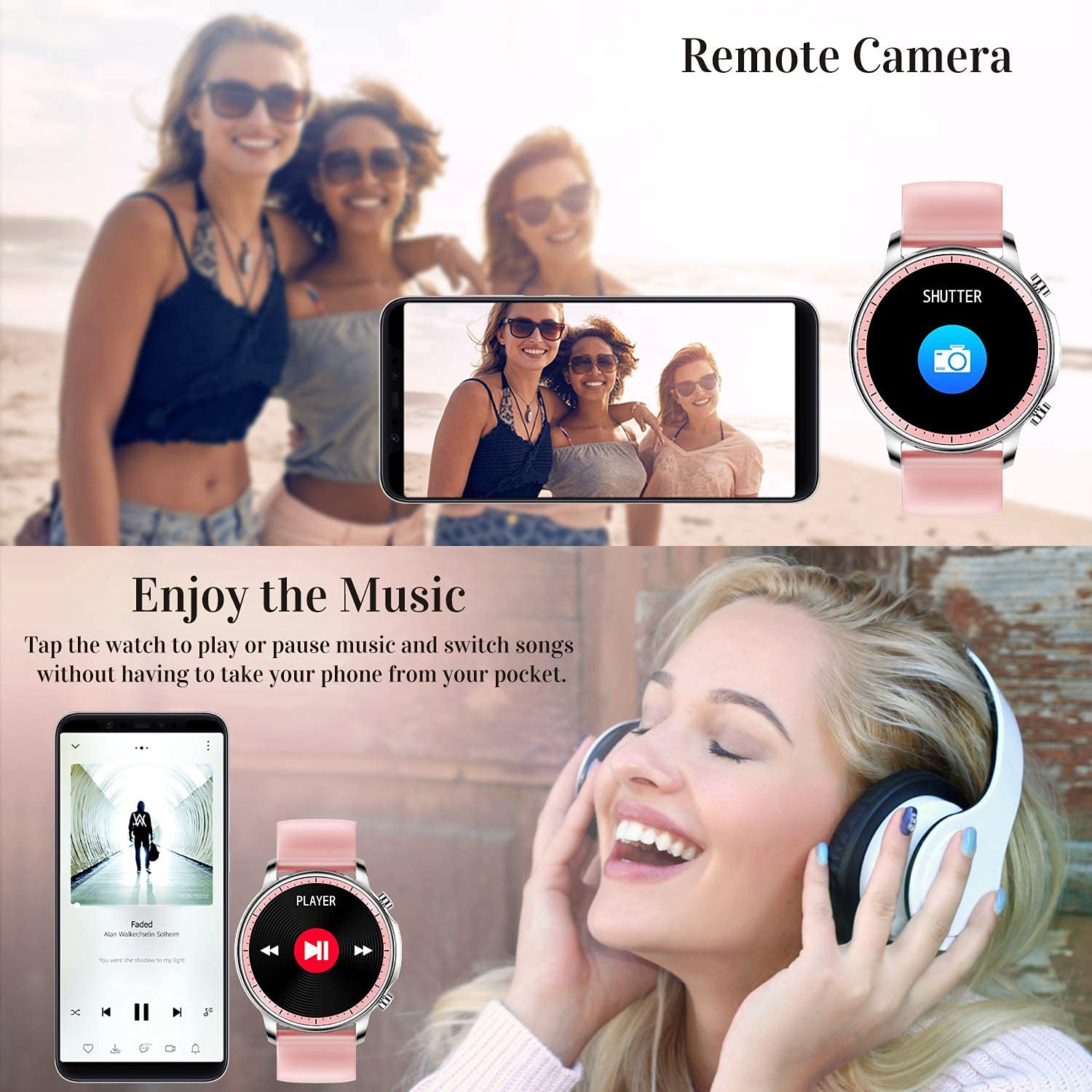
Control music playback on your smartphone directly from your watch. Tap to play/pause or switch songs without needing to access your phone.
5.5 ກ້ອງຖ່າຍຮູບທາງໄກ
Use your smart watch as a remote shutter for your smartphone camera. This feature allows you to take photos from a distance.

Figure 5.4: Remote Camera and Music Control
6. ຄຸນສົມບັດ
6.1 ການຕິດຕາມສຸຂະພາບ
- Heart Rate (HR) Monitor: ຕິດຕາມອັດຕາການເຕັ້ນຫົວໃຈຂອງທ່ານຢ່າງຕໍ່ເນື່ອງຕະຫຼອດມື້.
- Blood Pressure (BP) Monitor: Provides blood pressure readings. (Refer to safety disclaimer in Section 2).
- ຕິດຕາມກວດກາອົກຊີເຈນໃນເລືອດ (SpO2): ວັດແທກລະດັບຄວາມອີ່ມຕົວຂອງອົກຊີໃນເລືອດ.
- ເຄື່ອງຕິດຕາມການນອນ: Records sleep information, including deep sleep, light sleep, and awake time, to help you understand your sleep patterns.
- ການຕິດຕາມສຸຂະພາບເພດຍິງ: Offers features for tracking female health cycles.

Figure 6.1: Heart Rate and Blood Pressure Monitoring

ຮູບທີ 6.2: ການຕິດຕາມການນອນຫຼັບແບບສະຫຼາດ
6.2 ການຕິດຕາມກິດຈະກໍາ
The smart watch offers 7 data record modes to track various sports activities:
- ຍ່າງ
- ແລ່ນ
- ຖີບລົດ
- ບານບ້ວງ
- ບານເຕະ
- Badminton
- ຂ້າມ
This feature helps you monitor your exercise data and gain insights into your fitness levels.

Figure 6.3: Smart Watch Functions Overview
6.3 Smart Reminders
- ເຕືອນປະຈຳຕົວ: Reminds you to move and stay active after periods of inactivity.
- ໂມງປຸກ: ຕັ້ງໂມງປຸກໂດຍກົງຢູ່ໃນໂມງຂອງທ່ານ.
6.4 ໜ້າທີ່ອື່ນໆ
- ໂມງຈັບເວລາ
- Fun Game
7. ບໍາລຸງຮັກສາ
7.1 ການຕໍ່ຕ້ານນ້ໍາ
The ENHANCE Colmi V23 Smart Watch is IP68 waterproof, making it resistant to daily wet conditions such as hand washing or light rain. Avoid prolonged submersion in water, hot water, or steam, and do not operate buttons underwater.
7.2 ການທໍາຄວາມສະອາດ
ເຊັດໂມງ ແລະ ສາຍເປັນປະຈຳດ້ວຍຜ້າອ່ອນໆແຫ້ງ. ຖ້າຈຳເປັນ, ໃຫ້ໃຊ້ຜ້າເຊັດເບົາໆ.amp ຜ້າແລະຫຼັງຈາກນັ້ນໃຫ້ແຫ້ງຢ່າງລະອຽດ. ຫຼີກເວັ້ນການນໍາໃຊ້ສານເຄມີທີ່ຮຸນແຮງຫຼືວັດສະດຸຂັດ.
7.3 ການດູແລຫມໍ້ໄຟ
ເພື່ອຍືດອາຍຸການໃຊ້ງານຂອງແບັດເຕີຣີ, ໃຫ້ຫຼີກລ່ຽງການສາກແບັດເຕີຣີໃຫ້ໝົດເລື້ອຍໆ. ສາກໂມງເມື່ອລະດັບແບັດເຕີຣີຕໍ່າ. ເກັບຮັກສາໂມງໄວ້ໃນບ່ອນທີ່ເຢັນແລະແຫ້ງເມື່ອບໍ່ໄດ້ໃຊ້ງານເປັນເວລາດົນ.
8. ການແກ້ໄຂບັນຫາ
- ໂມງບໍ່ເປີດ: ກວດໃຫ້ແນ່ໃຈວ່າໂມງຖືກສາກເຕັມແລ້ວ. ເຊື່ອມຕໍ່ມັນກັບເຄື່ອງສາກຢ່າງໜ້ອຍ 30 ນາທີ.
- ໂມງບໍ່ໄດ້ຈັບຄູ່ກັບໂທລະສັບ: Make sure Bluetooth is enabled on your phone and the watch is within range. Restart both the watch and your phone, then try pairing again through the Da Fit app.
- ຂໍ້ມູນສຸຂະພາບບໍ່ຖືກຕ້ອງ: Ensure the watch is worn snugly on your wrist, not too tight or too loose. Clean the sensor on the back of the watch. Remember, this device is not a medical instrument.
- ການແຈ້ງເຕືອນບໍ່ປາກົດ: Check notification settings in the Da Fit app and your phone's system settings to ensure permissions are granted for the app to display notifications.
9. ຂໍ້ມູນຈໍາເພາະ
| ຍີ່ຫໍ້ | ປັບປຸງ |
| ຕົວແບບ | V23 Smart watch |
| ຂະໜາດສິນຄ້າ | 1.03 x 2 x 4.15 cm |
| ນ້ໍາຫນັກລາຍການ | 42 g |
| ຂະໜາດໜ້າຈໍ | 1.3 ນິ້ວ |
| ຄວາມລະອຽດ | 240 x 230 |
| ປະເພດການສະແດງ | Digital LCD |
| ຄວາມອາດສາມາດຫມໍ້ໄຟ | 200 mAh (Lithium Polymer) |
| ວິທີການສາກໄຟ | Magnetic Wire Charging |
| ປະເພດໄຮ້ສາຍ | Bluetooth |
| ອຸປະກອນທີ່ເຂົ້າກັນໄດ້ | Mobile Phone (Android 4.0+ & iOS 9.0+) |
| ລະບົບປະຕິບັດການ | Android ແລະ iOS |
| ການຕໍ່ຕ້ານນ້ໍາ | IP68 |
| ວັດສະດຸ | ພາດສະຕິກ |
10. ການຮັບປະກັນແລະການສະຫນັບສະຫນູນ
For warranty information and customer support, please refer to the documentation included with your product or contact ENHANCE customer service. The included user manual contains details regarding warranty terms and contact information.


