1. ການແນະນໍາ ແລະຫຼາຍກວ່າview
The ToolkitRC M8S is a highly versatile and powerful smart charger and discharger designed for a wide range of battery types commonly used in remote-controlled (RC) applications, including drones, cars, and boats. Beyond its primary charging and discharging capabilities, the M8S integrates several essential tools such as a servo tester, cell tester, wattmeter, PWM/PPM/Sbus input/output generators, and a variable DC output control. Its intuitive interface, displayed on a vibrant 2.4-inch TFT color LCD screen, ensures ease of use for both hobbyists and professionals.

ຮູບພາບ 1.1: ດ້ານຫນ້າ view of the ToolkitRC M8S Smart Charger, showing its 2.4-inch TFT color LCD screen with main menu options for Charger, Measurer, Output, and Settings. A rotary knob and OK/Exit buttons are visible on the right.

ຮູບພາບ 1.2: ມຸມ view of the ToolkitRC M8S Smart Charger, highlighting the screen interface and the output ports on the right side, including the main XT60 output and balance port.
2. ຂໍ້ມູນຄວາມປອດໄພ
WARNING: Failure to follow these safety instructions can result in fire, property damage, or injury.
- ປະຕິບັດການສາກໄຟຢູ່ບ່ອນທີ່ມີລະບາຍອາກາດໄດ້ດີ, ຫ່າງຈາກວັດສະດຸທີ່ຕິດໄຟໄດ້ສະເໝີ.
- Do not charge batteries that are damaged, swollen, or leaking. Dispose of such batteries properly.
- Ensure correct polarity when connecting batteries to the charger. Incorrect connections can cause damage to the charger or battery.
- Never leave the charger unattended while it is in operation.
- ຮັກສາສາຍສາກໃຫ້ຫ່າງຈາກນໍ້າ, ຄວາມຊຸ່ມຊື່ນ, ແລະອຸນຫະພູມທີ່ຮຸນແຮງ.
- This device is not a toy. Keep out of reach of children. Adult supervision is required during operation.
- Use only the recommended power supply for the charger.
- ຫຼີກລ້ຽງການລັດວົງຈອນສັ້ນຢູ່ປາຍຍອດຜົນຜະລິດໄດ້.
3. ເນື້ອໃນຊຸດ
Upon opening the package, please verify that all components are present and in good condition. If any items are missing or damaged, contact your retailer immediately.
- ToolkitRC M8S Smart Charger Unit
- ຄູ່ມືແນະ ນຳ (ເອກະສານນີ້)
- (Note: Power supply and charging cables are typically sold separately unless specified by your retailer.)

Image 3.1: The ToolkitRC M8S Smart Charger unit displayed alongside its retail packaging box, indicating the product's compact size.
4. ຄຸນລັກສະນະຂອງຜະລິດຕະພັນ
The ToolkitRC M8S is engineered with advanced features to provide comprehensive battery management and diagnostic capabilities:
- ຄວາມເຂົ້າກັນໄດ້ຂອງຫມໍ້ໄຟກວ້າງ: Supports LiPo, LiHV, LiFe, Lion (1-8S), NiMh (1-20S), and Pb (1-12S) battery types.
- ຜົນຜະລິດພະລັງງານສູງ: Capable of charging and discharging at 0.1-18A with a maximum charge power of 400W.
- Multi-functional Tools:
- Balance Charge: Ensures even cell voltage for optimal battery health.
- Measurer: Functions as a cell voltage checker.
- Watt Meter: Measures power consumption and output.
- Servo Tester: Tests servo functionality.
- PWM/PPM/Sbus Input/Output Generators: For testing and generating control signals.
- DC Output Control: Provides a variable voltage and current DC power supply.
- ຈໍສະແດງຜົນ Vivid: Features a 2.4-inch TFT color LCD screen for clear and detailed information display.
- ການໂຕ້ຕອບຜູ້ໃຊ້ທີ່ເຂົ້າໃຈງ່າຍ: All-new UI designed for simple interaction and easy navigation.
- ສະຫນັບສະຫນູນຫຼາຍພາສາ: System supports multiple languages for global users.
- ລະບົບເຮັດຄວາມເຢັນທີ່ດີທີ່ສຸດ: Efficient heat dissipation for reliable high-power operation.
- ການອອກແບບກະທັດຮັດ: Portable dimensions of 98 x 68 x 35 mm.

Image 4.1: A visual representation of the ToolkitRC M8S's multifunctional capabilities, including Balance Charge, Measurer, Watt Meter, Annunciator, Drone Adapter, and Signal Tester.

Image 4.2: The ToolkitRC M8S display showing various language options, indicating its multi-language support for users worldwide.

Image 4.3: An internal diagram of the ToolkitRC M8S, illustrating its optimized cooling system designed for efficient heat dissipation during high-power operation.
5. ຕັ້ງຄ່າ
Follow these steps to set up your ToolkitRC M8S Smart Charger:
- ເຊື່ອມຕໍ່ການສະຫນອງພະລັງງານ: Connect a DC power supply (7-30V) to the input ports on the back of the charger. Ensure the polarity is correct (+ to + and - to -).
- ເປີດ: Once the power supply is connected, the charger will automatically power on and display the main menu.
- ເຊື່ອມຕໍ່ແບັດເຕີຣີ: For charging or discharging, connect your battery to the appropriate output ports on the side of the charger. For LiPo/LiHV/LiFe/Lion batteries, connect both the main discharge lead (XT60) and the balance lead to the corresponding ports.
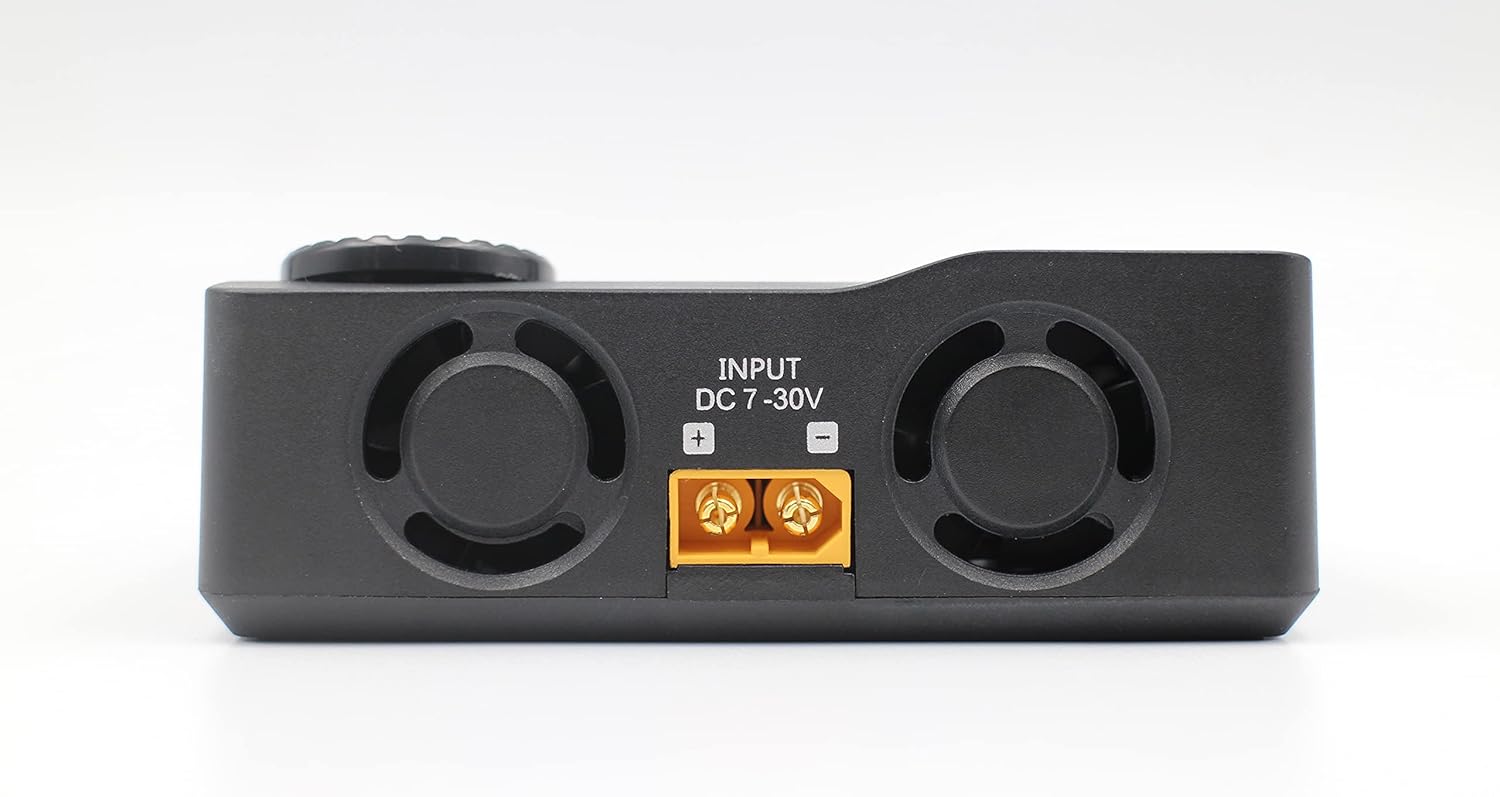
ຮູບພາບ 5.1: ດ້ານຫລັງ view of the ToolkitRC M8S Smart Charger, clearly showing the DC 7-30V input ports with positive and negative terminals for power connection.

ຮູບພາບ 5.2: ຂ້າງ view of the ToolkitRC M8S Smart Charger, displaying the main XT60 output port and the 2-8S balance port for connecting batteries.
6. ຄໍາແນະນໍາການດໍາເນີນງານ
The M8S features a user-friendly interface controlled by a rotary knob and two buttons (OK and EXIT).

Image 6.1: A close-up of the ToolkitRC M8S screen, showing the main menu with the 'Charge' option highlighted, indicating readiness for battery charging operations.
6.1. ການນໍາທາງ
- ລູກປືນ Rotary: Rotate to scroll through menu options or adjust values.
- ປຸ່ມຕົກລົງ: Press to confirm a selection or enter a submenu.
- ປຸ່ມອອກ: Press to go back to the previous menu or cancel an operation.
6.2. ການສາກແບັດເຕີຣີ
- ຈາກເມນູຫລັກ, ເລືອກ "Charger" ແລະກົດ OK.
- Select the battery type (e.g., LiPo, LiHV, NiMh) and the number of cells (S).
- Adjust the desired charge current (Amps) ແລະ voltage (ຖ້າມີ).
- Confirm settings and start the charging process. The screen will display real-time charging data.
6.3. Using Other Functions
- Measurer: ເລືອກ "Measurer" ການກວດສອບແຕ່ລະເຊລ voltages, voltage, and internal resistance of your battery.
- ຜົນຜະລິດ: ເລືອກ "Output" to use the M8S as a variable DC power supply or to test PWM/PPM/Sbus signals.
- ການຕັ້ງຄ່າ: ເລືອກ "ການຕັ້ງຄ່າ" to configure system parameters such as language, backlight, and sound.

Image 6.2: A composite image showcasing the ToolkitRC M8S's new user interface, displaying various screens including the main menu, a charging progress screen, and a PWM/PPM/Sbus signal testing screen.
7. ບໍາລຸງຮັກສາ
Proper maintenance ensures the longevity and optimal performance of your ToolkitRC M8S charger.
- ທໍາຄວາມສະອາດ: Use a soft, dry cloth to clean the charger's exterior. Do not use liquid cleaners or solvents.
- ການເກັບຮັກສາ: ເກັບຮັກສາເຄື່ອງສາກໄຟໄວ້ໃນບ່ອນທີ່ເຢັນ, ແຫ້ງ ແລະ ຫ່າງຈາກແສງແດດໂດຍກົງ ແລະ ອຸນຫະພູມສູງສຸດເມື່ອບໍ່ໄດ້ໃຊ້ງານ.
- ການລະບາຍອາກາດ: Ensure the ventilation openings are clear of dust and debris to maintain efficient cooling.
- ການອັບເດດເຟີມແວ: ກວດເບິ່ງຢ່າງເປັນທາງການຂອງ ToolkitRC ເປັນໄລຍະ website for any available firmware updates to ensure your charger has the latest features and bug fixes.
8. ການແກ້ໄຂບັນຫາ
If you encounter issues with your M8S charger, refer to the following common problems and solutions:
| ບັນຫາ | ສາເຫດທີ່ເປັນໄປໄດ້ | ການແກ້ໄຂ |
|---|---|---|
| ເຄື່ອງສາກເປີດບໍ່ໄດ້. | No power supply, incorrect power supply voltage, ການເຊື່ອມຕໍ່ວ່າງ. | ກວດສອບການເຊື່ອມຕໍ່ແຫຼ່ງຈ່າຍໄຟ ແລະ ລະດັບສຽງtage (7-30V DC). Ensure connections are secure. |
| Battery not detected. | Incorrect battery connection, damaged battery, wrong battery type selected. | Verify main and balance lead connections. Check battery health. Ensure correct battery type and cell count are selected in settings. |
| Charging error message. | ຫມໍ້ໄຟ voltage too low/high, internal resistance too high, short circuit. | ກວດເບິ່ງຫມໍ້ໄຟ voltage. Inspect battery and cables for damage. Reduce charge current if battery is old or has high internal resistance. |
| ໜ້າຈໍບໍ່ຕອບສະໜອງ ຫຼື ຄ້າງໄວ້. | ຄວາມຜິດພາດຂອງຊອບແວຊົ່ວຄາວ. | Disconnect power, wait a few seconds, then reconnect to restart the charger. |
If the problem persists after attempting these solutions, please contact ToolkitRC customer support or your retailer for further assistance.
9. ຂໍ້ມູນຈໍາເພາະ
| ຄຸນສົມບັດ | ລາຍລະອຽດ |
|---|---|
| ຕົວແບບ | M8S |
| ການປ້ອນຂໍ້ມູນ Voltage | DC 7-30V |
| ສາກໄຟປະຈຸບັນ | 0.1-18A |
| ປ່ອຍກະແສໄຟຟ້າ | 0.1-5A (Max 20W) |
| ການສາກໄຟສູງສຸດ | 400W |
| ປະເພດຫມໍ້ໄຟທີ່ຮອງຮັບ | LiPo/LiHV/LiFe/Lion (1-8S), NiMh (1-20S), Pb (1-12S) |
| ຍອດເງິນໃນປະຈຸບັນ | ສູງສຸດ 1A |
| ຈໍສະແດງຜົນ | ຈໍ LCD ສີ TFT ຂະໜາດ 2.4 ນິ້ວ |
| ຂະໜາດ | 98 x 68 x 35 ມມ |
| ນ້ຳໜັກ | 255g |
| UPC | 729974629191 |

Image 9.1: A detailed specifications table for the ToolkitRC M8S, outlining input, charge/discharge parameters, supported battery types, and other technical data.
10. ການຮັບປະກັນແລະການສະຫນັບສະຫນູນ
ToolkitRC products are manufactured to high quality standards. For warranty information, please refer to the warranty card included with your product or visit the official ToolkitRC webເວັບໄຊ. ຮັກສາໃບຮັບເງິນການຊື້ຂອງທ່ານໄວ້ເປັນຫຼັກຖານການຊື້ສໍາລັບການຮ້ອງຂໍການຮັບປະກັນ.
For technical support, troubleshooting assistance beyond this manual, or inquiries about spare parts, please contact your authorized ToolkitRC dealer or the manufacturer directly through their official support channels.
ທາງການ Webເວັບໄຊ: www.toolkitrc.com (ກະລຸນາສັງເກດ: ນີ້ແມ່ນຕົວຍຶດ URL. Refer to your product packaging or official documentation for the correct webສະຖານທີ່.)


