1. ບົດແນະນຳ
This manual provides essential information for setting up, operating, maintaining, and troubleshooting your HP EliteOne 800 G5 24-inch All-in-One Touchscreen PC. Please read this guide thoroughly before using your device to ensure proper functionality and longevity.

Figure 1: HP EliteOne 800 G5 All-in-One PC with included keyboard and mouse.
2. ເນື້ອໃນຊຸດ
ກວດສອບວ່າລາຍການທັງຫມົດແມ່ນມີຢູ່ໃນຊຸດ:
- HP EliteOne 800 G5 All-in-One PC
- ແປ້ນພິມ HP USB
- ເມົ້າ HP USB
- ສາຍໄຟ
- ເອກະສານ (ຄູ່ມືນີ້, ຂໍ້ມູນຄວາມປອດໄພ)
3. ຜະລິດຕະພັນເກີນview
3.1 ແນວ ໜ້າ View

ຮູບ 2: ດ້ານຫນ້າ view of the HP EliteOne 800 G5, showing the 24-inch touchscreen display and integrated speakers.
- 23.8-inch FHD IPS WLED-backlit Touchscreen Display: Main interactive display area.
- 2 MP FHD Pop-up Webກ້ອງ: Located at the top center, retracts when not in use.
- Integrated Dual Array Digital Microphone: For clear audio input during calls or recordings.
- Bang & Olufsen Speakers: Located below the screen for high-quality audio output.
3.2 ຂ້າງ View (ຂວາ)

ຮູບທີ 3: ດ້ານຂວາ view illustrating the optical disk drive and audio ports.
- Optical Disk Drive: ສຳລັບການອ່ານ ແລະ ຂຽນແຜ່ນ CD/DVD.
- Disc drive eject button: To open the optical disk drive tray.
- Standard lock slot (10 mm): For security cables.
- Universal Audio Jack with CTIA headset support: For connecting headsets with a microphone.
- ຕົວເຊື່ອມຕໍ່ຫູຟັງ: ສໍາລັບການເຊື່ອມຕໍ່ຫູຟັງ.
3.3 ດ້ານຫຼັງ View ແລະພອດ
ຮູບ 4: ລາຍລະອຽດດ້ານຫລັງ view showing all available ports and connections.
- USB 3.1 Gen 2 Type-A port: High-speed USB connection.
- USB 3.1 Gen 2 Type-A port (charge support up to 5V/1.5A): High-speed USB with charging capability.
- Audio line-out connector: For connecting external speakers or audio systems.
- USB 3.1 Gen 1 Type-A ports (2): Standard USB connections.
- RJ-45 (network) jack: ສໍາລັບການເຊື່ອມຕໍ່ອີເທີເນັດແບບມີສາຍ.
- ຕົວເຊື່ອມຕໍ່ພະລັງງານ: ສໍາລັບການເຊື່ອມຕໍ່ສາຍໄຟ.
- USB 3.1 Gen 2 Type-A ports (2) wake capable: High-speed USB ports that can wake the system.
- Dual-Mode DisplayPort™ 1.2 (DP++): ສໍາລັບການເຊື່ອມຕໍ່ຈໍສະແດງຜົນພາຍນອກ.
- HDMI 2.0a connector: ສໍາລັບການເຊື່ອມຕໍ່ຈໍສະແດງຜົນພາຍນອກ.
- SD card reader 4.0 (NOT INCLUDED on all models): ສໍາລັບການອ່ານກາດຫນ່ວຍຄວາມຈໍາ SD.
- USB 3.1 Type-C™ Gen 2 port (charge support up to 5V/3A): Reversible USB-C port with charging capability.
- Dual-state power button: To power on/off or put the system to sleep.
- ແນ່ນອນ View Button (optional): Activates HP Sure View integrated privacy screen.

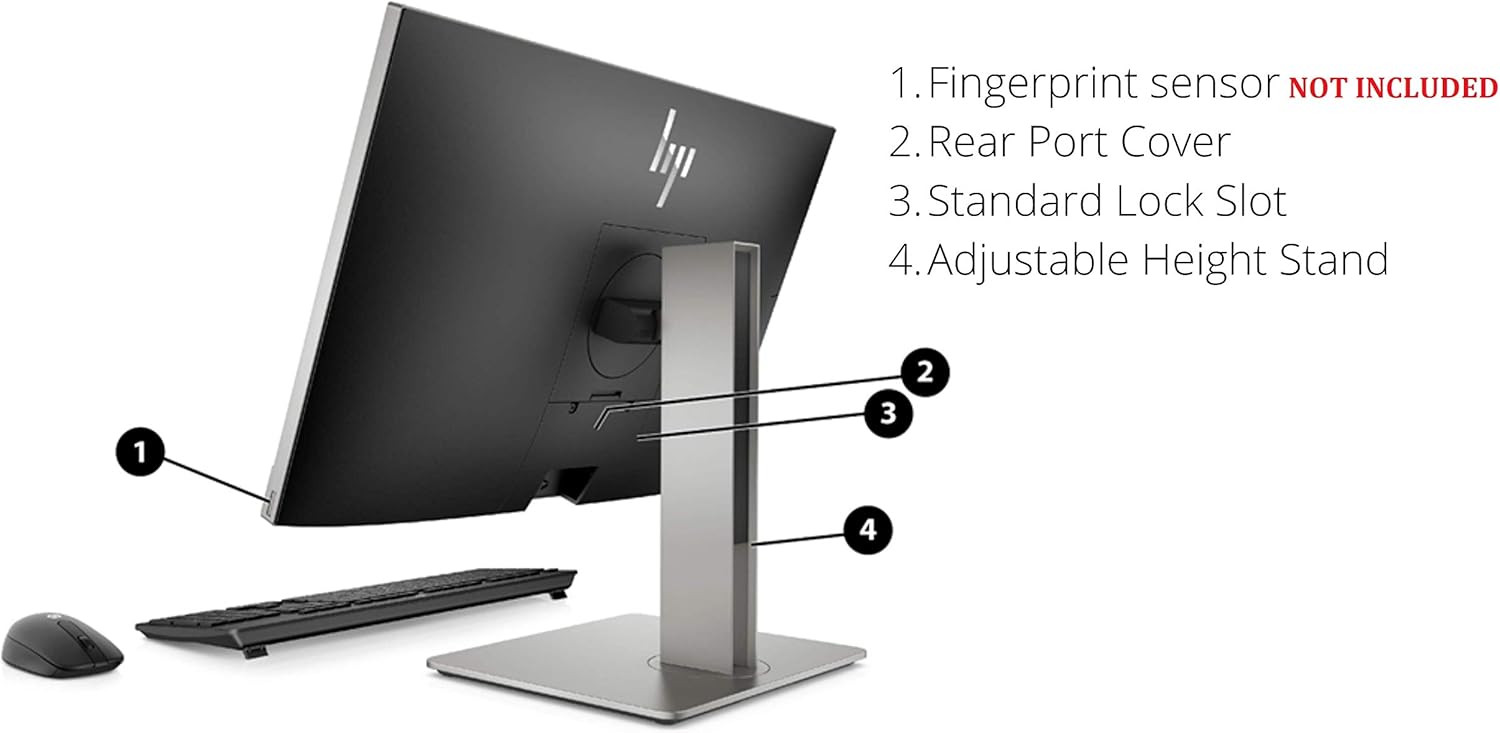
ຮູບ 5: ດ້ານຫລັງ view highlighting the adjustable height stand and other features.
- Fingerprint sensor (NOT INCLUDED on all models): ສໍາລັບການກວດສອບຄວາມຖືກຕ້ອງທາງຊີວະມິຕິ.
- Rear Port Cover: Conceals and protects rear ports.
- Standard Lock Slot: For security cables.
- ຂາຕັ້ງຄວາມສູງທີ່ສາມາດປັບໄດ້: Allows for ergonomic positioning of the display.
4. ຕັ້ງຄ່າ
Follow these steps to set up your HP EliteOne 800 G5 PC:
- Unpack the PC: ເອົາສ່ວນປະກອບທັງຫມົດອອກຈາກການຫຸ້ມຫໍ່ຢ່າງລະມັດລະວັງ.
- ວາງຕຳແໜ່ງ PC: Place the All-in-One PC on a stable, flat surface. Ensure adequate ventilation around the device.
- ເຊື່ອມຕໍ່ແປ້ນພິມ ແລະເມົາສ໌: Plug the USB keyboard and mouse into any available USB Type-A ports on the rear of the PC.
- ເຊື່ອມຕໍ່ພະລັງງານ: Connect the power cord to the power connector on the rear of the PC, then plug the other end into a grounded electrical outlet.
- ເຊື່ອມຕໍ່ກັບເຄືອຂ່າຍ (ທາງເລືອກ): For a wired internet connection, connect an Ethernet cable from your router or modem to the RJ-45 (network) jack on the rear of the PC.
- ເປີດ: Press the dual-state power button, located on the rear of the PC, to turn on the system.
- ການຕັ້ງຄ່າເບື້ອງຕົ້ນ: ປະຕິບັດຕາມຄໍາແນະນໍາໃນໜ້າຈໍເພື່ອເຮັດສໍາເລັດການຕັ້ງຄ່າ Windows 10 Pro, ລວມທັງພາສາ, ພາກພື້ນ, ການເຊື່ອມຕໍ່ເຄືອຂ່າຍ (ຖ້າບໍ່ໄດ້ເຊື່ອມຕໍ່ສາຍ), ແລະການສ້າງບັນຊີຜູ້ໃຊ້.
5. ຄໍາແນະນໍາການດໍາເນີນງານ
5.1 ການຄຸ້ມຄອງພະລັງງານ
- ເປີດ: Press the power button on the rear of the PC.
- ຮູບແບບການນອນ: Briefly press the power button or select 'Sleep' from the Windows Start menu.
- ປິດລົງ: ເລືອກ 'ປິດ' ຈາກເມນູເລີ່ມຕົ້ນຂອງ Windows.
- ຣີສະຕາດ: ເລືອກ 'ເລີ່ມຕົ້ນໃໝ່' ຈາກເມນູເລີ່ມຕົ້ນຂອງ Windows.
5.2 ການນໍາໃຊ້ຫນ້າຈໍສໍາຜັດ
The 24-inch display supports multi-touch gestures. Common gestures include:
- ແຕະ: ເທົ່າກັບການຄລິກເມົ້າ.
- ແຕະສອງເທື່ອ: ເທົ່າກັບການຄລິກສອງເທື່ອ.
- ກົດຄ້າງໄວ້: ເທົ່າກັບການຄລິກຂວາ.
- ບີບ/ຍືດ: ຊູມເຂົ້າ ຫຼືອອກ.
- ປັດ: ເລື່ອນຜ່ານເນື້ອຫາ ຫຼື ນຳທາງ.
5.3 Webກ້ອງ ແລະ ສຽງ
- Webກ້ອງ: The 2 MP FHD pop-up webcam automatically extends when an application requires it (e.g., video calls). Gently push it down to retract when not in use for privacy.
- ໄມໂຄຣໂຟນ: The integrated dual array digital microphone is active when the webcam is in use or when voice input is required.
- ລໍາໂພງ: The Bang & Olufsen speakers provide audio output. Volume can be adjusted via Windows settings or keyboard shortcuts.
5.4 Optical Disk Drive
To use the DVD+/-RW SM DL 9.5mm slim tray:
- Press the eject button on the right side of the PC.
- Place a CD or DVD onto the tray, ensuring it is seated correctly.
- Gently push the tray back into the PC until it clicks shut.
6. ບໍາລຸງຮັກສາ
6.1 ການທໍາຄວາມສະອາດ
- ໜ້າຈໍ: ໃຊ້ຜ້າແພທີ່ອ່ອນໆ ທີ່ບໍ່ມີເສັ້ນດ່າງ dampຜະສົມດ້ວຍນ້ໍາຫຼືການແກ້ໄຂການທໍາຄວາມສະອາດຫນ້າຈໍ. ຢ່າສີດຂອງແຫຼວໂດຍກົງໃສ່ຫນ້າຈໍ.
- ແຈ້ງ: ເຊັດດ້ວຍຜ້າອ່ອນໆ, ແຫ້ງ. ຫຼີກລ້ຽງການເຮັດຄວາມສະອາດຂັດ.
- ການລະບາຍອາກາດ: ຮັບປະກັນວ່າຊ່ອງລະບາຍອາກາດບໍ່ມີຝຸ່ນ ແລະ ສິ່ງກີດຂວາງເພື່ອປ້ອງກັນຄວາມຮ້ອນເກີນໄປ.
6.2 ການປັບປຸງຊອບແວ
ປັບປຸງລະບົບປະຕິບັດການ ແລະໄດເວີຂອງທ່ານຢ່າງເປັນປົກກະຕິເພື່ອຮັບປະກັນປະສິດທິພາບ ແລະຄວາມປອດໄພທີ່ດີທີ່ສຸດ:
- ອັບເດດ Windows: ໄປທີ່ ການຕັ້ງຄ່າ > ອັບເດດ ແລະຄວາມປອດໄພ > Windows Update ເພື່ອກວດສອບ ແລະຕິດຕັ້ງອັບເດດ.
- ຜູ້ຊ່ວຍສະ ໜັບ ສະ ໜູນ HP: Use the pre-installed HP Support Assistant software to check for driver and firmware updates specific to your HP EliteOne PC.
7. ການແກ້ໄຂບັນຫາ
| ບັນຫາ | ສາເຫດທີ່ເປັນໄປໄດ້ | ການແກ້ໄຂ |
|---|---|---|
| PC ບໍ່ເປີດ | ບໍ່ມີໄຟຟ້າ, ການເຊື່ອມຕໍ່ວ່າງ | Check power cord connection to PC and outlet. Ensure outlet is functional. |
| ບໍ່ມີການສະແດງຢູ່ໃນຫນ້າຈໍ | PC in sleep mode, display settings issue | Press any key or move mouse to wake. If connected to external display, check display input source. |
| ໜ້າຈໍສຳຜັດບໍ່ຕອບສະໜອງ | Software glitch, dirty screen | Restart the PC. Clean the screen with a soft, lint-free cloth. |
| ບໍ່ມີສຽງຈາກລຳໂພງ | Volume muted, incorrect audio output device | Check volume levels in Windows. Ensure 'Speakers (Bang & Olufsen)' is selected as the default playback device. |
| Webກ້ອງບໍ່ເຮັດວຽກ | Webcam retracted, privacy settings, driver issue | ຮັບປະກັນ webcam is extended. Check Windows privacy settings for camera access. Update webcam drivers via HP Support Assistant. |
8. ຂໍ້ມູນຈໍາເພາະ
Key technical specifications for the HP EliteOne 800 G5 24-inch All-in-One PC:
| ຄຸນສົມບັດ | ລາຍລະອຽດ |
|---|---|
| ໝາຍເລກຕົວແບບ | 2D9S5UW#ABA |
| ຈໍສະແດງຜົນ | 23.8" diagonal FHD IPS widescreen WLED-backlit touch screen (1920 x 1080) |
| ໂຮງງານຜະລິດ | Intel Core i5-9500 (9M Cache, up to 4.40 GHz) |
| ຮູບພາບ | Intel UHD Graphics 630 (ປະສົມປະສານ) |
| RAM | SDRAM 8 GB DDR4-2666 |
| ການເກັບຮັກສາ | 256 GB M.2 2280 PCIe NVMe TLC SSD |
| ລະບົບປະຕິບັດການ | Windows 10 Pro |
| Webກ້ອງ | 2 MP FHD pop-up webກ້ອງ |
| ສຽງ | Bang & Olufsen Speakers, Integrated Dual Array Digital Microphone |
| Optical Drive | DVD+/-RW SM DL 9.5mm slim tray |
| ພອດ (ດ້ານຫຼັງ) | USB 3.1 Gen 2 Type-A (x3), USB 3.1 Gen 1 Type-A (x2), USB 3.1 Type-C Gen 2 (x1), DisplayPort 1.2 (x1), HDMI 2.0a (x1), RJ-45 (x1), Audio line-out (x1), Power connector (x1) |
| Ports (Side) | Universal Audio Jack (x1), Headphone connector (x1) |
| ຂະໜາດ (LxWxH) | 18.4 x 7.1 x 21.2 ນິ້ວ |
| ນ້ຳໜັກ | 19.24 ປອນ |
9. ການຮັບປະກັນແລະການສະຫນັບສະຫນູນ
Your HP EliteOne 800 G5 PC comes with a standard manufacturer's warranty. Please refer to the warranty card included in your package for specific terms and conditions, including coverage duration and service options.
For technical support, driver downloads, and additional product information, please visit the official HP support webເວັບໄຊ:
When contacting support, have your product model number (2D9S5UW#ABA) and serial number ready.