ແນະນຳ
Thank you for choosing the Opal Selfie Stick OP-Sel-BT-01. This manual provides essential information for the safe and effective use of your device. Please read it thoroughly before operation and retain it for future reference.
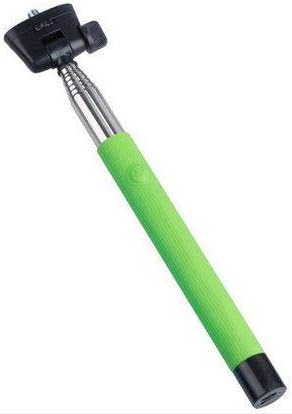
ຮູບທີ 1: The Opal Selfie Stick OP-Sel-BT-01 in green, showing its extendable arm, phone holder, and comfortable grip.
ຄຸນສົມບັດຜະລິດຕະພັນ
- ສີ: ສີຂຽວ
- ວັດສະດຸຫຼັກ: ເຫຼັກກ້າ
- ຄວາມອາດສາມາດໂຫຼດສູງສຸດ: 500 g
- ການເຊື່ອມຕໍ່: ໄຮ້ສາຍ (Bluetooth)
- ລະບົບເຂົ້າກັນໄດ້: Android 3.0 ແລະສູງກວ່າ, iOS 4.0 ແລະສູງກວ່າ
ຕັ້ງຄ່າ
- Unfold the Selfie Stick: Gently pull the phone holder section upwards to extend the stick.
- Adjust Phone Holder: ເປີດໂທລະສັບ clamp and securely place your smartphone within it. Ensure the phone is centered and stable. The clamp is designed to hold various phone sizes.
- ເປີດ: Locate the power button (if applicable, usually on the handle) and press it to turn on the selfie stick. An indicator light may illuminate.
ຄໍາແນະນໍາການດໍາເນີນງານ
ການຈັບຄູ່ Bluetooth
- Ensure the selfie stick is powered on and in pairing mode (indicator light may flash rapidly).
- ໃນໂທລະສັບສະຫຼາດຂອງທ່ານ, ໄປທີ່ ການຕັ້ງຄ່າ > Bluetooth.
- ເປີດ Bluetooth ແລະຊອກຫາອຸປະກອນທີ່ມີຢູ່.
- Select "Opal OP-Sel-BT-01" or a similar name from the list of devices.
- Once paired, the indicator light on the selfie stick may turn solid or turn off, indicating a successful connection.
ຖ່າຍຮູບ/ວິດີໂອ
- ເປີດແອັບພລິເຄຊັນກ້ອງຖ່າຍຮູບຂອງໂທລະສັບສະຫຼາດຂອງທ່ານ.
- ຂະຫຍາຍໄມ້ເຊວຟີຕາມຄວາມຍາວທີ່ຕ້ອງການ.
- ວາງໂທລະສັບຂອງທ່ານໄວ້ສຳລັບຮູບທີ່ຕ້ອງການ.
- Press the shutter button on the selfie stick handle to capture a photo or start/stop video recording.
ບໍາລຸງຮັກສາ
- ທໍາຄວາມສະອາດ: Wipe the selfie stick with a soft, dry cloth. Do not use abrasive cleaners or solvents.
- ການເກັບຮັກສາ: Store the device in a cool, dry place away from direct sunlight and extreme temperatures. Retract the stick fully before storage.
- ການດູແລຫມໍ້ໄຟ: If the selfie stick has a rechargeable battery, ensure it is charged periodically even when not in use to maintain battery health.
ການແກ້ໄຂບັນຫາ
| ບັນຫາ | ສາເຫດທີ່ເປັນໄປໄດ້ | ການແກ້ໄຂ |
|---|---|---|
| ບໍ່ສາມາດຈັບຄູ່ກັບໂທລະສັບໄດ້ | Selfie stick not in pairing mode; Bluetooth off on phone; battery low. | Ensure stick is on and in pairing mode. Turn phone's Bluetooth off/on. Charge the selfie stick. |
| Shutter button not working | Not paired; camera app settings. | Verify successful Bluetooth pairing. Check camera app settings for volume button shutter control. |
| Phone not stable in clamp | Phone not centered; clamp not fully secured. | Re-position phone to be centered. Ensure clamp is firmly gripping the phone. |
ຂໍ້ມູນຈໍາເພາະ
- ຕົວແບບ: OP-Sel-BT-01
- ຍີ່ຫໍ້: ໂອປາ
- ສີ: ສີຂຽວ
- ວັດສະດຸຫຼັກ: ເຫຼັກກ້າ
- ຄວາມອາດສາມາດໂຫຼດສູງສຸດ: 500 g
- ການເຊື່ອມຕໍ່: ໄຮ້ສາຍ (Bluetooth)
- ລະບົບປະຕິບັດການທີ່ຮອງຮັບ: Android 3.0+, iOS 4.0+
- ASIN: B091DBB122
- ວັນທີທີ່ມີໃຫ້ທໍາອິດ: 30 ມີນາ 2021
ການຮັບປະກັນແລະການສະຫນັບສະຫນູນ
For information regarding warranty coverage or technical support, please refer to the documentation included with your purchase or visit the official Opal webເວັບໄຊ. ເງື່ອນໄຂການຮັບປະກັນສະເພາະອາດຈະແຕກຕ່າງກັນໄປຕາມພາກພື້ນ ແລະຮ້ານຂາຍຍ່ອຍ.
ຂໍ້ມູນຄວາມປອດໄພ
- ຢ່າໃຫ້ອຸປະກອນຖືກອຸນຫະພູມສູງ, ຄວາມຊຸ່ມຊື່ນ ຫຼື ແສງແດດໂດຍກົງເປັນເວລາດົນ.
- ຮັກສາໃຫ້ໄກຈາກເດັກນ້ອຍ.
- ຢ່າພະຍາຍາມຖອດປະກອບ ຫຼືແກ້ໄຂອຸປະກອນ. ນີ້ອາດຈະເຮັດໃຫ້ການຮັບປະກັນເປັນໂມຄະແລະເຮັດໃຫ້ເກີດຄວາມເສຍຫາຍ.
- Ensure your phone is securely fastened in the clamp before extending the stick.


