1. ບົດແນະນຳ
The Midea Cube 35 Pint Dehumidifier is designed to efficiently remove moisture from your home, creating a more comfortable environment. Its unique lift-and-twist design offers flexibility in operation and storage, while smart controls provide convenient management of humidity levels. This manual provides essential information for the safe and effective use of your dehumidifier.

Figure 1: Midea Cube Dehumidifier in operation, demonstrating multi-directional air flow.
2. ຄຸນລັກສະນະຂອງຜະລິດຕະພັນ
- ການອອກແບບຍົກແລະບິດ: Offers unparalleled flexibility, allowing the unit to operate in extended or nested form for compact storage.
- ຄວາມອາດສາມາດຂອງຖັງນ້ໍາຂະຫນາດໃຫຍ່: Features a 4.2-gallon (15.9L) removable bucket, providing up to 3 times more capacity than traditional dehumidifiers, reducing the frequency of emptying.
- ທາງເລືອກການລະບາຍນ້ໍາຢ່າງຕໍ່ເນື່ອງ: Includes a drain hose for continuous moisture removal without needing to empty the bucket.
- ການຄວບຄຸມອັດສະລິຍະ: Wi-Fi enabled for remote control via the Midea SmartHome app (iOS/Android) and voice commands through Alexa or Google Assistant.
- ປິດເປີດອັດຕະໂນມັດ: ດຳເນີນການຄືນໃໝ່ໂດຍອັດຕະໂນມັດກັບການຕັ້ງຄ່າກ່ອນໜ້ານີ້ຫຼັງຈາກເປີດໄຟtage.
- Auto-Defrost: Prevents collected water from freezing, protecting the machine.
- ການກັ່ນຕອງລ້າງໄດ້: Maintains air quality and is easy to clean, eliminating the need for expensive replacements.

Figure 2: The dehumidifier's large 4.2-gallon water tank capacity.
3. ເນື້ອໃນຊຸດ
ຮັບປະກັນວ່າສິນຄ້າທັງໝົດມີຢູ່ໃນເວລາທີ່ຖອດອອກ:
- Midea Cube 35 Pint Dehumidifier Unit
- Water Bucket (integrated)
- ລະບາຍ Hose
- ຄູ່ມືຜູ້ໃຊ້ (ເອກະສານນີ້)
4. ຕັ້ງຄ່າ
4.1 ການຫຸ້ມຫໍ່
Carefully remove the dehumidifier and all packaging materials from the box. Inspect the unit for any damage during transit. Keep packaging for future storage or transport.
4.2 ການຕິດລໍ້
The dehumidifier comes with optional wheels for easy mobility. To attach, carefully tilt the unit and insert each wheel into the designated slots on the bottom of the water bucket until they click securely into place. Ensure all four wheels are firmly attached before placing the unit upright.
4.3 ການຈັດຕຳແໜ່ງເຄື່ອງດູດຄວາມຊຸ່ມ
Place the dehumidifier on a level, stable surface. Ensure there is at least 8 inches (20 cm) of space around the unit for proper air circulation. Avoid placing it near heat sources, in direct sunlight, or in areas where it could be exposed to splashing water.
4.4 ການເຊື່ອມຕໍ່ພະລັງງານ
ສຽບສາຍໄຟໃສ່ບ່ອນສຽບໄຟຟ້າທີ່ມີດິນ. ດຽວນີ້ ໜ່ວຍ ດັ່ງກ່າວກຽມພ້ອມ ສຳ ລັບການ ດຳ ເນີນງານ.

Figure 3: The dehumidifier's flexible extended and nested forms.
5. ຄໍາແນະນໍາການດໍາເນີນງານ
5.1 ກະດານຄວບຄຸມຫຼາຍກວ່າview
The control panel is located on the top of the unit and features several buttons and a digital display:
- ປຸ່ມເປີດປິດ: Turns the unit ON/OFF. Press and hold for 3 seconds to connect to Wi-Fi.
- ລູກສອນຂຶ້ນ/ລົງ: Adjust humidity levels or timer settings.
- ປຸ່ມພັດລົມ: Selects fan speed (Low/High). Press and hold for 3 seconds to reset the filter indicator.
- ປຸ່ມໂໝດ: Cycles through operation modes (Set, Continuous, Max).
- ປຸ່ມຕື່ມລະດັບ: Sets the desired water fill level (1-4) for the bucket.
- ປຸ່ມຈັບເວລາ: ຕັ້ງໂມງຈັບເວລາ ເປີດ/ປິດ 24 ຊົ່ວໂມງ.
- ຈໍດິຈິຕອນ: ສະແດງຄວາມຊຸ່ມຊື່ນໃນປະຈຸບັນ, ຄວາມຊຸ່ມຊື່ນເປົ້າໝາຍ, ຫຼືການຕັ້ງຄ່າໂມງຈັບເວລາ.
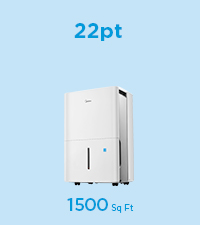
Figure 4: Midea Cube Dehumidifier Control Panel.
5.2 ການຕັ້ງຄ່າຄວາມຊຸ່ມຊື່ນທີ່ຕ້ອງການ
Press the 'Mode' button until 'Set' mode is active. Use the Up/Down arrows to select your desired humidity level (e.g., 35% to 85%). The unit will operate until the room humidity reaches the set level, then cycle ON/OFF to maintain it.
5.3 ການປັບຄວາມໄວພັດລົມ
Press the 'Fan' button to toggle between Low and High fan speeds.
5.4 ຮູບແບບການໃຊ້ງານ
- ຕັ້ງຄ່າໂໝດ: Maintains a user-defined humidity level.
- ໂModeດຕໍ່ເນື່ອງ: ແລ່ນຢ່າງຕໍ່ເນື່ອງໂດຍບໍ່ຄໍານຶງເຖິງລະດັບຄວາມຊຸ່ມຊື່ນ.
- ໂໝດສູງສຸດ: Operates at the highest fan speed continuously for maximum moisture removal.
5.5 ຟັງຊັນຈັບເວລາ
Press the 'Timer' button and use the Up/Down arrows to set a desired ON/OFF time (up to 24 hours). The unit will automatically turn ON or OFF after the set time has elapsed.
5.6 ແອັບອັດສະລິຍະ ແລະ ການຄວບຄຸມດ້ວຍສຽງ
The Midea Cube is Wi-Fi enabled for smart control. Download the Midea SmartHome app on your iOS or Android device. Follow the in-app instructions to connect your dehumidifier. Once connected, you can monitor humidity levels, adjust settings, receive full-water alerts, and integrate with Alexa or Google Assistant for voice control.

Figure 5: App and voice control functionality.
6. ການລະບາຍນ້ຳ
6.1 ການລະບາຍນ້ຳດ້ວຍມື
When the water bucket is full, the unit will automatically stop operating and send a notification via the SmartHome app. To empty:
- Lift the top unit from the water bucket using the integrated handle.
- Carefully carry the water bucket to a sink or drain.
- ຖອກນ້ໍາທີ່ເກັບໄດ້.
- Return the empty bucket and top unit to their original position.
You can also use the 'Fill Level' button on the control panel to set a lower fill level (1-4) if you prefer to empty the bucket more frequently when it's less heavy.
Figure 6: Emptying the water tank.
6.2 ການລະບາຍນ້ໍາຢ່າງຕໍ່ເນື່ອງ
For continuous operation without manual emptying, use the included drain hose:
- ເອົາຖັງນ້ໍາອອກຈາກຫນ່ວຍ.
- Connect one end of the drain hose to the drainage port on the back of the unit.
- Route the other end of the hose to a suitable floor drain or sink, ensuring a continuous downward slope for gravity drainage.
- Place the unit above the sink or drain, or position it over a floor drain.
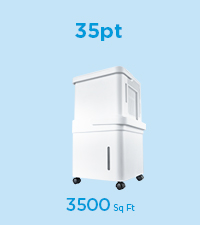
Figure 7: Connecting the drain hose for continuous drainage.
7. ບໍາລຸງຮັກສາ
7.1 ການທໍາຄວາມສະອາດເຄື່ອງກອງອາກາດ
The dehumidifier features a washable filter to maintain optimal performance and air quality. Clean the filter regularly (approximately every 250 hours of operation or when the filter indicator light illuminates):
- ຖອດປລັກໜ່ວຍອອກຈາກປລັກສຽບໄຟ.
- ເອົາການກັ່ນຕອງອາກາດອອກຈາກດ້ານຫລັງຂອງຫນ່ວຍງານ.
- ລ້າງການກັ່ນຕອງດ້ວຍນ້ໍາສະບູທີ່ອົບອຸ່ນ. ລ້າງໃຫ້ສະອາດ.
- ປ່ອຍໃຫ້ການກັ່ນຕອງອາກາດແຫ້ງຫມົດກ່ອນທີ່ຈະໃສ່ຄືນ.
- Press and hold the 'Fan' button for 3 seconds to reset the filter indicator.
7.2 ການທໍາຄວາມສະອາດຫນ່ວຍງານ
To keep your dehumidifier looking new and functioning properly:
- Always unplug the unit before cleaning to prevent electric shock.
- ເຊັດພາຍນອກດ້ວຍຜ້າອ່ອນ, ງamp ຜ້າ.
- Clean the water bucket regularly to prevent mold or mildew growth.
7.3 ການເກັບຮັກສາ
When not in use for extended periods, empty the water bucket, clean the filter, and store the unit in its nested form for compact storage. Ensure the unit is dry before storing.
Figure 8: Lift-and-twist design for easy access and storage.
8. ການແກ້ໄຂບັນຫາ
If your dehumidifier is not operating as expected, consult the following common issues:
- Unit does not turn ON: Check if the power cord is securely plugged into a grounded outlet. Ensure the water bucket is correctly seated and not full.
- Dehumidifier ບໍ່ໄດ້ເກັບນ້ໍາ: Verify that the ambient temperature and humidity are within the operating range (e.g., above 41°F/5°C and 30% relative humidity). Ensure the air filter is clean and not blocked.
- ໜ່ວຍງານມີສຽງດັງ: Check for any obstructions in the fan or air intake/outlet. Ensure the unit is on a level surface.
- Water bucket is full but unit continues to run: This model is designed to stop when the bucket is full. If it continues, ensure the float switch in the bucket is not obstructed.
- ບັນຫາການເຊື່ອມຕໍ່ແອັບ: Ensure your Wi-Fi network is active and the dehumidifier is within range. Follow the app's troubleshooting steps for re-pairing.
9. ຂໍ້ມູນຈໍາເພາະ
| ຄຸນສົມບັດ | ຂໍ້ມູນຈໍາເພາະ |
|---|---|
| ຍີ່ຫໍ້ | Midea |
| ຊື່ຕົວແບບ | Midea Cube Dehumidifier |
| ໝາຍເລກຕົວແບບ | MAD35S1QWT |
| ຄວາມອາດສາມາດ Dehumidification | 35 Pints per Day (50 PT-2012 DOE equivalent) |
| ພື້ນທີ່ຄອບຄຸມ | ສູງເຖິງ 3,500 ຕາແມັດ. ຟຸດ. |
| ປະລິມານຖັງ | 4.2 ກາລອນ (15.9L) |
| ຂະໜາດສິນຄ້າ (ກວ້າງ x ຍາວ x ສູງ) | 14" x 15" x 15" |
| ຈໍານວນຄວາມໄວ | 3 |
| ວັດtage | 314 ວັດ |
| ຮູບແບບການເຮັດວຽກ | Continuous, Set Humidity, Max |
| ຄຸນນະສົມບັດພິເສດ | SmartPhone Compatible (Midea Cube Air app), Wi-Fi, Alexa, Google Assistant, Auto Restart, Auto-Defrost, Washable Filter, Drain Hose Included |
10. ການຮັບປະກັນແລະການສະຫນັບສະຫນູນ
10.1 ຂໍ້ມູນການຮັບປະກັນ
Midea Cube 35 Pint Dehumidifier ມາພ້ອມກັບ a ການຮັບປະກັນ 1 ປີສ່ວນແລະແຮງງານ. ກະລຸນາຮັກສາຫຼັກຖານການຊື້ຂອງທ່ານສໍາລັບການຮຽກຮ້ອງການຮັບປະກັນ.
10.2 ສະຫນັບສະຫນູນລູກຄ້າ
For technical assistance, troubleshooting, or warranty inquiries, please contact Midea Customer Support. Refer to the contact information provided on the Midea webເວັບໄຊທ໌ ຫຼື ເອກະສານລົງທະບຽນຜະລິດຕະພັນຂອງທ່ານ.


