1. ບົດແນະນຳ
Thank you for choosing the boAt Airdopes 641 Truly Wireless Earbuds. This manual provides essential information for setting up, operating, and maintaining your earbuds to ensure optimal performance and longevity. Please read this guide carefully before using the product.
2. ຜະລິດຕະພັນເກີນview
The boAt Airdopes 641 are designed for a seamless audio experience, featuring advanced connectivity and intuitive controls.

ຮູບພາບ: Key features of the Airdopes 641, highlighting RGB LEDs, Instant Wake N' Pair (IWP) technology, Bluetooth 5.0 connectivity, 6mm Dual Drivers for audio, and a Capacitive Touch Panel for controls.
2.1 ອົງປະກອບ
- ຕຸ້ມຫູ: Left and Right truly wireless earbuds with in-ear design.
- ຕູ້ສາກໄຟ: ເຄສແບບພົກພາສໍາລັບການສາກໄຟ ແລະເກັບຮັກສາຫູຟັງ.
- ສາຍ USB Type-C: ສໍາລັບການສາກໄຟກໍລະນີ.
- ຄູ່ມືຜູ້ໃຊ້: ເອກະສານນີ້.
2.2 ຄຸນສົມບັດ
- Bluetooth 5.0: ສຳລັບການເຊື່ອມຕໍ່ໄຮ້ສາຍທີ່ໝັ້ນຄົງ ແລະ ມີປະສິດທິພາບ.
- IWP (Instant Wake N' Pair): Enables quick pairing with your device once the case lid is opened.
- ແຜງສຳຜັດແບບ Capacitive: For easy control of music, calls, and voice assistant.
- 6mm Dual Drivers: ສະໜອງປະສົບການສຽງທີ່ສົມຈິງ.
- ໄຟ LED RGB: Indicator lights for status.
- ໂໝດສັດເດຍລະສານ: Low latency mode for gaming.
- IPX5 Water & Sweat Shield: ສະຫນອງການປ້ອງກັນຈາກການ splashes ແລະເຫື່ອ.
- ການຫຼິ້ນທັງໝົດສູງສຸດ 30 ຊົ່ວໂມງ: Combined battery life of earbuds and charging case.
- ການສາກ USB Type-C: ພອດສາກໄຟທີ່ທັນສະໄໝ ແລະ ສະດວກສະບາຍ.
3. ຕັ້ງຄ່າ
3.1 ການສາກຫູຟັງ ແລະ ເຄສ
ກ່ອນທີ່ຈະໃຊ້ຄັ້ງທໍາອິດ, ໃຫ້ແນ່ໃຈວ່າທັງຫູຟັງເອຍບັດແລະກ່ອງສາກໄດ້ສາກເຕັມແລ້ວ.
- Place both earbuds into the charging case, ensuring they are correctly seated. The earbuds will automatically begin charging.
- ເຊື່ອມຕໍ່ສາຍສາກໄຟ USB Type-C ເຂົ້າກັບພອດສາກໄຟໃນເຄສ ແລະ ສຽບອີກສົ້ນໜຶ່ງເຂົ້າກັບອະແດບເຕີໄຟ USB ທີ່ເຂົ້າກັນໄດ້ (ບໍ່ມີໃຫ້).
- The LED indicators on the case will show the charging status. Once fully charged, the indicators may change or turn off.
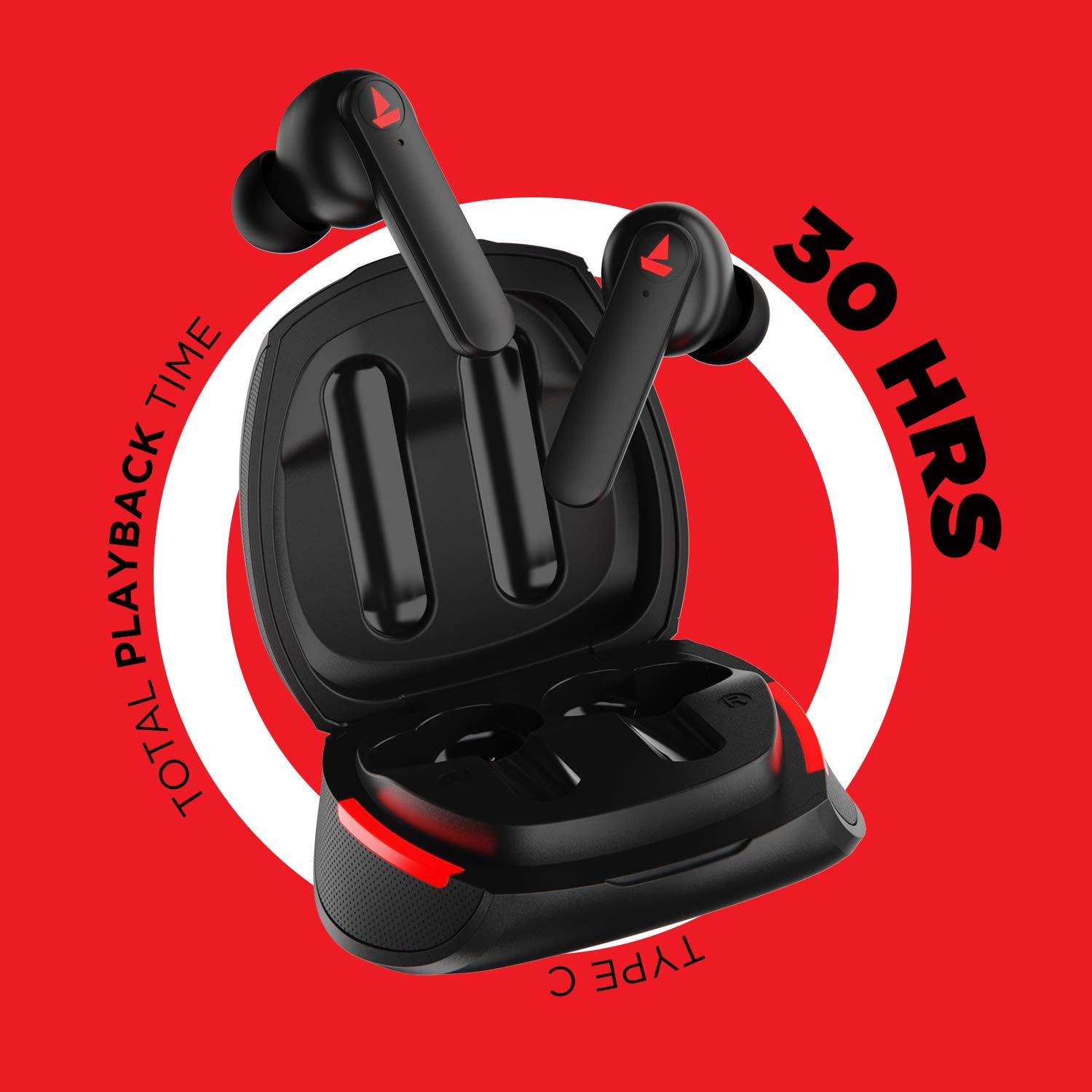
ຮູບພາບ: The Airdopes 641 earbuds resting in their charging case, illustrating the Type-C charging capability and the impressive 30 hours of total playback time.
3.2 Initial Pairing (IWP Technology)
The Airdopes 641 feature Instant Wake N' Pair (IWP) technology for quick and effortless connection.
- ເປີດຝາຂອງກໍລະນີສາກໄຟ. ຫູຟັງເອຍບັດຈະເປີດເຄື່ອງອັດຕະໂນມັດ ແລະເຂົ້າສູ່ໂໝດຈັບຄູ່.
- ໃນໂທລະສັບສະຫຼາດ ຫຼື ອຸປະກອນທີ່ເປີດໃຊ້ງານ Bluetooth ຂອງທ່ານ, ໃຫ້ເປີດໃຊ້ງານ Bluetooth.
- ຊອກຫາ "Airdopes 641" in the list of available devices and select it to pair.
- ເມື່ອຈັບຄູ່ແລ້ວ, ທ່ານຈະໄດ້ຍິນສຽງເຕືອນ, ແລະຫູຟັງຈະພ້ອມທີ່ຈະໃຊ້.
- The earbuds will automatically connect to the last paired device when the case lid is opened, provided Bluetooth is enabled on the device.
4. ຄໍາແນະນໍາການດໍາເນີນງານ
4.1 ເປີດ/ປິດ
- ເປີດ: Open the charging case lid. The earbuds will power on automatically. Alternatively, long-press the Capacitive Touch Control (CTC) on both earbuds for 3 seconds.
- ປິດພະລັງງານ: Place the earbuds back into the charging case and close the lid. They will power off automatically. Alternatively, long-press the CTC on both earbuds for 5 seconds.
4.2 Capacitive Touch Controls (CTC)
The Airdopes 641 feature intuitive touch controls on each earbud.
- ຫຼິ້ນ/ຢຸດ: Single tap on either earbud's CTC.
- ເພງຕໍ່ໄປ: Double tap on the right earbud's CTC.
- ຕິດຕາມກ່ອນ ໜ້າ ນີ້: Double tap on the left earbud's CTC.
- ຮັບ/ສາຍໂທ: Single tap on either earbud's CTC.
- ປະຕິເສດການໂທ: Long press on either earbud's CTC for 2 seconds.
- ກະຕຸ້ນຜູ້ຊ່ວຍສຽງ: Triple tap on either earbud's CTC.
- ປະລິມານຂຶ້ນ: Long press the right earbud's CTC.
- ປະລິມານລົງ: Long press the left earbud's CTC.
4.3 ໂໝດ BEAST (ການຫຼິ້ນເກມທີ່ມີຄວາມໜ່ວງເວລາຕ່ຳ)
Activate BEAST Mode for a low-latency audio experience, ideal for gaming.

ຮູບພາບ: The Airdopes 641 earbuds and their sleek charging case, emphasizing the "BEAST Mode" feature designed to provide a low-latency audio experience for gamers.
- Activate BEAST Mode: Triple tap on the right earbud's CTC.
- ປິດໂໝດ BEAST: Triple tap on the right earbud's CTC again.
5. ບໍາລຸງຮັກສາ
Proper care ensures the longevity and performance of your Airdopes 641.
5.1 ການທໍາຄວາມສະອາດ
- ເຊັດຫູຟັງຫູຟັງ ແລະ ກະເປົ໋າສາກໄຟດ້ວຍຜ້າແພອ່ອນໆ, ແຫ້ງ, ບໍ່ມີເຈັ້ຍ.
- ຢ່າໃຊ້ເຄື່ອງເຮັດຄວາມສະອາດຂັດ, ເຫຼົ້າ, ຫຼືສານລະລາຍສານເຄມີ.
- Regularly clean the ear tips and mesh to prevent wax buildup, which can affect sound quality.
5.2 ກັນນໍ້າ ແລະເຫື່ອ (IPX5)

ຮູບພາບ: The Airdopes 641 earbuds and their charging case surrounded by water splashes, illustrating their IPX5 rating for water and sweat resistance.
The Airdopes 641 are rated IPX5, meaning they are protected against low-pressure water jets from any direction. This makes them suitable for workouts and light rain.
- ຢ່າເອົາຫູຟັງເອຍບັດໃສ່ນ້ຳ.
- Do not expose them to high-pressure water or steam.
- ກວດໃຫ້ແນ່ໃຈວ່າຫູຟັງເອຍບັດແຫ້ງກ່ອນເອົາມັນກັບໃສ່ກ່ອງສາກເພື່ອປ້ອງກັນຄວາມເສຍຫາຍ.
5.3 ການເກັບຮັກສາ
ເກັບຮັກສາຫູຟັງເອຍບັດໃສ່ໃນກະເປົ໋າສາກໄຟຂອງເຂົາເຈົ້າເມື່ອບໍ່ໄດ້ໃຊ້ເພື່ອປົກປ້ອງພວກມັນ ແລະ ສືບຕໍ່ສາກໄຟ.
6. ການແກ້ໄຂບັນຫາ
If you encounter issues with your Airdopes 641, try the following solutions.
6.1 ຫູຟັງບໍ່ຈັບຄູ່/ເຊື່ອມຕໍ່
- ກວດໃຫ້ແນ່ໃຈວ່າໄດ້ສາກຫູຟັງທັງສອງອັນແລ້ວ.
- Make sure Bluetooth is enabled on your device and the earbuds are within range.
- Try forgetting "Airdopes 641" from your device's Bluetooth list and re-pairing.
- Perform a factory reset as described below.
6.2 ຣີເຊັດເປັນຄ່າໂຮງງານ
A factory reset can resolve many common issues by restoring the earbuds to their original settings.

ຮູບພາບ: A visual guide detailing the steps for a factory reset of the Airdopes 641. It emphasizes clearing the device from pairing history first, then long-pressing the Capacitive Touch Control (CTC) on both earbuds inside the case for 10 seconds until a green LED flashes three times, followed by closing and reopening the case.
- ຂັ້ນຕອນທີ 1: Before performing the reset, clear "Airdopes 641" from your pairing device history by forgetting the device on your phone/tablet.
- ຂັ້ນຕອນທີ 2: Place both earbuds back inside the charging case in the correct orientation.
- ຂັ້ນຕອນທີ 3: Long press the Capacitive Touch Control (CTC) on both earbuds inside the case for up to 10 seconds. The successful reset will be indicated by the flashing of a green LED three times.
- ຂັ້ນຕອນທີ 4: ປິດຝາກ່ອງສາກແລ້ວເປີດໃໝ່ອີກຄັ້ງ.
- ຂັ້ນຕອນທີ 5: Once you take the earbuds out from the charging case, they automatically restart and are ready for a new pairing.
Note: Please make sure the case is charged before performing a factory reset.
6.3 No Sound/Low Volume
- ກວດເບິ່ງລະດັບສຽງຢູ່ທັງອຸປະກອນຂອງທ່ານ ແລະຫູຟັງເອຍບັດ.
- ໃຫ້ແນ່ໃຈວ່າຫູຟັງເອຍບັດຢູ່ໃນຫູຂອງທ່ານຢ່າງຖືກຕ້ອງ.
- ອະນາໄມສິ່ງເສດເຫຼືອຕ່າງໆອອກຈາກຕາໜ່າງຫູຟັງ.
- ລອງຈັບຄູ່ຫູຟັງໃໝ່.
7. ຂໍ້ມູນຈໍາເພາະ
| ຊື່ຕົວແບບ | ເຮືອບິນ Airdopes 641 |
| ເຕັກໂນໂລຊີການເຊື່ອມຕໍ່ | ໄຮ້ສາຍ (Bluetooth) |
| ເຕັກໂນໂລຊີການສື່ສານໄຮ້ສາຍ | Bluetooth 5.0 |
| ປະເພດການຄວບຄຸມ | ແຕະ, ການຄວບຄຸມດ້ວຍສຽງ |
| ປະເພດໄດເວີສຽງ | ໄດເວີໄດນາມິກ (6 ມມ) |
| ການຈັດວາງຫູ | ໃນຫູ |
| ປັດໄຈແບບຟອມ | ໃນຫູ |
| ວັດສະດຸ | ພາດສະຕິກ |
| ການຈັດອັນດັບຄວາມຕ້ານທານນ້ໍາ | IPX5 |
| ພອດສາກໄຟ | USB Type-C |
| ອຸປະກອນທີ່ເຂົ້າກັນໄດ້ | ແທັບເລັດ, ໂທລະສັບມືຖື, ຄອມພິວເຕີໂນດບຸກ, ຄອມພິວເຕີຕັ້ງໂຕະ, ລຳໂພງອັດສະລິຍະ, ໂທລະພາບ |
8. ການຮັບປະກັນແລະການສະຫນັບສະຫນູນ
For warranty information and customer support, please refer to the warranty card included with your product or visit the official boAt webເວັບໄຊ. ຮັກສາໃບຮັບເງິນການຊື້ຂອງທ່ານສໍາລັບການຮ້ອງຂໍການຮັບປະກັນ.
ຜູ້ຜະລິດ: Imagine Marketing Pvt Ltd


