ສິນຄ້າເກີນview
The ANJANK AC190-DE is a versatile digital radio alarm clock designed to enhance your daily routine. It features a 10W fast wireless charger, a convenient USB charging port, and a clear, dimmable LED display. Enjoy your favorite stations with its integrated FM radio, complete with a programmable sleep timer. For private listening, a 3.5mm audio jack is included. The device operates on mains power and includes a battery backup system to retain settings during power interruptions.

The ANJANK AC190-DE Digital Radio Alarm Clock, showcasing its wooden finish and clear LED display.

This infographic highlights the three primary functions of the device: an alarm clock, an FM radio, and a wireless charger.
ຄໍາແນະນໍາການຕິດຕັ້ງ
- ການເຊື່ອມຕໍ່ພະລັງງານ: Connect the provided DC 9V power adapter to the "DC9V" port on the back of the unit. Plug the adapter into a standard wall outlet.
- ແບັດ ສຳ ຮອງ: For retaining time and alarm settings during power outages, insert two AAA batteries (not included) into the battery compartment located on the bottom of the unit.
- ເສົາອາກາດ FM: For optimal FM radio reception, fully extend the integrated FM antenna.
ປະຕິບັດການອຸປະກອນ
ການຄວບຄຸມview
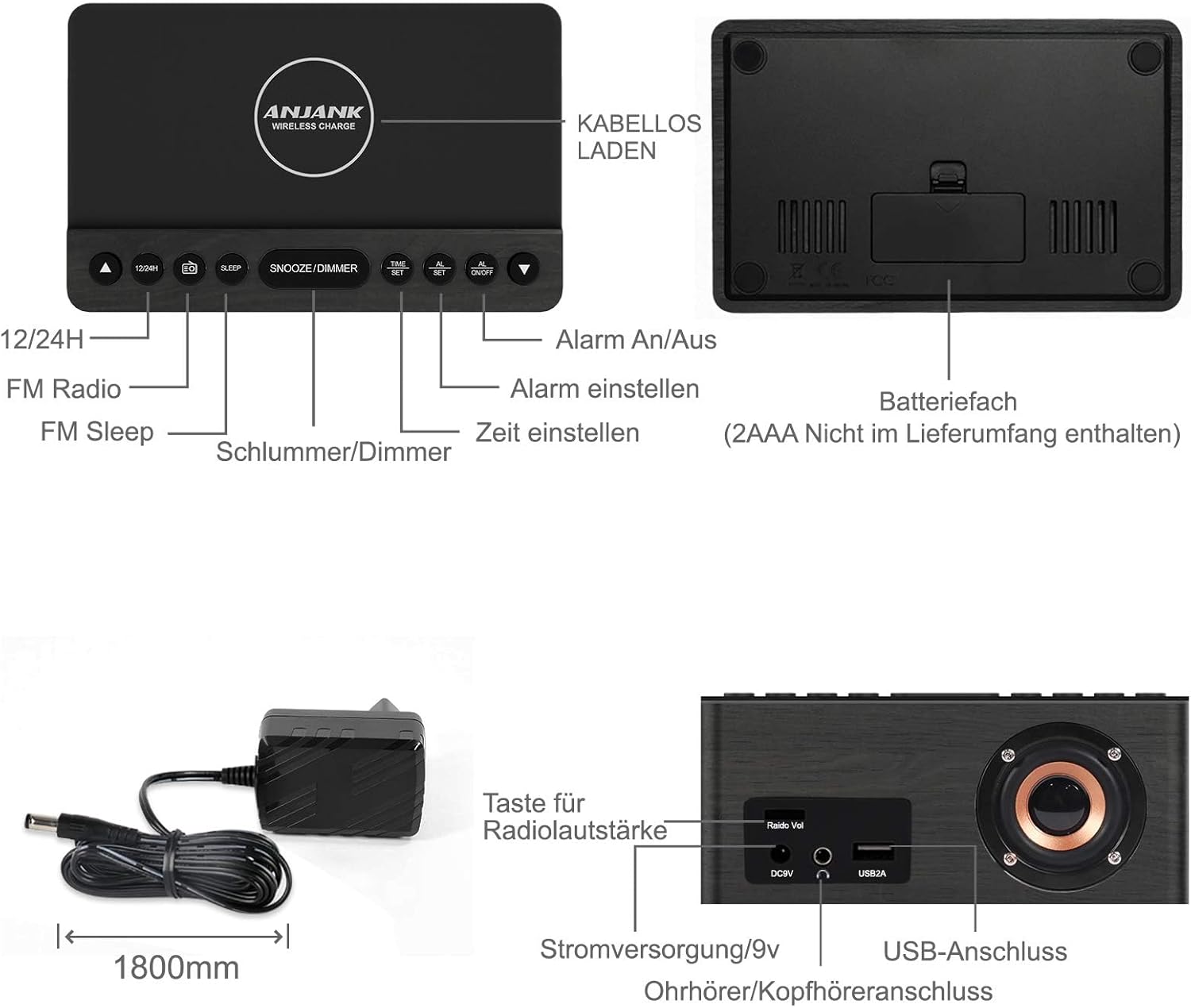
This diagram illustrates the location and function of the control buttons on the top panel and the ports on the rear of the ANJANK AC190-DE Digital Radio Alarm Clock. Key controls include 12/24H, FM Radio, Sleep, Snooze/Dimmer, Alarm On/Off, Time Set, and Alarm Set. Rear ports include DC9V power input, 3.5mm headphone jack, and USB 2A charging port.
ກໍານົດເວລາ
- ກົດຄ້າງໄວ້ ເວລາ ກຳ ນົດ ປຸ່ມ. ຕົວເລກຊົ່ວໂມງຈະເລີ່ມກະພິບ.
- ໃຊ້ UP or ລົງ ປຸ່ມເພື່ອປັບຊົ່ວໂມງ.
- ກົດ ເວລາ ກຳ ນົດ again to confirm the hour and proceed to minute adjustment.
- ໃຊ້ UP or ລົງ ປຸ່ມເພື່ອປັບນາທີ.
- ກົດ ເວລາ ກຳ ນົດ ເພື່ອຊ່ວຍປະຢັດເວລາໃນປະຈຸບັນ.
- ເພື່ອປ່ຽນລະຫວ່າງຮູບແບບ 12 ຊົ່ວໂມງ ແລະ 24 ຊົ່ວໂມງ, ໃຫ້ກົດທີ່ປຸ່ມ 12/24ຊ ປຸ່ມ. ໃນຮູບແບບ 12 ຊົ່ວໂມງ, ຕົວຊີ້ວັດ "AM" ຫຼື "PM" ຈະຖືກສະແດງ.
ຕັ້ງຄ່າໂມງປຸກ
The device supports two independent alarms (AL1 and AL2).
- ກົດຄ້າງໄວ້ ຕັ້ງໂມງປຸກ button. "AL1" will flash, and the hour digits will begin to flash.
- ໃຊ້ UP or ລົງ buttons to set the desired alarm hour for Alarm 1.
- ກົດ ຕັ້ງໂມງປຸກ to confirm the hour and move to minute adjustment.
- ໃຊ້ UP or ລົງ buttons to set the desired alarm minutes for Alarm 1.
- ກົດ ຕັ້ງໂມງປຸກ to select the alarm source: Buzzer or FM Radio. Use UP or ລົງ ທີ່ຈະເລືອກເອົາ.
- ກົດ ຕັ້ງໂມງປຸກ to set the alarm volume (for FM Radio alarm). Use UP or ລົງ ປັບ.
- ກົດ ຕັ້ງໂມງປຸກ to save Alarm 1 settings.
- Repeat steps 1-7 for Alarm 2 by pressing ຕັ້ງໂມງປຸກ until "AL2" flashes.
- ເພື່ອເປີດ ຫຼື ປິດການໃຊ້ງານໂມງປຸກ, ກົດປຸ່ມ ເປີດ / ປິດ button repeatedly until the desired alarm indicator (AL1 or AL2) appears or disappears on the display.
- ຟັງຊັນ Snooze: ເມື່ອມີສຽງປຸກ, ກົດປຸ່ມ SNOOZE / DIMMER button to temporarily silence it for 9 minutes. The alarm will sound again after 9 minutes.
- Stopping an Alarm: To stop an alarm completely, press any button other than SNOOZE / DIMMER. The alarm will reset for the next day.
ການດໍາເນີນງານວິທະຍຸ FM

This image highlights the FM radio capabilities of the ANJANK AC190-DE, including its frequency range of 87.5-108 MHz, adjustable volume, sleep timer (10-120 minutes), and support for headphones.
- ເປີດ/ປິດ: ກົດ ວິທະຍຸ FM ປຸ່ມເພື່ອເປີດຫຼືປິດວິທະຍຸ.
- ສະແກນອັດຕະໂນມັດ: ກົດຄ້າງໄວ້ ວິທະຍຸ FM button to automatically scan and save available FM stations. The device can store up to 30 stations.
- ຄູ່ມືການປບັຄູ່ມື: ໃຊ້ UP or ລົງ ປຸ່ມເພື່ອປັບແຕ່ງຄວາມຖີ່ສະເພາະໃດໜຶ່ງດ້ວຍຕົນເອງ.
- ການຄວບຄຸມລະດັບສຽງ: ໃຊ້ ວິທະຍຸ Vol knob on the back of the unit to adjust the radio volume.
- ເຄື່ອງຈັບເວລານອນ: ໃນຂະນະທີ່ວິທະຍຸກຳລັງຫຼິ້ນຢູ່, ກົດປຸ່ມ ນອນ button repeatedly to set a sleep timer (10-120 minutes). The radio will automatically turn off after the selected duration.
- ການໃຊ້ຫູຟັງ: Connect 3.5mm headphones to the headphone jack on the back for private listening.
ການສາກໄຟໄຮ້ສາຍ
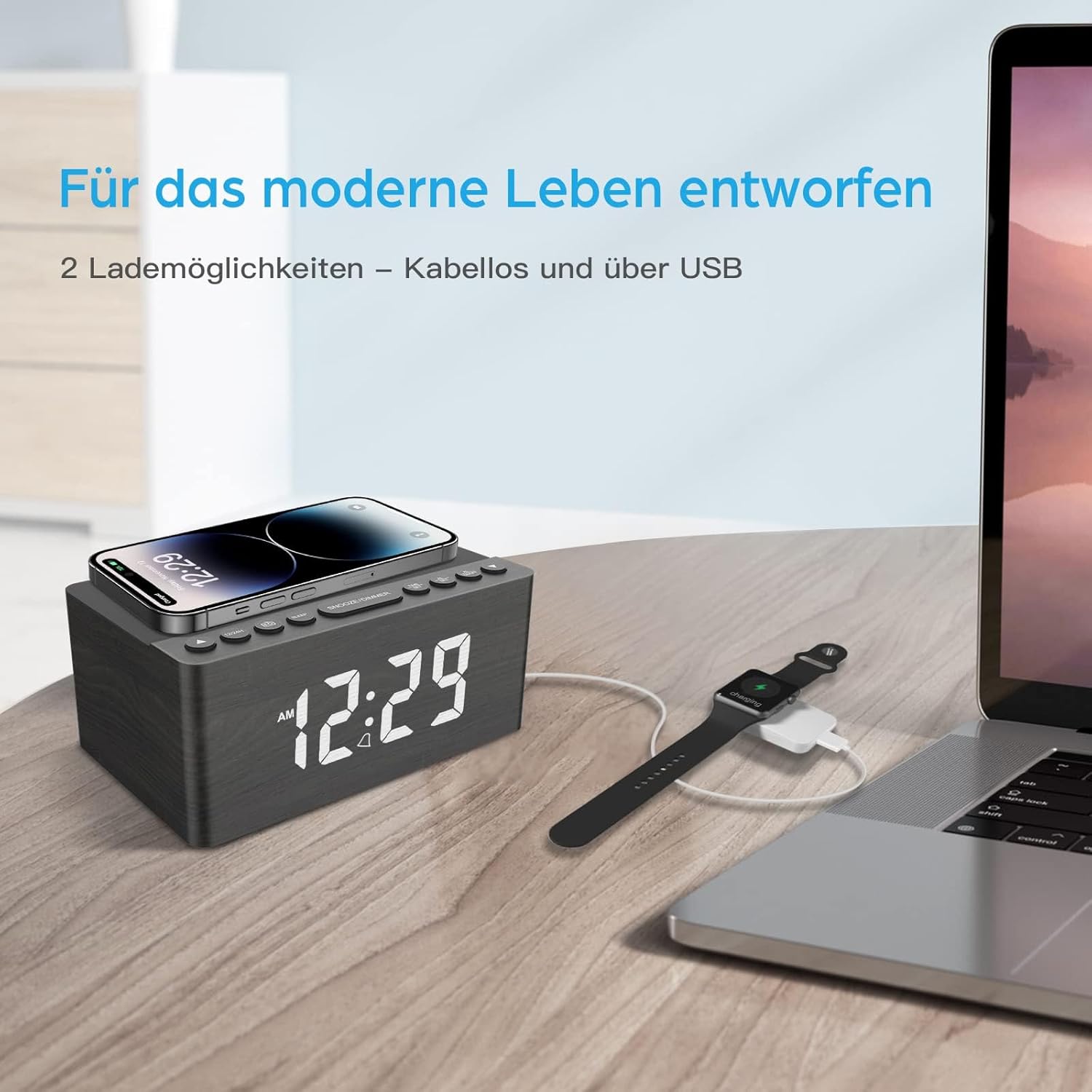
This image demonstrates the dual charging capabilities of the ANJANK AC190-DE, showing a smartphone being wirelessly charged on the top pad and a smartwatch connected to a laptop via USB, illustrating the convenience of charging multiple devices.
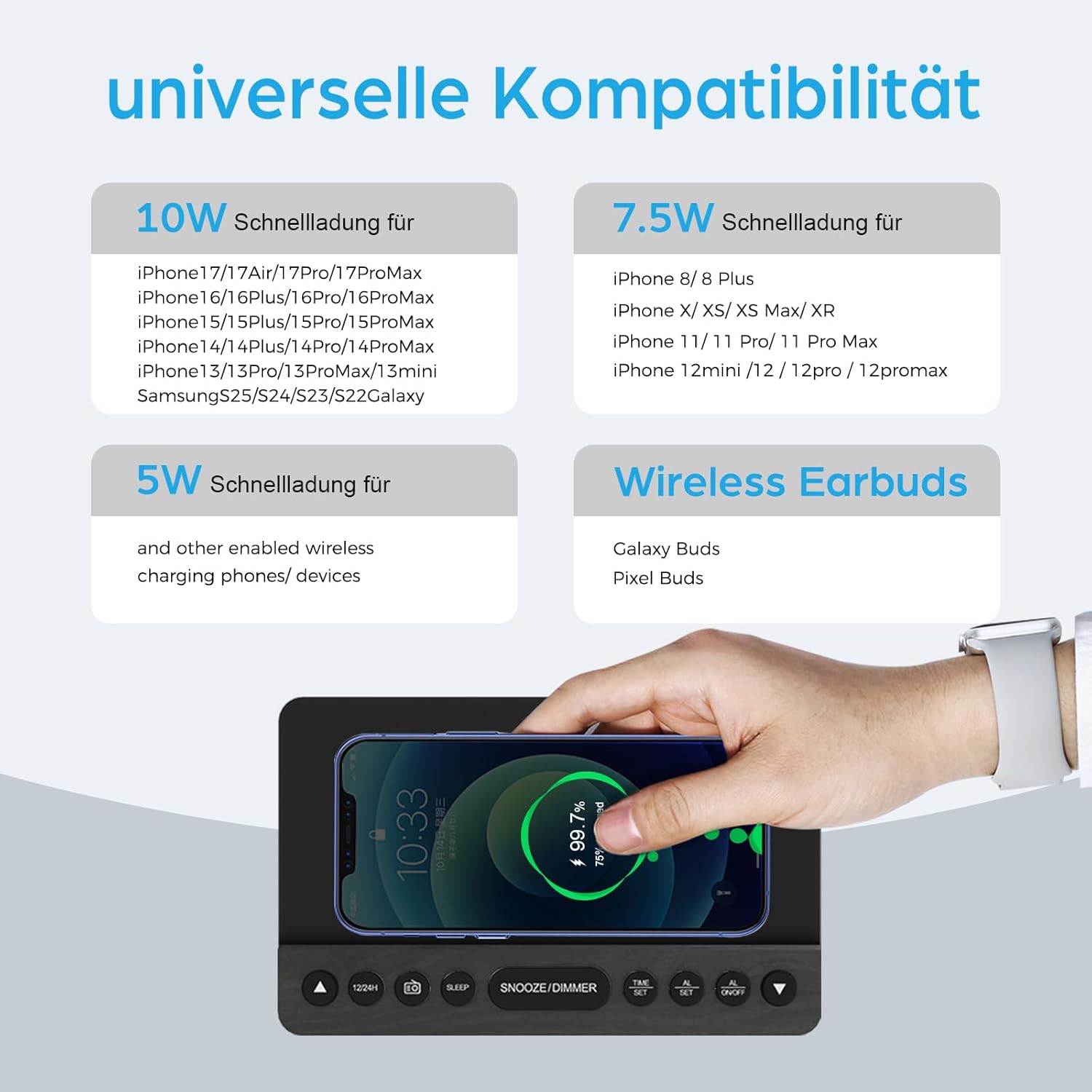
This infographic provides details on the universal compatibility of the wireless charging feature, specifying 10W fast charging for newer iPhone and Samsung models, 7.5W for other iPhone models, and 5W for other wireless charging phones and devices, including wireless earbuds.
- Place your Qi-compatible smartphone or device on the wireless charging pad located on the top surface of the clock.
- Ensure the device is centered on the charging pad for optimal charging.
- The charging indicator on the clock (if available) or on your device will confirm charging status.
- The charger supports 5W, 7.5W, and 10W adaptive charging.
ການສາກ USB
- ເຊື່ອມຕໍ່ສາຍສາກ USB ຂອງອຸປະກອນຂອງທ່ານກັບ USB2A port on the back of the clock.
- This port provides 2A output for charging other electronic devices like a second phone, power bank, or smartwatch.
ສະແດງ Dimmer

This image demonstrates the 5-level dimmer function of the ANJANK AC190-DE, allowing users to adjust the LED display brightness from maximum to completely off, ensuring comfort in various lighting conditions.
- ກົດ SNOOZE / DIMMER button (when no alarm is sounding) to cycle through the 5 brightness levels of the LED display.
- Select the brightness level that is most comfortable for your environment.
ບໍາລຸງຮັກສາ
- ທໍາຄວາມສະອາດ: ເຊັດເຄື່ອງດ້ວຍຜ້າອ່ອນໆ, ແຫ້ງ. ຢ່າໃຊ້ເຄື່ອງເຮັດຄວາມສະອາດຂອງແຫຼວຫຼືວັດສະດຸຂັດ.
- ການຈັດວາງ: Avoid placing the unit in direct sunlight, near heat sources, or in areas with high humidity.
- ພະລັງງານ: Disconnect the power adapter if the unit will not be used for an extended period.
ການແກ້ໄຂບັນຫາ
- ບໍ່ມີພະລັງງານ / ຈໍສະແດງຜົນປິດ:
- ໃຫ້ແນ່ໃຈວ່າອະແດບເຕີໄຟຟ້າໄດ້ເຊື່ອມຕໍ່ກັບເຄື່ອງຢ່າງແໜ້ນໜາ ແລະ ປລັກໄຟທີ່ໃຊ້ໄດ້.
- Check if the display dimmer is set to the lowest (off) level. Press SNOOZE / DIMMER ເພື່ອເພີ່ມຄວາມສະຫວ່າງ.
- Verify battery backup if applicable.
- ການສາກໄຟໄຮ້ສາຍບໍ່ເຮັດວຽກ:
- Ensure your device is Qi-compatible and properly centered on the charging pad.
- Remove any thick phone cases or metallic objects between the phone and the charging pad.
- Check if the clock is powered on.
- ການຮັບສັນຍານວິທະຍຸ FM ບໍ່ດີ:
- Fully extend and reposition the FM antenna.
- Try moving the unit to a different location to improve signal.
- Perform an auto-scan again to find stronger stations.
- ໂມງປຸກບໍ່ມີສຽງ:
- Ensure the alarm is activated (AL1 or AL2 indicator visible on the display).
- Check if the alarm volume is set appropriately (for radio alarm).
- Verify the time and alarm settings are correct.
ຂໍ້ມູນຈໍາເພາະ
| ຄຸນສົມບັດ | ລາຍລະອຽດ |
|---|---|
| ຍີ່ຫໍ້ | ແອນເຈີ້ |
| ໝາຍເລກຕົວແບບ | AC190-DE |
| ສີ | Grey + FM |
| ຂະໜາດສິນຄ້າ | 12.3 x 3.81 x 10.2 cm |
| ນ້ໍາຫນັກລາຍການ | 720 ກຣາມ |
| ພະລັງງານ/ວັດtage | 10 ວັດ |
| ວັດສະດຸ | ໄມ້ |
| ຄຸນນະສົມບັດພິເສດ | Adjustable Brightness, Adjustable Volume, Alarm, Charging Port, Charging Station, Programmable, Radio, Snooze, Timers |
| ແຫຼ່ງພະລັງງານ | ມີສາຍ |
| ຮູບຮ່າງລາຍການ | ຮູບສີ່ຫລ່ຽມ |
| ຫົວຂໍ້ | ດົນຕີ |
| ວັດສະດຸກອບ | ໄມ້ |
| ແບດເຕີລີ່ລວມ | No (Requires 2x AAA for backup) |

This image provides the physical dimensions of the ANJANK AC190-DE Digital Radio Alarm Clock.
ຂໍ້ມູນການຮັບປະກັນ
ANJANK offers a 30-day return policy for this product. Please refer to your purchase documentation or retailer's policy for specific terms and conditions regarding returns and warranty claims.
ການຊ່ວຍເຫຼືອລູກຄ້າ
For any inquiries or assistance, ANJANK provides 24-hour customer service. Please refer to the product packaging or the official ANJANK webສະຖານທີ່ສໍາລັບລາຍລະອຽດການຕິດຕໍ່ແລະຊັບພະຍາກອນສະຫນັບສະຫນູນເພີ່ມເຕີມ.


