1. ບົດແນະນຳ
This user manual provides essential information for the safe and efficient operation of your Redmi Smart LED TV X55. Please read this manual thoroughly before using the product and retain it for future reference.
The Redmi Smart LED TV X55 offers a 55-inch 4K Ultra HD display, powered by Android TV, and features advanced audio and visual technologies for an immersive entertainment experience.
2. ຂໍ້ມູນຄວາມປອດໄພທີ່ສໍາຄັນ
ປະຕິບັດຕາມຄວາມລະມັດລະວັງດ້ານຄວາມປອດໄພຂັ້ນພື້ນຖານສະເໝີເມື່ອໃຊ້ຜະລິດຕະພັນນີ້ເພື່ອຫຼຸດຜ່ອນຄວາມສ່ຽງຕໍ່ການເກີດອັກຄີໄພ, ໄຟໄໝ້, ແລະການບາດເຈັບ.
- ຢ່າເຮັດໃຫ້ໂທລະທັດຖືກຝົນຫຼືຄວາມຊຸ່ມຊື່ນ.
- ຫ້າມເປີດໂທລະທັດ ຄasing; ສົ່ງການບໍລິການທັງໝົດໃຫ້ກັບບຸກຄະລາກອນທີ່ມີຄຸນວຸດທິ.
- ຮັບປະກັນການລະບາຍອາກາດທີ່ເຫມາະສົມຮອບໂທລະທັດ.
- Use only the power cord and accessories supplied by the manufacturer.
- ຮັກສາໂທລະທັດໃຫ້ຫ່າງຈາກແສງແດດໂດຍກົງ, ແຫຼ່ງຄວາມຮ້ອນ, ແລະສະຫນາມແມ່ເຫຼັກທີ່ເຂັ້ມແຂງ.
- ເຮັດຄວາມສະອາດໂທລະທັດດ້ວຍຜ້າອ່ອນໆ, ແຫ້ງ. ຫ້າມໃຊ້ນໍ້າສະອາດ ຫຼື ແອໂຣໂຊລ.
3. ເນື້ອໃນຊຸດ
ເມື່ອຖອດຫໍ່ອອກແລ້ວ, ໃຫ້ກວດສອບວ່າທຸກລາຍການທີ່ມີລາຍການຂ້າງລຸ່ມນີ້ມີຢູ່ແລະຢູ່ໃນສະພາບທີ່ດີ:
- 1 x Redmi Smart LED TV X55
- 2 x Table Stand Bases
- 1 x ການຄວບຄຸມໄລຍະໄກ
- 4 x screws ສໍາລັບການປະກອບ stand
- 1 x ຄູ່ມືຜູ້ໃຊ້ (ເອກະສານນີ້)
- 1 x ສາຍໄຟ
4. ຜະລິດຕະພັນເກີນview
The Redmi Smart LED TV X55 is designed to deliver a premium viewing and audio experience. Below are its key features and components.
4.1. Visual Features
Experience stunning clarity and vibrant colors with the 55-inch 4K LED panel. Advanced technologies enhance your viewໃນ:
- 4K LED Panel: Delivers ultra-high-definition resolution for sharp images.
- Dolby Vision & HDR10: Provides superior contrast, brightness, and color depth.
- HLG (Hybrid Log-Gamma): Supports broadcast HDR content.
- Reality Flow & Vivid Picture Engine: Enhances motion smoothness and picture quality.
- MEMC (Motion Estimation, Motion Compensation): Reduces motion blur for fast-paced scenes.

ຮູບ 1: ດ້ານຫນ້າ view of the Redmi Smart LED TV X55.

ຮູບ 2: ເກີນview of key visual features including Dolby Vision, 4K HDR, and Vivid Picture Engine.
4.2. ຄຸນສົມບັດສຽງ
Immerse yourself in rich, powerful sound with the integrated audio system:
- 30W Output Speakers: Delivers clear and robust sound.
- ສຽງ Dolby: Provides enhanced sound quality for movies and music.
- DTS Virtual:X: ສ້າງປະສົບການສຽງຫຼາຍມິຕິລະດັບ.
- Dolby Atmos Pass-through via eARC: Allows for advanced audio formats to be sent to compatible sound systems.
- DTS-HD: High-definition audio decoding for a cinematic sound.
4.3. Smart Features & Performance
The Redmi Smart LED TV X55 runs on Android TV 10, offering a user-friendly interface and access to a vast ecosystem of apps.
- Android TV 10: Provides a smooth and intuitive smart TV experience.
- PatchWall 4 with IMDb Integration: A curated content platform with smart recommendations and IMDb ratings.
- ໜ່ວຍປະມວນຜົນ Quad Core: Ensures seamless performance and quick app loading.
- RAM 2GB + ໜ່ວຍຄວາມຈຳ 16GB: Ample memory and storage for apps and system operations.
- Built-in Wi-Fi (2x2 Dual Band) & Chromecast: Easy wireless connectivity and content casting from mobile devices.
- Ok Google: Voice control for searching content, controlling smart home devices, and more.
- ໂໝດການຕອບສະໜອງຕໍ່າອັດຕະໂນມັດ (ALLM): ປັບການຕັ້ງຄ່າການຫຼິ້ນເກມໃຫ້ເໝາະສົມ, ຫຼຸດຜ່ອນການປ້ອນຂໍ້ມູນຊ້າລົງ.
- Miracast: Wireless display mirroring from compatible devices.
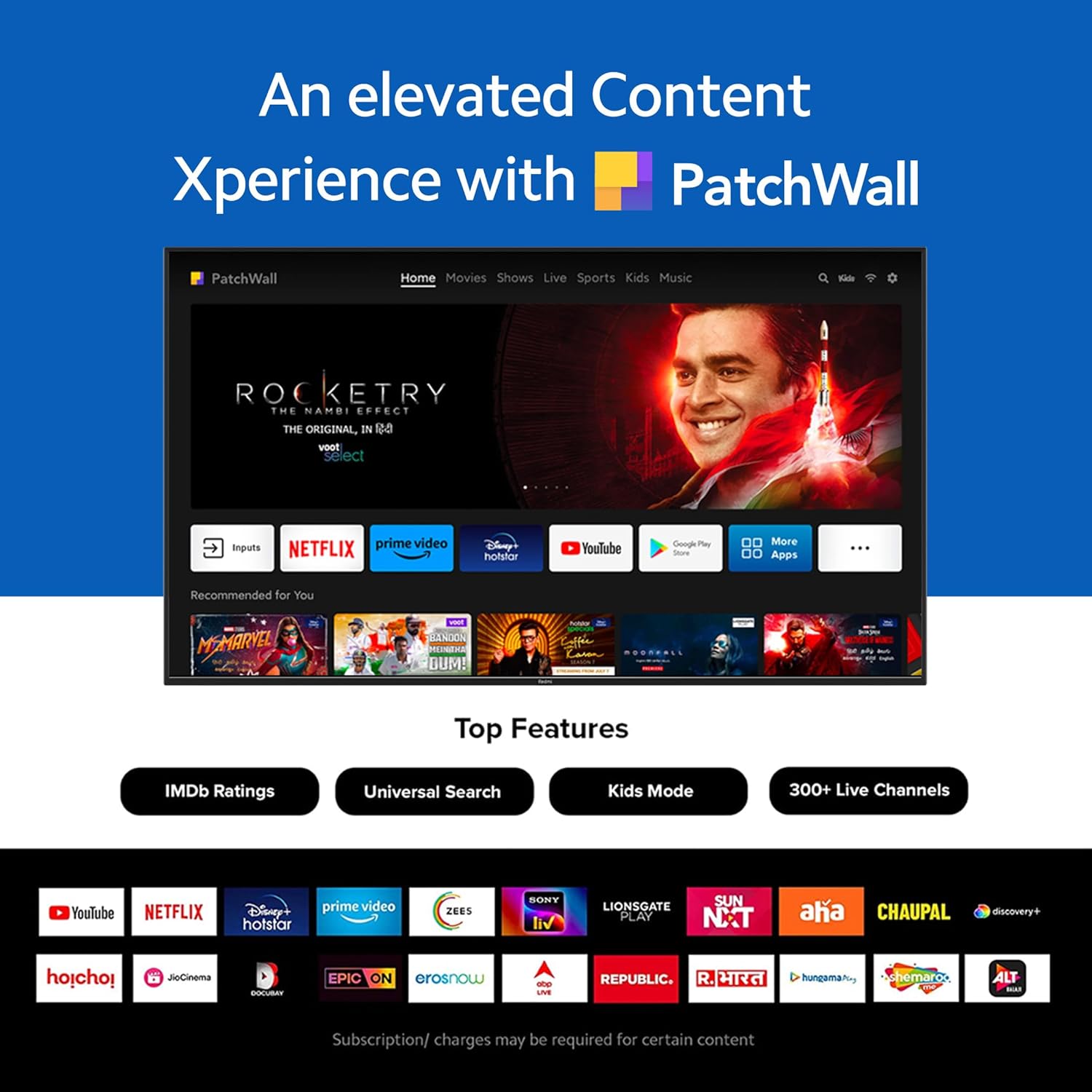
Figure 3: The PatchWall interface displaying various streaming apps and content.

Figure 4: Details on the TV's performance, including 2GB RAM, 16GB Storage, and Quad-core A55 processor.

Figure 5: Android TV 10 interface with Google Play, Ok Google, and Chromecast built-in.
4.4. ການເຊື່ອມຕໍ່
The TV offers multiple connectivity options for various devices:
- HDMI2.1: Multiple ports for high-definition audio and video input, supporting eARC.
- USB 2.0: ສໍາລັບການເຊື່ອມຕໍ່ອຸປະກອນການເກັບຮັກສາພາຍນອກ.
- ອີເທີເນັດ: ການເຊື່ອມຕໍ່ເຄືອຂ່າຍແບບມີສາຍ.
- Optical Port: ຜົນຜະລິດສຽງດິຈິຕອນ.
- ພອດສຽງ 3.5 ມມ: ສໍາລັບຫູຟັງຫຼືລໍາໂພງພາຍນອກ.
- Bluetooth 5.0 with BLE: Wireless connectivity for audio devices and accessories.

ຮູບ 6: ດ້ານຫລັງ view of the Redmi Smart TV X55 highlighting various input/output ports.

Figure 7: Close-up of the TV's ports, including HDMI 2.1, USB 2.0, Ethernet, Optical, and Headphone Jack.
5. ຄູ່ມືການຕິດຕັ້ງ
5.1. ການຕິດຕັ້ງທາງດ້ານຮ່າງກາຍ
Your Redmi Smart LED TV X55 can be installed on a table stand or wall-mounted.
- ການຕິດຕັ້ງໂຕະໂຕະ: Attach the two provided table stand bases to the bottom of the TV using the included screws. Ensure the TV is placed on a stable, flat surface.
- ການຕິດຕັ້ງຕິດຝາ: For wall mounting, use a compatible VESA wall mount kit (sold separately). Follow the instructions provided with the wall mount kit and ensure professional installation for safety.

Figure 8: Dimensions of the Redmi Smart TV X55 for planning installation.
5.2. ການເປີດເຄື່ອງເບື້ອງຕົ້ນ ແລະການເຊື່ອມຕໍ່ເຄືອຂ່າຍ
- ເຊື່ອມຕໍ່ສາຍໄຟກັບໂທລະພາບ ແລະປລັກສຽບໄຟ.
- ກົດປຸ່ມເປີດປິດໃນຣີໂໝດຄວບຄຸມ ຫຼືໂທລະພາບ.
- Follow the on-screen instructions to select your language, country, and connect to your Wi-Fi network or plug in an Ethernet cable.
- Sign in with your Google account to access Android TV features and the Play Store.
5.3. Setting Up Alexa Control
You can control your Redmi TV hands-free with Alexa devices. Follow these steps to set up Alexa:
Video 1: Instructions on how to set up Alexa control for your Redmi Smart TV.
To enable advanced settings for Alexa control, refer to the following video guide:
Video 2: Guide to enabling advanced settings on Redmi TV for Alexa control.
6. ຄໍາແນະນໍາການດໍາເນີນງານ
6.1. ການຄວບຄຸມໄລຍະໄກ
The sleek remote control provides quick access to essential functions:
- ຕື່ນດ່ວນ: ເປີດໂທລະທັດໃນເວລາຫນ້ອຍກວ່າ 5 ວິນາທີ.
- ປິດສຽງດ່ວນ: ແຕະສອງເທື່ອປຸ່ມລະດັບສຽງລົງເພື່ອປິດສຽງ.
- ການຕັ້ງຄ່າດ່ວນ: ກົດປຸ່ມ PatchWall ຄ້າງໄວ້ເພື່ອເຂົ້າເມນູການຕັ້ງຄ່າດ່ວນ.

Figure 9: The sleek remote control for the Redmi Smart TV X55, highlighting quick access features.
6.2. Navigating the Smart TV Interface
Use the remote's directional pad and OK button to navigate through the Android TV and PatchWall interfaces. Access apps, settings, and content recommendations easily.
6.3. ການໃຊ້ການຄວບຄຸມດ້ວຍສຽງ
Press the dedicated voice assistant button on your remote and speak commands to control your TV, search for content, or interact with connected smart home devices via Ok Google or Alexa.
6.4. App Usage and Casting
The TV supports popular streaming services like Prime Video, Netflix, Disney+ Hotstar, YouTube, and Apple TV. You can also cast content from your mobile devices using Chromecast built-in or Miracast.
7. ບໍາລຸງຮັກສາ
- ທໍາຄວາມສະອາດ: Gently wipe the screen and TV body with a soft, dry, lint-free cloth. Do not use abrasive cleaners or solvents.
- ອັບເດດຊອບແວ: Ensure your TV's software is up to date for optimal performance and security. Navigate to Settings > Device Preferences > About > System update to check for updates.
- ການຄຸ້ມຄອງພະລັງງານ: ຖອດປລັກໂທລະທັດໃນເວລາມີພະຍຸຟ້າຜ່າ ຫຼືເວລາທີ່ມັນຈະບໍ່ຖືກໃຊ້ເປັນໄລຍະເວລາ.
8. ການແກ້ໄຂບັນຫາ
If you encounter issues with your Redmi Smart LED TV X55, refer to the following common problems and solutions:
| ບັນຫາ | ການແກ້ໄຂທີ່ເປັນໄປໄດ້ |
|---|---|
| ບໍ່ມີພະລັງງານ | Check if the power cable is securely connected and the power outlet is working. Try a different outlet. |
| ບໍ່ມີຮູບ, ແຕ່ສຽງແມ່ນປະຈຸບັນ | Ensure the correct input source is selected. Check HDMI cable connections. |
| ບໍ່ມີສຽງ, ແຕ່ມີຮູບພາບ | Check volume levels and mute status. Verify audio output settings (e.g., internal speakers, external soundbar). |
| ການຄວບຄຸມໄລຍະໄກບໍ່ເຮັດວຽກ | Replace batteries. Ensure no obstructions between the remote and the TV. Re-pair the remote if necessary. |
| ບັນຫາການເຊື່ອມຕໍ່ເຄືອຂ່າຍ | Restart your router and modem. Check Wi-Fi password. Try connecting via Ethernet. |
9. ຂໍ້ມູນຈໍາເພາະ
Detailed technical specifications for the Redmi Smart LED TV X55:
| ຄຸນສົມບັດ | ຂໍ້ມູນຈໍາເພາະ |
|---|---|
| ຍີ່ຫໍ້ | Redmi |
| ຊື່ຕົວແບບ | X55 |
| ຂະໜາດໜ້າຈໍ | 55 ນິ້ວ |
| ເຕັກໂນໂລຊີການສະແດງ | LED-LCD |
| ຄວາມລະອຽດ | 3840 x 2160 ພິກເຊວ (4K) |
| ອັດຕາການໂຫຼດຂໍ້ມູນຄືນໃໝ່ | 60 Hz |
| ລະບົບປະຕິບັດການ | Android TV 10 |
| ໂຮງງານຜະລິດ | Quad Core A55 |
| RAM | 2 GB |
| ການເກັບຮັກສາ | 16 GB |
| ສຽງອອກ | 30 ວັດ |
| ເຕັກໂນໂລຊີການເຊື່ອມຕໍ່ | HDMI, USB, Wi-Fi (2x2 Dual Band), Ethernet, Bluetooth 5.0 |
| ພອດ HDMI | 3 (HDMI 2.1, eARC compatible) |
| ພອດ USB | 2 (USB 2.0) |
| Viewໃນມຸມ | 178 ອົງສາ |
| ອັດຕາສ່ວນ | 16:9 |
| ນ້ໍາຫນັກລາຍການ | 15 ກິໂລ 300 g |
| ປະເພດການຕິດຕັ້ງ | Wall Mount; Table Mount |
10. ການຮັບປະກັນແລະການສະຫນັບສະຫນູນ
Your Redmi Smart LED TV X55 comes with a standard brand warranty. For specific warranty terms, duration, and service procedures, please refer to the warranty card included in your package or visit the official Redmi support webເວັບໄຊ.

Figure 10: Information regarding Mi Extended Warranty, offering benefits like zero documentation, genuine spare parts, cashless repairs, authorized service centers, and on-site support.
For installation services, Amazon will coordinate with the brand within 48 hours of delivery. Scheduled delivery options are available in select cities. Installation charges may apply.


