ALFAJR CW-15 Automatic Islamic Azan Prayer Clock User Manual
Model: CW-15 | Brand: ALFAJR
ແນະນຳ
This manual provides comprehensive instructions for setting up and operating your ALFAJR CW-15 Automatic Islamic Azan Prayer Clock. Designed for both wall mounting and table placement, this digital clock automatically calculates and plays the Azan five times a day based on your set location. Please read this manual carefully to ensure proper use and to fully utilize all features of your new clock.
Automatic Azan time adjustment after initial city/time setup.
Gregorian and Hijri calendar display.
ການສະແດງອຸນຫະພູມໃນເຊນຊຽດຫຼືຟາເຣນຮາຍ.
Daylight Saving Time (DST) option.
English and Arabic display languages.
Wall-mountable or table-standing design.
Dimensions: Approximately 9 inches (width) x 8.5 inches (height).
Powered by 4 AA batteries (included) or USB-C (cable not included).
ຄູ່ມືການຕິດຕັ້ງ
1. ການຕິດຕັ້ງຫມໍ້ໄຟ
The ALFAJR CW-15 clock operates on 4 AA batteries. These are included in your package.
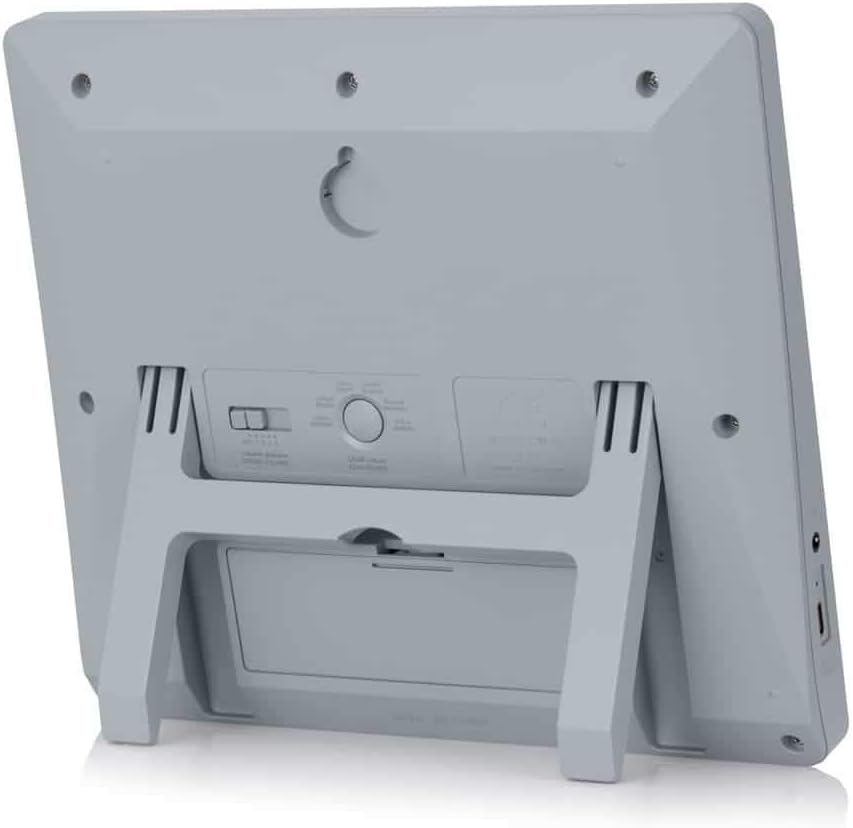
ຊອກຫາຊ່ອງໃສ່ຫມໍ້ໄຟຢູ່ດ້ານຫຼັງຂອງໂມງ.
ເປີດຝາປິດຊ່ອງໃສ່ຫມໍ້ໄຟ.
ໃສ່ແບັດເຕີຣີ AA 4 ກ້ອນ, ຮັບປະກັນວ່າຂົ້ວທີ່ຖືກຕ້ອງ (+ ແລະ -).
ປິດຝາປິດຊ່ອງໃສ່ຫມໍ້ໄຟຢ່າງປອດໄພ.
Alternatively, the clock can be powered via a USB-C cable (not included) connected to a compatible power adapter.
2. Initial Power On and Display Overview
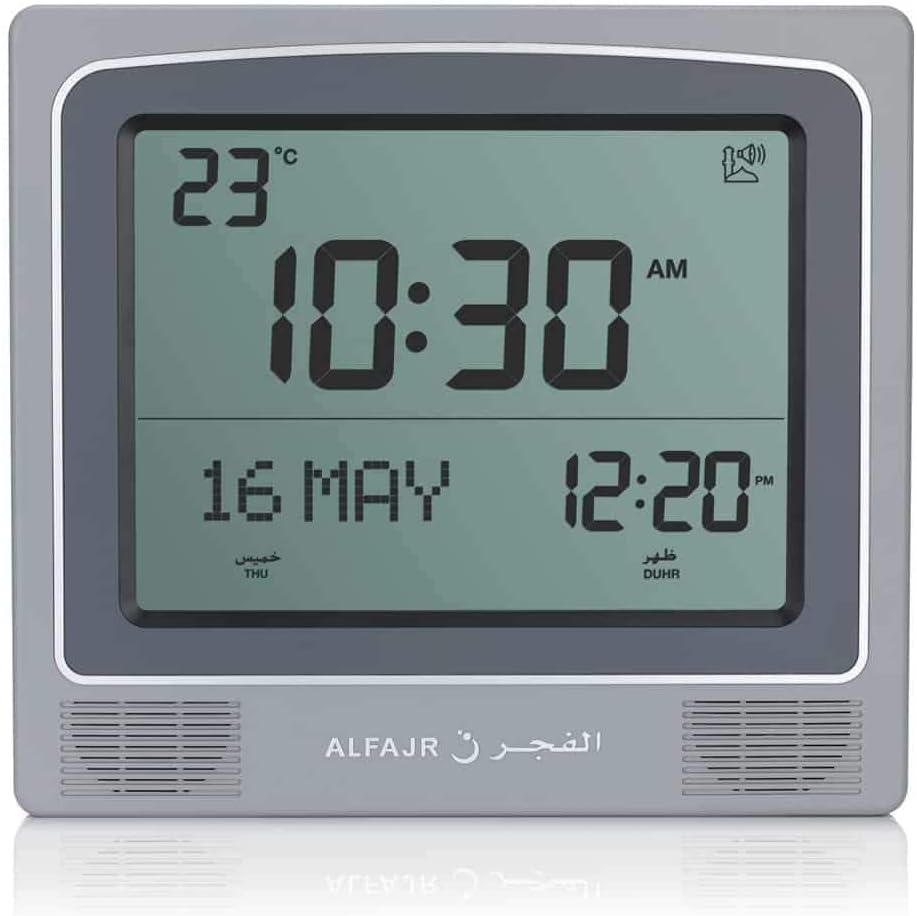
Upon inserting batteries or connecting USB-C power, the clock will power on. The display will show the current time, date, and temperature. Familiarize yourself with the buttons on the side/back of the clock: UP, SET, ແລະ ລົງ.
ຮູບ 1: ດ້ານຫນ້າ view of the ALFAJR CW-15 clock, showing the digital display with time, date, and temperature. The speaker grilles are visible at the bottom.
ຮູບ 2: ດ້ານຫນ້າ view of the ALFAJR CW-15 clock, similar to Figure 1, but with the ALFAJR brand logo visible at the bottom center.
3. ກໍານົດເວລາແລະວັນທີ
ກົດຄ້າງໄວ້ SET button for approximately 3 seconds until the time display starts flashing.
ໃຊ້ UP ແລະ ລົງ ປຸ່ມເພື່ອປັບຊົ່ວໂມງ. ກົດ SET ເພື່ອຢືນຢັນ ແລະ ຍ້າຍໄປທີ່ນາທີ.
ປັບນາທີໂດຍໃຊ້ UP ແລະ ລົງ, ຫຼັງຈາກນັ້ນກົດ SET.
Continue this process to set the year, month, and day.
ຫຼັງຈາກຕັ້ງວັນທີແລ້ວ, ໃຫ້ກົດ SET to exit the time/date setting mode.
4. Setting Location (City or Coordinates)
Accurate Azan times depend on correct location settings. You can select a pre-programmed city or enter latitude/longitude.
ກົດ SET button once (short press) to enter the main menu.
ໃຊ້ UP or ລົງ to navigate to the "CITY" or "LOCATION" setting.
ກົດ SET to enter the location setting.
Option A: Select Pre-programmed City: ໃຊ້ UP or ລົງ to scroll through the list of cities. Once your city is displayed, press SET ເພື່ອຢືນຢັນ.
Option B: Enter Latitude/Longitude: If your city is not listed, select the option to enter coordinates. Use UP ແລະ ລົງ to adjust the values for latitude, longitude, and time zone offset (GMT). Press SET ຫຼັງຈາກແຕ່ລະມູນຄ່າ.
After confirming your location, the clock will automatically calculate the Azan times.
5. Azan Calculation Method
The clock supports various Azan calculation methods. Consult local Islamic authorities for the recommended method in your region.
From the main menu (short press SET), navigate to "CALC. METHOD".
ກົດ SET ເຂົ້າໄປ.
ໃຊ້ UP or ລົງ to select the desired calculation method (e.g., Muslim World League, Umm Al-Qura, Egyptian General Authority of Survey, etc.).
ກົດ SET ເພື່ອຢືນຢັນ.
6. ເວລາປະຢັດແສງ (DST)
If your region observes Daylight Saving Time, enable this feature.
From the main menu, navigate to "DST".
ກົດ SET.
ໃຊ້ UP or ລົງ to toggle between "ON" and "OFF".
ກົດ SET ເພື່ອຢືນຢັນ.
7. ຫນ່ວຍອຸນຫະພູມ
You can choose to display temperature in Celsius or Fahrenheit.
From the main menu, navigate to "TEMP UNIT".
ກົດ SET.
ໃຊ້ UP or ລົງ to select "C" (Celsius) or "F" (Fahrenheit).
ກົດ SET ເພື່ອຢືນຢັນ.
8. ການສະແດງປະຕິທິນ
The clock can display either the Gregorian or Hijri calendar.
From the main menu, navigate to "CALENDAR".
ກົດ SET.
ໃຊ້ UP or ລົງ to select "GREGORIAN" or "HIJRI".
ກົດ SET ເພື່ອຢືນຢັນ.
ຄໍາແນະນໍາການດໍາເນີນງານ
1. Adjusting Azan Volume
The clock features adjustable Azan volume. The volume buttons are typically located on the side or back of the unit.
During an Azan, press the UP or ລົງ ປຸ່ມເພື່ອເພີ່ມ ຫຼືຫຼຸດລະດັບສຽງ.
Alternatively, some models may have a dedicated volume switch or buttons on the back. Refer to the physical clock for exact button placement.
2. Changing Azan Reciter
You can select from five different Azan reciters.
From the main menu (short press SET), navigate to "AZAN VOICE" or "RECITER".
ກົດ SET ເຂົ້າໄປ.
ໃຊ້ UP or ລົງ to cycle through the available reciters (Makkah, Madina, Egypt, AlQuds, Riyadh).
ກົດ SET ເພື່ອຢືນຢັນການເລືອກຂອງທ່ານ.
3. Daily Alarms
The clock includes daily alarm functions in addition to the Azan. These can be set for specific times.
From the main menu, navigate to "DAILY ALARM".
ກົດ SET.
ໃຊ້ UP or ລົງ to set the desired alarm time (hour and minute).
ກົດ SET to confirm and enable the alarm.
To disable, navigate back to "DAILY ALARM" and set the time to "OFF" or a similar option.
4. ໂໝດສະແດງຜົນ
The clock typically cycles through different display information or allows manual switching.
The default display shows time, date, and temperature.
ກົດສັ້ນ UP or ລົງ buttons outside of menu mode may cycle through additional information like next prayer time or Qibla direction (if available on this model).
ຕົວເລືອກການຕິດຕັ້ງ
The ALFAJR CW-15 clock is designed for versatile placement, either on a wall or a flat surface.
1. ຝາຜະ ໜັງ
To mount the clock on a wall:
Locate the keyhole slot on the back of the clock.
Choose a suitable location on a wall.
Install a screw (not included) into the wall, leaving a small portion protruding. Ensure the screw head fits into the keyhole slot.
Carefully hang the clock onto the screw, ensuring it is securely seated.
ຮູບ 3: ດ້ານຫລັງ view of the ALFAJR CW-15 clock, highlighting the keyhole for wall mounting and the battery compartment.
2. Table Placement
For table or desk placement:
Locate the integrated stand on the back of the clock.
Pull out the stand until it locks into position.
ວາງໂມງໃສ່ພື້ນຜິວທີ່ຮາບພຽງ.
ຮູບ 4: ຂ້າງ view of the ALFAJR CW-15 clock, showing the integrated kickstand extended for stable table placement.
Verify city, latitude, longitude, and GMT offset. Select the correct Azan calculation method for your region. Check DST setting.
Azan sound is too low or too high.
ການຕັ້ງຄ່າປະລິມານຕ້ອງການປັບ.
Adjust the volume using the dedicated buttons or through the menu.
ຈໍສະແດງຜົນແມ່ນມືດ ຫຼືກະພິບ.
ພະລັງງານຫມໍ້ໄຟຕ່ໍາ.
ປ່ຽນແບັດເຕີຣີ AA ທັງ 4 ກ້ອນດ້ວຍແບັດເຕີຣີໃໝ່.
Clock resets unexpectedly.
Intermittent power loss or very low batteries.
Ensure batteries are fresh and securely seated. If using USB-C, check the connection and power source stability.
ຂໍ້ມູນຈໍາເພາະ
ຕົວແບບ: CW-15
ຍີ່ຫໍ້: ALFAJR
ປະເພດການສະແດງ: ດິຈິຕອລ
ສີ: ສີເທົາ
ວັດສະດຸ: ພາດສະຕິກ
ຂະໜາດຜະລິດຕະພັນ: 8.5ນິ້ວ x 9ນິ້ວ (H)
ນ້ໍາຫນັກລາຍການ: 3 ອອນ
ແຫຼ່ງພະລັງງານ: 4 AA batteries (included) or USB-C (cable not included)
ປະເພດການຕິດຕັ້ງ: Wall Mount / Table Stand
ຄຸນນະສົມບັດພິເສດ: Automatic Azan, Multiple Azan Reciters, Gregorian/Hijri Calendar, Temperature Display, Daylight Saving Time
ພາສາ: ພາສາອັງກິດ, ອາຣັບ
ການຮັບປະກັນແລະການສະຫນັບສະຫນູນ
ການຮັບປະກັນຈໍາກັດ
The ALFAJR CW-15 Azan Clock comes with a limited warranty. Please refer to the warranty card included in your original packaging for specific terms, conditions, and duration. This warranty typically covers manufacturing defects under normal use.
ການຊ່ວຍເຫຼືອລູກຄ້າ
For technical assistance, troubleshooting not covered in this manual, or warranty claims, please contact ALFAJR customer support through their official website or the retailer from whom you purchased the product. Please have your model number (CW-15) and purchase date available when contacting support.
CW-5202 Series ເຄື່ອງເຮັດຄວາມເຢັນອຸດສາຫະກໍາ ຄູ່ມືຜູ້ໃຊ້ User manual for the CW-5202 Series Industrial Refrigeration Chiller, providing detailed information on safety, installation, operation, adjustment, troubleshooting, and technical specifications for industrial cooling applications.
CW-5200 Series ເຄື່ອງເຮັດຄວາມເຢັນອຸດສາຫະກໍາ ຄູ່ມືຜູ້ໃຊ້ ຄູ່ມືຜູ້ໃຊ້ສໍາລັບ CW-5200 Series Industrial Refrigeration Chiller, ກວມເອົາຂໍ້ມູນຄວາມປອດໄພ, ການຕິດຕັ້ງ, ການດໍາເນີນງານ, ການປັບ, ການເຕືອນໄພ, ການແກ້ໄຂບັນຫາ, ແລະຂໍ້ມູນສະເພາະ.
CW-5202 Series ເຄື່ອງເຮັດຄວາມເຢັນອຸດສາຫະກໍາ ຄູ່ມືຜູ້ໃຊ້ ຄູ່ມືຜູ້ໃຊ້ນີ້ໃຫ້ຄໍາແນະນໍາຢ່າງລະອຽດສໍາລັບ CW-5202 Series Industrial Refrigeration Chiller, ກວມເອົາການຕິດຕັ້ງ, ການດໍາເນີນງານ, ຄວາມລະມັດລະວັງດ້ານຄວາມປອດໄພ, ການແກ້ໄຂບັນຫາ, ແລະຂໍ້ກໍາຫນົດດ້ານວິຊາການສໍາລັບການປະຕິບັດທີ່ດີທີ່ສຸດ.