1. ບົດແນະນຳ
This manual provides comprehensive instructions for the installation, operation, and maintenance of your CALEX Smart Mini Indoor IP Camera. Please read this manual thoroughly before using the product to ensure proper functionality and safety.
The CALEX Smart Mini Indoor IP Camera is a Wi-Fi surveillance camera offering 1080P Full HD resolution, night vision capabilities, two-way audio communication, and flexible storage options via MicroSD card or cloud.
2. ເນື້ອໃນຊຸດ
ກວດສອບວ່າລາຍການທັງຫມົດແມ່ນມີຢູ່ໃນຊຸດ:
- 1 x CALEX Smart Mini Indoor IP Camera
- 1 x Power Adapter (AC 220-240 V, 50/60 Hz input; DC 5 V output)
- 1 x ສາຍ USB
- 1 x ຄູ່ມືຜູ້ໃຊ້ (ເອກະສານນີ້)
- Mounting accessories (if applicable, not explicitly listed but common for cameras)

Figure 2.1: CALEX Smart Mini Indoor IP Camera and its retail packaging. The packaging highlights 1080P Full HD, Wi-Fi 2.4 GHz, and compatibility with the Calex Smart app.
3. ຜະລິດຕະພັນເກີນview
Familiarize yourself with the components of your CALEX Smart Mini Indoor IP Camera.
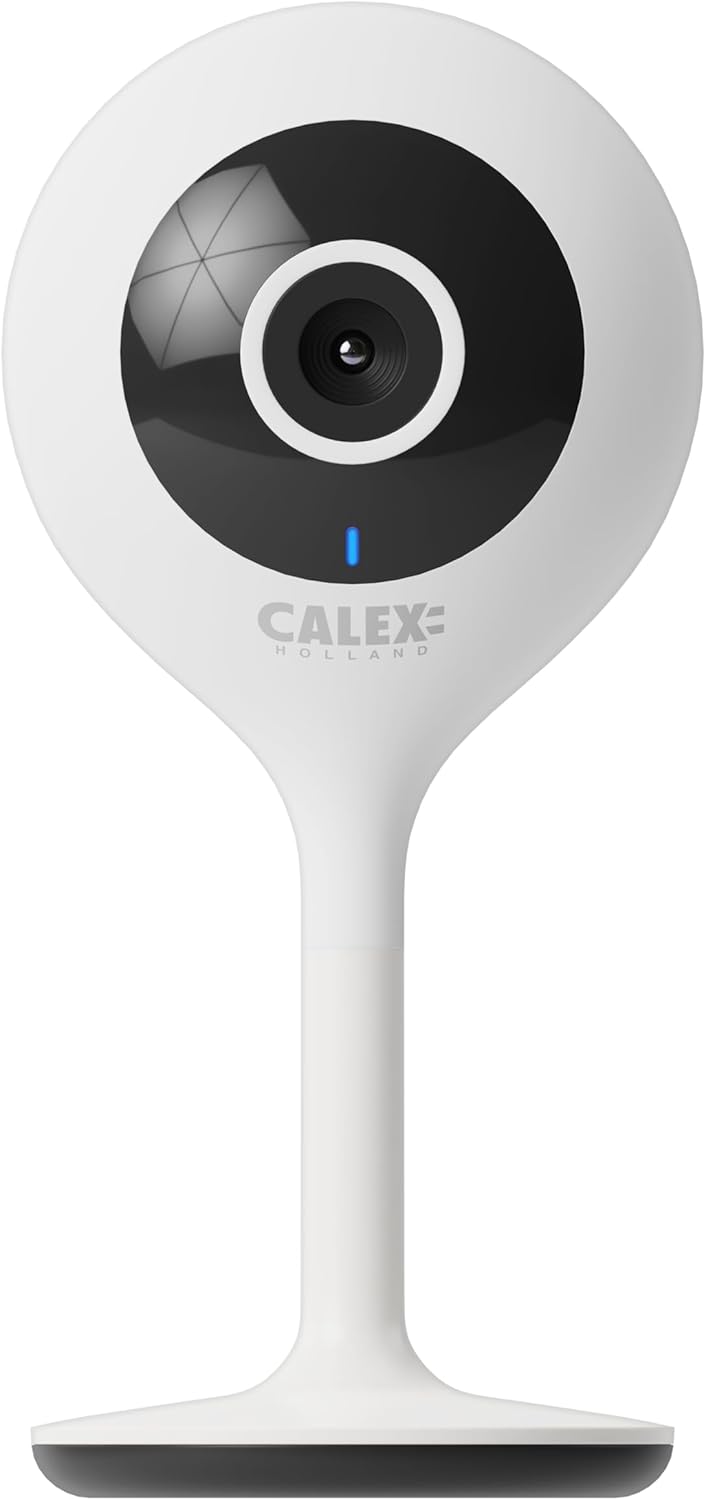
ຮູບ 3.1: ດ້ານຫນ້າ view of the CALEX Smart Mini Indoor IP Camera. It features a central lens, an indicator light, and the CALEX HOLLAND logo.

ຮູບ 3.2: ດ້ານຫລັງ view of the CALEX Smart Mini Indoor IP Camera. This view shows the speaker grille, a reset button, and the MicroSD card slot. The USB power input is located at the base.
ຄຸນນະສົມບັດທີ່ສໍາຄັນ:
- ຄວາມລະອຽດ Full HD 1080P: ໃຫ້ foo ວິດີໂອທີ່ຊັດເຈນແລະລາຍລະອຽດtage.
- ວິໄສທັດກາງຄືນ: Equipped with infrared LEDs for clear monitoring in low-light or dark conditions.
- ສຽງສອງທາງ: ໄມໂຄຣໂຟນ ແລະ ລຳໂພງໃນຕົວສຳລັບການສື່ສານ.
- ການເຊື່ອມຕໍ່ Wi-Fi: Connects to your home Wi-Fi network (2.4 GHz only).
- ການເກັບຮັກສາທ້ອງຖິ່ນ: Supports MicroSD card for continuous recording or event-triggered recording.
- Cloud Storage: Optional cloud storage service for secure off-site recording.
- ກວດຈັບການເຄື່ອນໄຫວ: Alerts and records upon detecting movement.
- ການຄວບຄຸມແອັບຯມືຖື: ຄຸ້ມຄອງ ແລະ view live feed via the Calex Smart app.
- ຄວາມເຂົ້າກັນໄດ້ຂອງຜູ້ຊ່ວຍສຽງ: Works with Amazon Alexa and Google Home.
4. ການຕິດຕັ້ງແລະການຕິດຕັ້ງ
4.1 ກ່ອນທີ່ທ່ານຈະເລີ່ມຕົ້ນ
- ໃຫ້ແນ່ໃຈວ່າເຄືອຂ່າຍ Wi-Fi ຂອງທ່ານແມ່ນ 2.4 GHz. ກ້ອງຖ່າຍຮູບບໍ່ຮອງຮັບ Wi-Fi 5 GHz.
- ກະກຽມຊື່ເຄືອຂ່າຍ Wi-Fi (SSID) ແລະລະຫັດຜ່ານຂອງທ່ານໃຫ້ພ້ອມ.
- Download the "Calex Smart" app from your mobile device's app store.
- ວາງກ້ອງຖ່າຍຮູບໄວ້ພາຍໃນຂອບເຂດຂອງເຣົາເຕີ Wi-Fi ຂອງທ່ານ.

Figure 4.1: QR codes for downloading the Calex Smart app. Scan the appropriate QR code for your device (iOS or Android) to download the application.
Download the Calex Smart app here: iOS App Store | Google Play Store
4.2 ຂັ້ນຕອນການຕິດຕັ້ງເບື້ອງຕົ້ນ
- ເປີດ: Connect the camera to a power outlet using the provided USB cable and power adapter. The camera's indicator light will begin to flash, indicating it is ready for pairing.
- Open Calex Smart App: Launch the Calex Smart app on your smartphone. If you are a new user, register an account. If you already have an account, log in.
- ເພີ່ມອຸປະກອນ: Tap the "+" icon in the top right corner of the app to add a new device. Select "Security & Video Surveillance" and then "Smart Camera".
- ຢືນຢັນສະຖານະຕົວຊີ້ບອກ: Follow the in-app instructions. Confirm that the indicator light on your camera is flashing rapidly.
- ໃສ່ລາຍລະອຽດ Wi-Fi: Enter your 2.4 GHz Wi-Fi network name and password when prompted.
- ສະແກນລະຫັດ QR: The app will generate a QR code. Hold your phone with the QR code approximately 15-20 cm (6-8 inches) in front of the camera lens. The camera will emit a sound when it successfully scans the QR code.
- ການເຊື່ອມຕໍ່: Tap "I heard a prompt" in the app. The camera will then attempt to connect to your Wi-Fi network. Once connected, the indicator light will turn solid blue.
- ຊື່ອຸປະກອນ: Once connected, you can name your camera (e.g., "Living Room Camera", "Nursery Camera").


ຮູບທີ 4.2: ຕົວຢ່າງamples of the Calex Smart app interface. The left image shows a live camera feed with options for screenshot, speaking, and recording. The right image shows a settings screen within the app.
5. ປະຕິບັດການກ້ອງຖ່າຍຮູບຂອງທ່ານ
5.1 ດໍາລົງຊີວິດ View
Open the Calex Smart app and select your camera from the device list to access the live video feed. You can view the feed in portrait or landscape mode.

ຮູບທີ 5.1: ຜູ້ໃຊ້ viewing the live feed from the CALEX Smart Mini Indoor IP Camera on their smartphone.
5.2 ສຽງສອງທາງ
ໃນຂະນະທີ່ຢູ່ໃນຊີວິດ view, tap the microphone icon to speak through the camera's speaker. Tap the speaker icon to listen to audio from the camera's microphone.
5.3 ການບັນທຶກແລະການຫຼິ້ນ
- ການບັນທຶກຄູ່ມື: Tap the "Record" button in the live view interface to start or stop manual recording. Recordings are saved to your phone's gallery.
- ພາບໜ້າຈໍ: ແຕະທີ່ປຸ່ມ "Screenshot" ເພື່ອບັນທຶກພາບຖ່າຍຈາກຟີດສົດ.
- ການບັນທຶກກາດ MicroSD: Insert a MicroSD card (up to 128GB, not included) into the camera's slot for continuous or event-triggered recording. Ensure the card is formatted within the app settings.
- Cloud Storage: Subscribe to the cloud storage service via the app for secure, off-site storage of event recordings.
- ຫຼິ້ນຄືນ: ການເຂົ້າເຖິງບັນທຶກ footage from the "Playback" section within the camera's settings in the app.

Figure 5.2: The Calex Smart app interface displaying options for cloud storage and video playback. This allows users to review ເຫດການທີ່ບັນທຶກໄວ້.
5.4 ກວດຈັບການເຄື່ອນໄຫວ ແລະການແຈ້ງເຕືອນ
Configure motion detection sensitivity and alert settings in the app. You will receive push notifications on your smartphone when motion is detected.
5.5 ການຄວບຄຸມສຽງ (Alexa/Google Home)
To integrate your camera with Amazon Alexa or Google Home, follow the instructions in the respective voice assistant app to enable the "Calex Smart" skill/action. You can then use voice commands to view ກ້ອງຖ່າຍຮູບຈະສົ່ງຂໍ້ມູນໄປຫາຈໍສະແດງຜົນອັດສະລິຍະທີ່ເຂົ້າກັນໄດ້.

Figure 5.3: A couple using voice commands with an Amazon Echo device, demonstrating the camera's compatibility with smart home ecosystems like Alexa and Google Home.
6. ບໍາລຸງຮັກສາ
- ທໍາຄວາມສະອາດ: ໃຊ້ຜ້າອ່ອນແລະແຫ້ງເພື່ອທຳຄວາມສະອາດເລນກ້ອງຖ່າຍຮູບ ແລະ ຕົວກ້ອງ. ຢ່າໃຊ້ນ້ຳຢາທຳຄວາມສະອາດທີ່ເປັນຂອງແຫຼວ ຫຼື ນ້ຳຢາສີດ.
- ການອັບເດດເຟີມແວ: Periodically check the Calex Smart app for available firmware updates for your camera. Keeping the firmware updated ensures optimal performance and security.
- ຣີເຊັດກ້ອງ: If you experience connectivity issues or need to reconfigure the camera, locate the reset button on the back of the device (refer to Figure 3.2). Use a pin or a straightened paperclip to press and hold the reset button for approximately 5-10 seconds until the indicator light flashes rapidly. This will restore the camera to factory settings.
7. ການແກ້ໄຂບັນຫາ
| ບັນຫາ | ສາເຫດທີ່ເປັນໄປໄດ້ | ການແກ້ໄຂ |
|---|---|---|
| ກ້ອງຖ່າຍຮູບບໍ່ສາມາດເຊື່ອມຕໍ່ກັບ Wi-Fi ໄດ້. | Incorrect Wi-Fi password; 5 GHz Wi-Fi network; camera too far from router; Wi-Fi signal interference. |
|
| ບໍ່ມີຟີດວິດີໂອສົດ. | Camera offline; poor internet connection; app issue. |
|
| ບໍ່ຮັບຮູ້ບັດ MicroSD. | Card not inserted correctly; card corrupted; unsupported card size/format. |
|
| ສຽງສອງທາງບໍ່ເຮັດວຽກ. | Microphone/speaker muted in app; low volume; app permissions. |
|
8. ຂໍ້ມູນຈໍາເພາະ
| ຄຸນສົມບັດ | ລາຍລະອຽດ |
|---|---|
| ຊື່ຕົວແບບ | ຄວາມປອດໄພອັດສະລິຍະ |
| ໝາຍເລກຕົວແບບ | 5501000300 |
| ຄວາມລະອຽດ | ຄວາມລະອຽດ Full HD 1080p |
| ການເຊື່ອມຕໍ່ | Wi-Fi (2.4 GHz ເທົ່ານັ້ນ) |
| ການປ້ອນຂໍ້ມູນພະລັງງານ | AC 220-240 Volts, 50/60 Hz |
| Power Output (ອະແດັບເຕີ) | DC 5 ໂວນ |
| ການບໍລິໂພກພະລັງງານ | 5 ວັດ |
| ຂະໜາດ (L x W x H) | 3.2 x 5.3 x 11 ຊມ (1.26 x 2.09 x 4.33 ນິ້ວ) |
| ນ້ຳໜັກ | 167 ກຣາມ (0.37 ປອນ) |
| ວັດສະດຸ | ພາດສະຕິກ |
| ສີ | ສີຂາວ |
| ຕົວເລືອກການເກັບຮັກສາ | MicroSD (up to 128GB), Cloud Storage |
| ຄຸນນະສົມບັດພິເສດ | Night Vision, Two-Way Audio, Motion Detection, Compatible with Alexa/Google Home |
| ສະພາບແວດລ້ອມການນໍາໃຊ້ | ພາຍໃນ |
9. ການຮັບປະກັນແລະການສະຫນັບສະຫນູນ
CALEX products are designed and manufactured to the highest quality standards. For warranty information and technical support, please refer to the official CALEX webເວັບໄຊ ຫຼືຕິດຕໍ່ບໍລິການລູກຄ້າຂອງເຂົາເຈົ້າໂດຍກົງ.
ຜູ້ຜະລິດ: ຄາເລັກ
ສໍາລັບການຊ່ວຍເຫຼືອເພີ່ມເຕີມ, ໄປຢ້ຽມຢາມ CALEX Official Webເວັບໄຊ.
10. ຂໍ້ມູນຄວາມປອດໄພ
- Do not expose the camera to water or moisture. This product is designed for indoor use only.
- ຢ່າພະຍາຍາມຖອດປະກອບ ຫຼືສ້ອມແປງກ້ອງດ້ວຍຕົວເອງ. ອ້າງອີງການບໍລິການທັງໝົດໃຫ້ກັບບຸກຄະລາກອນທີ່ມີຄຸນວຸດທິ.
- Use only the provided power adapter and cable to prevent damage or fire.
- Keep the camera away from direct sunlight, heat sources, and strong magnetic fields.
- Ensure the camera is placed on a stable surface to prevent it from falling.


