ແນະນຳ
This manual provides comprehensive instructions for the safe and efficient use of your Taurus Top Cuisine Food Processor, Model 925014000. Please read all instructions carefully before operating the appliance and retain this manual for future reference.
The Taurus Top Cuisine Food Processor is designed to simplify your cooking process with its versatile features, including 12 pre-set cooking programs, a 5-liter non-stick removable pot, a digital display, and a 24-hour programming function.
ຄໍາແນະນໍາຄວາມປອດໄພ
ຄຳເຕືອນ: To reduce the risk of fire, electric shock, or injury, always follow these basic safety precautions.
- ອ່ານຄໍາແນະນໍາທັງຫມົດກ່ອນທີ່ຈະໃຊ້ເຄື່ອງໃຊ້.
- ຢ່າແຕະພື້ນຜິວທີ່ຮ້ອນ. ໃຊ້ດ້າມຈັບ ຫຼື ບິດ.
- ເພື່ອປ້ອງກັນການຊ໊ອກໄຟຟ້າ, ຢ່າເອົາສາຍໄຟ, ປລັກສຽບ, ຫຼືຫົວຫນ່ວຍຫຼັກຢູ່ໃນນໍ້າ ຫຼືຂອງແຫຼວອື່ນໆ.
- ການເບິ່ງແຍງຢ່າງໃກ້ຊິດແມ່ນມີຄວາມຈໍາເປັນໃນເວລາທີ່ອຸປະກອນໃດໆຖືກນໍາໃຊ້ໂດຍຫຼືຢູ່ໃກ້ກັບເດັກນ້ອຍ.
- ຖອດປລັກອອກຈາກປລັກສຽບໃນເວລາທີ່ບໍ່ໄດ້ໃຊ້ແລະກ່ອນທີ່ຈະເຮັດຄວາມສະອາດ. ປ່ອຍໃຫ້ເຢັນກ່ອນທີ່ຈະໃສ່ຫຼືເອົາຊິ້ນສ່ວນ.
- ຫ້າມນຳໃຊ້ເຄື່ອງໃຊ້ທີ່ມີສາຍໄຟ ຫຼື ປລັກສຽບທີ່ເສຍຫາຍ, ຫຼື ຫຼັງຈາກເຄື່ອງໃຊ້ຜິດປົກກະຕິ ຫຼືໄດ້ຮັບຄວາມເສຍຫາຍໃນທຸກຮູບແບບ. ຕິດຕໍ່ບໍລິການລູກຄ້າເພື່ອກວດສອບ, ສ້ອມແປງ, ຫຼືປັບ.
- ການນໍາໃຊ້ອຸປະກອນເສີມທີ່ບໍ່ແນະນໍາໂດຍຜູ້ຜະລິດເຄື່ອງໃຊ້ອາດຈະເຮັດໃຫ້ເກີດການບາດເຈັບ.
- ຢ່າໃຊ້ນອກ.
- ຢ່າປ່ອຍໃຫ້ສາຍໄຟແຂວນໃສ່ຂອບໂຕະ ຫຼືໂຕະ, ຫຼືແຕະພື້ນຜິວທີ່ຮ້ອນ.
- ຢ່າວາງໃສ່ ຫຼືຢູ່ໃກ້ກັບເຕົາແກ໊ສຮ້ອນ ຫຼືເຕົາໄຟຟ້າ, ຫຼືໃນເຕົາອົບທີ່ມີຄວາມຮ້ອນ.
- ຕ້ອງໃຊ້ຄວາມລະມັດລະວັງເປັນຢ່າງຍິ່ງໃນເວລາເຄື່ອນຍ້າຍເຄື່ອງທີ່ບັນຈຸນ້ຳມັນຮ້ອນ ຫຼືຂອງແຫຼວຮ້ອນອື່ນໆ.
- ສຽບປລັກສຽບໃສ່ເຄື່ອງທຸກຄັ້ງກ່ອນ, ຈາກນັ້ນສຽບສາຍໃສ່ປລັກສຽບໃສ່ຝາ. ເພື່ອຕັດການເຊື່ອມຕໍ່, ເຮັດໃຫ້ການຄວບຄຸມໃດໆ "ປິດ", ຫຼັງຈາກນັ້ນເອົາປລັກອອກຈາກເຕົ້າສຽບຝາ.
- ຢ່າໃຊ້ເຄື່ອງໃຊ້ອື່ນນອກເໜືອໄປຈາກການໃຊ້ທີ່ຕັ້ງໃຈ.
- ເຄື່ອງໃຊ້ນີ້ແມ່ນໃຊ້ໃນຄົວເຮືອນເທົ່ານັ້ນ.
ສິນຄ້າເກີນview
Familiarize yourself with the components of your Taurus Top Cuisine Food Processor.


ອົງປະກອບຫຼັກ:
- ຫົວໜ່ວຍຫຼັກ: ເຮືອນອົງປະກອບຄວາມຮ້ອນແລະແຜງຄວບຄຸມ.
- ຫມໍ້ທີ່ຖອດອອກໄດ້: 5-liter capacity, non-stick coating.
- ຝາປິດ: With steam vent and sealing mechanism.
- ກະດານຄວບຄຸມ: Digital display, program selection buttons, timer, and start/stop.
- ມືຈັບ: For safe transport of the appliance.
ອຸປະກອນເສີມລວມ:
- ກະຕ່າເຄື່ອງອົບ: ສຳລັບນຶ່ງຜັກ, ປາ, ແລະອື່ນໆ.
- ຈອກວັດແທກ: For precise ingredient measurements.
- ບ່ວງ: For stirring and serving.
- Spatula: For mixing and scraping.
- ປຶ້ມສູດ: Contains over 50 recipes to get started.
ຕັ້ງຄ່າ
- ການຫຸ້ມຫໍ່: ເອົາວັດສະດຸຫຸ້ມຫໍ່ ແລະອຸປະກອນເສີມທັງໝົດອອກຈາກກ່ອງຢ່າງລະມັດລະວັງ.
- ທໍາຄວາມສະອາດເບື້ອງຕົ້ນ: Before first use, wash the removable pot, lid, steamer basket, measuring cup, spoon, and spatula with warm, soapy water. Rinse thoroughly and dry all parts. Wipe the main unit with a damp ຜ້າ. ຢ່າເອົາຫົວຫນ່ວຍຫຼັກຢູ່ໃນນ້ໍາ.
- ການຈັດວາງ: Place the appliance on a stable, flat, heat-resistant surface, away from water sources and direct heat. Ensure adequate ventilation around the unit.
- ໃສ່ຫມໍ້: Place the clean, dry removable pot into the main unit. Ensure it is seated correctly.
- ການເຊື່ອມຕໍ່ພະລັງງານ: Plug the power cord into a grounded electrical outlet (240 VAC). The digital display will illuminate.

ຄໍາແນະນໍາການດໍາເນີນງານ
ການດໍາເນີນງານພື້ນຖານ:
- ເພີ່ມສ່ວນປະກອບ: Place your desired ingredients into the removable pot.
- ປິດຝາ: Securely close the lid. Ensure it is properly locked to prevent steam from escaping.
- ເລືອກໂຄງການ: Use the "MENU" button to cycle through the 12 available cooking programs. The selected program will be displayed on the digital screen.
- Adjust Time/Temperature (if applicable): For some programs, you may be able to adjust cooking time or temperature using the dedicated buttons. Refer to the recipe book for specific program settings.
- ເລີ່ມປຸງແຕ່ງອາຫານ: Press the "START" button to begin the cooking process. The appliance will automatically maintain the set temperature and time.
- ຮັກສາຄວາມອົບອຸ່ນ: Once cooking is complete, the appliance may automatically switch to a "Keep Warm" function.
- ຢຸດ: To stop cooking at any time, press the "STOP" button.
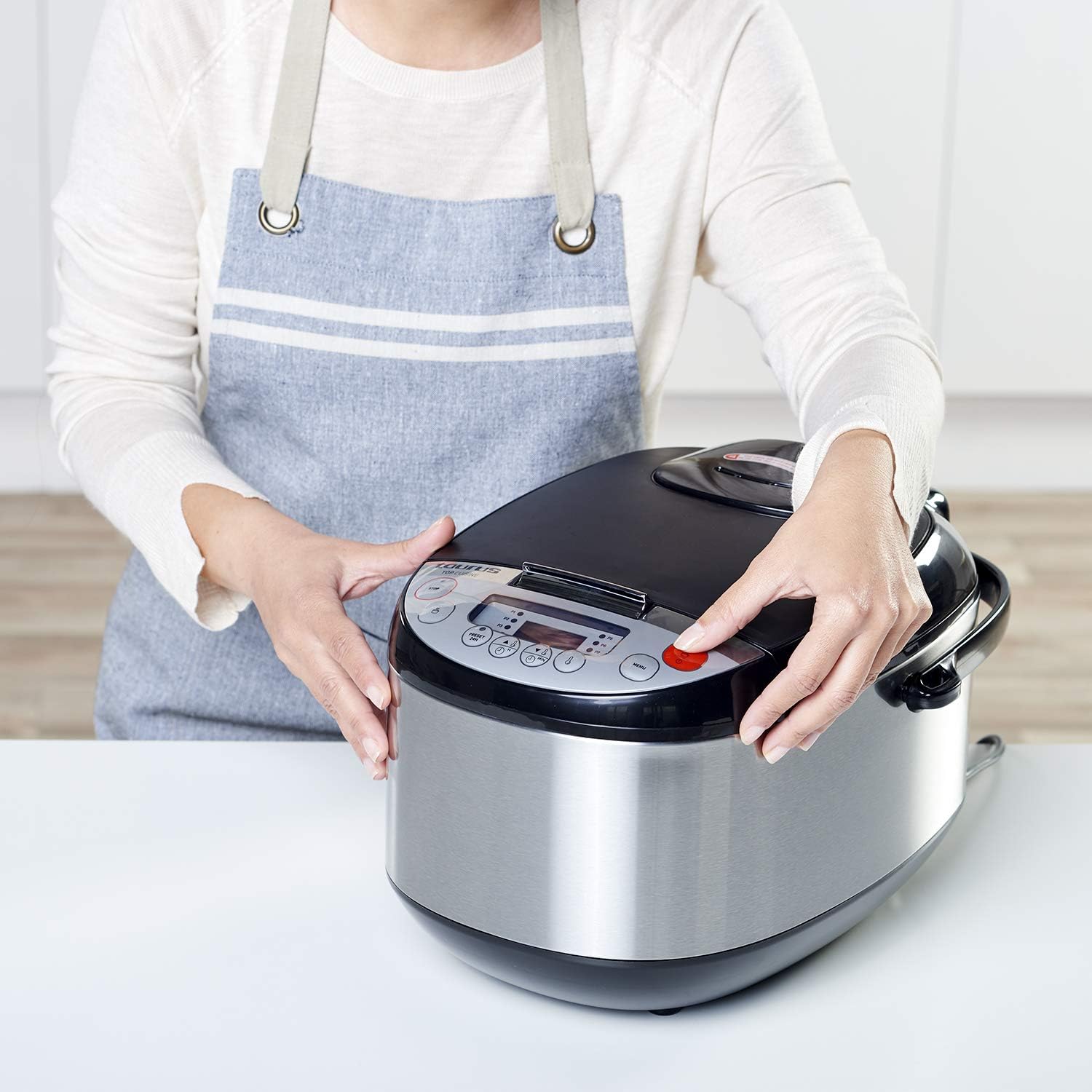
24-Hour Programming (Delay Start):
The 24-hour programming feature allows you to set a delayed start time for your cooking.
- ການກະກຽມສ່ວນປະກອບ: Place all ingredients into the pot and close the lid.
- ເລືອກໂຄງການ: Choose your desired cooking program using the "MENU" button.
- ກໍານົດເວລາຊັກຊ້າ: Press the "PRESET/DELAY" button. Use the hour and minute adjustment buttons to set the desired delay time (up to 24 hours). This is the time until cooking ເລີ່ມ.
- ຢືນຢັນ: Press the "START" button to confirm the delay setting. The timer will count down, and cooking will begin automatically once the delay time expires.
ການນໍາໃຊ້ກະຕ່າ Steamer:
To steam food, place water in the bottom of the removable pot (ensure water level is below the steamer basket). Place ingredients in the steamer basket and insert it into the pot. Select the appropriate steaming program or a manual setting.
ການບໍາລຸງຮັກສາແລະການທໍາຄວາມສະອາດ
Regular cleaning ensures the longevity and optimal performance of your food processor.
- ຖອດປລັກ: ຖອດປລັກເຄື່ອງອອກຈາກປລັກສຽບໄຟຢູ່ສະເໝີ ແລະປ່ອຍໃຫ້ມັນເຢັນໝົດກ່ອນທຳຄວາມສະອາດ.
- Removable Pot and Accessories: The removable pot, lid, steamer basket, measuring cup, spoon, and spatula are dishwasher safe. Alternatively, wash them by hand with warm, soapy water and a non-abrasive sponge. Rinse thoroughly and dry.
- ຫົວໜ່ວຍຫຼັກ: ເຊັດດ້ານນອກຂອງຫນ່ວຍງານຕົ້ນຕໍດ້ວຍຜ້າອ່ອນ, damp ຜ້າ. ຢ່າໃຊ້ເຄື່ອງເຮັດຄວາມສະອາດຂັດຫຼືແຜ່ນຂັດ. ຢ່າເອົາຫົວຫນ່ວຍຫຼັກໄວ້ໃນນໍ້າ ຫຼືຂອງແຫຼວອື່ນໆ.
- ການເກັບຮັກສາ: ໃຫ້ແນ່ໃຈວ່າທຸກພາກສ່ວນສະອາດແລະແຫ້ງກ່ອນທີ່ຈະເກັບຮັກສາເຄື່ອງໃຊ້. ເກັບຮັກສາໄວ້ໃນບ່ອນທີ່ເຢັນ, ແຫ້ງ.

ການແກ້ໄຂບັນຫາ
If you encounter issues with your Taurus Top Cuisine Food Processor, refer to the following table for common problems and solutions.
| ບັນຫາ | ສາເຫດທີ່ເປັນໄປໄດ້ | ການແກ້ໄຂ |
|---|---|---|
| ເຄື່ອງໃຊ້ບໍ່ໄດ້ເປີດ. | ບໍ່ສຽບ; ພະລັງງານ outage; ຊ່ອງສຽບຜິດພາດ. | ກວດໃຫ້ແນ່ໃຈວ່າໄດ້ສຽບສາຍໄຟເຂົ້າກັບປ່ຽງທີ່ເຮັດວຽກຢ່າງປອດໄພ. ກວດເບິ່ງເຄື່ອງຕັດວົງຈອນຂອງເຮືອນຂອງທ່ານ. |
| ອາຫານບໍ່ຖືກແຕ່ງຢູ່ສະເຫມີ. | Too much food; insufficient liquid; incorrect program selection. | Reduce food quantity. Add more liquid if necessary. Ensure the correct cooking program is selected for the type of food. |
| Lid is difficult to close or open. | Food debris or residue on the sealing ring; lid not aligned correctly. | Clean the lid and sealing ring thoroughly. Ensure the lid is aligned properly before attempting to close. |
| ລະຫັດຄວາມຜິດພາດໃນການສະແດງ. | ບັນຫາພາຍໃນສະເພາະ. | Unplug the appliance for 5 minutes, then plug it back in. If the error persists, contact customer support. |
If the problem persists after attempting these solutions, please contact Taurus customer support.
ຂໍ້ມູນຈໍາເພາະ
| ຍີ່ຫໍ້ | Taurus |
| ໝາຍເລກຕົວແບບ | 925014000 |
| ພະລັງງານ/ວັດtage | 900 ວັດ |
| ສະບັບtage | 240 VAC |
| ປະລິມານຄວາມອາດສາມາດ | 5 ລິດ |
| ຂະໜາດສິນຄ້າ (L x W x H) | 40.5 x 30 x 26 cm |
| ນ້ຳໜັກ | 5.2 ກິໂລ |
| ວັດສະດຸ | Alloyed steel |
| ຄຸນນະສົມບັດພິເສດ | Programmable, 12 cooking programs, 24-hour delay start |
| ພາກສ່ວນທີ່ປອດໄພຂອງເຄື່ອງລ້າງຈານ | Removable pot, lid, and accessories |
ການຮັບປະກັນແລະການສະຫນັບສະຫນູນ
ສຳລັບຂໍ້ມູນການຮັບປະກັນ ແລະ ການສະໜັບສະໜູນລູກຄ້າ, ກະລຸນາອ້າງອີງບັດຮັບປະກັນທີ່ມາພ້ອມກັບຜະລິດຕະພັນຂອງທ່ານ ຫຼື ເຂົ້າໄປທີ່ Taurus ຢ່າງເປັນທາງການ webເວັບໄຊ. ຮັກສາຫຼັກຖານການຊື້ຂອງທ່ານສໍາລັບການຮຽກຮ້ອງການຮັບປະກັນໃດໆ.
ຜູ້ຜະລິດ: Taurus
Webເວັບໄຊ: www.taurus.es (ຕ. ຢample link, ການເຊື່ອມຕໍ່ຕົວຈິງອາດຈະແຕກຕ່າງກັນໄປຕາມພາກພື້ນ)


