ແນະນຳ
Thank you for choosing the NEXT 8000 Full HD Satellite Receiver. This manual provides detailed instructions for the proper installation, operation, and maintenance of your device. Please read this manual thoroughly before using the receiver to ensure optimal performance and safety.
The NEXT 8000 is designed to deliver a high-quality viewing experience with its Full HD capabilities, multi-satellite search, and media playback features. It supports various languages and offers convenient software upgrades via USB.
ເນື້ອໃນຊຸດ
ກະລຸນາກວດສອບວ່າລາຍການທັງໝົດມີຢູ່ໃນຊຸດ:
- NEXT 8000 Satellite Receiver Unit
- ການຄວບຄຸມໄລຍະໄກ
- ສາຍ HDMI
- ສາຍ USB
- Power Adapter

Image: The NEXT 8000 Full HD Satellite Receiver unit shown alongside its remote control.
ຄູ່ມືການຕິດຕັ້ງ
1. ການເຊື່ອມຕໍ່ຕົວຮັບ
Follow these steps to connect your satellite receiver to your television and satellite dish:
- ດາວທຽມ IN: Connect the coaxial cable from your satellite dish to the 'LNB IN' port on the back of the receiver.
- ການເຊື່ອມຕໍ່ HDMI: Use the provided HDMI cable to connect the 'HD OUT' port on the receiver to an available HDMI input on your television. Note the HDMI input number on your TV (e.g., HDMI 1, HDMI 2).
- AV Connection (Optional): If your TV does not have an HDMI input, use an AV cable (not included) to connect the 'AV' port on the receiver to the corresponding AV inputs on your television.
- ການເຊື່ອມຕໍ່ພະລັງງານ: Connect the power adapter to the 'DC 12V' input on the receiver, then plug the adapter into a power outlet.
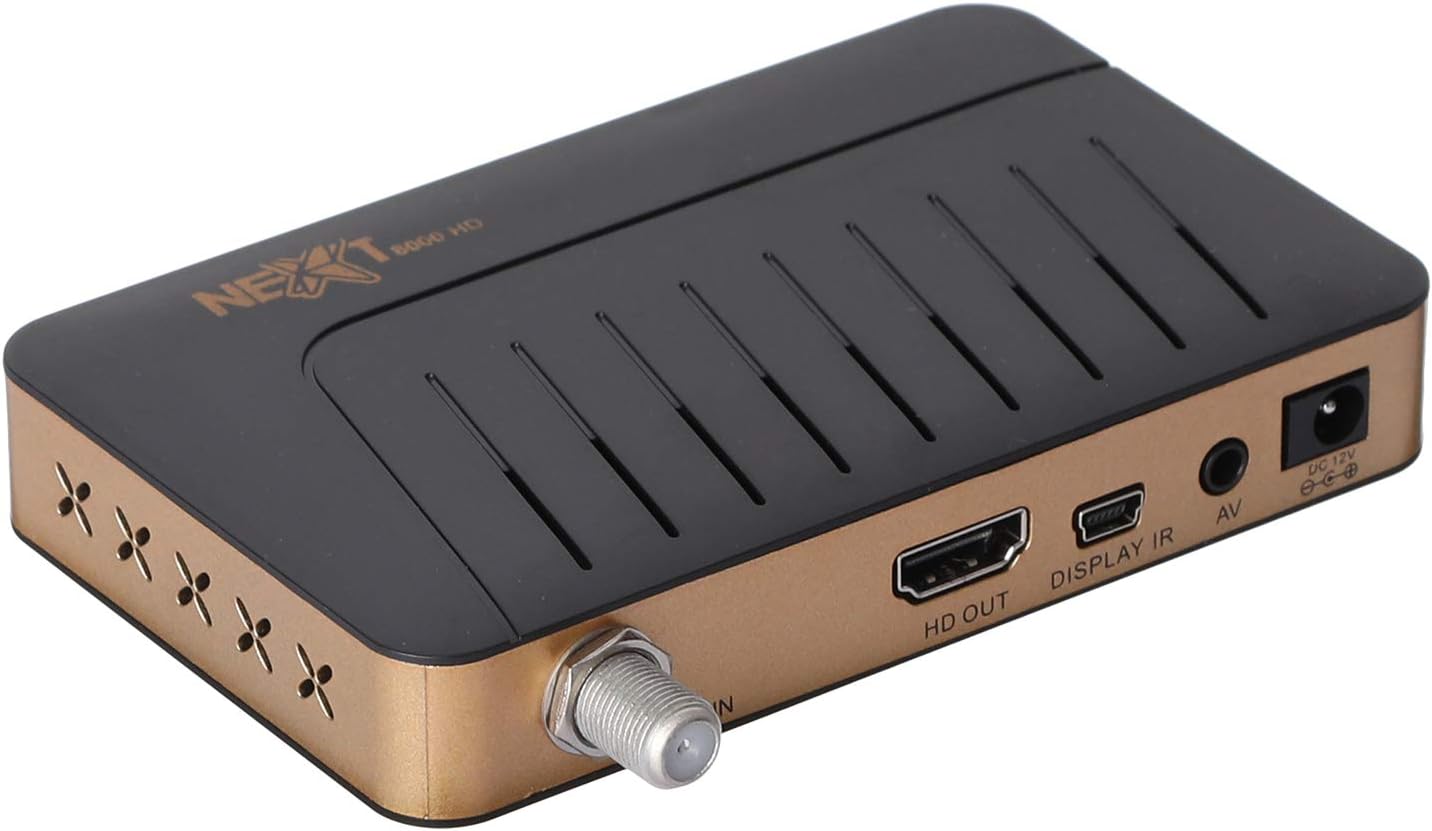
ຮູບພາບ: ດ້ານຫລັງ view of the NEXT 8000 receiver, highlighting the LNB IN, HD OUT (HDMI), AV, and DC 12V power input ports.
2. ເປີດ ແລະ ຕັ້ງຄ່າເບື້ອງຕົ້ນ
After connecting all cables:
- ເປີດໂທລະທັດຂອງທ່ານແລະເລືອກແຫຼ່ງປ້ອນ HDMI ຫຼື AV ທີ່ຖືກຕ້ອງ.
- The receiver will power on automatically. The initial setup wizard should appear on your screen.
- Follow the on-screen instructions to select your preferred language, time zone, and perform a channel scan. Refer to the 'Operating Instructions' section for details on channel scanning.
3. ການຄວບຄຸມໄລຍະໄກview
Familiarize yourself with the functions of the remote control:

Image: The remote control for the NEXT 8000 satellite receiver, showing various buttons for power, navigation, volume, channel, and special functions.
- ປຸ່ມເປີດປິດ: Turns the receiver on/off or to standby mode.
- ເມນູ: Accesses the main menu for settings and features.
- ຕົກລົງ: Confirms selections or displays channel list.
- ປຸ່ມລູກສອນ (ຂຶ້ນ/ລົງ/ຊ້າຍ/ຂວາ): ນຳທາງຜ່ານເມນູ ແລະຕົວເລືອກຕ່າງໆ.
- ອອກ: ກັບໄປໜ້າຈໍກ່ອນໜ້າ ຫຼືອອກຈາກເມນູ.
- VOL +/-: ປັບລະດັບສຽງ.
- CH +/-: ປ່ຽນຊ່ອງ.
- EPG: ສະແດງຄູ່ມືໂຄງການເອເລັກໂຕຣນິກ.
- SAT: Selects satellite.
- USB: Accesses USB media playback.
- Timeshift: Activates the Timeshift function (requires USB storage).
ຄໍາແນະນໍາການດໍາເນີນງານ
1. Channel Search and Management
To find and organize channels:
- ກົດ ເມນູ ປຸ່ມໃນການຄວບຄຸມໄລຍະໄກ.
- Navigate to 'Installation' or 'Channel Search' using the arrow buttons and press OK.
- Select 'Multi-satellite search' or 'Network search' based on your setup.
- Follow the on-screen prompts to initiate the scan. The receiver will automatically detect available channels.
- After the scan, you can access options to 'Program lock', 'Delete', 'Move', or 'Rename' channels within the channel management menu.
2. ການຫຼິ້ນສື່ຜ່ານ USB
The receiver supports media playback from a USB flash drive.
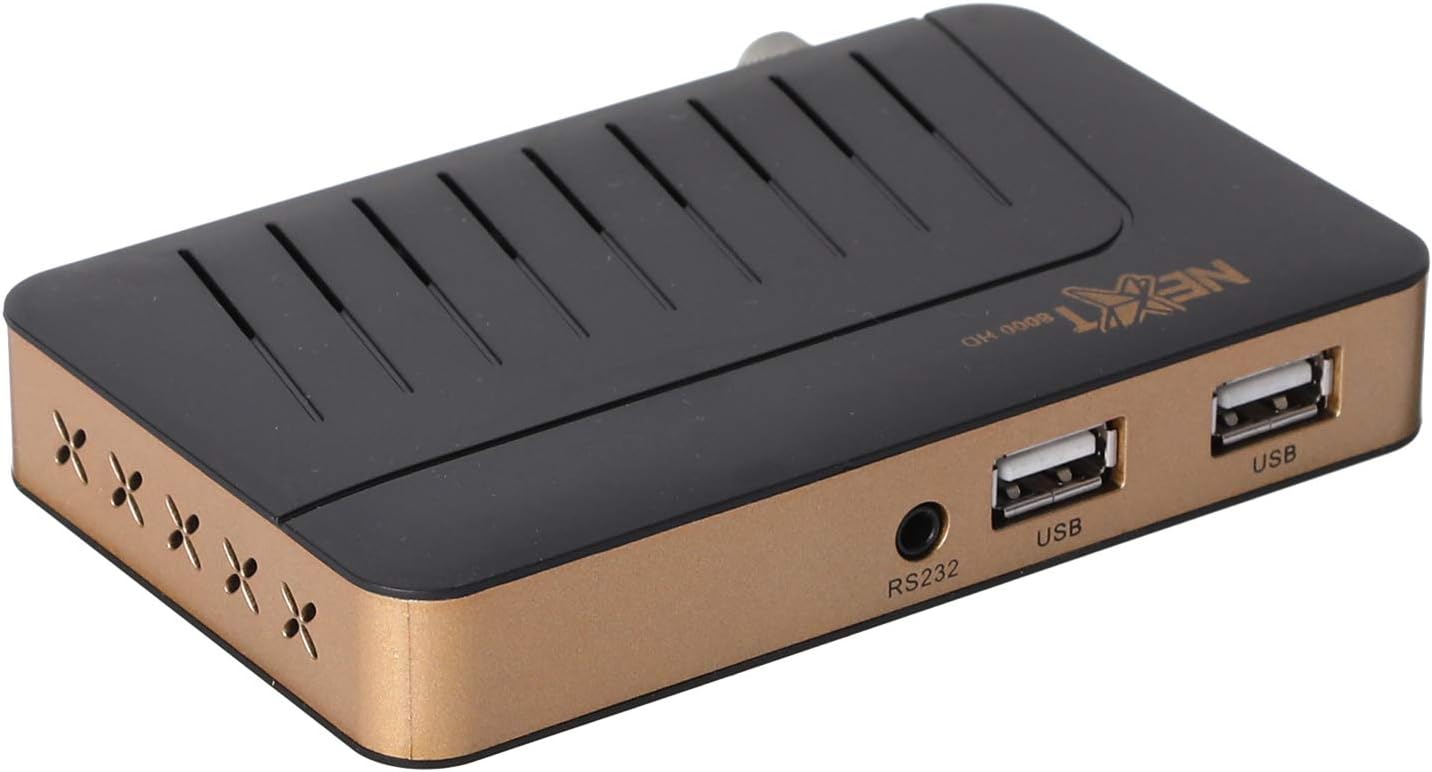
ຮູບພາບ: ທາງຫນ້າ view of the NEXT 8000 receiver, showing the two USB ports available for connecting external storage devices.
- Insert a USB flash drive into one of the USB ports on the receiver.
- ກົດ USB button on the remote control or navigate to the 'Media' menu.
- Select the type of media you wish to play (e.g., Video, Music, Photo).
- Browse your USB drive content and select the desired file. The receiver supports AVI, MKV, TS, TP, TRP, MPG, and MP4 files.
3. ການບັນທຶກ ແລະ Timeshift
To record programs or use the Timeshift function, a USB storage device must be connected.
- ການບັນທຶກ: ໃນຂະນະທີ່ເບິ່ງລາຍການ, ໃຫ້ກົດປຸ່ມ ບັນທຶກ button (usually a red circle) on the remote control to start recording. Press it again to stop. Recorded content will be saved to the connected USB drive.
- Timeshift: ກົດ Timeshift button on the remote control to pause live TV. You can then fast-forward or rewind within the buffered content.
4. ຄູ່ມືໂປຣແກຣມເອເລັກໂຕຣນິກ (EPG)
ກົດ EPG ປຸ່ມໃນການຄວບຄຸມໄລຍະໄກເພື່ອ view the 7-day electronic program guide. This allows you to see upcoming programs and set reminders or recordings.
5. Parental Lock
To restrict access to certain channels or menus, navigate to the 'System Settings' or 'Parental Control' menu. You can set a password to lock programs or specific functions.
ບໍາລຸງຮັກສາ
1. Software Upgrade via USB
To ensure your receiver has the latest features and bug fixes, you can upgrade its software:
- ດາວໂຫລດຊອບແວຫລ້າສຸດ file from the official NEXT website to a USB flash drive. Ensure the file is placed in the root directory of the USB drive.
- Insert the USB flash drive into the receiver's USB port.
- ໄປທີ່ ເມນູ > 'System Settings' > 'Software Upgrade' (or similar option).
- Select 'Upgrade by USB' and choose the software file.
- Confirm the upgrade. The receiver will restart automatically after the upgrade is complete. Do not power off the receiver during the upgrade process.
2. ທໍາຄວາມສະອາດ
To clean the receiver, disconnect it from the power supply. Use a soft, dry cloth to wipe the exterior surfaces. Do not use liquid cleaners or abrasive materials.
ການແກ້ໄຂບັນຫາ
If you encounter issues with your NEXT 8000 receiver, refer to the following table:
| ບັນຫາ | ສາເຫດທີ່ເປັນໄປໄດ້ | ການແກ້ໄຂ |
|---|---|---|
| ບໍ່ມີຮູບພາບຫຼືສຽງ | Incorrect TV input selected; Loose HDMI/AV cable; Receiver not powered on. | Select correct TV input; Check all cable connections; Ensure receiver is powered on. |
| ບໍ່ພົບຊ່ອງໃດ | Satellite dish not aligned; Incorrect LNB settings; Channel scan not performed. | Check satellite dish alignment; Verify LNB settings in menu; Perform a channel scan. |
| ການຄວບຄຸມໄລຍະໄກບໍ່ເຮັດວຽກ | Dead batteries; Obstruction between remote and receiver; Remote sensor blocked. | Replace batteries; Remove obstructions; Ensure receiver's IR sensor is clear. |
| ສື່ USB ບໍ່ສາມາດຫຼິ້ນໄດ້ | ບໍ່ຮອງຮັບ file ຟໍແມັດ; ໄດຣຟ໌ USB ບໍ່ໄດ້ສຽບຢ່າງຖືກຕ້ອງ; ເສຍຫາຍ file. | ກວດສອບ file format compatibility; Re-insert USB drive; Try a different USB drive or file. |
ຖ້າບັນຫາຍັງຄົງຢູ່ຫຼັງຈາກພະຍາຍາມແກ້ໄຂເຫຼົ່ານີ້, ກະລຸນາຕິດຕໍ່ຝ່າຍຊ່ວຍເຫຼືອລູກຄ້າ.
ຂໍ້ມູນຈໍາເພາະ
Key technical specifications for the NEXT 8000 Full HD Satellite Receiver:
- ຕົວແບບ: 8000
- ຄວາມລະອຽດຜົນຜະລິດວິດີໂອ: 576i, 576p, 720p, 1080i, 1080p (50/60 Hz)
- ການເຊື່ອມຕໍ່: HDMI, USB (2 ports), RS232, AV
- ຮູບແບບສຽງທີ່ຮອງຮັບ: Dolby Digital, DTS, AAC, PCM
- Supported Video/Media Formats: AVI, MKV, TS, TP, TRP, MPG, MP4
- ຫນ່ວຍຄວາມຈໍາການເກັບຮັກສາ: 100 satellites, 4000 frequencies, 8000 channels
- ໜ່ວຍປະມວນຜົນ: Sunplus
- ຄຸນສົມບັດ: Recording by USB flash, Screen enlargement, Multi-satellite search, Network search, Media playback, 7-day Electronic Program Guide (EPG), Teletex, Timeshift, Parental lock.
- ຂະໜາດ: 19.6 x 17.4 x 6.6 cm
- ນ້ຳໜັກ: 396 g
ການຮັບປະກັນແລະການສະຫນັບສະຫນູນ
For warranty information and technical support, please refer to the documentation provided with your purchase or visit the official NEXT product support webເວັບໄຊ. ຮັກສາໃບຮັບເງິນການຊື້ຂອງທ່ານໄວ້ເປັນຫຼັກຖານການຊື້ສໍາລັບການຮ້ອງຂໍການຮັບປະກັນ.


