ແນະນຳ
The ZIPRO Dash Rowing Machine is designed to provide an effective and smooth full-body workout in the comfort of your home. Featuring a magnetic braking system, it offers quiet operation and adjustable resistance levels to suit individual training needs. The integrated training computer is compatible with the iConsole+ mobile application, allowing for wireless control via Bluetooth from your smartphone or tablet. Additionally, it supports the Kinomap application for enhanced training experiences. The computer tracks essential workout data such as time, stroke count, calorie consumption, and heart rate (with the included Polar telemetry band), displaying them on its LCD screen. Its foldable design ensures convenient storage.

Image: The ZIPRO Dash Foldable Rowing Machine, showcasing its sleek black design with green accents, magnetic resistance unit, and comfortable seat on a sturdy rail.
ຂໍ້ມູນຄວາມປອດໄພທີ່ສໍາຄັນ
Please read all instructions carefully before assembling and using the ZIPRO Dash Rowing Machine. Keep this manual for future reference.
- ປຶກສາແພດຂອງທ່ານກ່ອນທີ່ຈະເລີ່ມໂຄງການອອກກໍາລັງກາຍໃດໆ.
- ຮັກສາເດັກນ້ອຍ ແລະສັດລ້ຽງຢູ່ຫ່າງຈາກເຄື່ອງໃນເວລານຳໃຊ້.
- ວາງເຄື່ອງພາຍໄວ້ເທິງພື້ນຜິວທີ່ຮາບພຽງ ແລະ ໝັ້ນຄົງ ໂດຍມີພື້ນທີ່ຫວ່າງພຽງພໍອ້ອມຮອບ.
- ໃຫ້ກວດສອບເຄື່ອງຈັກວ່າມີຊິ້ນສ່ວນທີ່ວ່າງ ຫຼື ສວມໃສ່ຫຼືບໍ່ກ່ອນການນຳໃຊ້ແຕ່ລະຄັ້ງ. ຢ່າໃຊ້ຖ້າມັນເສຍຫາຍ.
- ໃສ່ເກີບກິລາແລະເຄື່ອງນຸ່ງທີ່ເຫມາະສົມໃນລະຫວ່າງການອອກກໍາລັງກາຍ.
- ບໍ່ໃຫ້ເກີນນ້ໍາຫນັກຜູ້ໃຊ້ສູງສຸດຂອງ 135 ກິໂລ (297 lbs).
- Use the machine only for its intended purpose as described in this manual.
- ຢຸດການອອກກໍາລັງກາຍທັນທີຖ້າທ່ານຮູ້ສຶກອ່ອນເພຍ, ວິນຫົວ, ຫຼືມີອາການປວດ.
ເນື້ອໃນຊຸດ
Carefully unpack all components and ensure you have received the following parts:
- Main Frame Assembly (with magnetic resistance unit and console mount)
- ລົດໄຟບ່ອນນັ່ງ
- ບ່ອນນັ່ງເລື່ອນ
- ສະຖຽນລະພາບທາງຫນ້າ
- ສະຖຽນລະພາບດ້ານຫລັງ
- Footrests (2)
- ແຖບຈັບ
- Training Computer (LCD display)
- Polar T34 Telemetry Heart Rate Band
- ຊຸດຮາດແວ (ສະກູ, ແຜ່ນຮອງ, ນັອດ, ເຄື່ອງມື)
- ຄູ່ມືຜູ້ໃຊ້
ຖ້າພາກສ່ວນໃດຂາດຫາຍໄປຫຼືເສຍຫາຍ, ກະລຸນາຕິດຕໍ່ສະຫນັບສະຫນູນລູກຄ້າທັນທີ.
ສະພາແຫ່ງແລະການຕັ້ງຄ່າ
Assembly typically takes 30-60 minutes. It is recommended to have two people for assembly. Ensure all parts are present before beginning.
- ຕິດຕົວກັນສະຖຽນລະພາບ: Securely attach the front and rear stabilizers to the main frame using the provided bolts and tools. Ensure the stabilizing pads are properly aligned.
- Install Seat Rail: Connect the seat rail to the main frame. Make sure it is firmly attached and aligned.
- ບ່ອນນັ່ງຕິດ: Slide the seat onto the seat rail. Verify that the ball bearings allow for smooth movement.
- Attach Footrests: Secure the two footrests to the main frame. Ensure they are stable and the straps are adjustable.
- ເຊື່ອມຕໍ່ແຮນເບີ: Attach the handlebar to the pulling strap/chain mechanism.
- Install Console: Mount the training computer onto its designated holder. Insert the included batteries (AA Mignon cells). Connect any necessary cables from the main unit to the console.
- ກວດສອບຄັ້ງສຸດທ້າຍ: Before first use, double-check all bolts and connections to ensure they are tight and secure. Test the rowing motion and resistance adjustment.
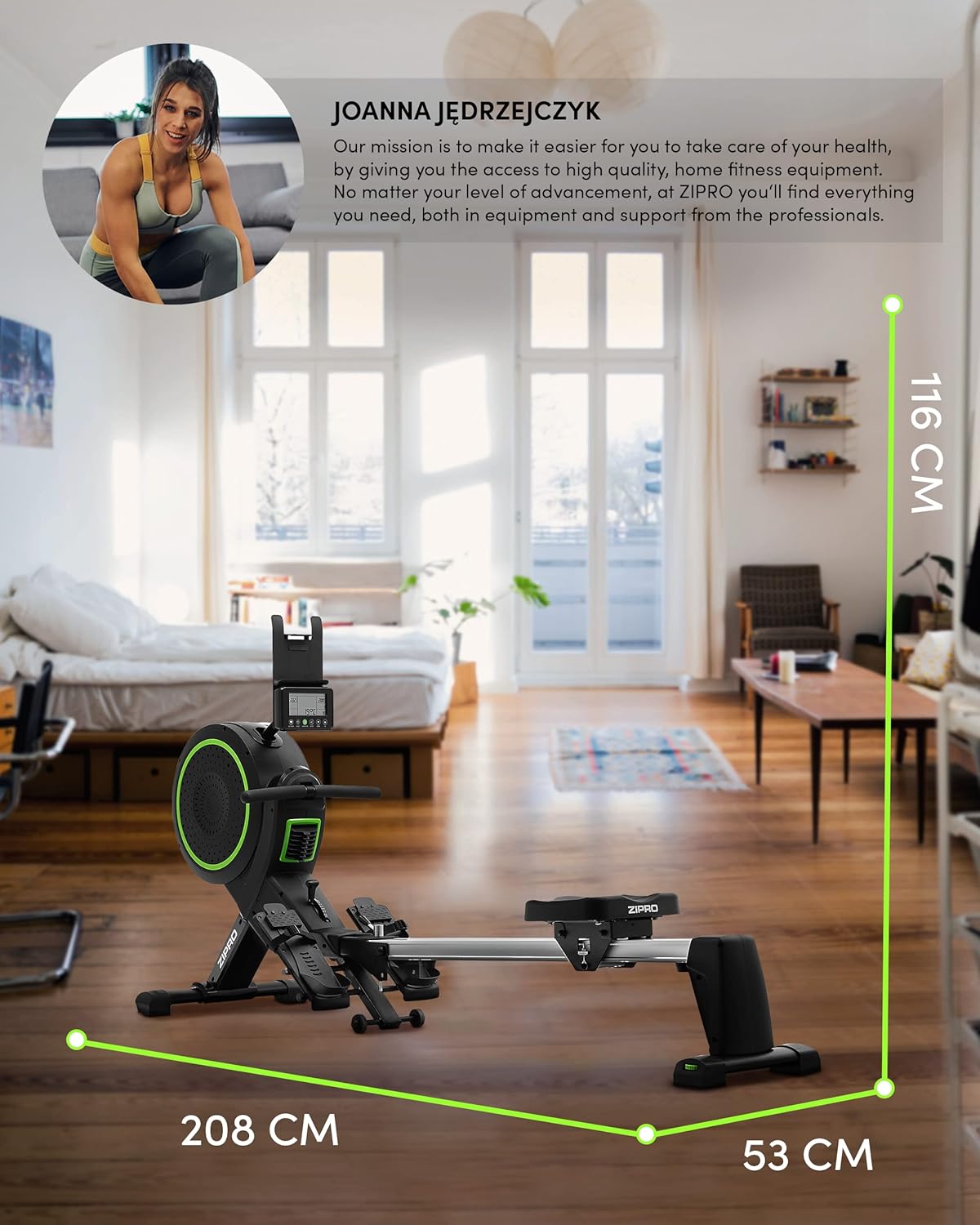
Image: Diagram showing the dimensions of the ZIPRO Dash Rowing Machine (208 cm length, 53 cm width, 116 cm height), useful for planning placement.
ຄໍາແນະນໍາການດໍາເນີນງານ
Powering On the Console
The LCD training computer powers on automatically when you begin rowing or press any button. It is powered by AA batteries (included).

ຮູບພາບ: ໃກ້ຊິດ view of the ZIPRO Dash Rowing Machine's LCD console, showing various workout metrics and control buttons.
ການປັບຄວາມຕ້ານທານ
The ZIPRO Dash features an 8-step magnetic resistance system. To adjust the resistance, locate the resistance knob or lever on the main unit (often near the fan/flywheel housing). Turn the knob clockwise to increase resistance and counter-clockwise to decrease it. Choose a level that challenges you appropriately for your fitness level.
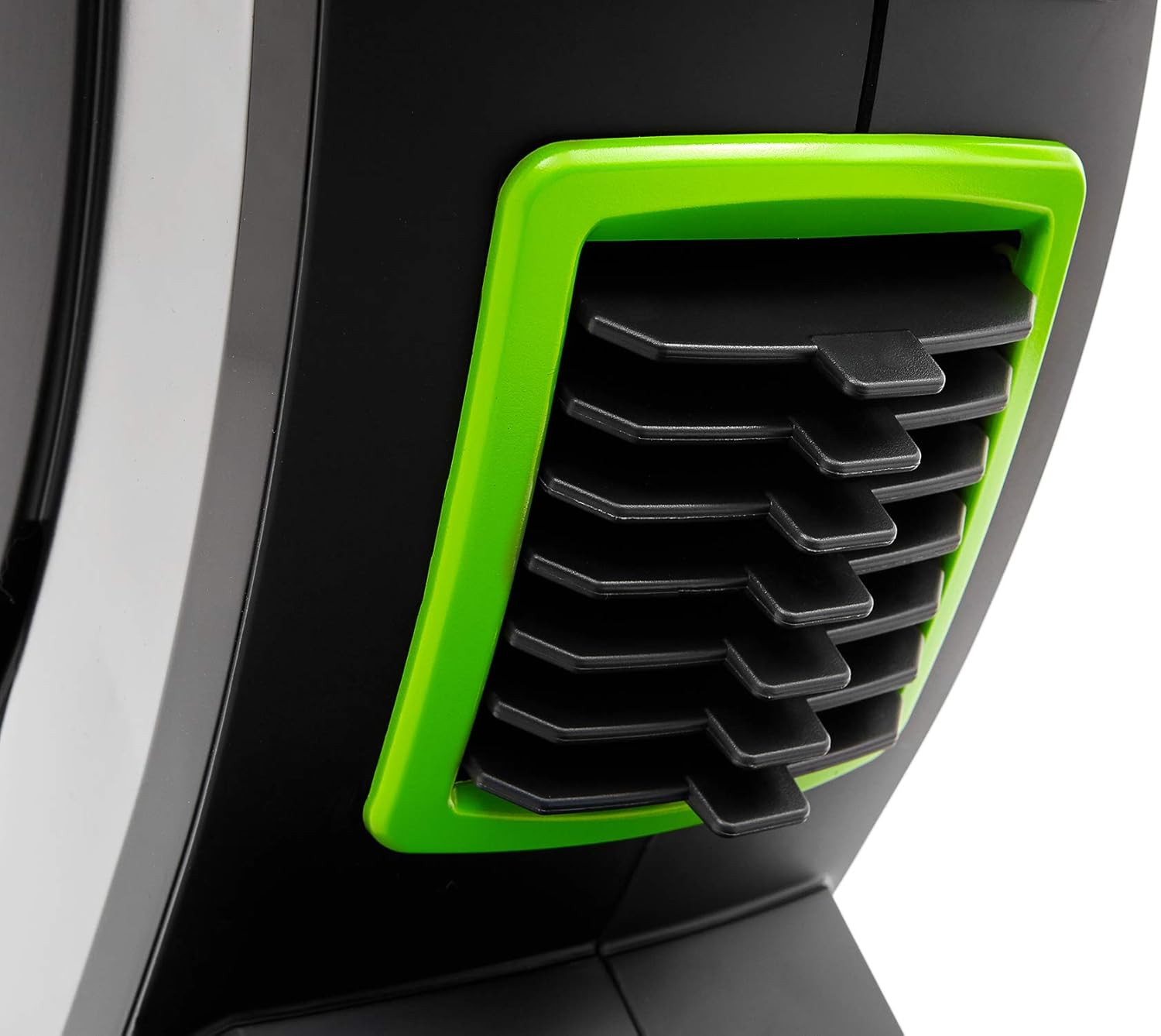
Image: Detail of the resistance adjustment mechanism on the ZIPRO Dash Rowing Machine, showing the numbered settings.
ການນໍາໃຊ້ຄອມພິວເຕີການຝຶກອົບຮົມ
The LCD display shows various workout metrics:
- ເວລາ: ໄລຍະເວລາຂອງການອອກກໍາລັງກາຍຂອງທ່ານ.
- ເສັ້ນເລືອດຕັນໃນ: Total number of strokes performed.
- ກາລະໂອກາດ: ຄາດຄະເນການເຜົາຜານພະລັງງານ.
- ອັດຕາການເຕັ້ນຂອງຫົວໃຈ: Your heart rate, measured via the Polar T34 telemetry band (if worn and connected).
- Other metrics may include distance, strokes per minute, etc.
Use the buttons on the console (e.g., MODE, SET, RESET) to navigate through display modes, set target values, or reset your workout data. Refer to the console's specific instructions for detailed button functions.
Connecting to Mobile Applications (iConsole+ & Kinomap)
The ZIPRO Dash computer is Bluetooth-enabled for connectivity with mobile apps.
- ດາວໂຫຼດແອັບ: Download the "iConsole+" and/or "Kinomap" applications from your device's app store.
- ເປີດໃຊ້ Bluetooth: ກວດໃຫ້ແນ່ໃຈວ່າ Bluetooth ຖືກເປີດໃຊ້ຢູ່ໃນສະມາດໂຟນ ຫຼືແທັບເລັດຂອງທ່ານ.
- ເຊື່ອມຕໍ່: Open the chosen app and follow the in-app instructions to search for and connect to your ZIPRO Dash rowing machine. The app will typically detect the machine automatically.
- ຄຸນສົມບັດ:
- iConsole+: Allows wireless control of the rowing computer, access to workout programs, and virtual routes.
- Kinomap: Tracks your progress and offers virtual routes with real-world video, allowing you to compete with other users.

Image: A user rowing on the ZIPRO Dash, with logos for Kinomap and iConsole+ apps, highlighting the machine's smart connectivity features.
ພັບແລະການເກັບຮັກສາ
The ZIPRO Dash is designed to be foldable for convenient storage.
- ກົນໄກການປ່ອຍ: Locate the folding release pin or knob, usually near the connection point of the seat rail to the main frame.
- Fold Up: Carefully lift the seat rail upwards until it locks into the vertical storage position. Ensure it is securely latched.
- ຍ້າຍ: Use the integrated transport wheels (located on the front stabilizer) to easily move the folded machine for storage.

Image: The ZIPRO Dash Rowing Machine shown in its folded, upright storage position, demonstrating its space-saving design.
ບໍາລຸງຮັກສາ
Regular maintenance will prolong the life of your rowing machine.
- ທໍາຄວາມສະອາດ: ເຊັດເຄື່ອງລົງດ້ວຍການໂຄສະນາamp ຜ້າຫຼັງຈາກແຕ່ລະການນໍາໃຊ້ເພື່ອເອົາເຫື່ອແລະຝຸ່ນ. ຢ່າໃຊ້ເຄື່ອງເຮັດຄວາມສະອາດຂັດ.
- ການລະບາຍສີ: Periodically check the seat rail for smooth operation. If needed, apply a small amount of silicone-based lubricant to the rail.
- ການກວດກາ: Regularly check all bolts, nuts, and moving parts for tightness and wear. Tighten any loose fasteners. Inspect the pulling strap/chain for fraying or damage.
- ການປ່ຽນແບັດເຕີຣີ: If the console display becomes dim or unresponsive, replace the AA batteries. Note that the battery compartment might require unscrewing the console from its mount.
ການແກ້ໄຂບັນຫາ
| ບັນຫາ | ສາເຫດທີ່ເປັນໄປໄດ້ | ການແກ້ໄຂ |
|---|---|---|
| ຄອນໂຊນບໍ່ສະແດງຂໍ້ມູນ. | Batteries are dead or incorrectly installed. Loose connection. | Replace batteries. Check all cable connections to the console. |
| Resistance feels inconsistent or too weak/strong. | Resistance setting is incorrect. Internal mechanism issue. | Adjust the resistance knob. If problem persists, contact support. |
| ບ່ອນນັ່ງເລື່ອນບໍ່ໄດ້ຢ່າງລຽບງ່າຍ. | Dirt or debris on the rail. Rail needs lubrication. | Clean the seat rail. Apply silicone lubricant. |
| ເຄື່ອງເຮັດໃຫ້ສຽງຜິດປົກກະຕິ. | Loose bolts or components. Worn parts. | Check and tighten all bolts. Inspect for worn parts and contact support if necessary. |
| App (iConsole+/Kinomap) not connecting via Bluetooth. | Bluetooth off on device. App permissions. Console not active. | Ensure Bluetooth is on. Grant app permissions. Start rowing to activate console. Restart app/device. |
ຂໍ້ມູນຈໍາເພາະ
| ຊື່ຕົວແບບ | ZIPRO Dash |
| ໝາຍເລກຕົວແບບ | 6299212 |
| ສີ | ດຳ |
| ກົນໄກການຕໍ່ຕ້ານ | Magnetic (8 levels) |
| ປະເພດການສະແດງ | ຈໍ LCD |
| Tracked Metrics | Time, Strokes, Calories, Heart Rate (with Polar T34 band) |
| ການເຊື່ອມຕໍ່ | Bluetooth (iConsole+, Kinomap compatible) |
| ນ້ໍາຫນັກຜູ້ໃຊ້ສູງສຸດ | 135 ກິໂລ (297 ປອນ) |
| ຄວາມສູງສູງສຸດຂອງຜູ້ໃຊ້ທີ່ແນະນຳ | 200 ຊມ (6 ຟຸດ 7 ນິ້ວ) |
| ຂະໜາດສິນຄ້າ (L x W x H) | 207 x 53 x 115 ຊມ (81.5 x 20.9 x 45.3 ນິ້ວ) |
| ຂະໜາດທີ່ພັບແລ້ວ (ປະມານ) | (Vertical storage, specific dimensions not provided but implied by foldable feature) |
| ນ້ໍາຫນັກລາຍການ | 40 ກິໂລ (88 ປອນ) |
| ວັດສະດຸກອບ | ໂລຫະ / Alloy Steel |
| ແຫຼ່ງພະລັງງານ | Manual (hand-operated), Console: Batteries (AA) |
| ຄຸນນະສົມບັດພິເສດ | Foldable design, Anti-slip footrests, Portable device holder, Stabilizing pads, Transport wheels |
ການຮັບປະກັນແລະການສະຫນັບສະຫນູນ
For warranty information, please refer to the warranty card included with your product or visit the official ZIPRO webເວັບໄຊ. ຮັກສາຫຼັກຖານການຊື້ຂອງທ່ານສໍາລັບການຮ້ອງຂໍການຮັບປະກັນ.
If you encounter any issues not covered in the troubleshooting section or require further assistance, please contact ZIPRO customer support. Contact details can typically be found on the manufacturer's webສະຖານທີ່ຫຼືຢູ່ໃນການຫຸ້ມຫໍ່ຜະລິດຕະພັນ.
ຜູ້ຜະລິດ: Morele.net Sp. z oo


