
1. ບົດແນະນຳ
Thank you for choosing the ZIPRO Flame VM Magnetic Fitness Bike. This manual provides essential information for the safe assembly, operation, and maintenance of your new fitness equipment. Please read this manual thoroughly before first use and keep it for future reference.
The ZIPRO Flame VM is designed to provide an effective and enjoyable indoor cycling experience, helping you achieve your fitness goals from the comfort of your home. Its magnetic resistance system ensures smooth and quiet operation, while the integrated computer and app compatibility offer advanced tracking and training options.
2. ຂໍ້ແນະນຳຄວາມປອດໄພ
WARNING: Before starting any exercise program, consult your physician. This is especially important for individuals over the age of 35 or those with pre-existing health problems.
- Always place the fitness bike on a flat, stable surface. Ensure adequate space around the bike for safe operation.
- ຮັກສາເດັກນ້ອຍ ແລະສັດລ້ຽງຢູ່ຫ່າງຈາກອຸປະກອນໃນເວລານຳໃຊ້.
- Inspect the bike before each use for any loose parts, wear, or damage. Do not use if damaged.
- ໃສ່ເສື້ອຜ້າ ແລະ ເກີບອອກກຳລັງກາຍທີ່ເໝາະສົມ. ຫຼີກລ່ຽງເຄື່ອງນຸ່ງທີ່ຫຼວມໆທີ່ອາດຈະຕິດຢູ່ໃນຊິ້ນສ່ວນທີ່ເຄື່ອນທີ່.
- ບໍ່ໃຫ້ເກີນຄວາມອາດສາມາດນ້ໍາຫນັກຜູ້ໃຊ້ສູງສຸດຂອງ 150 kg (330 lbs).
- ປັບບ່ອນນັ່ງ ແລະ ແຮນມືໃຫ້ຢູ່ໃນທ່າທີ່ສະດວກສະບາຍ ແລະ ປອດໄພກ່ອນເລີ່ມອອກກຳລັງກາຍ.
- ຖ້າທ່ານມີອາການປວດ, ວິນຫົວ, ຫຼືຫາຍໃຈສັ້ນ, ໃຫ້ຢຸດເຊົາການອອກກໍາລັງກາຍທັນທີແລະປຶກສາແພດ.
- Ensure the power adapter is correctly connected to the bike and a suitable power outlet.
3. ຄໍາແນະນໍາຂອງສະພາແຫ່ງ
The assembly of the ZIPRO Flame VM fitness bike is designed to be straightforward. Please follow these steps carefully. It is recommended to have two people for certain assembly steps.
3.1 ການຫຸ້ມຫໍ່ແລະການກໍານົດຊິ້ນສ່ວນ
Carefully remove all components from the packaging. Lay them out and compare them with the parts list provided in the separate assembly diagram. Ensure all parts are present and undamaged.

The user manual and power adapter included with your fitness bike.
3.2 ການປະກອບກອບຫຼັກ
Attach the front and rear stabilizers to the main frame using the provided bolts and washers. Ensure they are securely tightened to provide a stable base for the bike.
3.3 ການຕິດຕັ້ງ pedal
Identify the left (L) and right (R) pedals. The left pedal screws counter-clockwise, and the right pedal screws clockwise. Ensure they are threaded correctly and tightened firmly to prevent loosening during use.

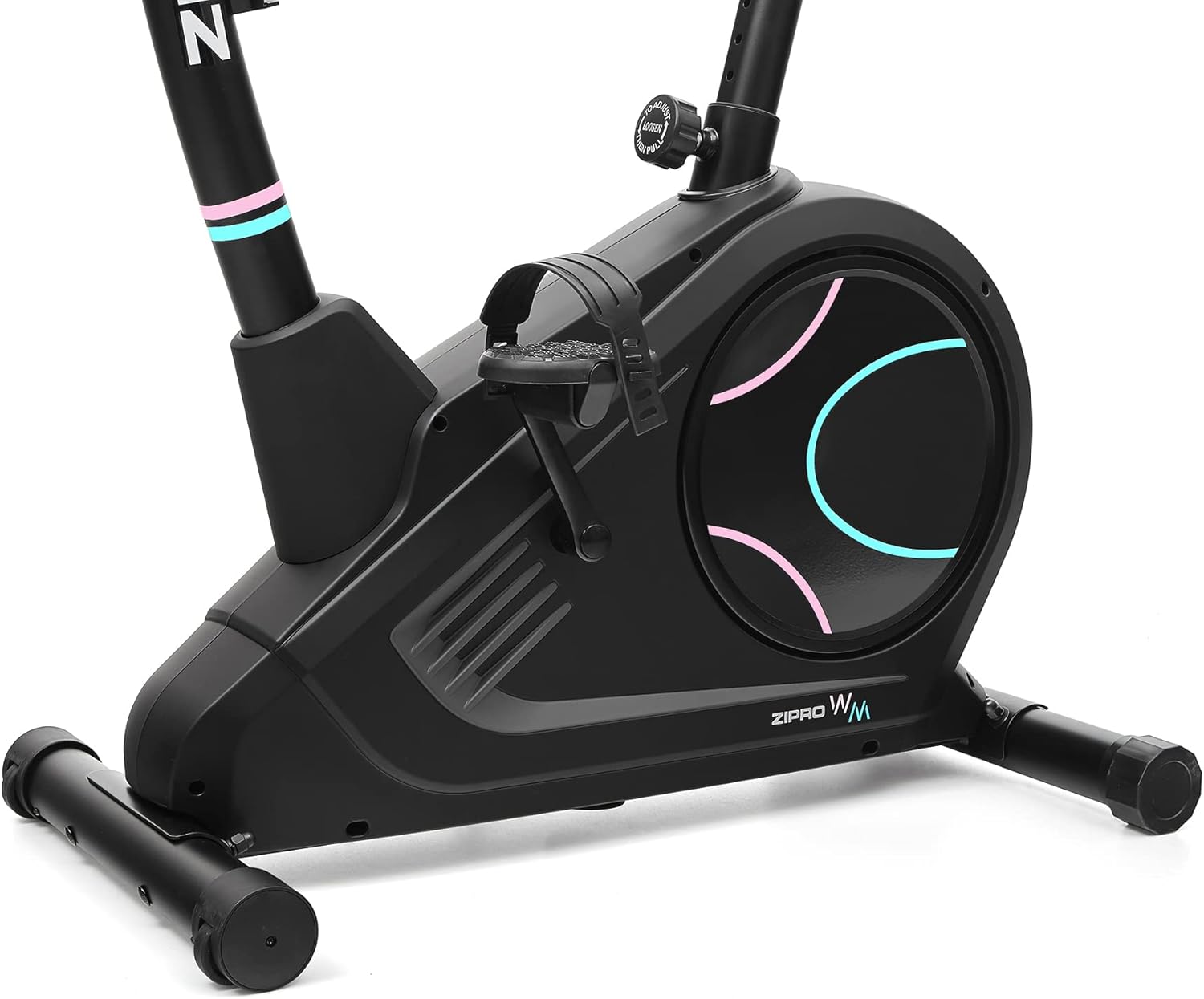
Detail of the non-slip pedals with adjustable straps for secure foot placement.
3.4 Seat and Handlebar Post Installation
Insert the seat post into the main frame and secure it with the adjustment knob. Similarly, insert the handlebar post and attach the handlebars. Ensure all connections are firm.
3.5 Console and Wiring Connection
Connect the console wires to the corresponding cables from the handlebar post. Carefully mount the console onto the handlebar post. Ensure all wires are properly routed and not pinched.
The power connection port, located at the bottom rear of the bike, for connecting the electrical cable.
4. ການກໍານົດອົງປະກອບ
Familiarize yourself with the main components of your ZIPRO Flame VM fitness bike:
- ຄອນໂຊ: Displays workout data, allows program selection, and connects to apps.
- ແຖບຈັບ: Provide grip and include pulse sensors.
- ບ່ອນນັ່ງ: Adjustable for height and horizontal position.
- pedals: Non-slip with adjustable straps for secure foot placement.
- ລູກບິດຕໍ່ຕ້ານ: Adjusts the magnetic resistance level.
- Stabilizers: Front and rear bases for stability, with transport wheels on the front.
- ຜູ້ຖືກະຕຸກນ້ຳ: Conveniently located for hydration during workouts.

ຂ້າງ view illustrating the main components of the fitness bike.

ຂ້າງຫນ້າ view highlighting the console, handlebars, and main body.
5. ຄໍາແນະນໍາການດໍາເນີນງານ
5.1 Powering On and Console Functions
Connect the power adapter to the bike and a wall outlet. The console will power on automatically. The easy-to-use computer with its clear screen allows you to select programs and monitor your workout progress.

The advanced computer display showing various workout metrics like time, calories, speed, and pulse.

A hand pressing a button on the console, demonstrating user interaction.

A user making adjustments on the fitness bike's console, highlighting its user-friendly interface.
5.2 ການປັບຄວາມຕ້ານທານ
The Flame VM features 32 levels of electric-magnetic resistance. Use the UP/DOWN buttons on the console to increase or decrease the resistance level according to your workout intensity needs.
5.3 ການວັດແທກກຳມະຈອນ
Grasp the pulse sensors on the handlebars with both hands. Your pulse will be displayed on the console. Maintaining the correct pulse rate can make your workout more effective.
5.4 Using iConsole+ Training and Kinomap Apps
The Bluetooth connectivity allows you to use popular fitness applications like iConsole+ Training and Kinomap. Place your mobile device on the integrated stand and connect via Bluetooth to enhance your training experience with virtual routes and additional programs.

The integrated stand for mobile devices, allowing you to enjoy digital content during your workout.

A smartphone securely placed on the console's media tray, ready for app integration.

A tablet positioned on the console's stand, demonstrating compatibility with larger mobile devices for an immersive workout.

A user actively exercising on the bike, with a virtual route from the Kinomap app displayed, enhancing the training experience.
5.5 Seat and Handlebar Adjustments
The adjustable seat and handlebar inclination allow you to find the safest and most comfortable position during your ride. Adjust the seat height and horizontal position using the knobs below the seat. The handlebar angle can also be adjusted for optimal comfort.

A user on the fitness bike, illustrating proper foot placement on pedals and interaction with the console.
5.6 Hydration
Stay hydrated during your workout. The included water bottle and holder allow you to quench your thirst without interrupting your exercise session.
6. ການບໍາລຸງຮັກສາແລະການດູແລ
Regular maintenance will ensure the longevity and optimal performance of your ZIPRO Flame VM fitness bike.
- ທໍາຄວາມສະອາດ: ເຊັດລົດຖີບດ້ວຍການໂຄສະນາamp ຜ້າຫຼັງຈາກແຕ່ລະການນໍາໃຊ້ເພື່ອເອົາເຫື່ອແລະຂີ້ຝຸ່ນ. ຢ່າໃຊ້ເຄື່ອງເຮັດຄວາມສະອາດຂັດຫຼືສານລະລາຍ.
- ການລະບາຍສີ: The magnetic resistance system is generally maintenance-free. However, occasionally check for any squeaks or unusual noises from moving parts and apply a silicone-based lubricant if necessary.
- ກວດສອບຄວາມເຄັ່ງຄັດ: Periodically check all bolts, nuts, and connections to ensure they are secure. Tighten any loose fasteners.
- ການເກັບຮັກສາ: ເກັບຮັກສາລົດຖີບໄວ້ໃນບ່ອນແຫ້ງ, ເຢັນຫ່າງຈາກແສງແດດໂດຍກົງ ແລະ ອຸນຫະພູມທີ່ຮ້າຍກາດ.
7. ການແກ້ໄຂບັນຫາ
If you encounter any issues with your fitness bike, refer to the following common problems and solutions:
| ບັນຫາ | ສາເຫດທີ່ເປັນໄປໄດ້ | ການແກ້ໄຂ |
|---|---|---|
| Console not turning on | Power adapter not connected; loose wiring; power outlet issue. | Ensure power adapter is securely plugged into bike and outlet. Check outlet with another device. Verify console wiring connections. |
| ບໍ່ມີການປ່ຽນແປງຄວາມຕ້ານທານ | Console not communicating with resistance mechanism; mechanical issue. | Check console wiring. If problem persists, contact customer support. |
| ການອ່ານກຳມະຈອນບໍ່ຖືກຕ້ອງ | Hands not firmly on sensors; dry hands; interference. | Ensure firm, consistent contact with both sensors. Lightly moisten hands if too dry. |
| ສຽງດັງ ຫຼື ສຽງດັງ | Loose parts; lack of lubrication (rare for magnetic systems); internal component issue. | Check and tighten all visible bolts. If noise persists, contact customer support. |
8. ຂໍ້ກໍານົດດ້ານວິຊາການ
| ຄຸນສົມບັດ | ຂໍ້ມູນຈໍາເພາະ |
|---|---|
| ຊື່ຕົວແບບ | Flame WM |
| ໝາຍເລກຕົວແບບ | 6299209 |
| ຍີ່ຫໍ້ | ZIPRO |
| ກົນໄກການຕໍ່ຕ້ານ | ແມ່ເຫຼັກ |
| ລະດັບຄວາມຕ້ານທານ | 32-step Electric-Magnetic |
| ນ້ໍາຫນັກຜູ້ໃຊ້ສູງສຸດ | 150 ກິໂລກຣາມ (ປະມານ 330 lbs) |
| ຂະໜາດ (L x W x H) | 118 x 49 x 140 cm (ປະມານ 46.5 x 19.3 x 55.1 ນິ້ວ) |
| ນ້ຳໜັກສິນຄ້າ | 27.3 ກິໂລກຣາມ (ປະມານ 60.2 lbs) |
| ແຫຼ່ງພະລັງງານ | ສາຍໄຟຟ້າ |
| ວັດສະດຸ | Plastic (main material) |
| ຄຸນນະສົມບັດພິເສດ | Modern computer with clear screen, pulse sensors, non-slip pedals, adjustable seat/handlebar, mobile device tray, iConsole+ and Kinomap compatibility, transport wheels. |

Detailed dimensions of the ZIPRO Flame VM fitness bike: 118 cm length, 49 cm width, 140 cm height.
9. ການຮັບປະກັນແລະການສະຫນັບສະຫນູນ
Your ZIPRO Flame VM Magnetic Fitness Bike is covered by a manufacturer's warranty. Please refer to the warranty card included with your purchase for specific terms and conditions.
For technical support, spare parts, or any questions not covered in this manual, please contact ZIPRO customer service. When contacting support, please have your product model number (6299209) and purchase information ready.
Thank you for choosing ZIPRO. We wish you many effective and enjoyable workouts!


