Varmilo VBS108 Lure Bot Mechanical Keyboard
ຄູ່ມືການສອນ
ແນະນຳ
Thank you for choosing the Varmilo VBS108 Lure Bot Mechanical Keyboard. This keyboard is designed for versatility and durability, featuring triple mode connectivity (Bluetooth 5.0, 2.4GHz Wireless, and USB-C), high-quality PBT dye-sub keycaps, and Cherry MX Brown switches for a tactile typing experience. This manual provides detailed instructions for setup, operation, maintenance, and troubleshooting to ensure optimal performance and longevity of your keyboard.
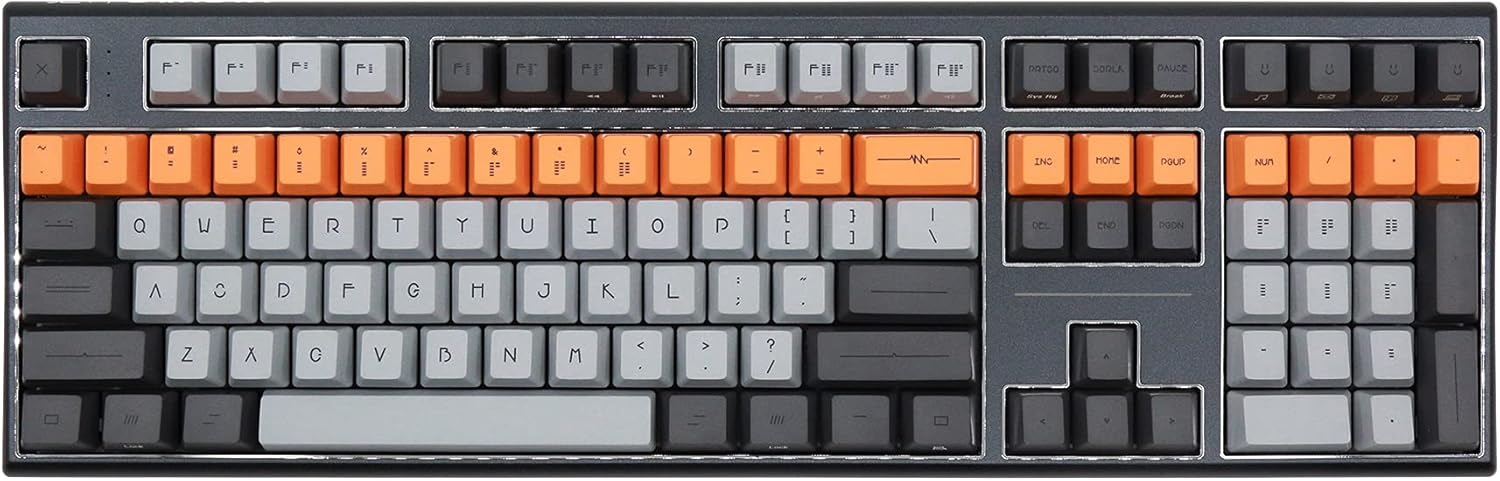
Figure 1: Varmilo VBS108 Lure Bot Mechanical Keyboard
ເນື້ອໃນຊຸດ
ກະລຸນາກວດສອບວ່າສິນຄ້າທັງໝົດມີຢູ່ໃນຊຸດ:
- Varmilo VBS108 Lure Bot Mechanical Keyboard
- ສາຍ USB-C ຫາ USB-A
- 2.4GHz Wireless Dongle (typically stored in the keyboard's battery compartment or a dedicated slot)
- Keycap Puller (ອາດຈະລວມ)
- ຄູ່ມືຜູ້ໃຊ້ (ເອກະສານນີ້)
ຕັ້ງຄ່າ
The Varmilo VBS108 offers three connectivity modes: USB-C wired, 2.4GHz wireless, and Bluetooth 5.0.
1. ການເຊື່ອມຕໍ່ແບບມີສາຍ USB-C
- Locate the USB-C port on the keyboard (usually on the top edge).
- ເຊື່ອມຕໍ່ປາຍໜຶ່ງຂອງສາຍ USB-C ທີ່ໃຫ້ມາກັບແປ້ນພິມ.
- ເຊື່ອມຕໍ່ປາຍອື່ນ (USB-A) ກັບພອດ USB ທີ່ມີຢູ່ໃນຄອມພິວເຕີຂອງທ່ານ.
- ແປ້ນພິມຈະຖືກຮັບຮູ້ໂດຍອັດຕະໂນມັດ ແລະພ້ອມນຳໃຊ້.
2. ການເຊື່ອມຕໍ່ໄຮ້ສາຍ 2.4GHz
- ຊອກຫາດອງເກິລໄຮ້ສາຍ 2.4GHz.
- ສຽບ dongle ເຂົ້າໄປໃນຜອດ USB ທີ່ມີຢູ່ໃນຄອມພິວເຕີຂອງທ່ານ.
- Ensure the keyboard is in 2.4GHz mode (refer to the keyboard's function key combinations or a physical switch if available).
- ແປ້ນພິມຄວນເຊື່ອມຕໍ່ອັດຕະໂນມັດ.
3. ການເຊື່ອມຕໍ່ Bluetooth 5.0
- Ensure the keyboard is in Bluetooth pairing mode. This typically involves holding down a specific Fn key combination (e.g., Fn + 1, Fn + 2, or Fn + 3 for different profiles) until an indicator light flashes. Consult your keyboard's specific key legend for Bluetooth pairing.
- ໃນຄອມພິວເຕີ ຫຼືອຸປະກອນຂອງທ່ານ, ເປີດການຕັ້ງຄ່າ Bluetooth.
- ຊອກຫາ new devices and select "Varmilo VBS108" or a similar name from the list.
- ປະຕິບັດຕາມການກະຕຸ້ນໃນຫນ້າຈໍໃດຫນຶ່ງເພື່ອສໍາເລັດຂະບວນການການຈັບຄູ່.
ປະຕິບັດການ
The Varmilo VBS108 keyboard includes various function key combinations for enhanced control.
Function Key Combinations (Fn + Key)
- Fn + F1-F12: Multimedia controls (play/pause, volume up/down, mute, etc.). Refer to the keycap legends for specific functions.
- Fn + Win: ລັອກ/ປົດລັອກປຸ່ມ Windows.
- Fn + Left Alt: Switch between macOS and Windows layouts (if supported).
- Fn + Q/W/E: ສະຫຼັບລະຫວ່າງ Bluetooth profiles (ຖ້າມີ).
- Fn + R: ປ່ຽນເປັນໂໝດໄຮ້ສາຍ 2.4GHz.
- Fn + T: ປ່ຽນໄປໃຊ້ໂໝດໃຊ້ສາຍ USB-C.
- Fn + Backlight Keys: Adjust backlight brightness or effects (if applicable).
Adjustable Flip-out Feet
ແປ້ນພິມມີລັກສະນະ 3-stage adjustable flip-out feet on the underside, allowing you to customize the typing angle for ergonomic comfort.

Figure 2: Adjustable Flip-out Feet
ບໍາລຸງຮັກສາ
Proper maintenance ensures the longevity and performance of your Varmilo keyboard.
ການເຮັດຄວາມສະອາດແປ້ນພິມ
- Keycaps: Use a keycap puller to carefully remove keycaps. Clean them with a mild soap solution and a soft cloth, then rinse thoroughly and air dry completely before reattaching.
- ກໍລະນີ: ເຊັດກະເປົ໋າແປ້ນພິມດ້ວຍຜ້າອ່ອນໆເລັກນ້ອຍ.amp, ຜ້າບໍ່ມີ lint. ຫຼີກເວັ້ນການນໍາໃຊ້ສານເຄມີທີ່ຮຸນແຮງຫຼືວັດສະດຸຂັດ.
- ລະຫວ່າງກະແຈ: Use compressed air to remove dust and debris from between the key switches. A small brush can also be used for stubborn particles.

Figure 3: PBT Dye-Sub Keycaps
ການແກ້ໄຂບັນຫາ
If you encounter issues with your Varmilo VBS108 keyboard, try the following solutions:
- ແປ້ນພິມບໍ່ຕອບສະໜອງ (ມີສາຍ): ກວດໃຫ້ແນ່ໃຈວ່າສາຍ USB-C ເຊື່ອມຕໍ່ຢ່າງປອດໄພກັບທັງແປ້ນພິມ ແລະຄອມພິວເຕີ. ລອງໃຊ້ພອດ USB ຫຼືສາຍອື່ນ.
- Keyboard not responding (Wireless/Bluetooth):
- ກວດເບິ່ງລະດັບຫມໍ້ໄຟ.
- Ensure the keyboard is in the correct mode (2.4GHz or Bluetooth).
- For 2.4GHz, ensure the dongle is properly inserted and try a different USB port.
- For Bluetooth, unpair and re-pair the keyboard with your device. Ensure your device's Bluetooth is enabled.
- ກະແຈບໍ່ໄດ້ລົງທະບຽນ: Remove the keycap and check for any obstructions around the switch. Clean the area with compressed air.
- ການເຊື່ອມຕໍ່ແບບບໍ່ຢຸດຢັ້ງ: Ensure there are no major sources of interference (e.g., other wireless devices) near the keyboard or dongle.
- ອັບເດດເຟີມແວ: Check the official Varmilo website for any available firmware updates for your model, which can resolve known issues.
ຂໍ້ມູນຈໍາເພາະ
| ຄຸນສົມບັດ | ລາຍລະອຽດ |
|---|---|
| ຍີ່ຫໍ້ | ວໍມິໂລ |
| ຕົວແບບ | VBS108 Lure Bot |
| ເຕັກໂນໂລຊີການເຊື່ອມຕໍ່ | Bluetooth 5.0, 2.4GHz Wireless, USB-C |
| ປະເພດສະຫຼັບ | ສີນ້ຳຕານເຊີຣີ MX |
| Keycap ວັດສະດຸ | PBT Dye-Sub |
| ຈໍານວນກະແຈ | 104 |
| ອຸປະກອນທີ່ເຂົ້າກັນໄດ້ | PC |
| ສີ | Cherry MX Brown (keyboard color scheme) |
| ຄຸນນະສົມບັດພິເສດ | 3-ສtage Adjustable Flip-out Feet |
ການຮັບປະກັນແລະການສະຫນັບສະຫນູນ
Varmilo products are designed for quality and reliability. For information regarding warranty coverage, technical support, or service, please refer to the warranty card included with your product or visit the official Varmilo webເວັບໄຊ. ທ່ານອາດຈະຕິດຕໍ່ກັບຜູ້ຄ້າປີກຈາກຜູ້ທີ່ເຈົ້າຊື້ຜະລິດຕະພັນເພື່ອຂໍຄວາມຊ່ວຍເຫຼືອ.


