1. ບົດແນະນຳ
This manual provides essential information for the safe and efficient operation of your iProda 2 in 1 Laptop, Model M1169YM. Please read this manual thoroughly before using the device and retain it for future reference. This convertible laptop features an 11.6-inch touchscreen, powered by an Intel N4100 processor, and runs on Windows 10 Pro.

Image: The iProda 2 in 1 Laptop can be used in multiple configurations, including traditional laptop, tent, stand, and tablet modes, showcasing versatility ຂອງມັນ.
2. ຂໍ້ມູນຄວາມປອດໄພ
ໃຫ້ປະຕິບັດຕາມຂໍ້ຄວນລະວັງດ້ານຄວາມປອດໄພຕໍ່ໄປນີ້ເພື່ອປ້ອງກັນຄວາມເສຍຫາຍຕໍ່ອຸປະກອນຂອງທ່ານ ຫຼື ການບາດເຈັບຕໍ່ຕົວທ່ານເອງ:
- ຢ່າເຮັດໃຫ້ອຸປະກອນຢູ່ໃນອຸນຫະພູມທີ່ຮຸນແຮງ, ແສງແດດໂດຍກົງ, ຫຼືຄວາມຊຸ່ມຊື່ນສູງ.
- ຫຼີກລ້ຽງການຫຼຸດລົງຫຼືອຸປະກອນທີ່ມີການກະທົບຢ່າງຮຸນແຮງ.
- ໃຊ້ອະແດບເຕີໄຟຟ້າທີ່ສະໜອງໃຫ້ ຫຼື ທີ່ໄດ້ຮັບການອະນຸມັດເທົ່ານັ້ນສຳລັບການສາກໄຟ.
- ຮັກສາອຸປະກອນໃຫ້ຫ່າງຈາກນ້ໍາແລະຂອງແຫຼວອື່ນໆ.
- ຢ່າພະຍາຍາມຖອດປະກອບ ຫຼືສ້ອມແປງອຸປະກອນດ້ວຍຕົນເອງ. ອ້າງອີງເຖິງພະນັກງານບໍລິການທີ່ມີຄຸນວຸດທິ.
3. ເນື້ອໃນຊຸດ
ກວດສອບວ່າລາຍການທັງຫມົດແມ່ນມີຢູ່ໃນຊຸດຂອງທ່ານ:
- iProda 2 in 1 Laptop (Model M1169YM)
- Power Adapter
- ຄູ່ມືຜູ້ໃຊ້ (ເອກະສານນີ້)
4. ຜະລິດຕະພັນເກີນview
The iProda 2 in 1 Laptop is designed for versatility, offering multiple usage modes and essential connectivity options.
4.1. ຄຸນນະສົມບັດທີ່ສໍາຄັນ
- ໜ້າຈໍ IPS ຂະໜາດ 11.6 ນິ້ວ: A responsive 10-point precision touchscreen with 1920x1080 resolution for interactive use.
- ການອອກແບບປ່ຽນໄດ້: 360-degree hinge allows seamless transition between laptop, tablet, tent, and stand modes.
- ໂປເຊດເຊີ Intel N4100: Provides efficient performance for daily tasks.
- Windows 10 Pro: Pre-installed operating system for productivity and security.
- ການເກັບຮັກສາທີ່ຂະຫຍາຍໄດ້: Supports M.2 2242 SSD for additional storage capacity.

Image: Key features of the iProda laptop, including its touchscreen, operating system, display specifications, and camera resolution.

Image: The laptop's 360-degree hinge allows it to convert into a tablet, enabling direct interaction via its precision touchscreen.
4.2. ພອດ ແລະປຸ່ມຕ່າງໆ
Familiarize yourself with the various ports and buttons on your laptop:
- Type-C Port: Used for power supply and data transfer.
- Micro HDMI: ສໍາລັບການເຊື່ອມຕໍ່ກັບຈໍສະແດງຜົນພາຍນອກ.
- Micro USB: ສໍາລັບການເຊື່ອມຕໍ່ອຸປະກອນ USB.
- ສະລັອດຕິງບັດ TF: For expanding storage with a TF (MicroSD) card.
- ປຸ່ມເປີດປິດ: ເພື່ອເປີດ/ປິດອຸປະກອນ ຫຼື ເຮັດໃຫ້ມັນເຂົ້າສູ່ໂໝດນອນ.
- ປຸ່ມລະດັບສຽງ: To adjust audio output.
- ຫູຟັງຫູຟັງ: ສໍາລັບການເຊື່ອມຕໍ່ຫູຟັງຫຼືລໍາໂພງພາຍນອກ.

ຮູບພາບ: A ລາຍລະອຽດ view of the laptop's side panels, indicating the location and function of each port and button for easy identification.
5. ຕັ້ງຄ່າ
5.1. ການສາກແບັດເຕີຣີ
Before first use, fully charge the laptop's battery. Connect the provided power adapter to the Type-C port on the laptop and plug it into a power outlet. The charging indicator light will illuminate.
5.2. First Boot ແລະ Windows Setup
- Press and hold the Power Button until the screen turns on.
- ປະຕິບັດຕາມຄໍາແນະນໍາໃນຫນ້າຈໍເພື່ອເຮັດສໍາເລັດການຕິດຕັ້ງເບື້ອງຕົ້ນ Windows 10 Pro, ລວມທັງການເລືອກພາສາ, ການເຊື່ອມຕໍ່ເຄືອຂ່າຍ, ແລະການສ້າງບັນຊີຜູ້ໃຊ້.
6. ການປະຕິບັດ Laptop ຂອງທ່ານ
6.1. ການນໍາໃຊ້ຫນ້າຈໍສໍາຜັດ
The 10-point precision touchscreen allows for intuitive interaction with Windows 10 Pro. Use gestures such as tapping, swiping, pinching, and stretching to navigate, zoom, and interact with applications.
6.2. ແປ້ນພິມ ແລະ Touchpad
The integrated keyboard and touchpad provide traditional input methods. The touchpad supports multi-touch gestures for scrolling, zooming, and switching applications.

Image: The laptop's full-size American keyboard and responsive touchpad, designed for comfortable typing and navigation.
6.3. ຮູບແບບການແປງ
The 360-degree hinge allows you to switch between various modes:
- ໂໝດແລັບທັອບ: ການຕັ້ງຄ່າມາດຕະຖານສໍາລັບການພິມແລະຜົນຜະລິດ.
- ໂໝດແທັບເລັດ: Fold the screen back completely for a tablet experience, ideal for browsing or drawing.
- ໂໝດເຕັນ: Position the laptop like a tent for media consumption or presentations.
- ໂໝດຢືນ: Flip the keyboard face down to use the screen as a display, suitable for watching videos.

Image: The laptop configured in tent mode, demonstrating its flexibility for viewing content without the keyboard in the way.
7. ການຂະຫຍາຍການເກັບຮັກສາ
The laptop comes with 64GB eMMC storage. You can expand the storage capacity by installing an M.2 2242 SSD (128GB/256GB/512GB, not included).
7.1. Installing an M.2 2242 SSD
To install an M.2 2242 SSD:
- Power off the laptop and disconnect the power adapter.
- Carefully open the back cover of the laptop.
- Locate the M.2 slot.
- Insert the M.2 2242 SSD into the slot and secure it with the appropriate screw (if provided).
- ປ່ຽນຝາຫຼັງ.
- Upon booting, you may need to initialize and format the new SSD through Windows Disk Management.
Note: If you are unsure about this procedure, it is recommended to seek professional assistance.

Image: Visual representation of the M.2 SSD slot, illustrating how additional storage can be integrated into the laptop.
8. ການເຊື່ອມຕໍ່
8.1. ການເຊື່ອມຕໍ່ Wi-Fi
The laptop supports dual-frequency 2.4GHz/5GHz Wi-Fi. To connect to a wireless network:
- ຄລິກໄອຄອນ Wi-Fi ໃນຖາດລະບົບ.
- ເລືອກເຄືອຂ່າຍທີ່ທ່ານຕ້ອງການຈາກບັນຊີລາຍຊື່.
- ໃສ່ລະຫັດຜ່ານເຄືອຂ່າຍຖ້າຖືກເຕືອນແລະຄລິກ 'ເຊື່ອມຕໍ່'.
8.2. External Display (Micro HDMI)
Connect an external monitor or TV using a Micro HDMI to HDMI cable. Once connected, you can configure display settings (duplicate, extend, second screen only) through Windows display settings.
8.3. ອຸປະກອນ USB
Use the Micro USB port or the Type-C port (with an appropriate adapter) to connect peripherals such as a mouse, keyboard, or external storage devices.
9. ບໍາລຸງຮັກສາ
9.1. ທໍາຄວາມສະອາດ
To clean the laptop, power it off and disconnect the power adapter. Use a soft, lint-free cloth slightly dampened with water or a screen cleaner for the display. Avoid harsh chemicals or abrasive materials.
9.2. ການດູແລຫມໍ້ໄຟ
ເພື່ອຍືດອາຍຸແບັດເຕີຣີ:
- ຫຼີກລ້ຽງການປະຈຸຫມໍ້ໄຟຢ່າງເຕັມທີ່ເລື້ອຍໆ.
- Do not expose the laptop to high temperatures.
- If storing the laptop for an extended period, ensure the battery is charged to around 50-70%.
10. ການແກ້ໄຂບັນຫາ
ນີ້ແມ່ນວິທີແກ້ໄຂບັນຫາທົ່ວໄປທີ່ເຈົ້າອາດຈະພົບ:
| ບັນຫາ | ການແກ້ໄຂ |
|---|---|
| ແລັບທັອບບໍ່ເປີດ. | ໃຫ້ແນ່ໃຈວ່າແບັດເຕີຣີໄດ້ສາກແລ້ວ. ເຊື່ອມຕໍ່ອະແດບເຕີໄຟ ແລະ ລອງໃໝ່ອີກຄັ້ງ. ຖ້າຍັງບໍ່ຕອບສະໜອງ, ໃຫ້ດຳເນີນການຕັ້ງຄ່າຄືນໃໝ່ໂດຍການກົດປຸ່ມເປີດປິດຄ້າງໄວ້ປະມານ 10-15 ວິນາທີ. |
| ໜ້າຈໍຫວ່າງເປົ່າ ຫຼືກະພິບ. | Restart the laptop. Check if an external display is connected and interfering. Update display drivers if possible. |
| ບັນຫາການເຊື່ອມຕໍ່ Wi-Fi. | ໃຫ້ແນ່ໃຈວ່າ Wi-Fi ຖືກເປີດໃຊ້ງານແລ້ວ. ປິດເປີດເຣົາເຕີ ແລະ ແລັບທັອບຂອງທ່ານຄືນໃໝ່. ກວດສອບການຕັ້ງຄ່າເຄືອຂ່າຍໃນ Windows. |
| ໜ້າຈໍສຳຜັດບໍ່ຕອບສະໜອງ. | Restart the laptop. Ensure the screen is clean. Check for any pending Windows updates or driver updates for the touchscreen. |
11. ຂໍ້ມູນຈໍາເພາະ
Technical specifications for the iProda 2 in 1 Laptop (Model M1169YM):
| ຄຸນສົມບັດ | ລາຍລະອຽດ |
|---|---|
| ຍີ່ຫໍ້ | iProda |
| ໝາຍເລກຕົວແບບ | M1169YM |
| ລະບົບປະຕິບັດການ | Windows 10 Pro |
| ຂະໜາດໜ້າຈໍ | 11.6 ນິ້ວ |
| ຄວາມລະອຽດໜ້າຈໍ | 1920 x 1080 ພິກເຊວ (1080p) |
| ໂຮງງານຜະລິດ | Intel N4100 (up to 2.4 GHz Burst Frequency) |
| RAM | 4 GB DDR4 |
| ຮາດດິດ | 64 GB eMMC |
| ບັດກາຟິກ | Integrated (UHD 600 Graphics) |
| ປະເພດໄຮ້ສາຍ | 2.4 GHz / 5 GHz Dual-frequency Wi-Fi |
| ອາຍຸຫມໍ້ໄຟສະເລ່ຍ | 8 Hours (3500mAh, 27Wh) |
| ນ້ໍາຫນັກລາຍການ | 3.63 ປອນ |
| ຂະໜາດສິນຄ້າ | 11.99 x 11.6 x 0.5 ນິ້ວ |
| ເຕັກໂນໂລຊີການເຊື່ອມຕໍ່ | HDMI, USB Type-C, Micro USB |
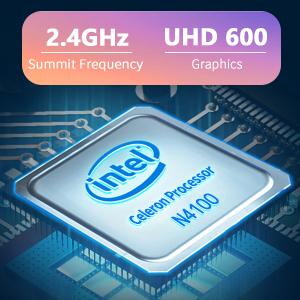
Image: The Intel Celeron N4100 processor, central to the laptop's performance, highlighting its clock speed and integrated graphics capabilities.

Image: The laptop's battery specifications, indicating its power capacity for extended use.
12. ການຮັບປະກັນແລະການສະຫນັບສະຫນູນ
For warranty information and technical support, please refer to the documentation included with your purchase or visit the official iProda website. Contact information for customer service can typically be found on the manufacturer's support page.


