1. ບົດແນະນຳ
The Tycon TPSC2440NMPPT is an advanced Maximum Power Point Tracking (MPPT) solar charge controller designed for efficient battery charging from solar panels. It automatically adjusts to 12V or 24V battery systems and supports various battery types including Flooded, AGM, GEL, and Lithium, with a customizable USER setting. This controller features an integral LCD display for monitoring key system parameters.
2. ຄໍາແນະນໍາຄວາມປອດໄພ
Please read and understand all instructions before installation and operation. Failure to follow these instructions may result in electric shock, fire, or severe injury.
- ໃຫ້ແນ່ໃຈວ່າສາຍໄຟທັງໝົດຖືກຂົ້ວຢ່າງຖືກຕ້ອງ ແລະເຊື່ອມຕໍ່ຢ່າງປອດໄພ.
- Do not disassemble or attempt to repair the controller. Refer to qualified service personnel.
- ຕິດຕັ້ງຕົວຄວບຄຸມໄວ້ໃນບໍລິເວນທີ່ມີລະບາຍອາກາດດີ, ຫ່າງຈາກວັດສະດຸໄວໄຟ ແລະ ອາຍແກັສທີ່ກັດກ່ອນ.
- Always disconnect the battery and solar panel before installing or moving the controller.
- ໃສ່ອຸປະກອນປ້ອງກັນສ່ວນບຸກຄົນທີ່ເຫມາະສົມ (PPE) ໃນລະຫວ່າງການຕິດຕັ້ງ.
- The controller is designed for indoor use or protected outdoor environments (IP32 rating). Avoid direct exposure to water.
3. ຜະລິດຕະພັນເກີນview
The TPSC2440NMPPT controller is equipped with several features to optimize solar charging and battery management:
- ເຕັກໂນໂລຊີ MPPT: Maximizes power harvest from solar panels.
- Auto-Ranging Voltage: Compatible with 12V or 24V battery arrays.
- ການດຳເນີນງານການໂຫຼດຫຼາຍໂໝດ: Offers 5 selectable modes for load control.
- Soft Start Load Output: Powers high capacitive loads safely.
- Automatic Battery Equalization: Performs 30-day equalization for optimal battery health.
- Conformal Coated Electronics: Provides environmental protection.
- TVS Lightning Protection: Enhances durability against electrical surges.
- Integral LCD Display: ສະແດງ Battery Voltage, Capacity, Charging Capacity, Temperature, Load Current, and Solar Current.
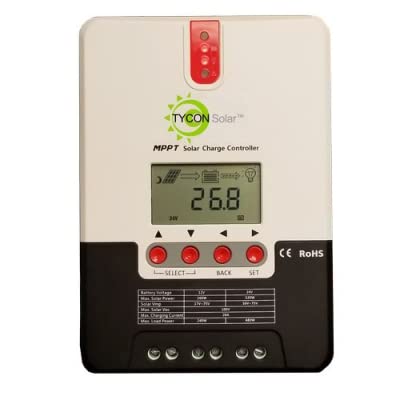
ຮູບ 1: ດ້ານຫນ້າ view of the Tycon TPSC2440NMPPT Solar MPPT Battery Charging Controller, showing the LCD display and connection terminals.
4. ການຕິດຕັ້ງແລະການຕິດຕັ້ງ
ປະຕິບັດຕາມຂັ້ນຕອນເຫຼົ່ານີ້ສໍາລັບການຕິດຕັ້ງທີ່ເຫມາະສົມ:
- ການຕິດຕັ້ງ: Choose a suitable location for mounting the controller. Ensure good ventilation and protection from direct sunlight and moisture.
- ການເຊື່ອມຕໍ່ຫມໍ້ໄຟ: Connect the battery to the controller's battery terminals first. Ensure correct polarity (+ to + and - to -). The controller will automatically detect the battery voltage (12V ຫຼື 24V).
- ການເຊື່ອມຕໍ່ແຜງແສງອາທິດ: Connect the solar panel array to the controller's solar input terminals. Observe correct polarity. Ensure the open-circuit voltage ຂອງແຜງແສງອາທິດບໍ່ເກີນແຮງດັນຂາເຂົ້າສູງສຸດຂອງຕົວຄວບຄຸມtage (110V at 25°C).
- ການເຊື່ອມຕໍ່ການໂຫຼດ (ທາງເລືອກ): If using the load output, connect your DC loads to the controller's load terminals. Do not exceed the rated load current (20A Max).
- ເຊັນເຊີອຸນຫະພູມ: Connect the included battery temperature probe cable to the designated port on the controller. Place the sensor near the battery for accurate temperature compensation.
- ເປີດ: Once all connections are secure, the controller will power on and begin operation.
5. ຄໍາແນະນໍາການດໍາເນີນງານ
The integral LCD display provides real-time information about your solar charging system. Use the buttons (if present, assuming standard UP/DOWN/SET) to navigate through the display menus and adjust settings.
5.1 ຂໍ້ມູນຈໍສະແດງຜົນ LCD
- ຫມໍ້ໄຟ Voltage: ສະບັບປັດຈຸບັນtage ຂອງແບັດເຕີຣີທີ່ເຊື່ອມຕໍ່.
- ຄວາມອາດສາມາດຫມໍ້ໄຟ: Estimated state of charge.
- ຄວາມອາດສາມາດສາກໄຟ: Current power being delivered to the battery.
- ອຸນຫະພູມຫມໍ້ໄຟ: Temperature measured by the external probe.
- ໂຫລດປັດຈຸບັນ: Current being drawn by connected DC loads.
- Solar Current: Current being generated by the solar panels.
5.2 ການຕັ້ງຄ່າປະເພດແບັດເຕີຣີ
The controller supports Flooded, AGM, GEL, and Lithium battery types. A USER setting allows for custom charge parameters. Refer to the on-screen menu for selecting and configuring the battery type.
5.3 Load Operation Modes
The controller offers 5 selectable load operation modes. Consult the device's menu for details on each mode and how to select them, typically involving timed operation or dusk-to-dawn control.
6. ບໍາລຸງຮັກສາ
ການບຳລຸງຮັກສາເປັນປະຈຳຮັບປະກັນປະສິດທິພາບທີ່ດີທີ່ສຸດ ແລະ ອາຍຸການໃຊ້ງານທີ່ຍາວນານຂອງຕົວຄວບຄຸມການສາກໄຟພະລັງງານແສງຕາເວັນຂອງທ່ານ.
- ກວດສອບການເຊື່ອມຕໍ່: ກວດເບິ່ງທຸກການເຊື່ອມຕໍ່ສາຍໄຟເປັນແຕ່ລະໄລຍະເພື່ອຄວາມແຫນ້ນຫນາແລະການກັດກ່ອນ.
- Clean Controller: Keep the controller clean and free of dust. Use a dry cloth for cleaning. Do not use liquids.
- ສຸຂະພາບຫມໍ້ໄຟ: ຕິດຕາມກວດກາ voltage and capacity on the LCD. Ensure batteries are properly maintained according to their manufacturer's guidelines.
- ການລະບາຍອາກາດ: ຮັບປະກັນວ່າພື້ນທີ່ຕິດຕັ້ງມີລະບາຍອາກາດດີເພື່ອປ້ອງກັນຄວາມຮ້ອນເກີນໄປ.
7. ການແກ້ໄຂບັນຫາ
| ບັນຫາ | ສາເຫດທີ່ເປັນໄປໄດ້ | ການແກ້ໄຂ |
|---|---|---|
| ບໍ່ມີຈໍສະແດງຜົນ / ບໍ່ມີພະລັງງານ | Loose battery connection; Battery voltage too low; Blown fuse (external, if applicable). | Check battery connections and polarity. Charge battery if voltage is below operating threshold. Check and replace any external fuses. |
| ບໍ່ມີການສາກໄຟແສງອາທິດ | Solar panel not connected; Incorrect polarity; Insufficient sunlight; Damaged solar panel/wiring. | Verify solar panel connections and polarity. Ensure panels are receiving adequate sunlight. Inspect panels and wiring for damage. |
| ໂຫຼດບໍ່ເຮັດວຽກ | Load disconnected; Overload; Short circuit; Battery voltage ຕ່ໍາເກີນໄປ. | Check load connections. Reduce load if exceeding 20A. Check for short circuits. Ensure battery is sufficiently charged. |
| ການອ່ານບໍ່ຖືກຕ້ອງ | Loose connections; Faulty sensor. | Check all wiring connections. Ensure temperature sensor is properly connected and placed. |
8. ຂໍ້ມູນຈໍາເພາະ
- ຕົວແບບ: TPSC2440NMPPT
- ອັດຕະໂນມັດ Voltage: 12V/24V (System)
- Ampນີ້: 40A
- ການຈັດອັນດັບການໂຫຼດປັດຈຸບັນ: 20A ສູງສຸດ
- ການໂຫຼດ Capacitive ສູງສຸດ: 10,000uF
- Max Solar Input Voltage: 110V (25°C), 90V (25°C)
- Max Power Point Range: 2VDC to 75VDC (Battery Volts)
- ປະສິດທິພາບການແປງ: 96% ພິມ.
- MPPT Tracking Efficiency: 99%
- ບໍລິໂພກດ້ວຍຕົນເອງ: 1W
- ການຊົດເຊີຍອຸນຫະພູມ: -3.0mV/°C/ເຊລ
- ຂະໜາດສາຍສູງສຸດ: 8 AWG
- ສະບັບtage and Current Accuracy: +/-2%
- ການຕໍ່ດິນ: ພື້ນດິນທາງລົບ
- ການປົກປ້ອງສິ່ງແວດລ້ອມ: IP32
- ຂະໜາດຜະລິດຕະພັນ: 12 x 9 x 6 ນິ້ວ
- ນ້ໍາຫນັກລາຍການ: 5.16 ປອນ
- ປະເພດການສະແດງ: ຈໍ LCD


