1. ບົດແນະນຳ
Thank you for choosing the Crenova Laminator Machine FNL001. This device is designed to protect and preserve your documents, photos, and other materials with a clear, durable laminated finish. This manual provides essential information for the safe and efficient operation, maintenance, and troubleshooting of your laminator. Please read it thoroughly before first use and keep it for future reference.
2. ຄໍາແນະນໍາຄວາມປອດໄພ
To ensure safe operation and prevent damage to the laminator or injury, please observe the following safety precautions:
- ອ່ານຄໍາແນະນໍາທັງຫມົດກ່ອນທີ່ຈະດໍາເນີນການເຄື່ອງ.
- ຮັກສາເຄື່ອງເຄືອບໃຫ້ຫ່າງຈາກນໍ້າ ຫຼື ຂອງແຫຼວອື່ນໆ. ຫ້າມໃຊ້ມືປຽກ.
- Do not touch the hot parts of the machine during or immediately after use.
- ຖອດປລັກເຄື່ອງເຄືອບອອກຈາກປລັກໄຟເມື່ອບໍ່ໄດ້ໃຊ້ງານ ຫຼື ກ່ອນການທຳຄວາມສະອາດ.
- ຮັບປະກັນການລະບາຍອາກາດທີ່ເໝາະສົມອ້ອມຮອບເຄື່ອງໃນລະຫວ່າງການປະຕິບັດງານ.
- Keep out of reach of children and pets. Adult supervision is required if children are near the device.
- ຢ່າໃສ່ວັດຖຸອື່ນນອກເໜືອຈາກຖົງເຄືອບເຂົ້າໄປໃນເຄື່ອງ.
- Use only laminating pouches recommended for this type of machine.
3. ຜະລິດຕະພັນເກີນview
The Crenova Laminator FNL001 features a compact design with essential controls for efficient lamination.
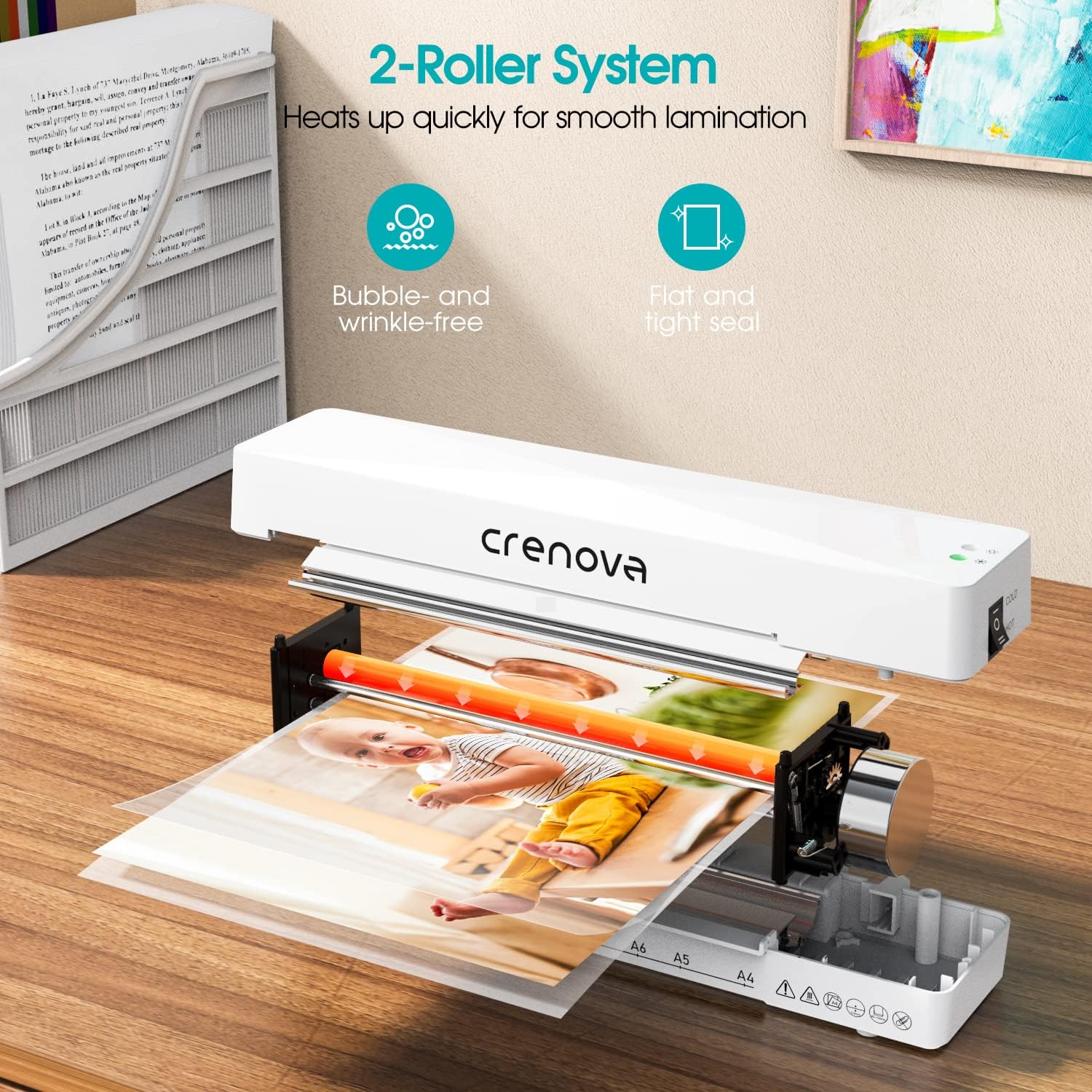
ລາຍລະອຽດຮູບພາບ: ພາຍໃນ view of the Crenova laminator, highlighting its 2-roller system designed for smooth lamination. The image shows a document being fed through the rollers, illustrating the heating process.
- ສະຫຼັບພະລັງງານ/ໂໝດ: ເລືອກລະຫວ່າງໂໝດການເຄືອບ OFF, COLD, ແລະ HOT.
- ແສງຕົວຊີ້ວັດ: Illuminates to show power status and readiness for lamination.
- Document Inlet: ບ່ອນທີ່ໃສ່ຖົງລາມິເນດ.
- Document Outlet: ບ່ອນທີ່ເອກະສານທີ່ເຄືອບແລ້ວອອກ.
- Jam Release Lever (ABS): Used to clear misfed or jammed pouches.
4. ຕັ້ງຄ່າ
- Unpack the laminator and remove all packaging materials.
- Place the laminator on a flat, stable, and heat-resistant surface.
- Ensure there is enough space around the machine for proper ventilation and for documents to exit freely.
- ສຽບສາຍໄຟເຂົ້າໄປໃນປ່ຽງໄຟຟ້າມາດຕະຖານ.
5. ຄໍາແນະນໍາການດໍາເນີນງານ
Follow these steps for successful lamination:

ລາຍລະອຽດຮູບພາບ: A four-panel image illustrating the simple operation of the Crenova laminator. Panel 1 shows switching to HOT or COLD. Panel 2 shows the mode indicator turning green. Panel 3 shows inserting the pouch straight into the inlet. Panel 4 shows the pouch auto-exiting the outlet.
- Step 1: Select Mode. Switch the power button to either ຮ້ອນ or ໜາວ mode, depending on your laminating pouch and document type. For most standard documents, use HOT mode. Cold lamination is suitable for heat-sensitive materials or self-adhesive pouches.
- Step 2: Wait for Readiness. If using HOT mode, allow the machine to preheat. The mode indicator light will turn ສີຂຽວ when the laminator is ready for use. This typically takes a few minutes.
- Step 3: Prepare Document. Place your document inside a laminating pouch, ensuring it is centered and there is an even border around the edges. Do not overload the pouch.
- Step 4: Insert Pouch. Insert the sealed edge of the laminating pouch straight into the document inlet. The machine will automatically feed the pouch through. Do not force the pouch or insert it at an angle.
- Step 5: Retrieve Laminated Document. The laminated document will exit from the rear outlet. Allow it to cool on a flat surface before handling to ensure a smooth, flat finish.
The Crenova Laminator supports various document sizes up to A4 (230mm / 9 inches wide).

ລາຍລະອຽດຮູບພາບ: The Crenova laminator positioned next to various paper sizes (A4, A5, A6, A7) with their dimensions, illustrating the machine's capability to laminate documents up to 230mm (9 inches) wide.

ລາຍລະອຽດຮູບພາບ: A visual representation of the Crenova A4 laminator's versatility, showing it can laminate various document types such as certificates, photos, and menus.
6. ບໍາລຸງຮັກສາ
- ທໍາຄວາມສະອາດ: Always unplug the laminator and allow it to cool completely before cleaning. Wipe the exterior with a soft, dry cloth. Do not use abrasive cleaners or solvents.
- ການເກັບຮັກສາ: Store the laminator in a clean, dry, and cool place when not in use.
- ທໍາຄວາມສະອາດ Roller: ໃຫ້ໃຊ້ແຜ່ນທຳຄວາມສະອາດ (ມີຂາຍແຍກຕ່າງຫາກ) ຜ່ານເຄື່ອງເຄືອບເປັນໄລຍະເພື່ອເອົາກາວທີ່ຕິດຄ້າງອອກຈາກລູກກິ້ງ.
7. ການແກ້ໄຂບັນຫາ
ຖ້າທ່ານພົບບັນຫາກັບເຄື່ອງເຄືອບຂອງທ່ານ, ໃຫ້ອ້າງອີງເຖິງບັນຫາ ແລະ ວິທີແກ້ໄຂທົ່ວໄປຕໍ່ໄປນີ້:
Paper Jam Release

ລາຍລະອຽດຮູບພາບ: A three-panel image demonstrating the paper jam release process. Panel 1 shows switching the laminator off. Panel 2 shows pushing and holding the ABS lever. Panel 3 shows pulling the jammed pouch out.
- Step 1: Switch Off. Immediately turn off the laminator using the power switch.
- Step 2: Engage Release Lever. Locate the ABS (Anti-Blocking System) jam release lever, usually on the side or back of the machine. Push and hold this lever.
- Step 3: Remove Pouch. While holding the lever, carefully pull the misfed or jammed pouch straight out from the inlet or outlet.
- Release the lever and allow the machine to cool before attempting further lamination.
ບັນຫາອື່ນໆ
- Poor Lamination Quality (Bubbles, Wrinkles):
- Ensure the laminator has fully preheated (green indicator light).
- Use appropriate pouch thickness for the machine and document.
- Insert the pouch straight and centered.
- Do not laminate multiple items in one pouch if they are too small or unevenly spaced.
- ເຄື່ອງບໍ່ເປີດ:
- Check if the power cord is securely plugged into both the laminator and the wall outlet.
- ກວດສອບວ່າປ່ຽງໄຟແມ່ນເຮັດວຽກໄດ້.
8. ຂໍ້ມູນຈໍາເພາະ
| ຍີ່ຫໍ້ | Crenova |
| ໝາຍເລກຕົວແບບ | FNL001 |
| ນ້ໍາຫນັກລາຍການ | 1.94 ປອນ |
| ຂະໜາດແພັກເກັດ | 13.54 x 6.3 x 3.11 ນິ້ວ |
| Max Lamination Width | 230mm (A4) |
| ລະບົບລູກກິ້ງ | ລະບົບ 2 ລູກກິ້ງ |
| ຮູບແບບການເຄືອບ | ຮ້ອນແລະເຢັນ |
| ASIN | B08QMMSNBF |
| ວັນທີທໍາອິດທີ່ມີ | ວັນທີ 3 ກັນຍາ 2025 |
9. ການຮັບປະກັນແລະການສະຫນັບສະຫນູນ
For detailed warranty information, please refer to the warranty card included with your product packaging or visit the official Crenova webເວັບໄຊ.
If you require technical assistance or have questions not covered in this manual, please contact Crenova customer support. Contact details can typically be found on the manufacturer's webສະຖານທີ່ຫຼືການຫຸ້ມຫໍ່ຜະລິດຕະພັນ.


