1. ບົດແນະນຳ
Thank you for choosing the KLARSTEIN VapoAir Opal Smart Humidifier. This device is designed to improve air quality and comfort in your home by adding moisture to dry air. It features smart control via an app, an ionizer, a large 5-liter water tank, and multiple mist levels. Please read this manual carefully before use to ensure proper operation and maintenance.
2. ຄໍາແນະນໍາຄວາມປອດໄພ
- Always place the humidifier on a firm, flat, waterproof surface away from direct sunlight and heat sources.
- Do not place the humidifier near furniture or appliances that are sensitive to moisture.
- ຮັກສາເຄື່ອງໃຊ້ໃຫ້ໄກຈາກເດັກນ້ອຍ ແລະສັດລ້ຽງ.
- ຢ່າຈຸ່ມຫົວ ໜ່ວຍ ໃນນ້ ຳ ຫລືທາດແຫຼວອື່ນໆ.
- ຖອດປລັກເຄື່ອງເພີ່ມຄວາມຊຸ່ມອອກຈາກປລັກໄຟກ່ອນທີ່ຈະຕື່ມ, ທຳຄວາມສະອາດ ຫຼື ຍ້າຍມັນ.
- ໃຊ້ສະເພາະນ້ຳປະປາທີ່ສະອາດ ແລະ ເຢັນເທົ່ານັ້ນ. ແນະນຳໃຫ້ໃຊ້ນ້ຳກັ່ນ ຫຼື ນ້ຳທີ່ບໍ່ມີແຮ່ທາດເພື່ອປ້ອງກັນການສະສົມຂອງແຮ່ທາດ.
- ຢ່າຕື່ມນ້ຳມັນຫອມລະເຫີຍໂດຍກົງໃສ່ຖັງນ້ຳ; ໃຫ້ໃຊ້ຖາດກະຈາຍກິ່ນຫອມທີ່ກຳນົດໄວ້.
- ຖ້າສາຍໄຟເສຍຫາຍ, ມັນຕ້ອງຖືກປ່ຽນແທນໂດຍຜູ້ຜະລິດ, ຕົວແທນບໍລິການ, ຫຼືຜູ້ທີ່ມີຄຸນສົມບັດທີ່ຄ້າຍຄືກັນເພື່ອຫຼີກເວັ້ນອັນຕະລາຍ.
- ຢ່າປິດກັ້ນທາງອອກຂອງຂີ້ຝຸ່ນ.
3. ເນື້ອໃນຊຸດ
ກະລຸນາກວດເບິ່ງຊຸດສຳລັບລາຍການຕໍ່ໄປນີ້:
- KLARSTEIN VapoAir Opal Smart Humidifier
- ການຄວບຄຸມໄລຍະໄກ
- ຄູ່ມືການສອນ
- Cleaning Brush (may be included)
4. ຜະລິດຕະພັນເກີນview ແລະອົງປະກອບ
ເຮັດຄວາມຄຸ້ນເຄີຍກັບພາກສ່ວນຕົ້ນຕໍຂອງເຄື່ອງເຮັດຄວາມຊຸ່ມຊື່ນຂອງທ່ານ:

ຮູບພາບ: ທາງຫນ້າ view of the KLARSTEIN VapoAir Opal Smart Humidifier, showcasing ການອອກແບບທີ່ທັນສະໄໝ ແລະ ຈໍສະແດງຜົນ LED ຂອງມັນ.
- ທາງອອກຂອງໝອກ: Where the mist is released into the air.
- ຖັງນໍ້າ: ຖັງທີ່ສາມາດຖອດອອກໄດ້ສຳລັບເກັບຮັກສານໍ້າ.
- ຫົວໜ່ວຍພື້ນຖານ: Contains the ultrasonic transducer and heating element.
- Control Panel/LED Display: Touch-sensitive buttons and digital display for settings.
- Aroma Diffuser Tray: Small tray for essential oils (located at the bottom/side).
- ສາຍໄຟ: ສໍາລັບການເຊື່ອມຕໍ່ກັບເຕົ້າສຽບໄຟຟ້າ.

Image: The KLARSTEIN VapoAir Opal Smart Humidifier with its dimensions labeled: 23cm (depth), 18cm (width), 37cm (height).
5. ຕັ້ງຄ່າ
5.1 ການຫຸ້ມຫໍ່
ເອົາອຸປະກອນການຫຸ້ມຫໍ່ທັງຫມົດອອກຢ່າງລະມັດລະວັງ. ຮັກສາການຫຸ້ມຫໍ່ສໍາລັບການເກັບຮັກສາຫຼືການຂົນສົ່ງໃນອະນາຄົດ.
5.2 ການຈັດວາງ
Place the humidifier on a flat, stable surface at least 15 cm away from walls and furniture. Ensure the mist outlet is not directed towards any objects or walls.
5.3 ການຕື່ມຖັງນໍ້າ
- ໃຫ້ແນ່ໃຈວ່າເຄື່ອງເພີ່ມຄວາມຊຸ່ມໄດ້ຖືກຖອດປລັກອອກແລ້ວ.
- Carefully lift the water tank from the base unit.
- Invert the water tank and unscrew the cap at the bottom.
- Fill the tank with clean, cool tap water. Distilled or demineralized water is recommended to minimize mineral residue. Do not fill past the MAX line.
- ໝວກໝວກຄືນໃຫ້ແໜ້ນ.
- Place the filled water tank back onto the base unit, ensuring it is seated correctly. The auto-stop function will prevent operation if the tank is not properly placed or if water is absent.
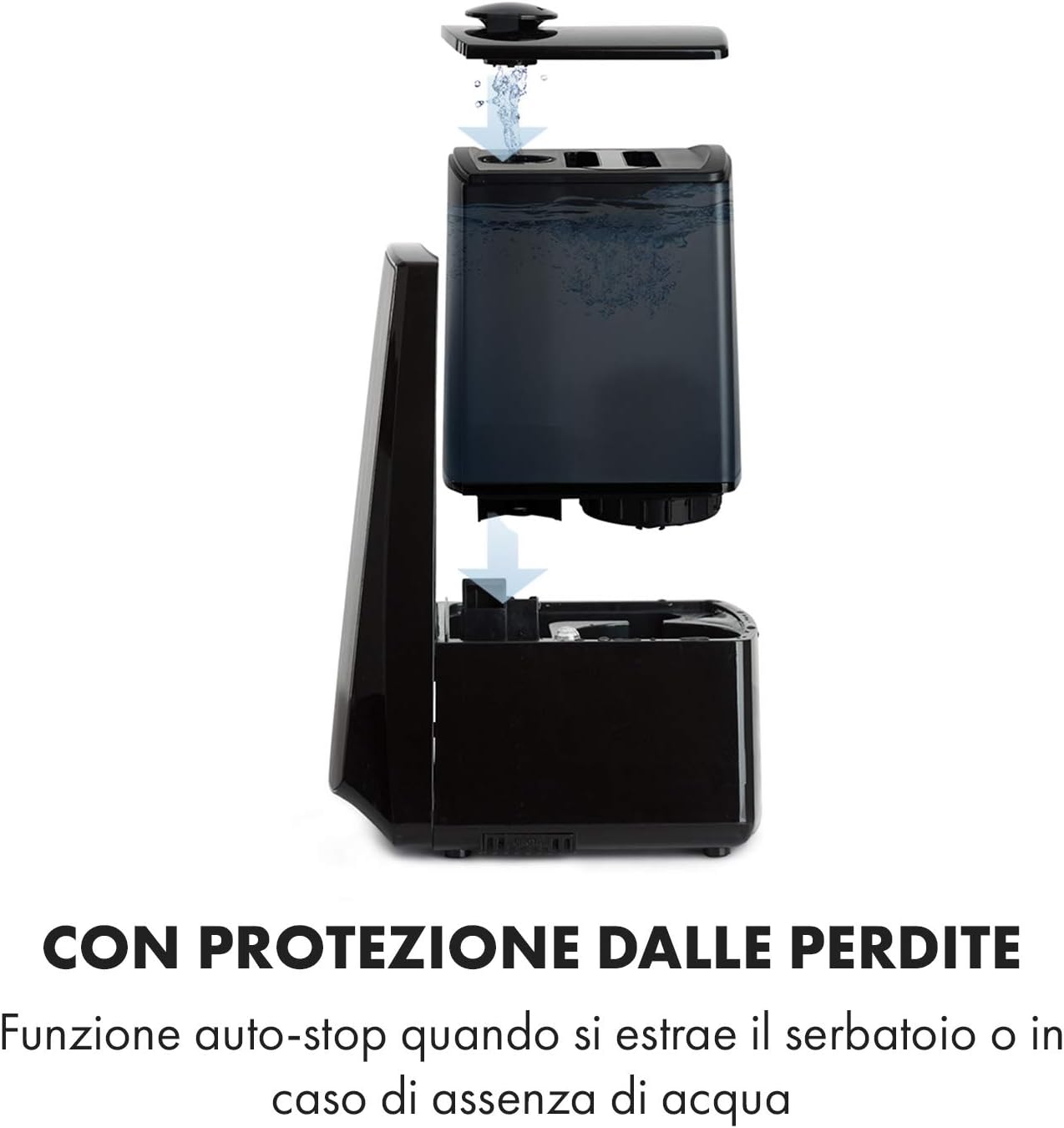
Image: Diagram illustrating the removal and refilling process of the water tank, highlighting the auto-stop feature when the tank is removed or empty.
5.4 ການເຊື່ອມຕໍ່ພະລັງງານ
ສຽບສາຍໄຟເຂົ້າໄປໃນເຕົ້າສຽບໄຟຟ້າທີ່ເຫມາະສົມ (230V).
6. ຄໍາແນະນໍາການດໍາເນີນງານ
6.1 ກະດານຄວບຄຸມຫຼາຍກວ່າview

ຮູບພາບ: A close-up view of the humidifier's LED display and touch controls, showing a hand interacting with the buttons.
The LED display shows current humidity, temperature, and selected settings. The touch buttons allow control over various functions.
6.2 ເປີດ/ປິດ
ກົດ ເປີດ/ປິດ ປຸ່ມເທິງແຜງຄວບຄຸມຫຼືການຄວບຄຸມໄລຍະໄກເພື່ອເປີດຫຼືປິດຫນ່ວຍບໍລິການ.
6.3 ການປັບລະດັບໝອກ
The humidifier offers 7 levels of mist output. Press the ໝອກ button repeatedly to cycle through the mist intensity levels. The current level will be displayed on the screen.
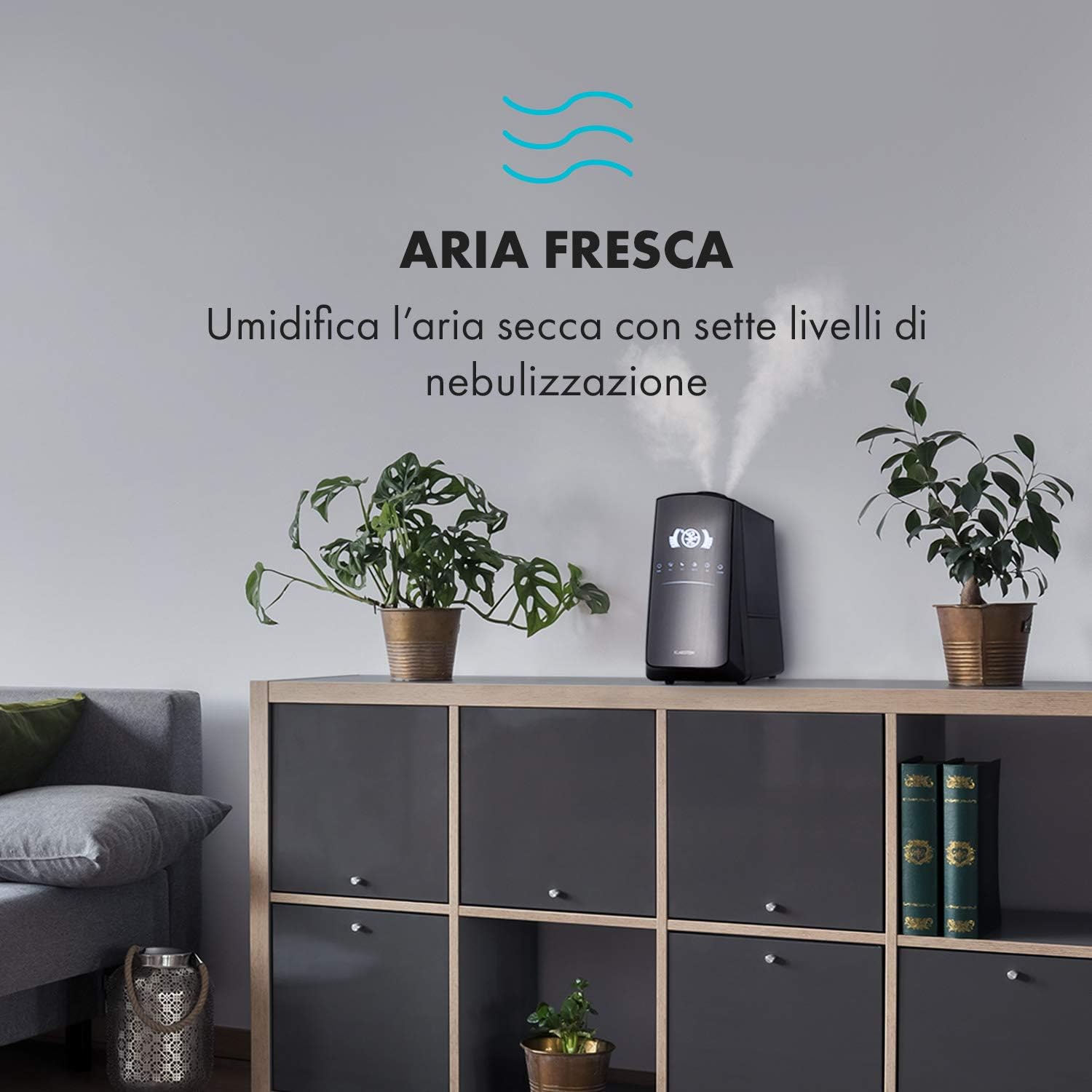
Image: The humidifier operating in a room, releasing mist to humidify the air.
6.4 Humidity Setting (Humidistat)
ກົດ ຄວາມຊຸ່ມຊື່ນ button to set your desired humidity level (e.g., 40% to 80% RH). The unit will automatically maintain this level, turning on and off as needed.
6.5 Warm/Cool Mist
ກົດ ຄວາມຮ້ອນ button to activate the warm mist function. Press again to switch back to cool mist. Warm mist can help raise room temperature slightly and is often preferred in colder climates.

Image: A close-up shot of the mist output, illustrating the option for either cool or warm mist.
6.6 ຟັງຊັນຈັບເວລາ
ກົດ ເວລາ button to set an operating duration from 1 to 12 hours. The unit will automatically turn off after the set time.
6.7 ຟັງຊັນ Ionizer
ກົດ ION button to activate the ionizer. This function releases negative ions to help purify the air by attracting dust and other particles.
6.8 ກິ່ນຫອມ
Pull out the aroma diffuser tray located at the bottom of the unit. Add a few drops of essential oil onto the sponge pad. Slide the tray back in. The mist will carry the aroma into the air.

Image: The integrated aroma diffuser tray, shown pulled out with an essential oil bottle and lemon slices nearby, indicating its use for adding scents.
6.9 ໂໝດກາງຄືນ
ກົດ ກາງຄືນ button to dim the LED display and reduce operational noise for undisturbed sleep.

Image: The humidifier in a modern living space, illustrating its versatile functions like auto mode, heating, health, baby, night mode, and timer.
7. ການຄວບຄຸມແອັບ
The KLARSTEIN VapoAir Opal Smart Humidifier can be controlled via a dedicated smartphone application.

Image: A person using a smartphone with the Klarstein app open, showing controls for the humidifier's settings and current humidity levels.
7.1 ການດາວໂຫຼດແອັບ
ຊອກຫາ the 'Klarstein App Experience' in your smartphone's app store (available for Android and iOS).
7.2 ການເຊື່ອມຕໍ່ Wi-Fi
- Ensure your humidifier is plugged in and turned on.
- Open the Klarstein App and follow the on-screen instructions to add a new device.
- The humidifier requires a ເຄືອຂ່າຍ Wi-Fi 2.4 GHz for connection. It is not compatible with 5 GHz networks. Ensure your router is configured to support 2.4 GHz or that your phone is connected to the 2.4 GHz band during setup.
- Once connected, you can control all humidifier functions remotely via the app.

Image: A smartphone displaying the Klarstein app interface, indicating smart home control via WiFi for Android and iOS devices.
8. ການບໍາລຸງຮັກສາແລະການທໍາຄວາມສະອາດ
ການທໍາຄວາມສະອາດເປັນປົກກະຕິເປັນສິ່ງຈໍາເປັນສໍາລັບການປະຕິບັດທີ່ດີທີ່ສຸດແລະການອະນາໄມ.
8.1 ການບໍາລຸງຮັກສາປະຈໍາວັນ
- ຫວ່າງເປົ່າແລະລ້າງຖັງນ້ໍາປະຈໍາວັນ.
- ເຊັດດ້ານໃນຂອງຖັງນໍ້າດ້ວຍຜ້າສະອາດ.
8.2 ການທໍາຄວາມສະອາດປະຈໍາອາທິດ
- ຖອດປລັກເຄື່ອງ ກ່ອນທີ່ຈະທໍາຄວາມສະອາດ.
- ເອົາຖັງນ້ໍາອອກແລະລ້າງນ້ໍາທີ່ຍັງເຫຼືອຈາກທັງຖັງແລະຫນ່ວຍພື້ນຖານ.
- ທໍາຄວາມສະອາດຖັງນໍ້າ: Fill the tank with a mixture of water and white vinegar (1:1 ratio). Let it sit for 30 minutes, then rinse thoroughly.
- ທໍາຄວາມສະອາດຫນ່ວຍບໍລິການພື້ນຖານ: Gently wipe the ultrasonic transducer (the small disc in the center of the base) with a soft brush or cloth to remove mineral deposits. Do not scrape or use abrasive cleaners. You can use a cotton swab dipped in vinegar for hard-to-reach areas.
- Aroma Diffuser Tray: Remove and clean the sponge pad with mild soap and water. Allow it to dry completely before reinserting.
- Wipe all external surfaces with a soft, damp ຜ້າ.
8.3 ການເກັບຮັກສາ
ຖ້າບໍ່ໄດ້ໃຊ້ເຄື່ອງເພີ່ມຄວາມຊຸ່ມເປັນເວລາດົນ, ໃຫ້ເຮັດຄວາມສະອາດຢ່າງລະອຽດ, ຮັບປະກັນວ່າທຸກຊິ້ນສ່ວນແຫ້ງ, ແລະເກັບຮັກສາໄວ້ໃນກ່ອງບັນຈຸເດີມໃນບ່ອນທີ່ເຢັນແລະແຫ້ງ.
9. ການແກ້ໄຂບັນຫາ
| ບັນຫາ | ສາເຫດທີ່ເປັນໄປໄດ້ | ການແກ້ໄຂ |
|---|---|---|
| ບໍ່ມີການອອກໝອກຫຼືໝອກຕ່ຳ |
|
|
| ຫນ່ວຍບໍລິການບໍ່ເປີດ |
|
|
| ກິ່ນເໝັນ |
|
|
| ຂີ້ຝຸ່ນສີຂາວຮອບຫນ່ວຍ | Hard water with high mineral content | Use distilled or demineralized water. Clean the unit regularly. |
| ບັນຫາການເຊື່ອມຕໍ່ Wi-Fi |
|
|
10. ຂໍ້ມູນຈໍາເພາະ
| ຄຸນສົມບັດ | ຂໍ້ມູນຈໍາເພາະ |
|---|---|
| ຍີ່ຫໍ້ | KLARSTEIN |
| ໝາຍເລກຕົວແບບ | XJ3-VapoAirOpalSmart |
| ສີ | ດຳ |
| ຂະໜາດ (L x W x H) | 23 x 18 x 37 cm |
| ນ້ຳໜັກ | 2.5 ກິໂລ |
| ພະລັງງານ | 110 ວັດ |
| ສະບັບtage | 230 ໂວນ |
| ຄວາມອາດສາມາດຂອງຖັງນໍ້າ | 5 ລິດ |
| ເວລາປະຕິບັດງານ | Up to 2 hours (continuous, depending on mist level) |
| ຄຸນນະສົມບັດພິເສດ | Remote Control, Timer, App Control, Ionizer, LED Display, 7 Mist Levels, Warm/Cool Mist, Aroma Diffuser |
| ປະເພດຫ້ອງ | ຫ້ອງຮັບແຂກ |
11. ການຮັບປະກັນແລະການສະຫນັບສະຫນູນ
KLARSTEIN products are covered by a manufacturer's warranty. For detailed warranty information, please refer to the warranty card included with your product or visit the official KLARSTEIN website. For technical support, spare parts, or service inquiries, please contact KLARSTEIN customer service through their official channels.
ກະລຸນາຮັກສາຫຼັກຖານການຊື້ຂອງທ່ານສໍາລັບການຮຽກຮ້ອງການຮັບປະກັນ.


