ແນະນຳ
Thank you for choosing the AUNA Microstar Sing Vertical Karaoke Micro System. This manual provides essential information for the safe and efficient operation of your device. Please read it thoroughly before use and retain it for future reference.
ຄໍາແນະນໍາຄວາມປອດໄພ
- ອ່ານຄໍາແນະນໍາທັງຫມົດຢ່າງລະອຽດກ່ອນທີ່ຈະດໍາເນີນການຫນ່ວຍງານ.
- ເກັບຮັກສາອຸປະກອນໃຫ້ຫ່າງຈາກນໍ້າ, ຄວາມຊຸ່ມ ແລະ ແສງແດດໂດຍກົງ.
- ຫ້າມປິດຊ່ອງລະບາຍອາກາດ. ຮັບປະກັນພື້ນທີ່ພຽງພໍຮອບຫນ່ວຍສໍາລັບການໄຫຼຂອງອາກາດທີ່ເຫມາະສົມ.
- ໃຊ້ພຽງແຕ່ອະແດບເຕີໄຟທີ່ໃຫ້ມາກັບເຄື່ອງ.
- ຢ່າພະຍາຍາມສ້ອມແປງຫຼືດັດແປງເຄື່ອງດ້ວຍຕົນເອງ. ອ້າງອີງການບໍລິການທັງໝົດໃຫ້ກັບບຸກຄະລາກອນທີ່ມີຄຸນວຸດທິ.
- Clean the unit only with a dry, soft cloth. Do not use liquid cleaners or aerosols.
- ເກັບຮັກສາຊິ້ນສ່ວນຂະໜາດນ້ອຍ ແລະ ວັດສະດຸຫຸ້ມຫໍ່ໃຫ້ໄກຈາກເດັກນ້ອຍ.
ເນື້ອໃນຊຸດ
ກະລຸນາກວດເບິ່ງຊຸດສຳລັບລາຍການຕໍ່ໄປນີ້:
- AUNA Microstar Sing Main Unit
- Stereo Speakers (2 units)
- ໄມໂຄຣໂຟນທີ່ມີສາຍ
- Power Adapter
- ຄູ່ມືຜູ້ໃຊ້ (ເອກະສານນີ້)
ສິນຄ້າເກີນview
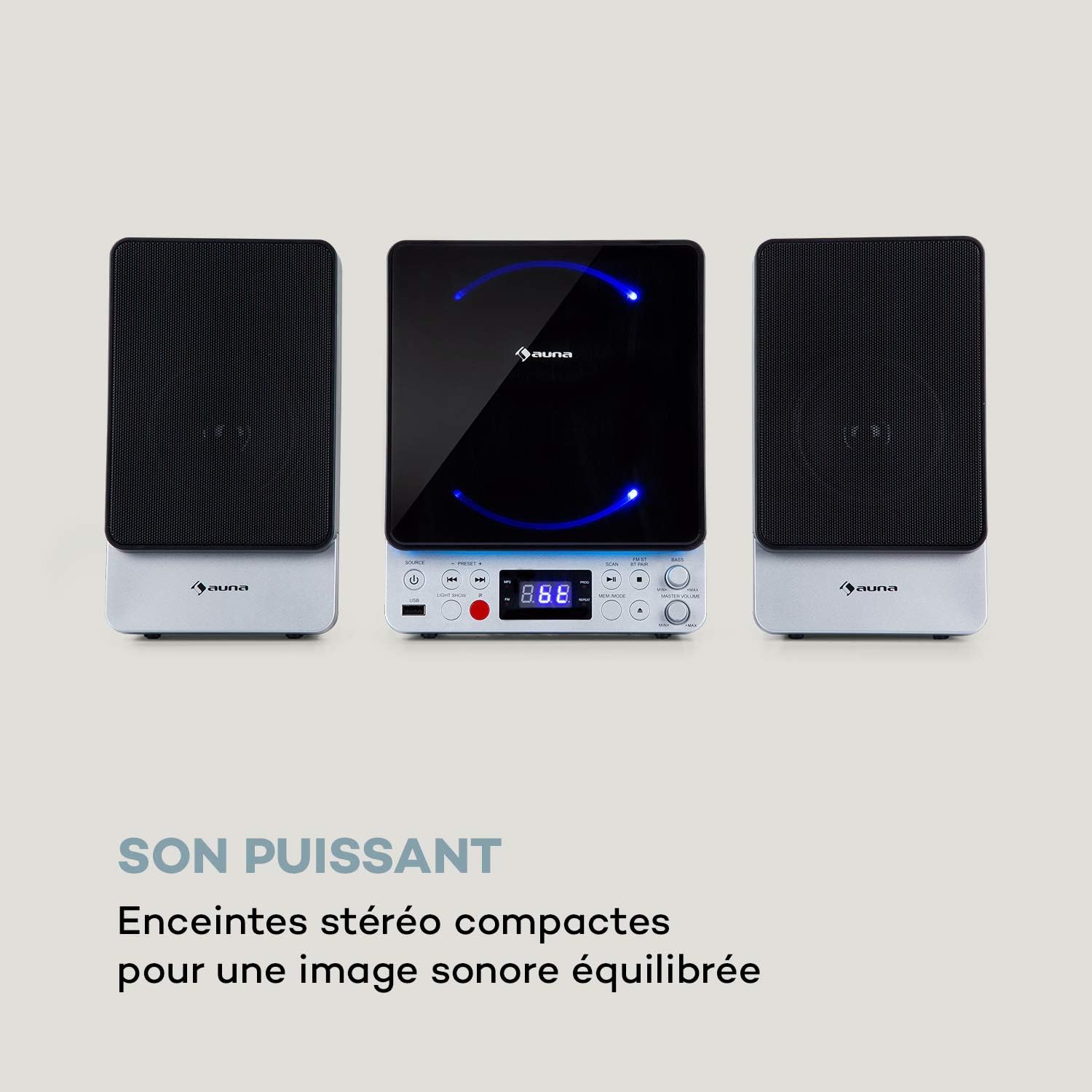
The AUNA Microstar Sing is a versatile micro system designed for karaoke and audio playback. It features a compact design, multiple input options, and integrated LED lighting.


ຄຸນນະສົມບັດທີ່ສໍາຄັນ:
- Space-saving vertical design
- CD player compatible with standard audio CDs, CD-R, CD-RW, MP3 CDs, and CD-G (Karaoke CDs with graphics)
- Video output (composite PAL) for displaying CD-G lyrics on an external screen
- Bluetooth interface for wireless audio streaming
- USB port for MP3 playback from USB storage devices
- FM radio tuner with 30 preset stations
- Two microphone inputs for duets
- Integrated LED lighting for ambiance
- AUX-In for connecting external audio sources
ຕັ້ງຄ່າ
1. ການຫຸ້ມຫໍ່ ແລະການຈັດວາງ:
Carefully remove all components from the packaging. Place the main unit and speakers on a stable, flat surface. Ensure there is adequate ventilation around the unit.
2. Connecting the Speakers:
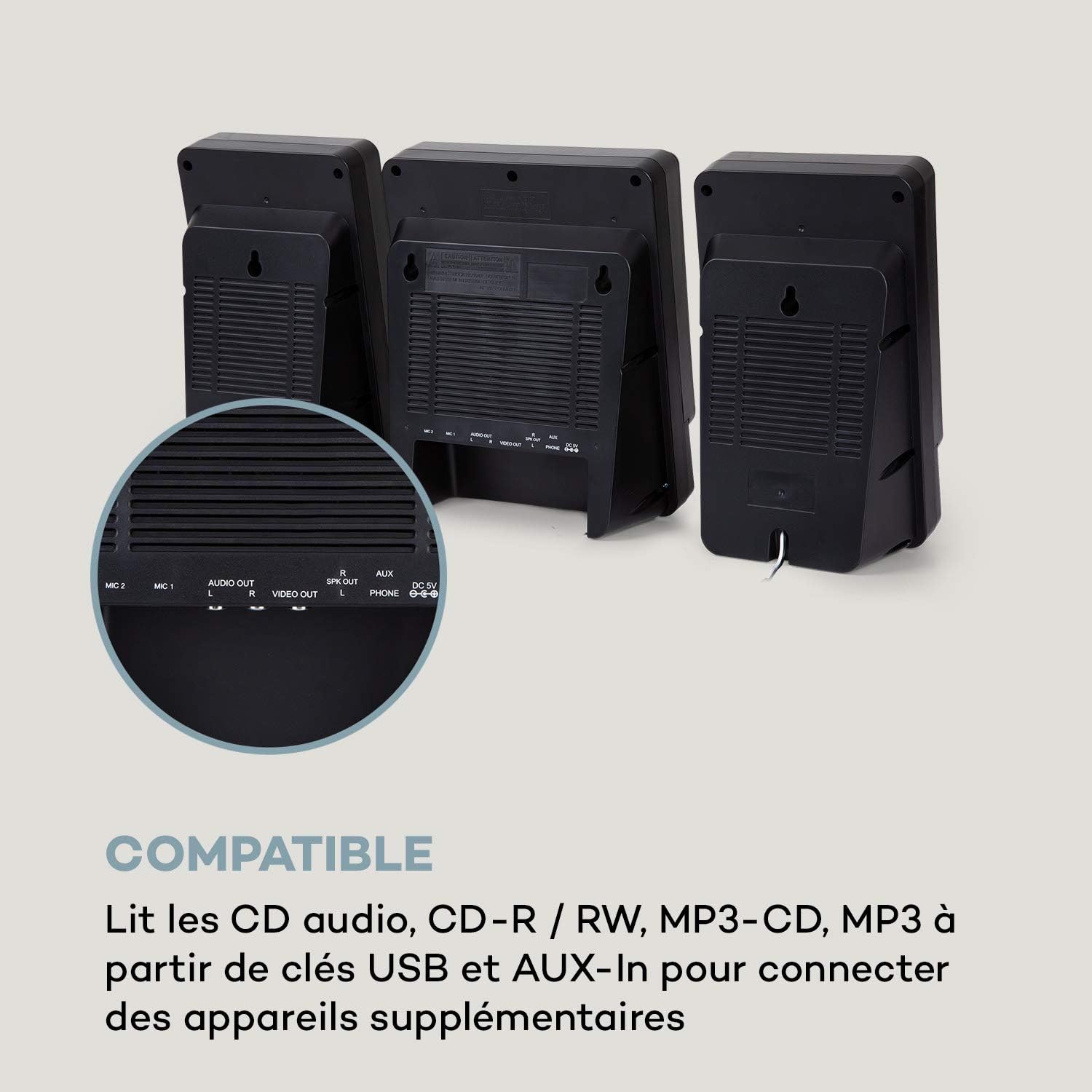
Connect the two stereo speakers to the speaker output ports on the main unit. Ensure a secure connection for optimal sound quality.
3. ການເຊື່ອມຕໍ່ພະລັງງານ:
Connect the supplied power adapter to the DC 5V input on the main unit, then plug the adapter into a wall outlet.
4. Microphone Connection:
Plug the wired microphone into one of the MIC input jacks (MIC 1 or MIC 2) on the main unit.
5. Video Output (for CD-G):
If using CD-G discs, connect a composite video cable (not included) from the VIDEO OUT port on the main unit to the video input of your TV or monitor.
ຄໍາແນະນໍາການດໍາເນີນງານ
1. ເປີດ/ປິດ:
ກົດ ພະລັງງານ ປຸ່ມເພື່ອເປີດຫຼືປິດເຄື່ອງ.
2. ການເລືອກແຫຼ່ງ:
ກົດ ແຫຼ່ງຂໍ້ມູນ button repeatedly to cycle through available modes: CD, Bluetooth (BT), USB, FM, AUX.
3. ການຫຼິ້ນ CD:
- ເລືອກຮູບແບບ CD ການນໍາໃຊ້ ແຫຼ່ງຂໍ້ມູນ ປຸ່ມ.
- ເປີດຫ້ອງປະກອບ CD.
- Place a CD (audio CD, CD-R, CD-RW, MP3 CD, or CD-G) onto the spindle with the label side facing up.
- Close the CD compartment. The disc will begin playing automatically or after pressing ຫຼິ້ນ/ຢຸດຊົ່ວຄາວ.
- ໃຊ້ ກ່ອນໜ້ານີ້ ແລະ ຕໍ່ໄປ ປຸ່ມເພື່ອຂ້າມເພງ.

4. ການຈັບຄູ່ Bluetooth:
- Select BT mode using the ແຫຼ່ງຂໍ້ມູນ button. The display will show "BT" and flash, indicating pairing mode.
- ເປີດໃຊ້ Bluetooth ໃນອຸປະກອນມືຖືຂອງທ່ານ (ໂທລະສັບສະຫຼາດ, ແທັບເລັດ, ແລະອື່ນໆ).
- ຊອກຫາ "AUNA Microstar Sing" in your device's Bluetooth settings and select it to pair.
- Once paired, you can stream audio wirelessly from your device to the Microstar Sing.

5. ການຫຼິ້ນ USB:
- ໃສ່ USB flash drive ທີ່ບັນຈຸສຽງ MP3 files ເຂົ້າໄປໃນພອດ USB.
- ເລືອກໂຫມດ USB ໂດຍໃຊ້ ແຫຼ່ງຂໍ້ມູນ ປຸ່ມ.
- ຫນ່ວຍບໍລິການຈະກວດພົບແລະເລີ່ມຫຼິ້ນ MP3 ໂດຍອັດຕະໂນມັດ files.
- ໃຊ້ ກ່ອນໜ້ານີ້ ແລະ ຕໍ່ໄປ ປຸ່ມເພື່ອນຳທາງ.
6. ວິທະຍຸ FM:
- ເລືອກຮູບແບບ FM ການນໍາໃຊ້ ແຫຼ່ງຂໍ້ມູນ ປຸ່ມ.
- ກົດ ສະແກນ ປຸ່ມເພື່ອສະແກນອັດຕະໂນມັດ ແລະບັນທຶກສະຖານີ FM ທີ່ມີຢູ່.
- ໃຊ້ ຕັ້ງໄວ້ + ແລະ ຕັ້ງໄວ້ລ່ວງໜ້າ - ປຸ່ມເພື່ອໝຸນວຽນຜ່ານສະຖານີທີ່ບັນທຶກໄວ້.
7. Karaoke Function:
With a CD-G disc playing and connected to a TV, or any audio source playing, adjust the microphone volume using the dedicated ລະດັບສຽງ MIC knob. Sing along with the music. The LED lighting will enhance the karaoke experience.
8. ການຄວບຄຸມປະລິມານ:
ປັບລະດັບສຽງໂດຍລວມໂດຍໃຊ້ ໝວດ MASTER VOLUME ລູກບິດ. ໄດ້ ເບສ knob allows for bass level adjustment.
9. LED Light Show:
ກົດ ແສງໄຟ button to activate or deactivate the integrated LED lighting effects.
ບໍາລຸງຮັກສາ
ທໍາຄວາມສະອາດ:
Wipe the unit with a soft, dry cloth. Do not use abrasive cleaners, waxes, or solvents as they may damage the finish. Ensure the unit is unplugged before cleaning.
ການເກັບຮັກສາ:
If not in use for an extended period, unplug the unit and store it in a cool, dry place, away from direct sunlight and extreme temperatures.
ການແກ້ໄຂບັນຫາ
| ບັນຫາ | ສາເຫດທີ່ເປັນໄປໄດ້ | ການແກ້ໄຂ |
|---|---|---|
| ບໍ່ມີພະລັງງານ | ອະແດບເຕີໄຟບໍ່ໄດ້ເຊື່ອມຕໍ່ ຫຼືປລັກສຽບເກີດຄວາມຜິດພາດ. | ໃຫ້ແນ່ໃຈວ່າອະແດບເຕີໄຟຟ້າໄດ້ເຊື່ອມຕໍ່ກັບເຄື່ອງຢ່າງແໜ້ນໜາ ແລະ ປລັກໄຟທີ່ໃຊ້ໄດ້. |
| ບໍ່ມີສຽງ | Volume too low; incorrect source selected; speakers not connected. | Increase master volume. Select the correct input source. Check speaker connections. |
| CD ບໍ່ໄດ້ຫຼິ້ນ | CD inserted incorrectly; disc scratched/dirty; incorrect mode. | Ensure CD is inserted correctly. Clean or replace the disc. Select CD mode. |
| Bluetooth ບໍ່ເຊື່ອມຕໍ່ | ໜ່ວຍບໍ່ໄດ້ຢູ່ໃນໂໝດຈັບຄູ່; ອຸປະກອນຢູ່ໄກເກີນໄປ; Bluetooth ປິດຢູ່ໃນອຸປະກອນຕົ້ນທາງ. | Ensure unit is in BT mode and flashing. Move device closer. Enable Bluetooth on your device. |
| ໄມໂຄຣໂຟນບໍ່ເຮັດວຽກ | Microphone not connected; MIC volume too low. | Ensure microphone is securely plugged in. Increase MIC volume. |
| ການຮັບວິທະຍຸ FM ບໍ່ດີ | ສັນຍານອ່ອນ; ເສົາອາກາດບໍ່ໄດ້ຖືກວາງຢ່າງຖືກຕ້ອງ. | Adjust the position of the unit or external antenna (if applicable) for better reception. |
ຂໍ້ມູນຈໍາເພາະ
| ຄຸນສົມບັດ | ຂໍ້ມູນຈໍາເພາະ |
|---|---|
| ຍີ່ຫໍ້ | AUNA |
| ໝາຍເລກຕົວແບບ | MG3-9200-hghg |
| ສີ | ເງິນ |
| ເຕັກໂນໂລຊີການເຊື່ອມຕໍ່ | Bluetooth, USB |
| ການເຊື່ອມຕໍ່ | USB, AUX-In, Microphone (2), Video Out (Composite) |
| ພອດ USB ທັງໝົດ | 1 |
| ປະເພດສື່ | CD-RW, USB, MP3 CD, CD-G |
| ຈໍານວນລໍາໂພງ | 2 (ສະເຕຣິໂອ) |
| ສ່ວນປະກອບລວມ | ໄມໂຄຣໂຟນ |
| ການນໍາໃຊ້ທີ່ແນະນໍາ | ບ້ານ |
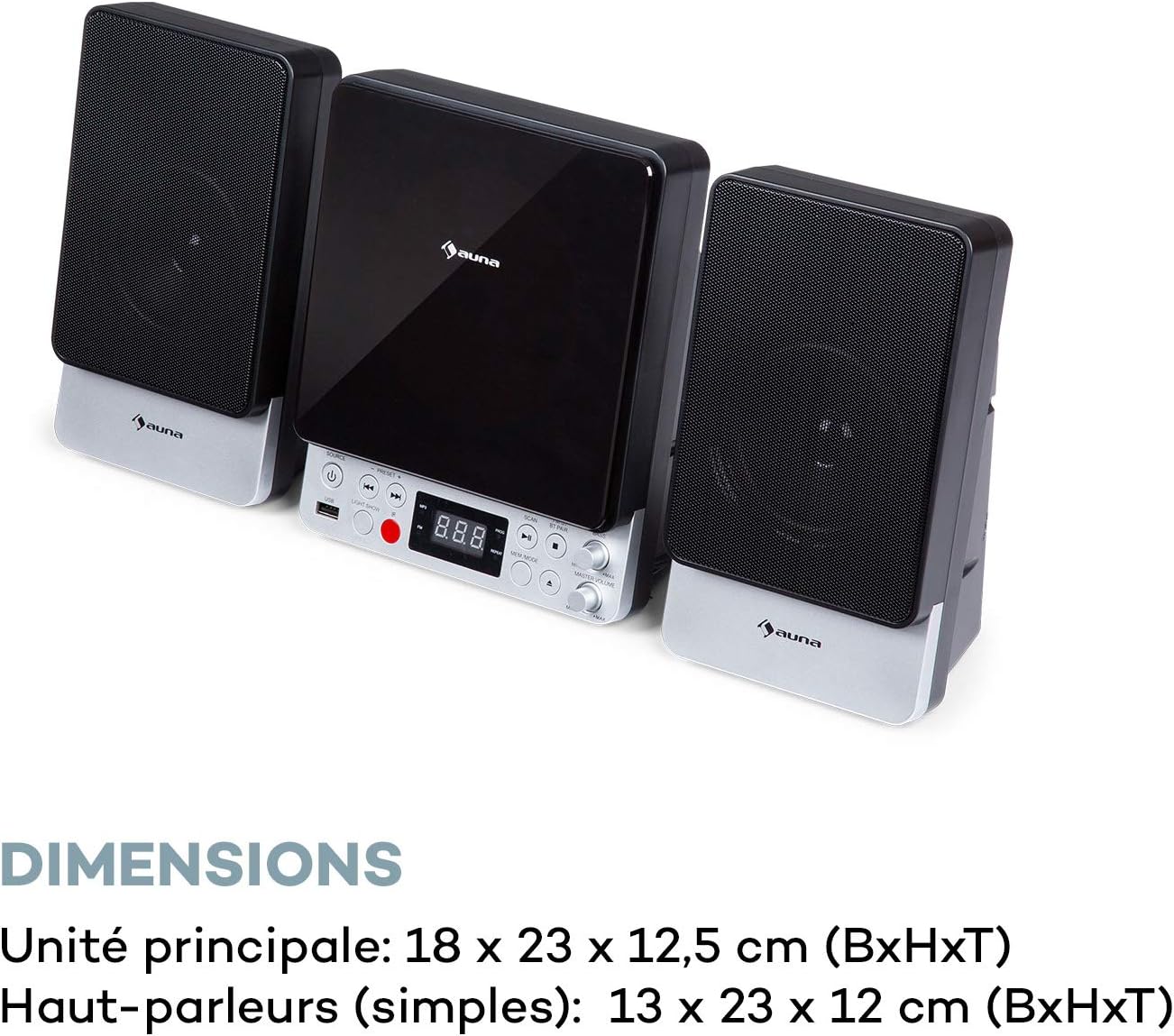
| Main Unit Dimensions (WxHxD) | 18 x 23 x 12.5 cm |
| Speaker Dimensions (WxHxD, each) | 13 x 23 x 12 cm |
ການຮັບປະກັນແລະການສະຫນັບສະຫນູນ
For warranty information and technical support, please refer to the warranty card included with your product or contact AUNA customer service directly. Keep your proof of purchase for any warranty claims.
For further assistance, please visit the official AUNA webເວັບໄຊ ຫຼືຕິດຕໍ່ຊ່ອງທາງການຊ່ວຍເຫຼືອຂອງເຂົາເຈົ້າ.


