1. ບົດແນະນຳ
This manual provides comprehensive instructions for the One For All URC4912 Sony TV Replacement Remote Control. Designed to function identically to your original Sony TV remote, the URC4912 offers immediate compatibility with all Sony TV models (LCD, LED, Plasma) without requiring any setup. It also includes a learning feature for personalized customization of functions.
2. ຕັ້ງຄ່າ
2.1 ການຕິດຕັ້ງ ໝໍ້ ໄຟ
ຣີໂໝດຄວບຄຸມ URC4912 ຕ້ອງໃຊ້ແບັດເຕີຣີ AA ສອງກ້ອນ (ບໍ່ລວມ). ໃຫ້ປະຕິບັດຕາມຂັ້ນຕອນເຫຼົ່ານີ້ເພື່ອຕິດຕັ້ງພວກມັນ:
- ຊອກຫາຝາປິດຊ່ອງໃສ່ຫມໍ້ໄຟຢູ່ດ້ານຫຼັງຂອງຣີໂໝດຄວບຄຸມ.
- ເລື່ອນຝາປິດລົງລຸ່ມ ຫຼືກົດປຸ່ມເພື່ອເປີດມັນ.
- ໃສ່ແບັດເຕີຣີ AA ສອງກ້ອນ, ຮັບປະກັນວ່າຂົ້ວບວກ (+) ແລະຂົ້ວລົບ (-) ສອດຄ່ອງກັບເຄື່ອງໝາຍພາຍໃນຊ່ອງຢ່າງຖືກຕ້ອງ.
- ປ່ຽນຝາປິດຊ່ອງໃສ່ແບັດເຕີລີໂດຍການເລື່ອນມັນກັບຄືນໃສ່ບ່ອນເກົ່າຈົນກວ່າມັນຈະກົດຢ່າງປອດໄພ.
Note: Always use new batteries and dispose of old batteries responsibly.
2.2 Initial Setup (No Configuration Required)
The One For All URC4912 remote control is pre-programmed for all Sony televisions. No setup or programming is required. Simply insert the batteries, and the remote is ready for immediate use with your Sony TV.
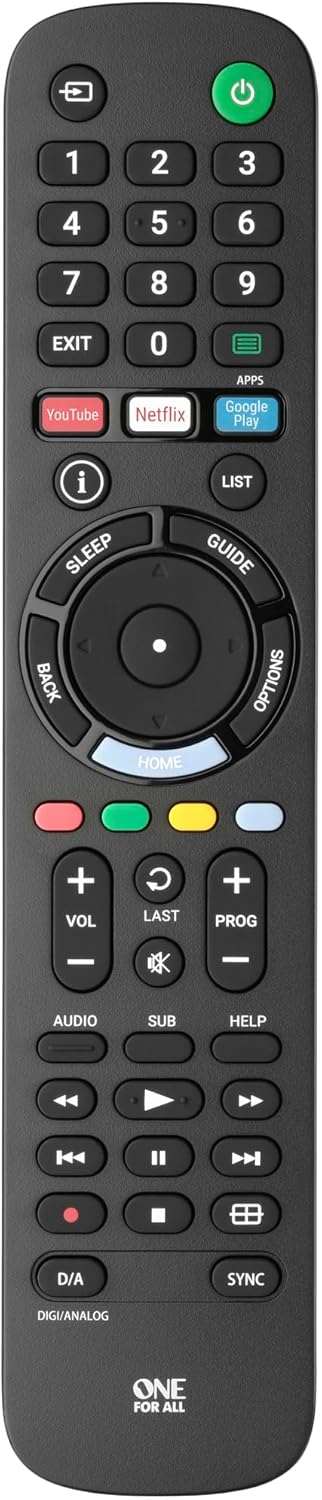
ຮູບພາບ 1: ດ້ານຫນ້າ view of the One For All URC4912 remote control. This image displays the remote's layout, including number buttons, navigation pad, volume and channel controls, and dedicated app buttons for services like YouTube and Netflix.
3. ການດໍາເນີນງານການຄວບຄຸມໄລຍະໄກ
3.1 ຫນ້າທີ່ພື້ນຖານ
The URC4912 remote provides all standard functions found on an original Sony TV remote:
- ປຸ່ມເປີດປິດ: ເປີດ ຫຼືປິດໂທລະພາບ.
- ປຸ່ມຕົວເລກ (0-9): ສໍາລັບການເລືອກຊ່ອງທາງໂດຍກົງ.
- ລະດັບສຽງຂຶ້ນ/ລົງ (+/-): ປັບລະດັບສຽງໂທລະພາບ.
- Channel Up/Down (PROG +/-): ປ່ຽນຊ່ອງໂທລະພາບ.
- ປິດສຽງ: ປິດສຽງໂທລະພາບ.
- ແຖບນໍາທາງ (ຂຶ້ນ, ລົງ, ຊ້າຍ, ຂວາ, ຕົກລົງ): ສໍາລັບການນໍາທາງເມນູແລະການເລືອກ.
- ປຸ່ມກັບຄືນ: ກັບຄືນໄປຫາໜ້າຈໍ ຫຼືເມນູກ່ອນໜ້າ.
- ປຸ່ມຫນ້າທໍາອິດ: Accesses the TV's main home screen or smart TV interface.
3.2 Specific Sony Functions
This remote supports common Sony-specific functions, including:
- ໂຮງລະຄອນ: Activates or deactivates Theatre mode.
- i-Manual: Accesses the TV's electronic instruction manual.
- ຕົວເລືອກ: Displays context-sensitive options for the current screen.
3.3 Learning Feature
The URC4912 remote includes a learning feature, allowing you to copy functions directly from your original remote control. This is useful for any specific functions not pre-programmed or for personalizing button assignments.
- Place the URC4912 remote and your original remote on a flat surface, facing each other, with their IR emitters approximately 1-2 inches apart.
- On the URC4912, press and hold the ຕັ້ງຄ່າ button (if available, or refer to the full manual for specific button combination to enter learning mode) until the LED indicator blinks twice and then stays lit.
- Press the button on the URC4912 that you wish to program. The LED will blink rapidly.
- On your original remote, press and hold the corresponding function button until the URC4912's LED blinks twice to confirm successful learning.
- ເຮັດຊ້ໍາຂັ້ນຕອນ 3 ແລະ 4 ສໍາລັບປຸ່ມອື່ນໆທີ່ທ່ານຕ້ອງການທີ່ຈະດໍາເນີນໂຄງການ.
- ເພື່ອອອກຈາກໂໝດການຮຽນຮູ້, ກົດປຸ່ມ ຕັ້ງຄ່າ ປຸ່ມອີກເທື່ອຫນຶ່ງ. LED ຈະປິດ.
Note: If the LED shows a long blink, the learning was unsuccessful. Try again, ensuring both remotes are stable and the original remote's batteries are fresh.

ຮູບພາບ 2: ມຸມ view of the One For All URC4912 remote control, highlighting its ergonomic design and button placement for easy access to various functions.
4. ບໍາລຸງຮັກສາ
ເພື່ອຮັບປະກັນອາຍຸການໃຊ້ງານທີ່ຍາວນານ ແລະ ປະສິດທິພາບທີ່ດີທີ່ສຸດຂອງຣີໂໝດຄວບຄຸມຂອງທ່ານ:
- ທໍາຄວາມສະອາດ: Wipe the remote with a soft, dry cloth. Do not use abrasive cleaners or liquids.
- ການປ່ຽນແບັດເຕີຣີ: Replace batteries when the remote's response becomes sluggish or the LED indicator (if present) signals low power. Always replace both batteries simultaneously.
- ການເກັບຮັກສາ: ເກັບຮັກສາຫ່າງໄກສອກຫຼີກໄວ້ໃນບ່ອນທີ່ແຫ້ງ, ຫ່າງຈາກແສງແດດໂດຍກົງແລະອຸນຫະພູມທີ່ຮຸນແຮງ.
5. ການແກ້ໄຂບັນຫາ
| ບັນຫາ | ການແກ້ໄຂ |
|---|---|
| ໄລຍະໄກບໍ່ຕອບສະຫນອງ. |
|
| ບາງປຸ່ມບໍ່ເຮັດວຽກ. |
|
| Learning feature fails. |
|
6. ຂໍ້ມູນຈໍາເພາະ
| ຍີ່ຫໍ້ | ຫນຶ່ງສໍາລັບທຸກຄົນ |
| ຕົວແບບ | ອຄ. ອງ |
| ອຸປະກອນທີ່ເຂົ້າກັນໄດ້ | Television (All Sony TV types: LCD, LED, Plasma) |
| ຄຸນນະສົມບັດພິເສດ | Infrared, Learning Function |
| ຈໍານວນລາຍການ | 1 |
| ປະເພດຫມໍ້ໄຟ | 2 x AA ຫມໍ້ໄຟ (ບໍ່ລວມ) |
| ຂະໜາດສິນຄ້າ | 19.5 x 4.4 x 2.5 cm |
| ນ້ໍາຫນັກລາຍການ | 100 g |
7. ຂໍ້ມູນການຮັບປະກັນ
For detailed warranty information regarding your One For All URC4912 remote control, please refer to the official One For All webເວັບໄຊທ໌ ຫຼື ບັດຮັບປະກັນທີ່ມາພ້ອມກັບການຊື້ຂອງທ່ານ. ຂໍ້ກຳນົດ ແລະ ເງື່ອນໄຂການຮັບປະກັນອາດແຕກຕ່າງກັນໄປຕາມພາກພື້ນ.
8. ສະຫນັບສະຫນູນ
Should you require further assistance, technical support, or have questions not covered in this manual, please visit the official One For All support website or contact their customer service. You can often find FAQs, additional guides, and contact information on their brand page:


