1. ບົດແນະນຳ
Thank you for choosing the Inateck 360° Protective Laptop Bag Case. This product is designed to provide comprehensive protection and convenient portability for your laptop and accessories. Crafted with durable, water-resistant materials and featuring intelligent design elements, this case ensures your device remains safe from daily wear and tear, accidental bumps, and splashes.
2. ຄຸນລັກສະນະຂອງຜະລິດຕະພັນ
- 360° Enhanced Protection: The interior features a thick protective strip to prevent zipper scratches. Elastic shockproof cotton on the bottom and sides, combined with a soft flannel lining, offers all-round protection against scratches, dust, and shocks.
- Elastic Handle: A retractable PU handle allows the case to function as both a briefcase and a laptop sleeve. The handle can be hidden for easy placement into a backpack or extended for convenient carrying.
- Waterproof Exterior: The outer layer is constructed from splashproof 600D polyester fabric, safeguarding your device from accidental liquid spills.
- ພື້ນທີ່ເກັບຂໍ້ມູນເພີ່ມເຕີມ: A large front zipper pocket provides convenient space for power adapters, cables, a mouse, and other essential accessories.
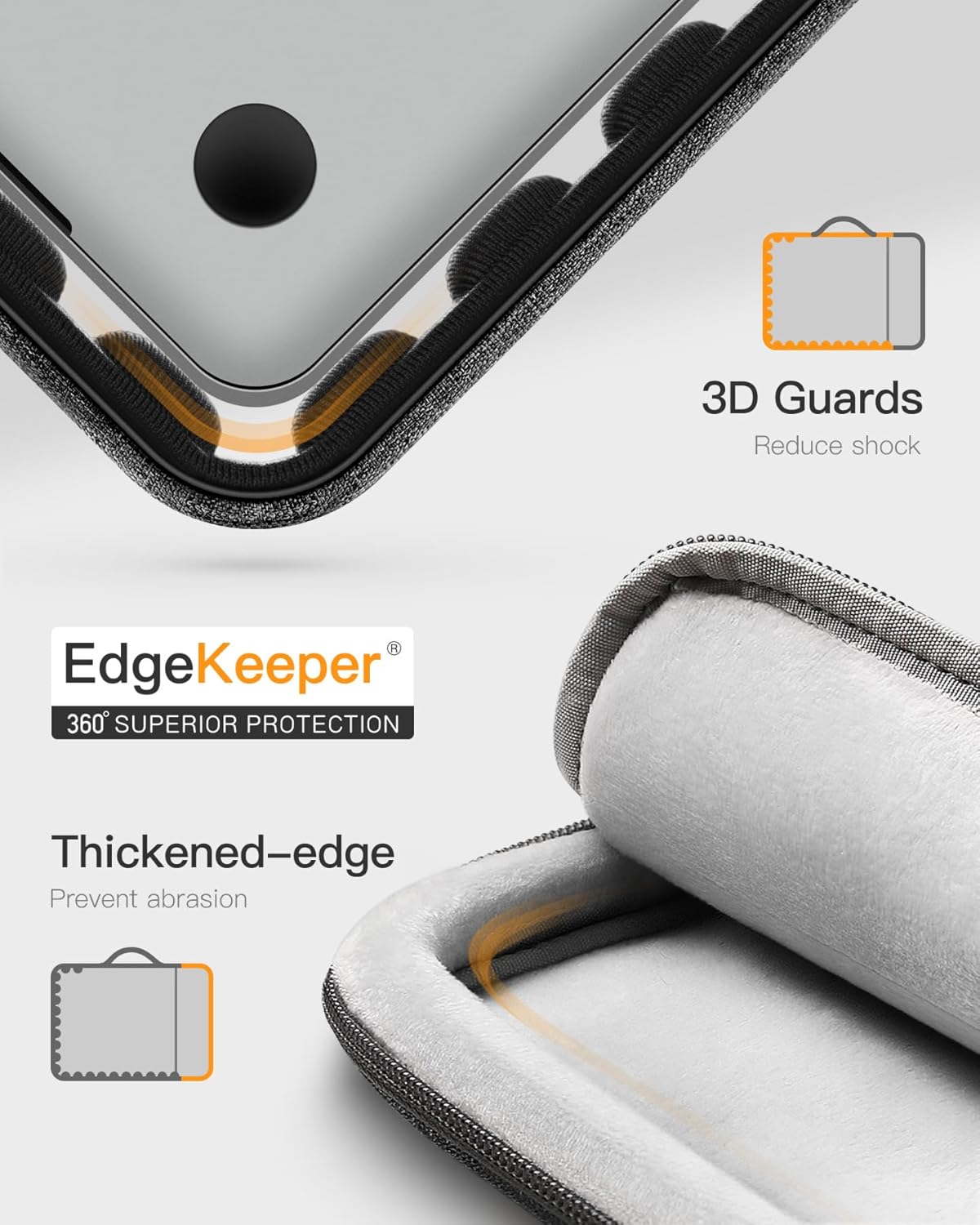
ຮູບພາບ: ໃກ້ຊິດ view illustrating the 360° EdgeKeeper superior protection with thickened edges and 3D guards to reduce shock and prevent abrasion.

Image: Detail of the water-resistant external fabric with water droplets and the ultra-soft flannelette internal lining.

Image: The front accessory pocket shown holding a power adapter, cables, and a mouse, demonstrating its storage capacity.
ວິດີໂອ: ຫຼາຍກວ່າview of the Inateck Laptop Briefcase LB02006, highlighting its design, features, and functionality.
3. ຄວາມເຂົ້າກັນໄດ້
This laptop sleeve is compatible with a wide range of devices. Please verify your device's dimensions against the internal dimensions provided below for the best fit.
- 14-inch MacBook Pro/Max M5/M4/M3/M2/M1 (A3434, A3112, A2918, A2992, A2779, A2442) 2021-2025 models
- 13.5-inch Surface Laptop 6/5, Surface Book 3
- 13.3-inch MacBook Air A1466, A1369
- 13-inch MacBook Pro Retina A1502, A1425
- 13-inch MacBook Pro/Air M2/M1 2010-2022 models
- 12.3-inch Surface Pro 3/4/5/6/7/8/9/X
ຂະໜາດພາຍໃນ: 32.5 x 23 x 2 cm (12.8 x 9 x 0.8 ໃນ)
ຂະ ໜາດ ພາຍນອກ: 35 x 25.5 x 4 cm (13.8 x 10 x 1.6 ໃນ)

Image: A visual guide to compatible MacBook models and the internal dimensions of the sleeve.
4. ຄໍາແນະນໍາການນໍາໃຊ້
4.1 Inserting Your Laptop
- Unzip the main compartment of the laptop bag.
- Carefully slide your laptop into the main compartment. Ensure it sits snugly within the soft flannel lining for maximum protection.
- Zip up the main compartment completely. The internal protective strip will prevent the zipper from scratching your device.
4.2 Utilizing the Accessory Pocket
- Locate the large zipper pocket on the front of the bag.
- Open the zipper and place your power adapter, charging cables, mouse, or other small peripherals inside.
- Close the zipper securely to keep your accessories organized and safe.
4.3 Using the Elastic Handle
- For Briefcase Mode: Gently pull the PU handle upwards from its concealed position. The handle will extend, allowing you to carry the bag like a traditional briefcase.
- For Sleeve Mode: Push the PU handle downwards until it retracts and lies flat against the bag. This allows the case to be easily slipped into a larger backpack or travel bag.

Image: A person demonstrating how to carry the laptop bag using its retractable handle.
5. ການດູແລແລະບໍາລຸງຮັກສາ
- ທໍາຄວາມສະອາດ: For minor spills or dirt, gently wipe the exterior with a damp ຜ້າ. ຫຼີກເວັ້ນການນໍາໃຊ້ສານເຄມີທີ່ຮຸນແຮງຫຼືເຄື່ອງເຮັດຄວາມສະອາດຂັດ.
- ການອົບແຫ້ງ: If the bag gets wet, allow it to air dry completely in a well-ventilated area, away from direct sunlight or heat sources.
- ການເກັບຮັກສາ: Store the bag in a cool, dry place when not in use to maintain its material integrity.
- ຫຼີກເວັ້ນການລ້າງ: Do not machine wash, bleach, iron, or dry clean the laptop bag, as this may damage the materials and protective coatings.
ວິດີໂອ: ລູກຄ້າຕອບview highlighting the sleeve's protective qualities and mentioning that it should not be washed.
6. ການແກ້ໄຂບັນຫາ
If you encounter any issues with your Inateck laptop bag, please consider the following:
- ການຕິດ Zipper: Ensure the zipper path is clear of any fabric or debris. Apply a small amount of zipper lubricant if necessary.
- ບັນຫາທີ່ພໍດີ: Double-check your laptop's dimensions against the internal dimensions provided in the compatibility section. Overstuffing the bag can strain zippers and seams.
- ຄວາມຕ້ານທານນ້ໍາ: While the exterior is splashproof, it is not fully waterproof. Avoid submerging the bag in water or exposing it to heavy rain for extended periods.
7. ຂໍ້ມູນຈໍາເພາະ
| ຄຸນລັກສະນະ | ມູນຄ່າ |
|---|---|
| ຂະໜາດສິນຄ້າ | 13.78 x 10.04 x 1.57 ນິ້ວ |
| ນ້ໍາຫນັກລາຍການ | 8.5 ອອນ |
| ASIN | B08NTCLLB8 |
| ໝາຍເລກຕົວແບບ | B09D38SL3F |
| ຍີ່ຫໍ້ | Inateck |
| ສີ | ສີດໍາສີຂີ້ເຖົ່າ |
| ປັດໄຈແບບຟອມ | Sleeve, Case, Bag |
| ປະເພດ Shell | ອ່ອນ |
8. ສິ່ງທີ່ຢູ່ໃນກ່ອງ
- 1x Inateck Laptop Sleeve
9. ການຮັບປະກັນແລະການສະຫນັບສະຫນູນ
Inateck products come with a standard manufacturer's warranty. For specific warranty details, product support, or any inquiries, please refer to the official Inateck webເວັບໄຊ ຫຼືຕິດຕໍ່ບໍລິການລູກຄ້າຂອງເຂົາເຈົ້າໂດຍກົງ. ຮັກສາໃບຮັບເງິນການຊື້ຂອງທ່ານສໍາລັບການຮ້ອງຂໍການຮັບປະກັນ.


