ສິນຄ້າເກີນview
The TJOY LED Lights for Bedroom 100ft are RGB color-changing LED strip lights designed to enhance the ambiance of various indoor spaces. These lights offer versatile control options, including a remote and a smart app, along with a music sync feature for dynamic lighting effects. They are suitable for decorating bedrooms, kitchens, living rooms, and for use during holidays and parties.

ຮູບພາບ: ຫຼາຍກວ່າview of the TJOY LED strip lights, showing the packaging, remote control, power adapter, and LED strips.
ຄຸນນະສົມບັດທີ່ສໍາຄັນ
- ຄວາມຍາວ 100ft: ສະຫນອງ ample length to cover large areas like bedrooms, kitchens, or living rooms.
- ການປ່ຽນແປງສີ RGB: Offers over 16 million colors for a vivid lighting experience.
- ວິທີການຄວບຄຸມຄູ່: Can be controlled via a 24-key IR remote or a self-developed Bluetooth smart app.
- ຮູບແບບການຊິງເພງ: Lights change colors in sync with the music, enhancing the atmosphere.
- ສາກທີ່ສາມາດປັບແຕ່ງໄດ້: Choose from 22 unique patterns and various scene modes via the app.
- ຟັງຊັນເວລາ: Set schedules for automatic on/off and color changes through the smart app.
- ການອອກແບບ Cuttable: LED strips can be cut along designated cut-lines to fit specific installation needs (cut-off parts cannot be reused).
- ການຕິດຕັ້ງງ່າຍດາຍ: Features industry-leading adhesives for secure mounting on clean, dry surfaces.
ເນື້ອໃນຊຸດ
ກະລຸນາຮັບປະກັນວ່າມີທຸກລາຍການຢູ່ກ່ອນເລີ່ມການຕິດຕັ້ງ:
- TJOY 100ft LED Strip Lights (2 rolls of 50ft each)
- IR Remote Control (24-key)
- ຄວບຄຸມ Bluetooth
- AC Power Adapter (DC Power Supply)
- ຄູ່ມືຜູ້ໃຊ້

Image: Close-up of the components included in the TJOY LED light kit, showing the remote, power supply, and LED strip rolls.
ຄໍາແນະນໍາການຕິດຕັ້ງ
- ການກະກຽມຫນ້າດິນ: Ensure the surface where the LED strips will be installed is clean, dry, and smooth. Dust, dirt, or moisture can affect adhesive performance.
- ການວາງແຜນການ: Before peeling the adhesive, plan the desired layout of the LED strips. Measure and mark the path.
- ເຊື່ອມຕໍ່ອົງປະກອບ:
- Connect the LED strip to the Bluetooth controller. Ensure the arrows on the connectors align (+24V to +24V).
- Connect the Bluetooth controller to the AC power adapter.
- Plug the AC power adapter into a power outlet.

Image: Step-by-step diagram illustrating the correct connection of the adapter, IR receiver, and LED strips, emphasizing arrow alignment.
- ຕິດແຖບ LED: Carefully peel off the adhesive backing and press the LED strip firmly onto the prepared surface. For corners, gently bend the strip or use corner connectors (not included) to avoid damage.
- ດາວໂຫລດ App ໄດ້: Scan the QR code on the Bluetooth controller or in the user manual to download the recommended smart app (e.g., HappyLighting).
- ຈັບຄູ່ກັບ Bluetooth: Open the app and follow the on-screen instructions to pair your smartphone with the LED lights via Bluetooth.
ຄໍາແນະນໍາການດໍາເນີນງານ
Using the Smart App:
The smart app provides comprehensive control over your TJOY LED lights:
- ການເລືອກສີ: Choose from over 16 million colors using the color wheel or preset options.
- ການປັບຄວາມສະຫວ່າງ: Easily increase or decrease the light intensity.
- ໂໝດສາກ: Select from various pre-programmed scene modes for different moods and occasions.
- Music Sync: Activate Music Mode to synchronize light changes with audio played through your phone's microphone or the app.
- ຟັງຊັນເວລາ: Set custom schedules for the lights to turn on/off automatically at specific times.
- ສີ DIY: Create and save your own custom color combinations and patterns.
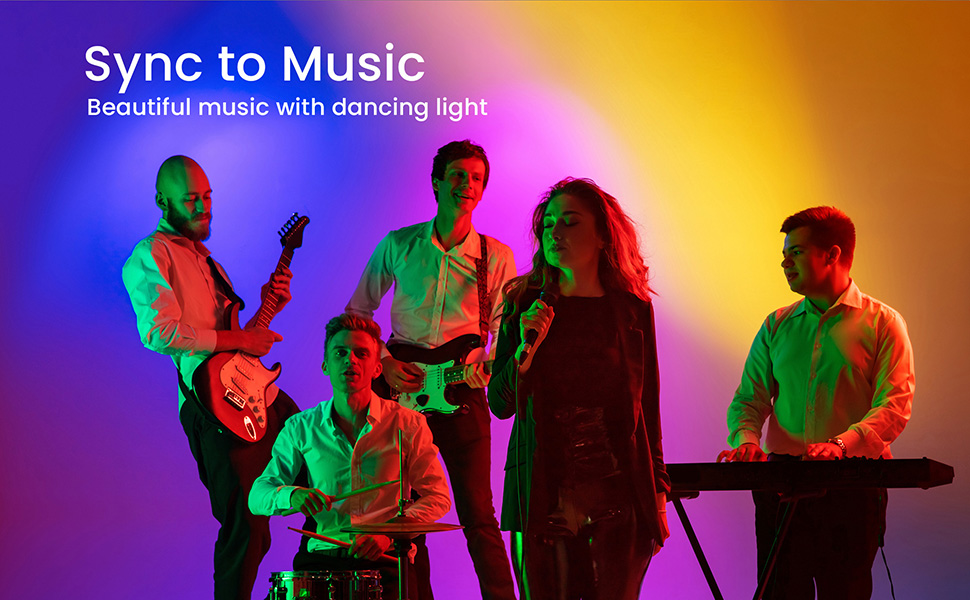
Image: A smartphone screen displaying the TJOY smart app interface, showing options for color selection, scene modes, and music sync.
ການໃຊ້ຣີໂໝດຄວບຄຸມ IR:
The included 24-key IR remote provides basic control functions:
- ເປີດ/ປິດ: ເປີດ ຫຼື ປິດໄຟ.
- ການເລືອກສີ: Select from a range of preset colors.
- ການປັບຄວາມສະຫວ່າງ: ປັບຄວາມເຂັ້ມຂອງແສງ.
- ການເລືອກໂໝດ: Cycle through various dynamic lighting modes (e.g., flash, strobe, fade, smooth).

Image: A split image showing control via the IR remote on the top and control via the smartphone app on the bottom, demonstrating dual control options.
ຄຸນນະສົມບັດການຊິງເພງ:
Experience dynamic lighting that responds to sound. The music sync feature can be activated via the smart app. The lights will change color and intensity according to the rhythm and beat of the music playing in your environment.
Image: A group of people playing musical instruments in a room illuminated by TJOY LED lights, demonstrating the music sync feature.
ບໍາລຸງຮັກສາ
- ທໍາຄວາມສະອາດ: ເຊັດແຖບ LED ຄ່ອຍໆດ້ວຍຜ້າແຫ້ງອ່ອນໆເພື່ອເອົາຝຸ່ນອອກ. ຢ່າໃຊ້ນໍ້າຢາທໍາຄວາມສະອາດ ຫຼື ວັດສະດຸຂັດ.
- ກວດ ກາວ: Periodically check the adhesive backing to ensure the strips remain securely attached. Re-apply if necessary with appropriate adhesive.
- ການເກັບຮັກສາ: If storing the lights for an extended period, ensure they are clean, dry, and rolled neatly to prevent damage.
ການແກ້ໄຂບັນຫາ
| ບັນຫາ | ສາເຫດທີ່ເປັນໄປໄດ້ | ການແກ້ໄຂ |
|---|---|---|
| ໄຟບໍ່ເປີດ. | Power adapter not connected, loose connection, power outlet issue. | Check all connections, ensure power adapter is plugged in correctly, try a different outlet. |
| ການຄວບຄຸມໄລຍະໄກບໍ່ເຮັດວຽກ. | ແບັດເຕີຣີໝົດ, ຕົວຮັບສັນຍານ IR ຖືກບລັອກ, ຣີໂໝດຢູ່ນອກຂອບເຂດສັນຍານ. | Replace remote battery, ensure clear line of sight to IR receiver, operate within range. |
| ແອັບບໍ່ສາມາດເຊື່ອມຕໍ່ກັບໄຟໄດ້. | Bluetooth not enabled, app not updated, lights already paired with another device. | Ensure Bluetooth is on, update app, unpair from other devices, restart lights/app. |
| Lights are dim or inconsistent. | Insufficient power, damaged section of strip, incorrect brightness setting. | Check power supply, inspect strip for damage (if cuttable, ensure proper connection), adjust brightness via app/remote. |
| Adhesive not holding. | Surface not clean/dry, textured surface, old adhesive. | Clean and dry surface thoroughly before application. For textured surfaces, consider additional mounting clips or stronger adhesive. |
Customer-Reported Issues (for informational purposes):
- Some users reported issues with one side of the strip not working or having a "shortness" in the connection. This may require checking the connection points carefully.
- Adhesion quality has been a concern for some, with lights falling down after a few days. Ensure proper surface preparation and consider additional adhesive if needed.
- A few users noted lights changing colors on their own unexpectedly. This could be an app or controller issue.
ຂໍ້ມູນຈໍາເພາະ
| ຄຸນສົມບັດ | ລາຍລະອຽດ |
|---|---|
| ໝາຍເລກຕົວແບບ | TA2B1502415-2 |
| ຍີ່ຫໍ້ | TJOY |
| ຄວາມຍາວ | 100ft (2 rolls) |
| ສີ | RGB ຫຼາຍສີ |
| ປະເພດແຫຼ່ງແສງ | LED |
| ແຫຼ່ງພະລັງງານ | ອະແດັບເຕີ AC (ການສະຫນອງພະລັງງານ DC) |
| ສະບັບtage | 24 ໂວນ |
| ວັດtage | 36 ວັດ |
| ວິທີການຄວບຄຸມ | ແອັບ, ໄລຍະໄກ |
| ເຕັກໂນໂລຊີການເຊື່ອມຕໍ່ | Bluetooth |
| ການນຳໃຊ້ພາຍໃນ/ນອກ | ໃຊ້ພາຍໃນເຮືອນເທົ່ານັ້ນ |
| ລະດັບຄວາມຕ້ານທານນ້ໍາ | ບໍ່ທົນທານຕໍ່ນ້ໍາ |
| UPC | 779683795953 |
ການຮັບປະກັນແລະການສະຫນັບສະຫນູນ
TJOY is committed to providing customers with the best product quality and shopping experience.
- ການຮັບປະກັນ: This product includes a 12-month after-sales service and 100% satisfaction guarantee.
- ບໍລິການລູກຄ້າ: For any issues during installation, defective items, replacements, or refunds, please contact TJOY customer service via email for a prompt solution. TJOY aims to resolve issues within 24 hours.
- ຮ້ານ Online: Visit the official TJOY store for more products and information: TJOY Store on Amazon.


